
Because many customers are in the process of building their infrastructure as code, the use cases for Terraform are growing. This is especially true when you’re automating the creation of an environment in Oracle Cloud Infrastructure (OCI) and using OCI Marketplace images. Using Terraform to deploy OCI Marketplace offerings lets you have all of your deployment code in an automated format for deployment and state management.
This post provides the basic necessary code for you to use to add OCI Marketplace images into your infrastructure with Terraform. It doesn’t cover creating any of the network or storage portions.
Required code
You need two resource elements and five data elements. The two resource elements are agreements for using the Marketplace image, and the data elements support the resource agreements.
Resource elements
The key resource elements that you need to use a Marketplace image are oci_marketplace_accepted_agreement and oci_marketplace_listing_package_agreement. These agreements also require several data elements to get the signed agreement.
Resource element: oci_marketplace_accepted_agreement
resource "oci_marketplace_accepted_agreement" "test_accepted_agreement" {
  #Required
  agreement_id    = oci_marketplace_listing_package_agreement.test_listing_package_agreement.agreement_id
  compartment_id  = var.compartment_id
  listing_id      = data.oci_marketplace_listing.test_listing.id
  package_version = data.oci_marketplace_listing.test_listing.default_package_version
  signature       = oci_marketplace_listing_package_agreement.test_listing_package_agreement.signature
}
Resource element: oci_marketplace_listing_package_agreement
resource "oci_marketplace_listing_package_agreement" "test_listing_package_agreement" {
  #Required
  agreement_id    = data.oci_marketplace_listing_package_agreements.test_listing_package_agreements.agreements[0].id
  listing_id      = data.oci_marketplace_listing.test_listing.id
  package_version = data.oci_marketplace_listing.test_listing.default_package_version
}
Data elements
To get the correct data for the resources, you need the following data elements:
- Agreement ID
- Compartment ID
- Listing ID
- Package version
The compartment ID is the OCID of the compartment in which you plan to install the Marketplace offering.
As a PowerShell user, I like to use the OCI PowerShell toolkit to get the listing ID information. The OCI PowerShell toolkit is in part of the common module, and the command is Get-OCIComputeAppCatalogListingsList. You can also get the display names and IDs of the catalog listings through other means, either from the Marketplace page or through the OCI CLI.
The PowerShell command looks as follows:
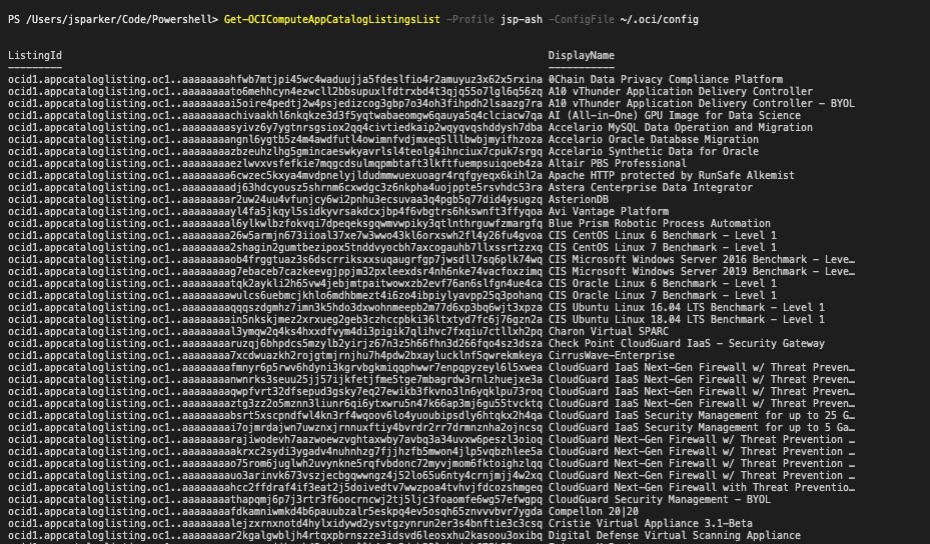
Figure 1: PowerShell output for Marketplace listings
You can get the same information with the OCI CLI, although you might have to scroll for a bit if you don’t have the name of the Marketplace offering ahead of time.
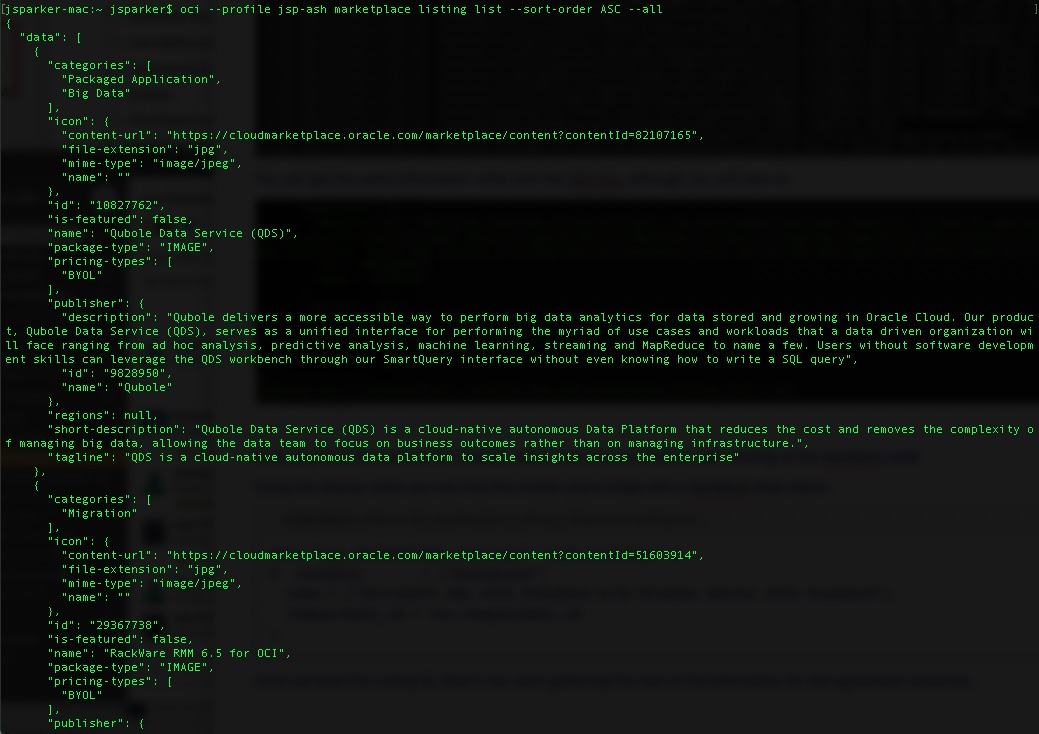
Figure 2: CLI output for Marketplace listings
After you have the display name, you’re ready to start looking at the Terraform code. You can use the display name to find the Marketplace image with a Terraform data object.
OCI_marketplace_listing
data "oci_marketplace_listings" "test_listings" {
  name = ["Microsoft SQL 2016 Standard with Windows Server 2016 Standard"]
  compartment_id = var.compartment_id
}
After you have the listing ID, then you can start gathering the rest of the information for the agreement resources.
Data elements
data "oci_marketplace_listing_package_agreements" "test_listing_package_agreements" {
  #Required
  listing_id      = data.oci_marketplace_listing.test_listing.id
  package_version = data.oci_marketplace_listing.test_listing.default_package_version

  #Optional
  compartment_id = var.compartment_id
}

data "oci_marketplace_listing_package" "test_listing_package" {
  #Required
  listing_id      = data.oci_marketplace_listing.test_listing.id
  package_version = data.oci_marketplace_listing.test_listing.default_package_version

  #Optional
  compartment_id = var.compartment_id
}

data "oci_marketplace_listing_packages" "test_listing_packages" {
  #Required
  listing_id = data.oci_marketplace_listing.test_listing.id

  #Optional
  compartment_id = var.compartment_id
}

data "oci_marketplace_listing" "test_listing" {
  listing_id     = data.oci_marketplace_listings.test_listings.listings[0].id
  compartment_id = var.compartment_id
}

data "oci_core_app_catalog_listing_resource_version" "test_catalog_listing" {
  listing_id = data.oci_marketplace_listing_package.test_listing_package.app_catalog_listing_id
  resource_version = data.oci_marketplace_listing_package.test_listing_package.app_catalog_listing_resource_version
}
Now that you have the agreement, you pass it to the instance information so that you can build the Marketplace offering in your OCI compartment. The resource in this example is oci_core_instance, and we pass to it the source ID from the data.oci_core_app_catalog_listing_resource_version.test_catalog_listing.listing_resource_id. This is an example of building a Microsoft SQL Server.
Instance resources
resource "oci_core_instance" "SQLA" {

  availability_domain = var.availability_domain1
  fault_domain        = var.instance_fault_domain_1
  compartment_id      = var.compartment_id
  display_name        = var.hostname_2
  shape               = var.sql_shape
  subnet_id           = oci_core_subnet.subnet2.id
  hostname_label      = var.hostname_2

  metadata = {
    user_data = base64encode(file("Meta Data script of your choosing"))
  }

  source_details {
    source_id   = data.oci_core_app_catalog_listing_resource_version.test_catalog_listing.listing_resource_id
    source_type = "image"
  }

  lifecycle {
    ignore_changes = [
      source_details[0].source_id,
    ]
  }
}
These are all the components that you need to deploy a Marketplace offering with OCI.
Putting it all together
Now that you have all the components for a Marketplace offering, let’s see what it looks like all together.
// Copyright (c) 2019, 2020 Oracle and/or its affiliates. All rights reserved.
/*
* This is an example of a marketplace agreement
*/
provider "oci" {
  version          = ">= 3.0"
  tenancy_ocid     = var.tenancy_ocid
  user_ocid        = var.user_ocid
  fingerprint      = var.fingerprint
  private_key_path = var.private_key_path
  region           = var.region
}
/*
    Variables
*/
variable "tenancy_ocid" {
  default = "Your OCI Tenancy OCID"
}
variable "user_ocid" {
  default = "Your OCI user OCID"
}
variable "fingerprint" {
  default = "Your Finger Print"
}
variable "private_key_path" {
  default = "Your path to your .pem file"
}
variable "compartment_id" {
  default = "Enter your compartment OCID"
}
variable "hostname_1" {
  default = "SQLA"
}
variable "sql_shape" {
  default = "VM.Standard2.4"
}
variable "availability_domain1" {
  default = "AaRH:US-ASHBURN-AD-1"
}
variable "instance_fault_domain_1" {
  default = "FAULT-DOMAIN-1"
}
/*
    Resource Elements
*/
resource "oci_marketplace_accepted_agreement" "test_accepted_agreement" {
  #Required
  agreement_id    = oci_marketplace_listing_package_agreement.test_listing_package_agreement.agreement_id
  compartment_id  = var.compartment_id
  listing_id      = data.oci_marketplace_listing.test_listing.id
  package_version = data.oci_marketplace_listing.test_listing.default_package_version
  signature       = oci_marketplace_listing_package_agreement.test_listing_package_agreement.signature
}
resource "oci_marketplace_listing_package_agreement" "test_listing_package_agreement" {
  #Required
  agreement_id    = data.oci_marketplace_listing_package_agreements.test_listing_package_agreements.agreements[0].id
  listing_id      = data.oci_marketplace_listing.test_listing.id
  package_version = data.oci_marketplace_listing.test_listing.default_package_version
}
/*
    Data Elements
*/
data "oci_marketplace_listing_package_agreements" "test_listing_package_agreements" {
  #Required
  listing_id      = data.oci_marketplace_listing.test_listing.id
  package_version = data.oci_marketplace_listing.test_listing.default_package_version

  #Optional
  compartment_id = var.compartment_id
}
data "oci_marketplace_listing_package" "test_listing_package" {
  #Required
  listing_id      = data.oci_marketplace_listing.test_listing.id
  package_version = data.oci_marketplace_listing.test_listing.default_package_version

  #Optional
  compartment_id = var.compartment_id
}
data "oci_marketplace_listing_packages" "test_listing_packages" {
  #Required
  listing_id = data.oci_marketplace_listing.test_listing.id

  #Optional
  compartment_id = var.compartment_id
}
data "oci_marketplace_listing" "test_listing" {
  listing_id     = data.oci_marketplace_listings.test_listings.listings[0].id
  compartment_id = var.compartment_id
}
data "oci_marketplace_listings" "test_listings" {
#  category       = ["Analytics"]
  name = ["Microsoft SQL 2016 Standard with Windows Server 2016 Standard"]
  compartment_id = var.compartment_id
}
data "oci_core_app_catalog_listing_resource_version" "test_catalog_listing" {
  listing_id = data.oci_marketplace_listing_package.test_listing_package.app_catalog_listing_id
  resource_version = data.oci_marketplace_listing_package.test_listing_package.app_catalog_listing_resource_version
}
/*
    Compute Resources
*/
resource "oci_core_instance" "SQLA" {
  availability_domain = var.availability_domain1
  fault_domain        = var.instance_fault_domain_1
  compartment_id      = var.compartment_id
  display_name        = var.hostname_1
  shape               = var.sql_shape
  subnet_id           = oci_core_subnet.subnet1.id
  hostname_label      = var.hostname_1
  metadata = {
    user_data = base64encode(file("Meta Data script of your choosing"))
  }
  source_details {
    source_id   = data.oci_core_app_catalog_listing_resource_version.test_catalog_listing.listing_resource_id
    source_type = "image"
  }
  lifecycle {
    ignore_changes = [
      source_details[0].source_id,
    ]
  }
}
To complete your environment, you’ll need to add resources such as a virtual cloud network (VCN) and subnets.
Wrap-up
After putting it all together, you have code that will let you get an Oracle Cloud Infrastructure Marketplace offering and add it to your Terraform code to help you develop better deployment practices. Good luck and happy coding.