
In the AI-Driven world,stolen sensitive data can be processed in no time.Certainly,with traditional role-based access control methods,we can follow the principle of least privilege.However,when the privilege is granted,we are granting the 24×7 access to the PII data.
Just because a user is authorized to access the sensitive data,it does not mean that the user can access or manipulate the sensitive data at midnight on a Sunday.What if the user credentials get compromised that results in a data breach at midnight? By the time the business is online,the damage is done.Can the 24×7 access be restricted?
Let’s consider this example in an organization.
An Officer, who is at an administrative position, may need to create certain tables during the business hours – 9 AM to 5 PM from Monday till Friday. He should not be allowed to perform the same operation outside of the above window and during the weekends too.
Note: To keep the concept simple,CREATE TABLE operation has been considered in this blog post.
The same procedure can be extended to restrict various commands like SELECT TABLE,DROP TABLE etc..
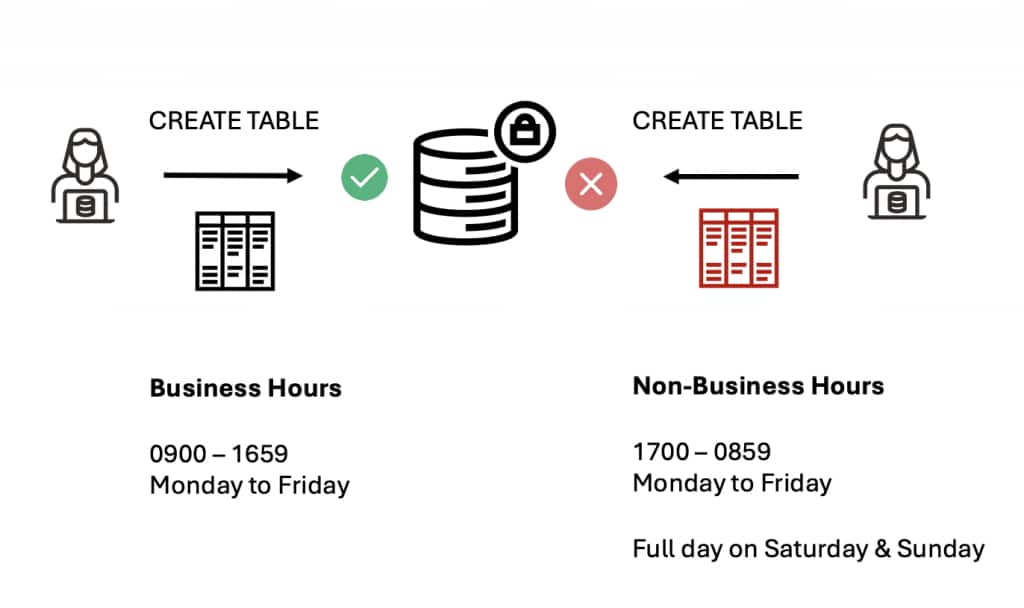
In this blog post, we will discuss the access control methodology based on the time at which the operation is being executed.
Please have the following tasks performed before creating the required rules described further in this blog.
- Create a user called OFFICER and grant CREATE SESSION & CREATE ANY TABLE privileges.
- Enable Database Vault using the simple steps given in the Documentation
Create a Rule that allows the operation from 9 AM to 5 PM on weekdays only.
- To check the user who has logged in (OFFICER).
- To check the day of the week.
D – 1,2,3,4,5,6,7 (Sunday being 1).
The condition is to allow the operation from Monday till Friday.Hence,D will be from 2 to 6. - To check the current time.
The business hours is being considered as 9 am to 5 pm(Considered as 16:59).
BEGIN
  DBMS_MACADM.CREATE_RULE(
    rule_name => 'OFFICER_WORKING_HOURS',
    rule_expr => q'[
      DVF.F$SESSION_USER = 'OFFICER' AND
      TO_CHAR(SYSDATE, 'D') BETWEEN '2' AND '6' AND
      TO_CHAR(SYSDATE, 'HH24') BETWEEN '09' AND '16'
    ]',
    is_static => FALSE
  );
END;
/
Create a Rule Set to bundle the rules.
BEGIN
 DBMS_MACADM.CREATE_RULE_SET(
  rule_set_name    => 'OFFICER_WORKING_HOURS',
  description      => 'Access to the Officer during the business hours',
  eval_options     => DBMS_MACUTL.G_RULESET_EVAL_ALL,
  audit_options    => DBMS_MACUTL.G_RULESET_AUDIT_OFF,
  fail_options     => DBMS_MACUTL.G_RULESET_FAIL_SHOW,
  fail_message     => 'Operation is not permitted during non-business hours',
  fail_code        => 20461,
  is_static        => FALSE);
END;
/
Add the Rules to the Rule Set.
BEGIN
 DBMS_MACADM.ADD_RULE_TO_RULE_SET(
  rule_set_name => 'OFFICER_WORKING_HOURS',
  rule_name     => 'OFFICER_WORKING_HOURS');
END;
/
Create a Command Rule on CREATE TABLE statements and apply the above timer.
BEGIN
 DBMS_MACADM.CREATE_COMMAND_RULE(
  command         => 'CREATE TABLE',
  rule_set_name   => 'OFFICER_WORKING_HOURS',
  object_owner    => '%',
  object_name     => '%',
  enabled         => DBMS_MACUTL.G_YES);
END;
/
Let’s check the access by logging in during the business hours and during non-business hours.
- OFFICER has connected at 5 AM (CURRENT_HOUR-5 & DAY_OF_WEEK – 3 ).
The table creation has been denied based on the rules defined using Database Vault.
SQL> SELECT TO_CHAR(SYSDATE, 'HH24') AS current_hour, TO_CHAR(SYSDATE, 'D') AS day_of_week, TO_CHAR(SYSDATE, 'DD-MON-YYYY') AS current_date FROM DUAL;

CURRENT_HOUR DAY_OF_WEEK	  CURRENT_DATE
------------ -------------------- --------------------
05	     3			  24-FEB-2026

SQL> show user
USER is "OFFICER"


SQL> create table finance (name varchar2(20),Balance number);
create table finance (name varchar2(20),Balance number)
*
ERROR at line 1:
ORA-47306: 20461: Operation is not permitted during non-business hours
- OFFICER has connected post 9 AM (CURRENT_HOUR-9 & DAY_OF_WEEK – 3 ).
The table creation has been successful based on the rules defined using Database Vault.
SQL> SELECT TO_CHAR(SYSDATE, 'HH24') AS current_hour, TO_CHAR(SYSDATE, 'D') AS day_of_week, TO_CHAR(SYSDATE, 'DD-MON-YYYY') AS current_date FROM DUAL;

CURRENT_HOUR DAY_OF_WEEK	  CURRENT_DATE
------------ -------------------- --------------------
09	     3			  24-FEB-2026

SQL> show user;
USER is "OFFICER"

SQL> create table finance (name varchar2(20),Balance number);

Table created.
Conclusion
Data is the most valuable asset.Implementing time-based access control provides “Just-in-time” access to the users and keeps the sensitive data secure even during non-business hours.Being context-aware,it can also prevent the users from accidentally executing highly privileged statements during peak hours.Moreover,all the operations can be audited effectively,making it both a preventive and detective security measure.
Want to learn more about Database Vault?
Please take a look at the following knowledge base.
Oracle Database Vault Documentation
Oracle Database Vault Product Page
Database Vault LiveLabs