
If you’ve ever configured Single Sign-On (SSO) between two parties, you know the process can be complex and error-prone. The SAML protocol enables users to sign on using a single identity across otherwise unaffiliated organizations. To enable SSO, administrators need to establish trust between the party performing authentication (the identity provider or IdP) and the party that relies on the authentication (the service provider or SP). But the administrative interfaces to configure this relationship vary by vendor. The differences in approach and lack of a single end-to-end interface can lead to unnecessary complexity and errors with unclear origins.
Typically, the process requires administrators to go back and forth between the IdP and the SP to apply configurations, which can be challenging because the process has circular dependencies and end-to-end testing is virtually impossible until both sides are configured properly. Any human error during this process could introduce risk by allowing user access from an untrusted IdP or by breaking the authentication process. OCI Identity and Access Management (OCI IAM) may reduce these risks and make the process of establishing trust easier with its SAML Identity Provider Configuration Wizard.
OCI IAM SAML Identity Provider Configuration Wizard
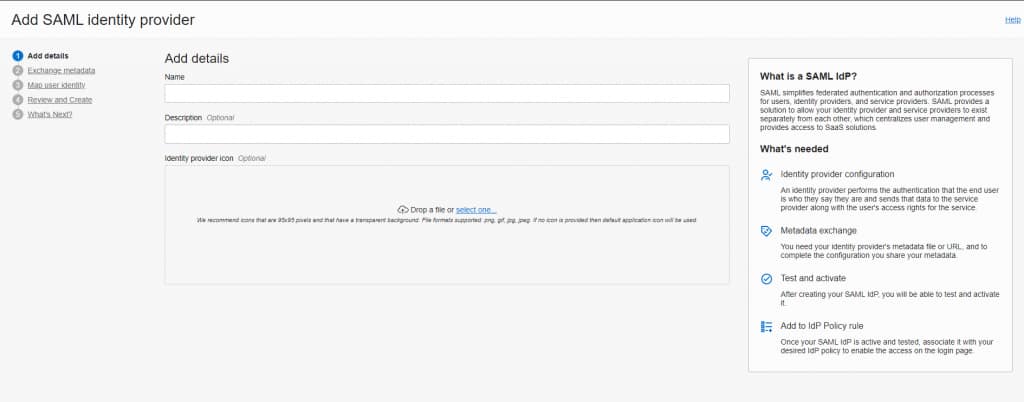
The OCI IAM SAML Identity Provider configuration wizard simplifies the administrator experience by providing an easy-to-use, wizard-based interface with built-in validation testing. It also supports SAML Just-in-Time (JIT) provisioning and group mapping. This approach makes life easier for administrators and reduces the time it takes to onboard new identity providers.
OCI Administrators can access the wizard by navigating to the identity domains Identity Providers menu option. Click Add IdP and select the option to Add SAML IdP. This opens the SAML identity provider configuration wizard.
The wizard reduces the number of steps required to configure a SAML IdP. It also minimizes the need to swap back and forth between multiple screens. In a single workflow, administrators can download and execute the required details and metadata for both the IdP and the SP, which in this case, is an OCI IAM identity domain. As it’s critical to test the configuration before activating the IdP, the wizard also provides inline validation. When the IdP is configured, the wizard then guides administrators on how to add the IdP to the target identity domain’s IdP policy.
This improved interface offers the option of automated imports or manual configuration of identity provider details. This improves flexibility for administrators to leverage whichever approach they prefer.
Just-in-Time Provisioning
JIT provisioning simplifies identity lifecycle management by creating and updating user profiles in the OCI IAM identity domain during the authentication process. When a user first attempts to sign into an identity domain via an external IdP, the system captures all of the required SAML claims (i.e., profile attributes and group memberships) and creates the user in the identity domain. With this approach, an administrator does not need to create the user in advance. Each time a user signs in, their profile is updated with the latest information from the IdP. This eliminates the need to proactively synchronize user attributes and group memberships between the IdP and the identity domain.
OCI IAM’s new simplified JIT configuration interface provides the following capabilities:
- Operation Type: Choose which lifecycle management operations to enable via the JIT process.
- Attribute Mapping: Map attributes from the IdP to attributes in the OCI IAM identity domain.
- Group Mapping: Manage group memberships in identity domains based on the group memberships in the IdP. Implicit group mappings expect group names between the IdP and SP to be identical. Explicit group mappings allow mapping of IdP groups with any groups in the OCI IAM identity domain.
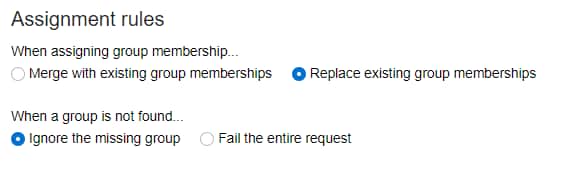
- Membership Rules: Configure additional actions that need to happen during group membership processing.
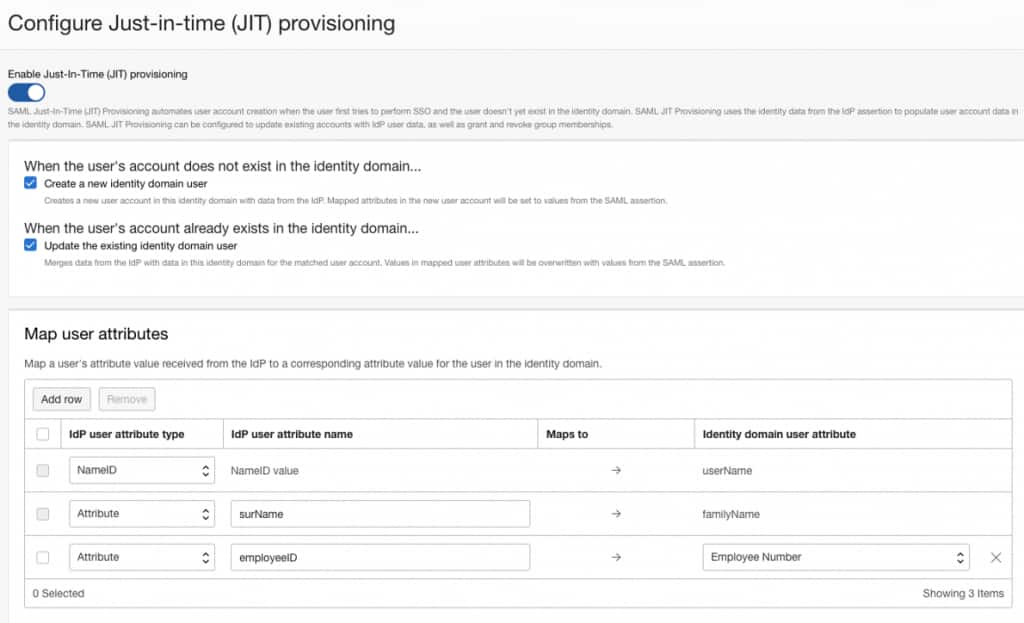
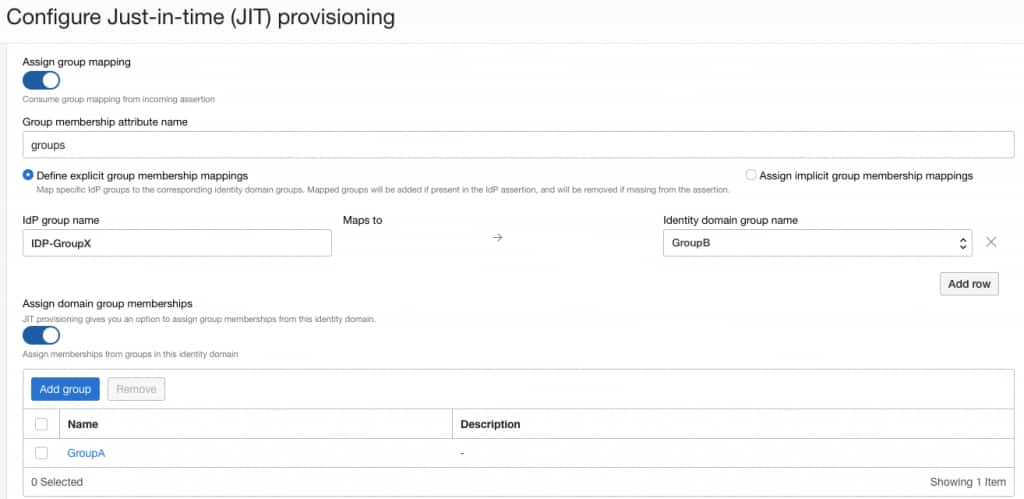
| Guidance for configuration with Microsoft Azure AD Organizations who are configuring SAML integrations with Microsoft Azure AD as the identity provider should keep in mind the following: For attribute names, be sure to provide the full name of the Azure AD attribute in the IdP user attribute name field. For example, the surname attribute in Azure AD is labelled as “http://schemas.xmlsoap.org/ws/2005/05/identity/claims/surname” in the assertion response. Inserting only “surname”, which is common for other providers, will yield an error. For group mapping, be aware that Azure AD sends a group GUID in the groups claim and not a group name. Entering a group name instead of a GUID will yield an error. For more detail, please refer to How-to-connect-fed-group-claims. |
We hope you agree that the OCI IAM SAML Identity Provider configuration wizard improves the administrative experience and reduces the time required to onboard identity providers. This is just an example of the work we’re putting into making OCI IAM more user-friendly and easier to manage.
For more information, please visit the product resources below and visit our website to learn more about how OCI IAM can add value to your organization.