
As more organizations adopt a multicloud strategy, it’s increasingly important to facilitate quick and easy movement across cloud platforms. One example of Oracle making multicloud easier is our partnership with Microsoft through which we enable a low-latency, private connection between the two cloud providers. But you don’t have to take advantage of fast interconnectivity to get value across multiple clouds. One common requirement for our customers is to enable Single Sign-On (SSO) between multiple cloud providers. Cloud administrators and application users don’t want to re-authenticate as they move from one cloud platform to another, which is something they may do multiple times throughout a typical day.
We recently published a tutorial on how to enable SSO between Oracle Cloud Infrastructure Identity and Access Management (OCI IAM) and Microsoft Azure Active Directory (Azure AD). To enable a fully seamless experience, we also cover configuration of identity lifecycle management (LCM) which includes provisioning and deprovisioning of accounts as well as synchronization of attributes and group memberships.
OCI IAM and Azure AD are enterprise Identity-as-a-Service (IDaaS) solutions that offer numerous methods for integration with other IAM solutions. Both services play two important roles: One as an identity provider for their respective cloud platforms and the other as an IDaaS service addressing IAM use-cases that extend beyond each vendor’s cloud boundaries. Both also support various mechanisms to configure SSO and LCM between them and virtually any other IAM provider. Specifically, OCI IAM and Azure AD both provide support for identity standards such as SAML, WS-Fed, OpenID Connect, OAuth, and SCIM. These standards enable interoperability with each other as well as other identity providers and/or applications.
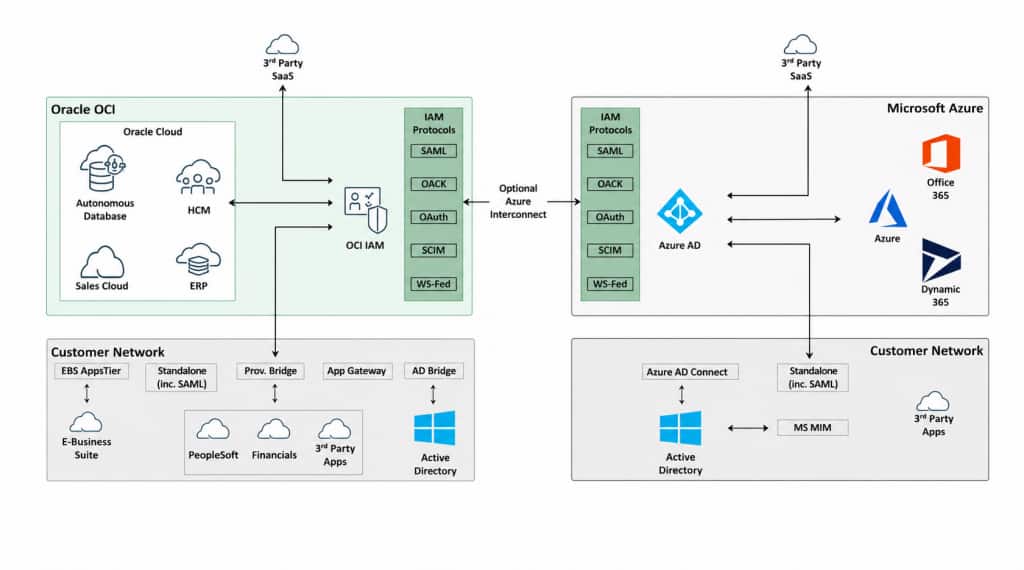
Single Sign-On
To enable SSO from Azure AD to OCI IAM, there are three key steps:
- Download the SAML metadata from OCI IAM.
- Apply SAML configurations in both the Azure AD and OCI IAM consoles.
- Test the SSO flows initiated by the Identity Provider (Azure AD) and by the Service Provider (OCI IAM).
For details on how to configure Azure AD as an Identity Provider for OCI IAM:
Tutorial: Single Sign-On between OCI and Microsoft Azure
Identity Lifecycle Management
For SSO to work, the same user accounts must be present in both OCI IAM and Azure AD. To achieve this, OCI IAM and Azure AD provide mechanisms for configuring identity lifecycle management via the SCIM protocol.
OCI IAM hosts two separate application templates in its application catalog for provisioning identities to or from Azure AD:
- The Microsoft Azure app template helps organizations provision user accounts from Azure AD to OCI IAM. It also provides synchronization of user accounts between OCI IAM and Azure AD.
- The Microsoft Office 365 app template supports provisioning of accounts from OCI IAM to Microsoft Office 365. It also helps to assign roles, licenses, and groups to users from OCI IAM.
Both of these templates leverage the OAuth protocol’s three-legged authentication process to provide simple and easy setup. There is no manual configuration required on the Azure AD side when using these app templates.
There is also an application template for integration with OCI IAM available from the Microsoft Azure AD application gallery. For this app template, a confidential application must be created on OCI IAM to generate the secret token. This token is used by Azure AD to connect and provision user accounts to OCI IAM.
In general, if you need to provision accounts from OCI IAM to Microsoft Office 365, we recommend that you use the Microsoft Office 365 template. Otherwise, we recommend the OCI IAM app template for Microsoft Azure to enable provisioning to OCI IAM. Customers who have standardized on Azure AD as their Identity Provider also have the choice of using the OCI IAM app template in the Azure AD application gallery.
To enable choice and support the best-fitting approach for your organization, instructions on configuring LCM via all three templates are provided in this LCM tutorial.
For details on how to configure provisioning between OCI IAM and Azure AD:
Tutorial: Identity Lifecycle Management between OCI and Microsoft Azure
For more information on OCI IAM, please visit the product webpage for the latest updates and announcements.