

IoT investigations often begin with an imprecise symptom: a device stopped updating, a dashboard looks stale, or a command did not produce the expected response. The hard part is usually not one API call. It is collecting the right context across device identity, digital twin configuration, recent telemetry, rejected payloads, command history, and platform configuration.
That is where the Model Context Protocol, or MCP, becomes useful. MCP servers improve AI agent-assisted workflows by giving agents a defined interface to external tools, data sources, and business processes, instead of forcing users to manually supply context in a chat window.
Oracle’s public OCI IoT Platform MCP server shows how MCP can connect an AI assistant to Oracle Cloud Infrastructure Internet of Things Platform (OCI IoT Platform) workflows. It exposes OCI IoT Platform and data API capabilities so an assistant can help gather evidence for common IoT questions. It is best treated as sample code for learning and experimentation, not as a production-ready operating model by itself. The server does not remove operator judgment, replace IAM design, or turn an assistant into an autonomous production operator; it gives the assistant a more structured way to help.
What is an MCP server?
MCP is an open standard for connecting AI applications to external systems such as files, databases, APIs, cloud services, developer tools, and workflows. Instead of relying only on what a user types into a chat window, an MCP-compatible application can discover structured capabilities exposed by an MCP server.
The architecture is usually described with three roles:
- Host: the AI application the user interacts with.
- Client: the component inside that host that maintains a connection to one MCP server.
- Server: the program that provides context and capabilities through the protocol.

Example flow for OCI IoT context gathering through MCP
Those capabilities can include tools, resources, and prompts. Tools are callable operations with defined inputs and outputs, resources are contextual data the application can read, and prompts are reusable templates that guide a workflow.
For cloud and IoT workflows, that structure matters because it can reduce manual context gathering. Instead of pasting commands, describing API shapes, or collecting evidence from several places, a user can work with an assistant that calls named capabilities and receives structured results. The boundary still matters: an MCP server can expose sensitive data or action-capable tools, so credentials, permissions, logging, and human review remain part of the operating model.
Why teams are adopting MCP servers
MCP is gaining attention because assistant workflows are moving from experimentation into everyday developer and operator tasks. In those workflows, usefulness depends less on what the model knows in general and more on whether it can reach the right context at the right moment.
For many teams, the first version of an assistant workflow is manual: paste command output, summarize logs, describe API shapes, or copy details from tickets, dashboards, and cloud consoles. That can work for a demo, but it does not scale well when the work depends on several systems and repeated investigation patterns.
MCP offers a cleaner integration model. A server exposes capabilities once, and compatible clients can use those capabilities through the protocol. Teams can review the server like normal software, decide which tools to expose, choose credentials deliberately, and separate read-only context gathering from operations that require human approval.
That pattern is especially useful for IoT. An issue with a device sending telemetry to an IoT platform may involve device identity, connectivity, data normalization, digital twins, rejected data, command delivery, and cloud-side configuration. MCP gives an assistant an explicit path to gather and organize that evidence without turning each investigation into a one-off integration.
What can be accomplished with the OCI IoT Platform MCP server?
Oracle’s public oci-iot-mcp-server is a useful reference implementation because it is not just a generic “call an API” bridge. It groups OCI IoT control plane, Data API, and operator-oriented workflows behind named MCP tools. That gives an assistant a way to ask focused questions about an IoT environment instead of forcing the user to manually stitch together console pages, SDK calls, and API responses.
For this article, the most useful way to describe the server is by capability area:
| Capability area | What it helps the assistant gather | Why it matters in an IoT investigation |
| Platform context | Domain, domain group, model, adapter, digital twin, relationship, compartment, and work request context. | A vague symptom becomes tied to the actual resources that define the device workflow. |
| Current and recent state | Latest snapshot data, historized data, raw data, rejected data, and command records. | The user can separate “nothing is arriving” from “data is arriving but not landing where expected.” |
| Readiness checks | Whether selectors resolve, the domain context is usable, credentials are present, and snapshot data is being observed. | Setup issues can be surfaced before the user chases the wrong device, adapter, or payload path. |
| Investigation helpers | Higher-level wrappers such as twin platform context, latest twin state, recent rejected data, recent commands, and wait-for-update flows. | Common troubleshooting flows become repeatable and easier for the assistant to summarize. |
| Action-aware context | Command history and, when configured, command invocation tools. | The assistant can gather command context before a human decides whether any new action is appropriate. |
That last point deserves careful framing. The server’s tool list is not purely read-only. Depending on configuration and permissions, it can include create, update, delete, configuration, token, and command operations. The value is not “let the assistant freely operate the deployment.” The value is giving the assistant a structured path to collect evidence, while the environment still relies on least-privilege IAM, secret handling, logs, runbooks, and human review for meaningful changes.
In other words, the OCI IoT MCP Platform server can help an assistant move from “the device is not updating” to a compact evidence summary: which twin is involved, how it is wired into the domain, what the latest state shows, whether rejected data exists, and what command or data history is relevant. That is the practical win. It reduces context gathering friction without pretending the assistant replaces operator judgment.
Three example use cases
The following examples are intentionally framed as investigation workflows. They show how an assistant could use the OCI IoT MCP Platform server to gather context and organize evidence. They do not assume the assistant is autonomously changing production systems.
Example 1: A device Is not updating
A user sees that a device has not updated in a monitoring view. Rather than fix the device, the goal is to collect enough context to decide which layer deserves attention next: the device, connectivity path, IoT model, adapter, data ingestion, or digital twin state.
The user might ask: This device is not updating. Gather OCI IoT context for twin edge-sensor-01 and summarize likely next checks.
The assistant can start by resolving the digital twin and surrounding platform context. That includes the relevant domain, domain group, model, adapter, and twin identifiers. It can then check latest known state and recent data signals. If the latest state is stale, the assistant can look for recent rejected data to distinguish “nothing is arriving” from “data is arriving but failing normalization.”
The useful output is a short evidence summary:
- Does the twin exist?
- Is the twin associated with the expected model and adapter?
- When did the latest known state update?
- Is recent data arriving but rejected?
- Which next check looks most likely: device, connectivity, payload shape, adapter mapping, model setup, or platform configuration?
This turns a vague symptom into a more concrete next step. The operator is still responsible for interpreting the evidence and deciding what to do, but the assistant can reduce the manual context gathering required to get there.
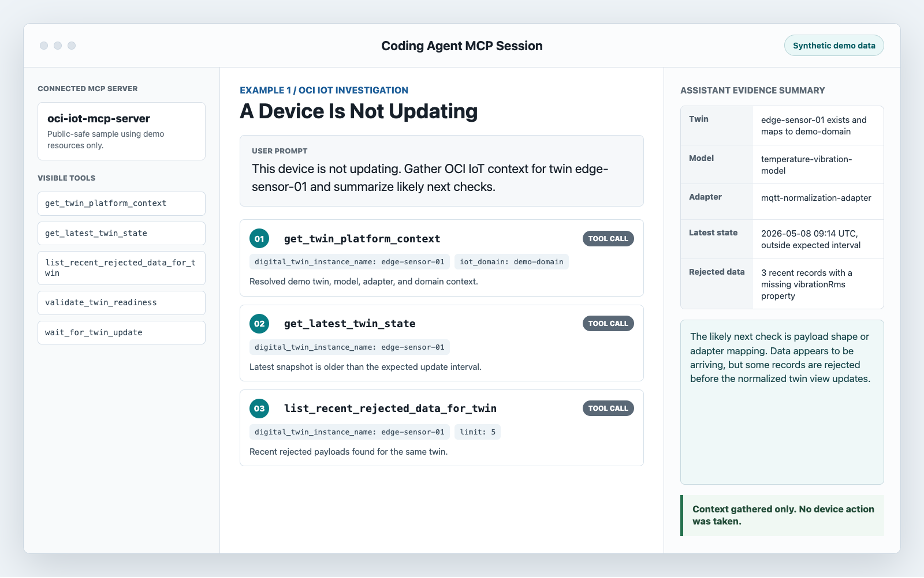
Screenshot of a coding agent showing the OCI IoT MCP Platform server gathering context for the “A Device Is Not Updating” example
Example 2: Data is arriving but not normalizing
In some cases, the device is sending data but the expected normalized view is still empty or stale. The goal is to separate a transport problem from a payload, mapping, or model-alignment problem.
The user might ask: Check whether recent data for edge-sensor-01 is being rejected and summarize what that suggests.
The assistant can gather recent rejected records for the twin or related context, then pair those rejection clues with the digital twin, model, and adapter details. It should avoid hiding the evidence behind a confident-sounding diagnosis. The useful output is a short interpretation that clearly separates observed facts from likely next checks.
The output should answer:
- Is data arriving at all?
- Are recent records being rejected?
- Which twin, model, or adapter appears related?
- Is there an obvious payload-shape or mapping direction to inspect?
- What evidence supports that interpretation?
Rejected data is useful because it can distinguish “nothing is arriving” from “something is arriving but failing normalization.” For an operator, that difference changes the next step. If the assistant can gather recent rejected records and pair them with twin, model, and adapter context, the user can move faster toward the right investigation path. The assistant should not invent the root cause; it should show the evidence and make the next manual check obvious.
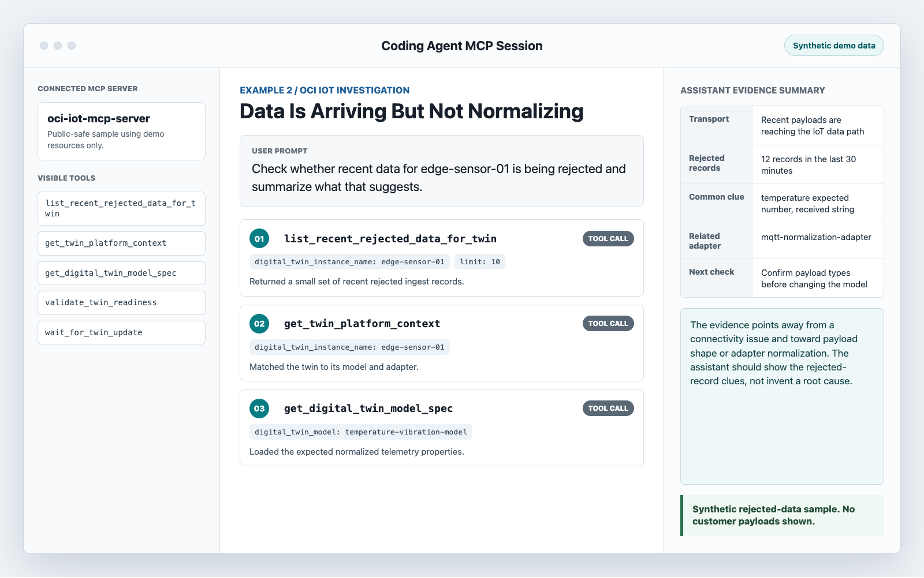
Screenshot of a coding agent showing the OCI IoT MCP Platform server gathering context for the “Data Is Arriving but Not Normalizing” example
Example 3: Reviewing command context before acting
Commands are operationally sensitive because they are action-oriented. Before a user retries or changes a command, the goal is to understand recent command history, response signals, and current twin context.
The user might ask: Before I send another command to edge-sensor-01, summarize recent command history and what I should verify.
The assistant can gather recent command records for the twin and summarize what has already happened. It can help the user see whether commands were sent, whether responses were observed, and whether there is a timing or payload pattern worth reviewing. The workflow should stop at context gathering unless the human explicitly reviews and approves any command action.
The output should distinguish evidence from action:
- Which recent commands were sent?
- Were responses observed?
- Is there a pattern in timing, payload type, or result?
- What should a human verify before sending anything new?
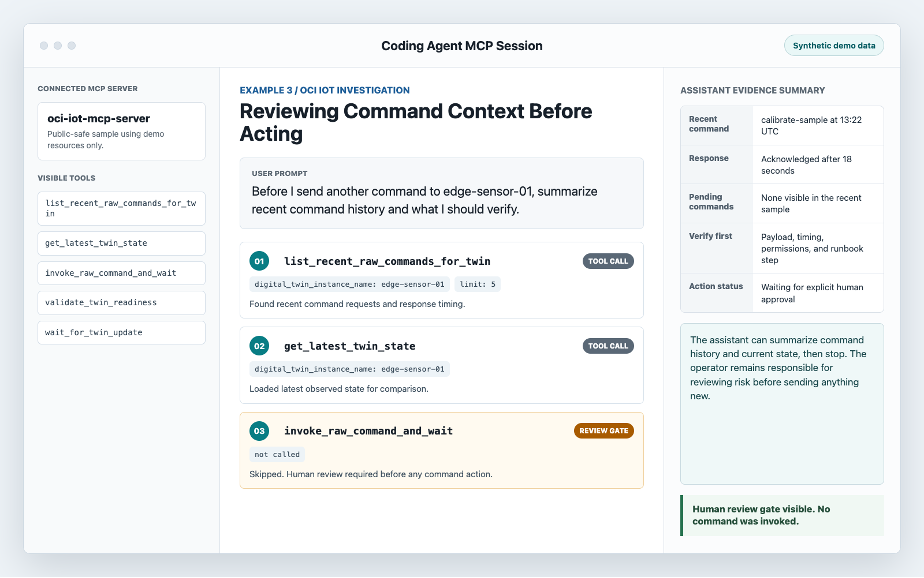
Screenshot of a coding agent showing the OCI IoT MCP Platform server gathering context for the “Reviewing Command Context Before Acting” example.
Summary
The practical value of the OCI IoT MCP Platform server is not that it makes an assistant an autonomous operator. It is that it gives the assistant a structured way to gather evidence across the systems that shape an IoT investigation: platform context, latest state, rejected data, command history, and repeatable investigation helpers.
That framing is important. MCP does not make an assistant automatically safe, and a reference implementation is not a production operating model by itself. IAM design, credential hygiene, logging, testing, runbooks, and operator judgment still matter.
Used carefully, the OCI IoT MCP Platform server can make agent-assisted context gathering more useful, repeatable, and reviewable. The best first outcome is a clearer evidence summary that helps a human operator choose the next step faster.
Where to go next
To learn more, start with the public Oracle MCP repository and the oci-iot-mcp-server README. Those pages are the right place for current code, setup details, tool names, and configuration notes. This article is intentionally not a replacement for the README.
If you are evaluating MCP for an OCI IoT workflow, start small:
- Pick one investigation scenario, such as a device that is not updating.
- Write down the context an operator already gathers manually.
- Map that context to the MCP server tools.
- Run the workflow in a demo or non-production environment.
- Review the result for usefulness, permission boundaries, secret handling, and operational clarity.
If the first workflow produces a clear evidence summary, that is already useful. From there, teams can decide whether the pattern belongs in a demo, a development workflow, a team runbook, or a more formal operational process.
Resources
What is the Model Context Protocol?
Oracle OCI IoT Platform MCP server README