
Introduction
Public Key Infrastructure (PKI) ceremonies are among the security workflows that organizations are least willing to simplify incorrectly. Root CA and intermediate CA operations usually require strong key custody, auditable approvals, controlled administrator access, and evidence that private keys were never exposed outside approved cryptographic boundaries.
Traditionally, meeting those requirements meant buying and operating physical Hardware Security Modules (HSMs). That model is proven, but it also introduces operational work: protected rooms, power and cooling, surveillance, smart-card or quorum credential management, custodian logistics, remote assignment procedures, break-fix support, firmware lifecycle, disaster recovery, and evidence collection for auditors.
This article shows a different pattern: a small internal PKI ceremony web application deployed on Oracle Kubernetes Engine (OKE), backed by OCI Dedicated HSM through the OCI Dedicated KMS Java Cryptography Extension (JCE) provider. The goal is not to build a general-purpose public CA platform, the goal is to provide a focused, private, auditable web workflow for CA ceremonies while private CA keys remain non-extractable inside the OCI dedicated HSM hardware offer.
Why this pattern
OCI Dedicated KMS provides a managed, highly available, single-tenant HSM partition.
Oracle documentation describes Dedicated KMS as giving customers exclusive access to dedicated partitions in tamper-resistant HSM devices, with cryptographic ownership of HSM partitions and control over key generation, storage, and usage. The HSM partitions are documented as FIPS 140-2 Level 3 certified.
For PKI operators, this changes the operating model. The customer still governs the HSM users, keys, labels, certificate profiles, and ceremony policy. Oracle operates the HSM infrastructure layer. That can reduce the burden of maintaining local HSM rooms, surveillance, hardware replacement, power redundancy, and physical token logistics while preserving the control model expected for CA private keys.
Kubernetes adds another advantage: the runtime becomes explicit. The image, Helm chart, mounted secrets, ConfigMaps, internal service, sidecar, and persistent volumes can be reviewed as code, promoted through environments, and attached to change records. Containers do not create compliance by themselves, but they make the ceremony application easier to rebuild, inspect, patch, and audit than a manually configured server.
Where containers meet compliance
For security teams, the container model is useful because it narrows the question, “What exactly is running?” The Dockerfile declares the base operating system, Java runtime, OCI HSM client packages, application artifact, environment variables, and startup command.
The Helm chart declares how that image is exposed, which files are mounted, which values come from Secrets, which volumes are retained, and which sidecar must be running before the application can use the HSM.
That does not remove the customer’s governance responsibilities. The customer still needs certificate policies, ceremony approvals, administrator role separation, audit retention, incident response, and evidence mapping to frameworks such as GDPR, NIS2, eIDAS, ACN requirements, or sector-specific controls. But Kubernetes gives those controls a concrete technical surface: manifests, release history, image tags, logs, persistent volumes, and network policy can all be reviewed.
Solution architecture
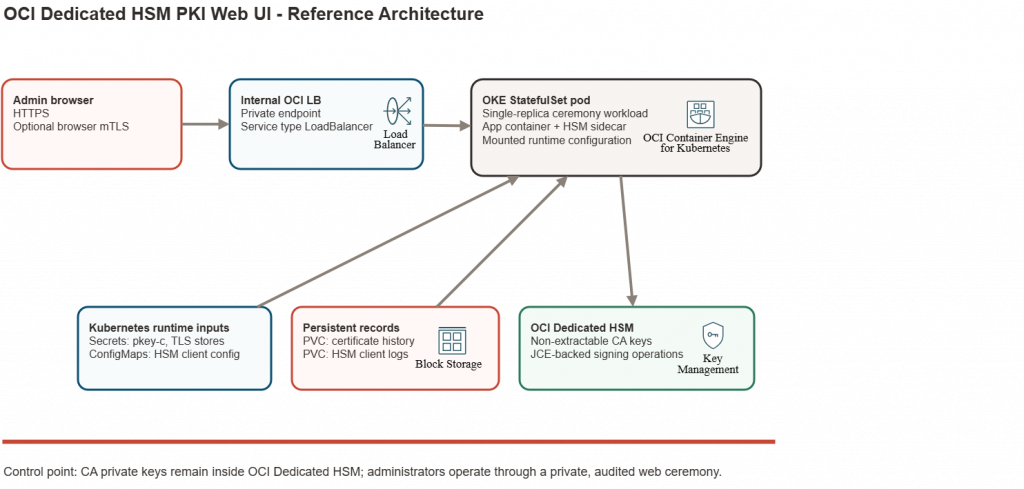
The application runs as a single-replica Kubernetes StatefulSet behind an internal OCI Load Balancer. Administrators access the UI over HTTPS, optionally with browser mutual TLS (mTLS). The application container runs a Spring Boot web UI and uses the OCI Dedicated KMS JCE provider through com.oracle.dkms.jce.provider.DedicatedKmsProvider. A sidecar runs the OCI HSM client_daemon, which maintains the client channel to the HSM cluster.
The pod mounts HSM client configuration from ConfigMaps, HSM client private material from Kubernetes Secrets, and TLS stores from Kubernetes Secrets. Certificate history is stored under /app/data, and HSM client logs under /var/log/dkms; both paths can use persistent volumes with retention policy aligned to audit needs.
The service is internal:
service:
  type: LoadBalancer
  port: 443
  targetPort: 8444
  annotations:
    service.beta.kubernetes.io/oci-load-balancer-internal: "true"
This keeps the ceremony interface on private network paths. Network Security Groups, route tables, security lists, and administrative access paths should further restrict who can reach the web UI.
Security model
The main security control is simple: private CA keys stay in OCI Dedicated HSM. The Java application signs through the OCI JCE provider and does not export private key material into the container, browser, logs, or local storage.
The HSM Crypto User can be configured server-side, while the PIN/password is entered only on operation forms. The application passes that credential to the OCI JCE provider through a request-scoped CallbackHandler, clears Java character arrays where possible, and avoids writing the PIN/password to configuration, audit logs, URLs, browser storage, or application logs.
Web access has its own controls. HTTPS is enabled for the application, and Tomcat can require browser client certificates:
export APP_TLS_CLIENT_AUTH=need
export APP_CLIENT_CERT_AUTH_ENABLED=true
export APP_CLIENT_CERT_ALLOWED_PRINCIPALS=admin
The browser client-auth trust store should be dedicated to web administration. Do not reuse CA keys managed by the ceremony application as browser-access client-auth material.
Certificate policy is also server-side. For example, the intermediate-ca-pathlen0 profile can force critical BasicConstraints with CA:true and pathlen:0, plus critical KeyUsage for keyCertSign and cRLSign. A leaf profile can force CA:false, server/client authentication EKUs, and copy Subject Alternative Names from the CSR only when the profile permits it. This prevents the final certificate policy from being blindly inherited from CSR-requested extensions.
This is a shared-responsibility design. Oracle provides the cloud service controls, HSM infrastructure operation, and compliance attestations for applicable OCI services. The customer remains responsible for the PKI policy, HSM user governance, certificate profile approval, administrator access, network restrictions, backup/export policy, and how the implementation maps to the customer’s regulatory obligations.
Build the container image
The Dockerfile uses a two-stage build. The build stage installs Java 17 and Maven on Oracle Linux 9, compiles the Spring Boot application, and includes the OCI JCE provider jar for compilation. The runtime stage uses Oracle Linux 9 slim, installs Java 17 and the OCI HSM client RPMs, and starts the application with the OCI libraries available at runtime.
FROM oraclelinux:9 AS build-stage
WORKDIR /workspace
RUN dnf -y install java-17-openjdk-devel maven && dnf clean all
COPY pom.xml ./
COPY hsm-libs/ ./hsm-libs/
COPY src/ ./src/
COPY run-oci-hsm.sh ./
RUN mvn -B -DskipTests clean package

FROM oraclelinux:9-slim
WORKDIR /app
COPY rpms/ /tmp/rpms/
RUN microdnf -y install java-17-openjdk-headless oniguruma glibc-gconv-extra libedit opensc jq \
    && microdnf clean all \
    && rpm -i /tmp/rpms/* \
    && rm -rf /tmp/rpms \
    && mkdir -p /app/audit /app/data /app/config
COPY --from=build-stage /workspace/target/oci-hsm-jce-ca-web-*.jar /app/app.jar
COPY --from=build-stage /workspace/run-oci-hsm.sh /app/run-oci-hsm.sh
ENV APP_BIND_ADDRESS=0.0.0.0 APP_PORT=8444 OCI_HSM_LIB=/opt/oci/hsm/lib LD_LIBRARY_PATH=/opt/oci/hsm/lib
CMD ["/app/run-oci-hsm.sh"]
Build and push the image to Oracle Cloud Infrastructure Registry:
docker build -t <region>.ocir.io/<namespace>/<repo>/hsm-webclient:<tag> .
docker push <region>.ocir.io/<namespace>/<repo>/hsm-webclient:<tag>
Do not bake customer-specific HSM configuration, pkey-c, TLS stores, HSM passwords, or generated certificates into the image. Those are runtime inputs.
Deploy with Helm
The Helm chart deploys the application as a single StatefulSet pod. It mounts OCI HSM client files into both the application container and the client-daemon sidecar. It also mounts application TLS stores into the application container.
export APP_TLS_KEY_STORE_PASSWORD='<redacted>'
export APP_TLS_TRUST_STORE_PASSWORD='<redacted>'

helm upgrade --install hsm-webclient ./helm/hsm-webclient \
  --set image.repository=<region>.ocir.io/<namespace>/<repo>/hsm-webclient \
  --set image.tag=<tag> \
  --set-file hsm.config.clientDaemonCfg=./client_daemon.cfg \
  --set-file hsm.config.certC=./cert-c \
  --set-file hsm.config.partitionOwnerCertPem=./partitionOwnerCert.pem \
  --set-file hsm.pkeyCSecret.value=./pkey-c \
  --set-file app.tls.keyStore.value=./oci-hsm-ca-web.p12 \
  --set-file app.tls.trustStore.value=./client-auth-truststore.p12 \
  --set app.tls.keyStore.password="$APP_TLS_KEY_STORE_PASSWORD" \
  --set app.tls.trustStore.password="$APP_TLS_TRUST_STORE_PASSWORD"
For stricter handling, create the pkey-c Secret first and reference it by name:
kubectl create secret generic hsm-webclient-pkey-c --from-file=pkey-c=./pkey-c

helm upgrade --install hsm-webclient ./helm/hsm-webclient \
  --set hsm.pkeyCSecret.create=false \
  --set hsm.pkeyCSecret.name=hsm-webclient-pkey-c
The sidecar starts the HSM client daemon:
/opt/oci/hsm/bin/client_daemon /opt/oci/hsm/data/client_daemon.cfg
The application and sidecar share /opt/oci/hsm/data. A dedicated writable emptyDir is used for /opt/oci/hsm/data/certs, which matches the HSM client CApath setting and allows the client to create the small hashed certificate files it needs at runtime.
PKI workflows
Key discovery
The first workflow is HSM key discovery. An administrator enters the HSM PIN/password and, when needed, an alias filter. The application authenticates to OCI Dedicated HSM through the JCE provider and lists the matching objects.
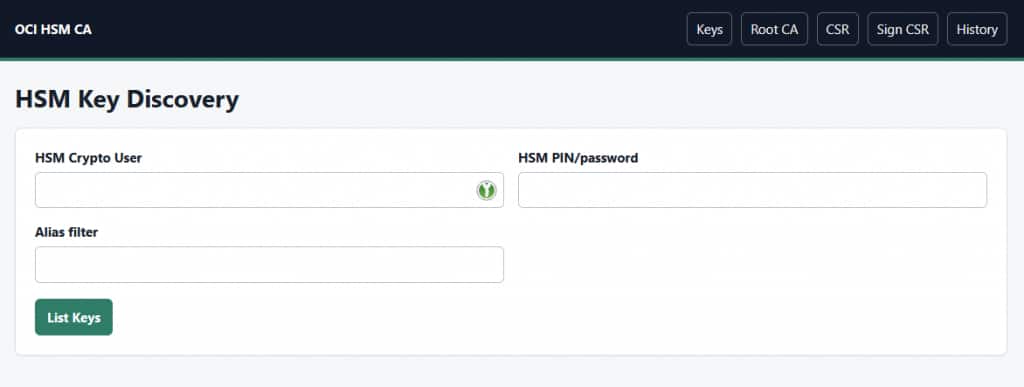
The UI shows labels, handles, key type, object type, size, signing usability, and duplicate warnings. OCI HSM labels are not assumed to be unique. If multiple private signing keys match an alias, the application refuses to choose one silently.
Root CA creation
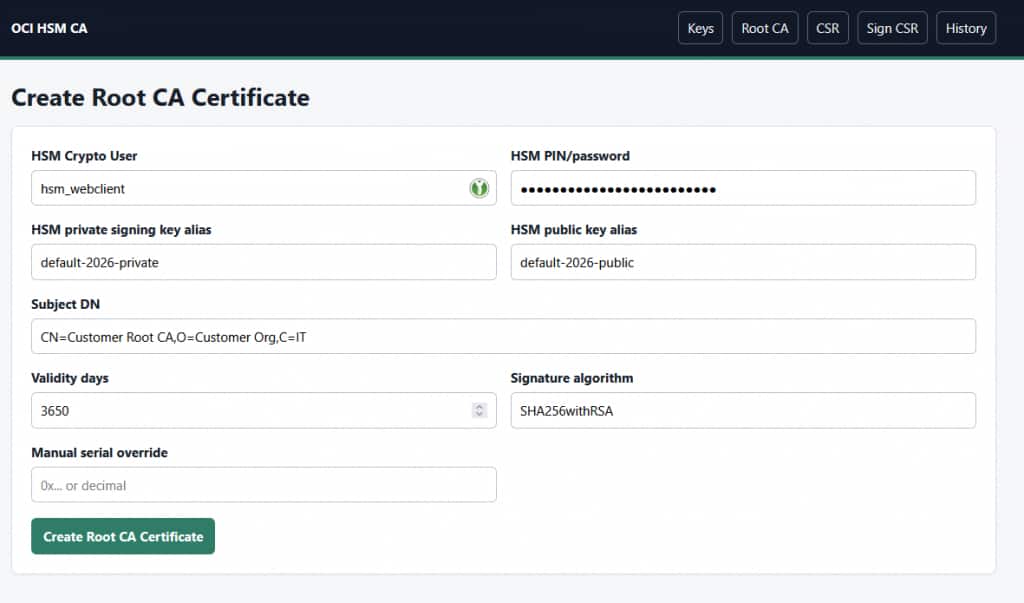
To create a root CA certificate, the administrator selects a private signing key alias and the matching public key alias from the HSM, enters the subject DN, validity period, and signature algorithm, and submits the ceremony operation.
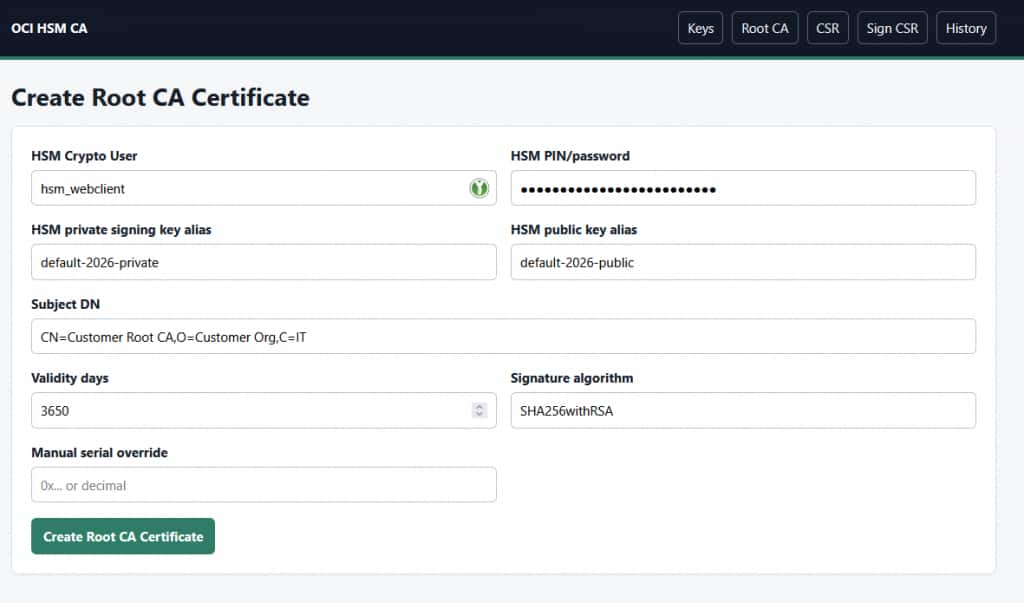
The application reads the public key from the HSM, verifies that it matches the selected private key, and creates a self-signed root CA certificate. The generated certificate includes CA-appropriate extensions such as critical Basic Constraints, critical Key Usage, Subject Key Identifier, and Authority Key Identifier.
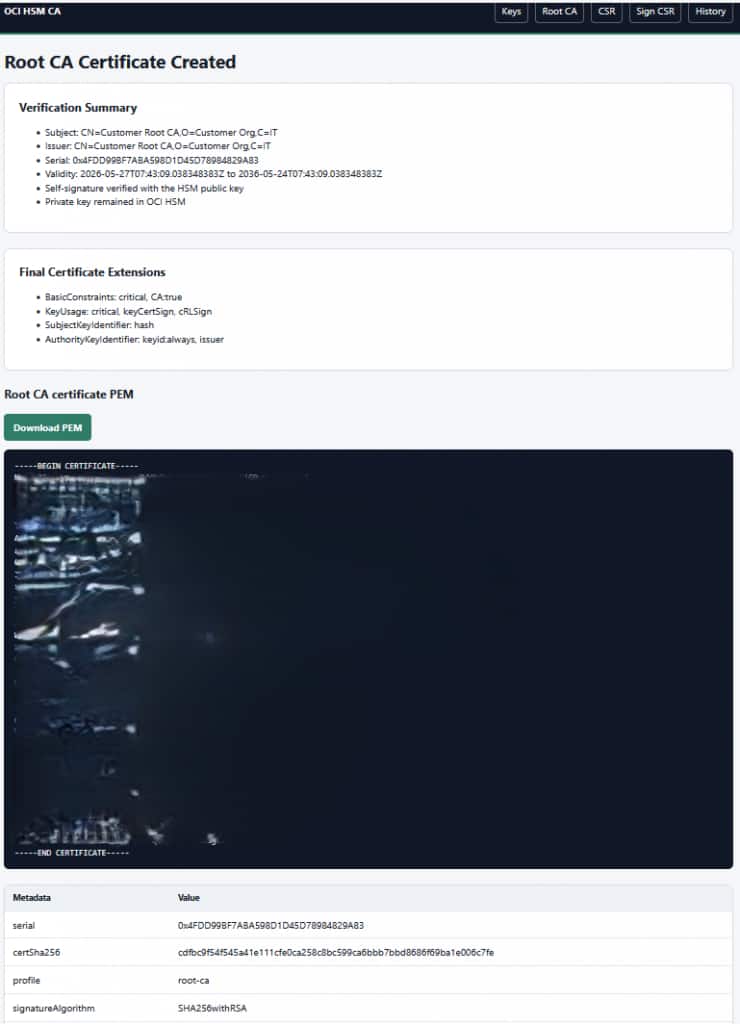
The result page provides the certificate PEM and highlights the security-relevant outcome: the self-signature was verified with the HSM public key, and the private key remained in OCI Dedicated HSM.
CSR creation and inspection
The application can create a PKCS#10 CSR using an HSM-backed private key and matching public key. It can also inspect an externally generated CSR, which is useful when another appliance or platform generates the request and the PKI operator needs to sign it with a controlled profile.
CSR signing
For CSR signing, the administrator provides the issuer certificate, the CSR, the HSM signing key alias, and selects the certificate profile to apply during certificate issuance. This means the same signing workflow can issue different certificate types, such as an intermediate CA certificate or a leaf certificate, without trusting the CSR to define the final policy.
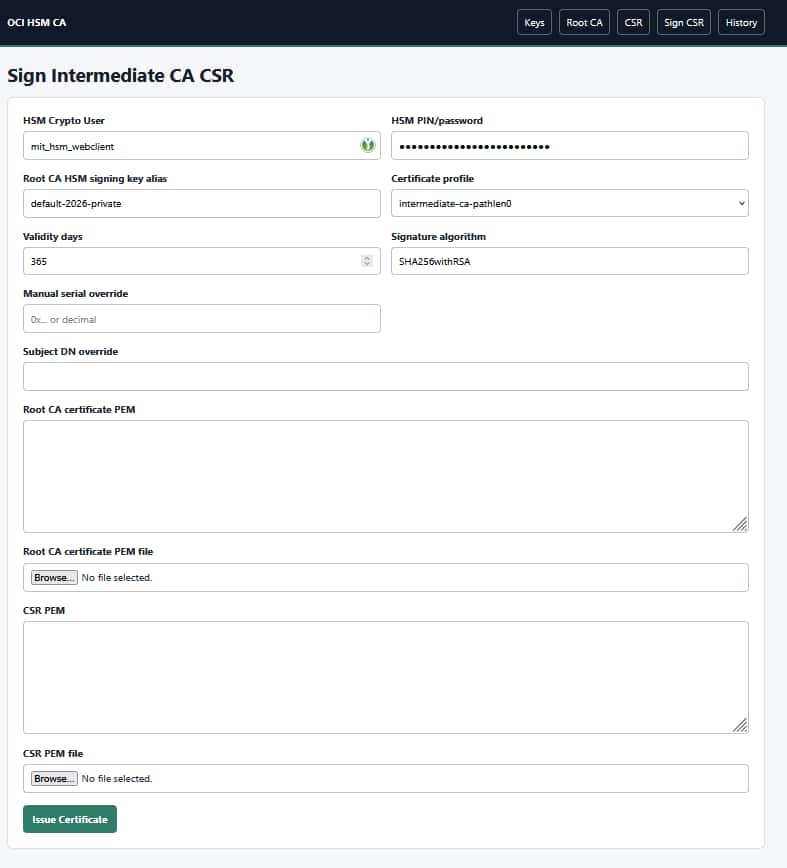
Profiles are controlled by server-side configuration and selected in the CSR signing form at emission time. For an intermediate CA certificate, the profile can force CA:true and pathLen:0 even if the CSR did not request those extensions. For a leaf certificate, the profile can force CA:false, add server/client authentication EKUs, and copy requested Subject Alternative Names when appropriate.
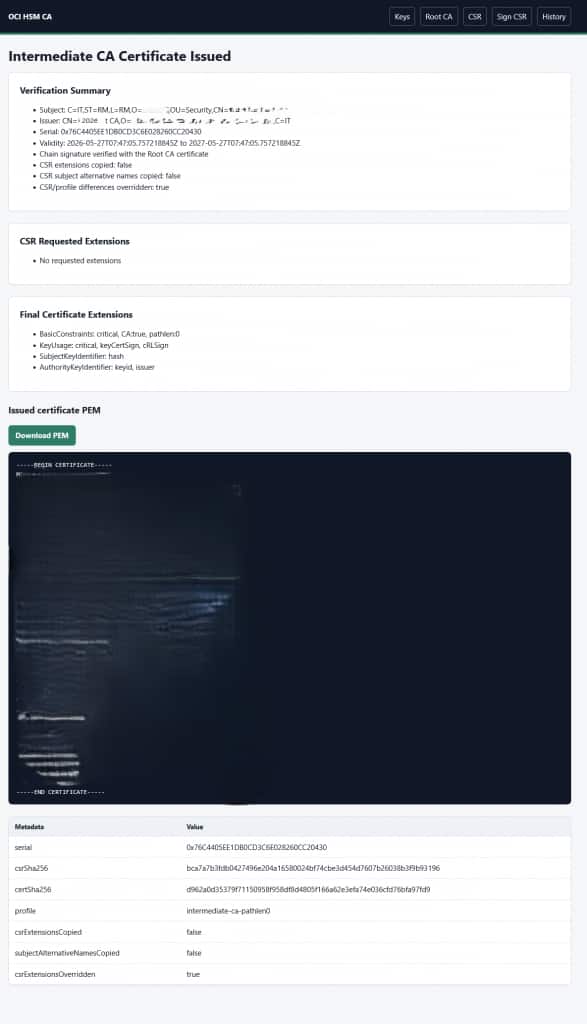
The result page shows both the requested CSR extensions and the final certificate extensions. It also indicates whether SANs were copied and whether CSR-requested extensions were overridden by policy.
Certificate history
Every generated certificate is stored in local certificate history. The history view supports unarchived and archived rows, certificate download, chain download when available, and archive or unarchive actions.
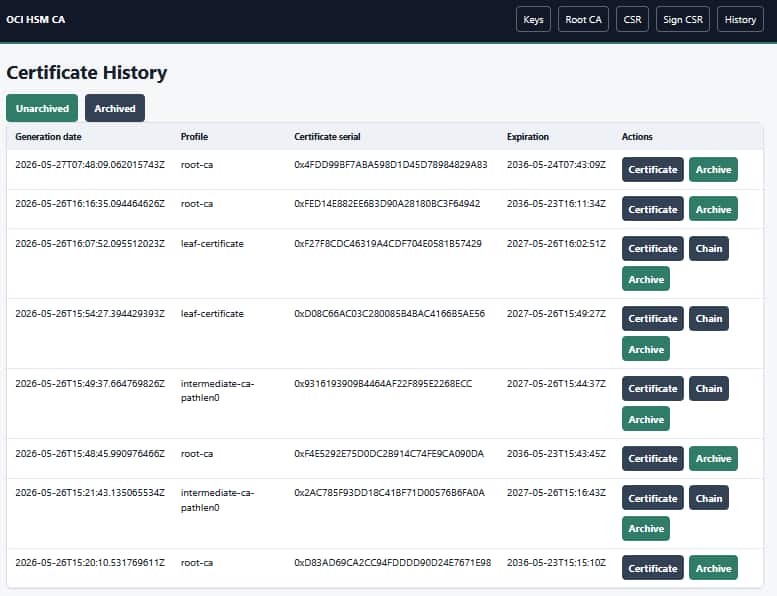
This history is intentionally simple and local to the ceremony workload.
It gives administrators a practical way to recover the generated PEMs and review prior operations without turning the application into a full CA management platform.
Validate the deployment
After installation, confirm that the StatefulSet, pod, service, and persistent volumes are ready. Review both application and sidecar logs:
kubectl get statefulset,pod,svc,pvc -l app.kubernetes.io/name=hsm-webclient
kubectl logs statefulset/hsm-webclient -c client-daemon
kubectl logs statefulset/hsm-webclient -c hsm-webclient
Then validate generated artifacts with OpenSSL:
openssl x509 -in root-ca.pem -noout -text
openssl verify -CAfile root-ca.pem intermediate-ca.pem
openssl req -in request.csr -noout -text -verify
OpenSSL is only used here for inspection and verification. The CA signing operation itself is performed through OCI Dedicated HSM by the Java application.
The application writes JSON Lines audit records with timestamp, authenticated application user, HSM username, key alias, operation, CSR and certificate hashes, serial, subject, issuer, validity, selected profile, final extensions, and CSR override decisions. PIN/password values are never written.
Conclusion
OCI Dedicated HSM makes it possible to run cloud-based PKI ceremonies while keeping CA private keys protected by dedicated hardware. By combining the OCI JCE provider, a small Spring Boot web UI, OKE, Helm, mTLS, and a client daemon sidecar, security teams can create a practical browser-based workflow for root CA creation, intermediate CA issuance, certificate history, and audit evidence.
The pattern is especially useful when a customer wants the operational benefits of containers and Kubernetes without relaxing the controls around CA signing keys. The application remains simple, the keys remain non-extractable, and the deployment model stays close to standard OCI cloud-native operations.
To go deeper, review the OCI Dedicated KMS documentation, the OCI Dedicated KMS JCE provider documentation, the Oracle Cloud compliance resources, and the related A-Team article, Building scalable cryptographic applications using OCI Dedicated Key Management Service.