
Introduction
OCI DNS provides name resolution for applications and services across cloud and private networks. As these environments grow, records for the same domain may be maintained in multiple private zones, on-premises DNS servers, or a combination of private and public DNS. A record missing from one source may therefore exist elsewhere. Whether the lookup reaches that source depends on how the resolver handles the missing information.
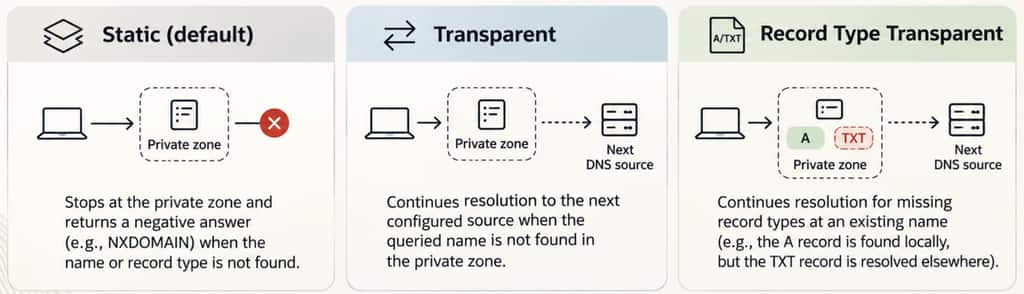
OCI Private DNS supports three resolution modes: Static, Transparent, and Record Type Transparent. Static is the default. When a matching private zone does not contain the requested name or record type, it returns a negative answer and ends the lookup. This behavior works well when the zone is intended to provide the complete answer for its namespace. When records are distributed across different sources, however, it can prevent the resolver from reaching the source that holds the required record.
Transparent mode allows resolution to continue when the queried name is absent from the private zone. This makes it useful for shared namespaces across private networks, hybrid DNS environments, and private zones that override selected public records.
Record Type Transparent mode extends that flexibility to missing record types at existing names—for example, when one source provides a hostname’s A record while another provides its TXT record. Both modes depend on a later configured source being able to answer the query.
This blog explains how these resolution modes affect a DNS lookup, where each mode is useful, and how to choose the appropriate behavior when DNS records are distributed across multiple sources.
OCI Private DNS: the five building blocks
Before following a query, it helps to separate the components that store DNS records from the components that make those records reachable.
| Building block | What it does |
|---|---|
| Private zone | Stores the DNS records for a domain, such as acme.com. Its resolution mode controls what happens when the requested name or record type is missing. |
| Private view | Groups private zones for a resolver to consult. Each zone belongs to one view. Different views can contain separate zones with the same name. |
| VCN resolver | Answers DNS queries for a VCN. Each VCN has a dedicated resolver, with a default listener at 169.254.169.254. |
| Listening endpoint | Provides an address through which clients or resolvers in another network can send queries to this VCN’s resolver. |
| Forwarding endpoint and rule | The rule decides which queries to send to another DNS server; the forwarding endpoint provides the outbound path. |
These components work together, but they are not interchangeable. A zone holds the records, a view makes them available to a resolver, and endpoints carry queries between networks. Routes and security rules must separately permit that traffic.
The resolver checks its attached views first, in their configured order. The default view is checked last among the views unless it is explicitly positioned in that list. Forwarding rules come next, followed by Internet resolution. Normally, an answer ends the lookup even when it is negative; transparency changes when a missing name or record type allows the lookup to continue.
Scenario: the same domain, but records in different Regions
Consider two connected Regions, identified here as Ashburn (ASH) and Phoenix (PHX). Each has its own private zone named acme.com, and each zone contains the address record for its local server. From the ASH server, the goal is to reach the PHX server using server-phx.acme.com.
| Region | Private zone | Server record | Private IP |
|---|---|---|---|
| ASH | acme.com | server-ash.acme.com | 10.0.0.22 |
| PHX | acme.com | server-phx.acme.com | 10.10.0.28 |
The walkthrough follows the query from ASH to PHX. It first uses the server records shown in the lab screenshots, then extends the example with separate A and TXT records to demonstrate Record Type Transparent mode.
Private records and the DNS path
In the ASH zone, the A record for server-ash.acme.com points to 10.0.0.22. There is no record for the PHX hostname in this zone.

The PHX zone contains the corresponding record for server-phx.acme.com, pointing to 10.10.0.28.

Although the zones share a name, they are independent sets of records. OCI does not automatically merge them. The ASH resolver must therefore reach the PHX resolver to obtain the PHX-only record.
Prerequisite for this walkthrough: assume ASH has a forwarding rule for acme.com that uses an ASH forwarding endpoint to send queries to a PHX listening endpoint. The PHX resolver can then consult its private zone. The endpoint routes and security rules must allow DNS over UDP and TCP port 53, including the response path. The screenshots show the records and client tests, not these endpoint and rule settings.
For the flow below, no later local view supplies the requested record before the forwarding rule is reached. PHX can remain Static, providing the final answer for this one-way lookup. The important question is whether the ASH zone lets the query get that far.
Check connectivity before changing DNS
Start with the PHX server’s IP address. Run this command on the ASH server:
ping 10.10.0.28
This confirms that ICMP traffic can reach the PHX server and return. It does not, by itself, prove that the separate resolver-endpoint path on port 53 works. It also does not show a reverse PHX-to-ASH test.
Next, check a name whose record is local to ASH:
ping server-ash
The DHCP settings help explain where the client sends its queries. On this NetworkManager-managed instance, inspect them with:
nmcli -f dhcp4 device show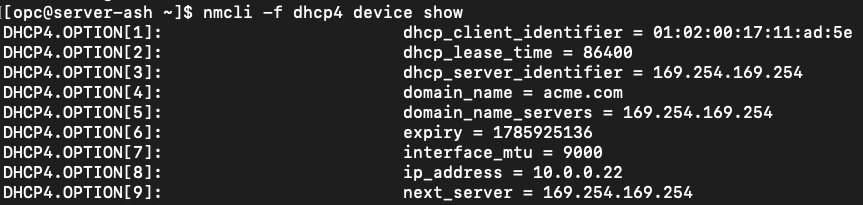
The domain setting is consistent with the successful short-name test. For the remote test, use the full hostname so that the name being requested is unambiguous. We now have a useful baseline: the PHX IP responds, and the local ASH name resolves.
Static mode: the local zone ends the lookup
Repeat the connectivity test from ASH, this time using the PHX hostname:
ping server-phx.acme.com
Static is the default resolution mode. The current value is shown on a private zone’s Details page, under Resolution mode. For this ASH-to-PHX lookup, inspect the ASH copy of acme.com, because that is the zone consulted first.
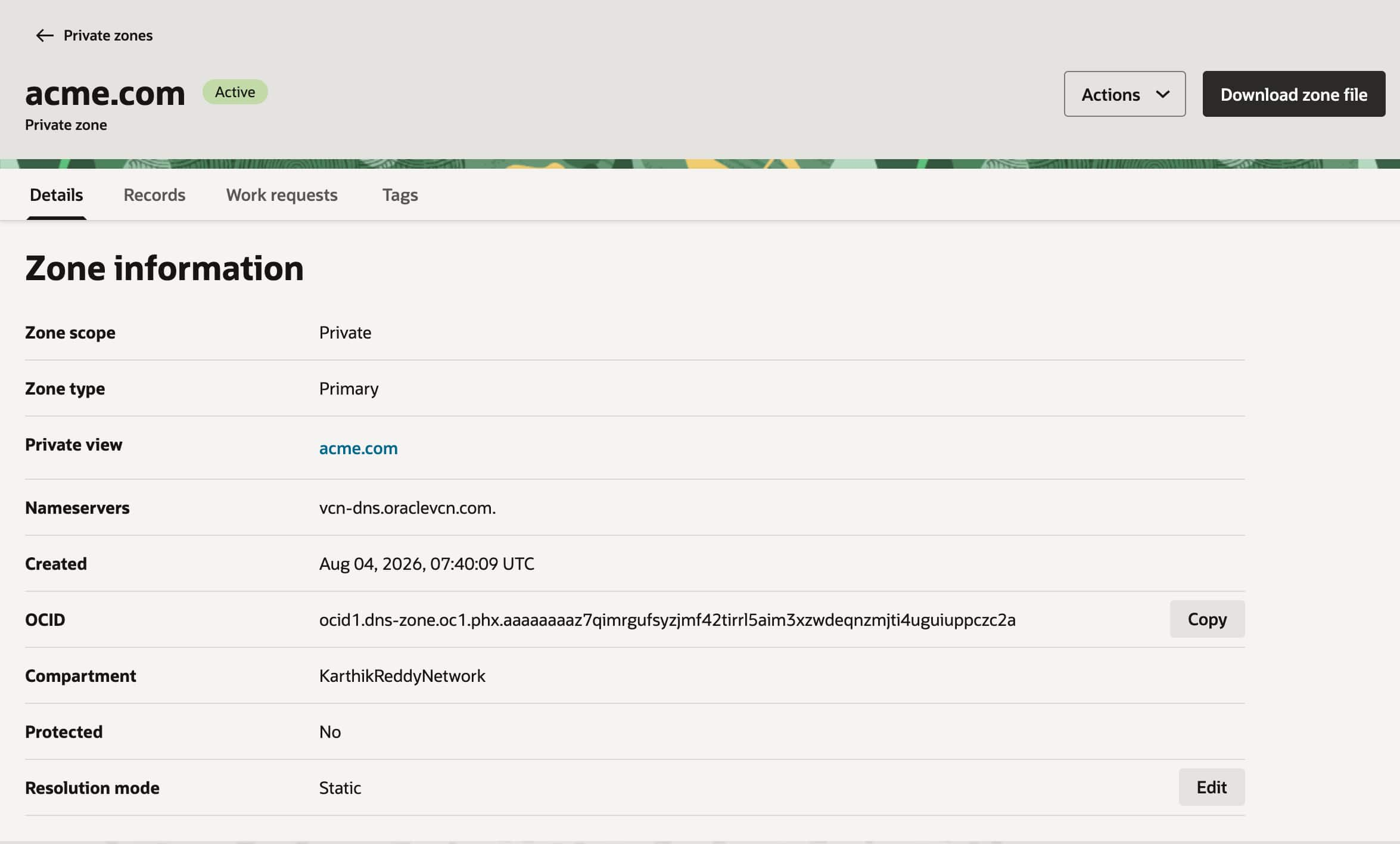
When the query reaches the ASH resolver, its local acme.com zone covers the requested name. However, that zone contains server-ash.acme.com, not server-phx.acme.com. In Static mode, the missing hostname produces NXDOMAIN. The resolver returns that response to the client and does not evaluate the forwarding rule that could reach PHX.
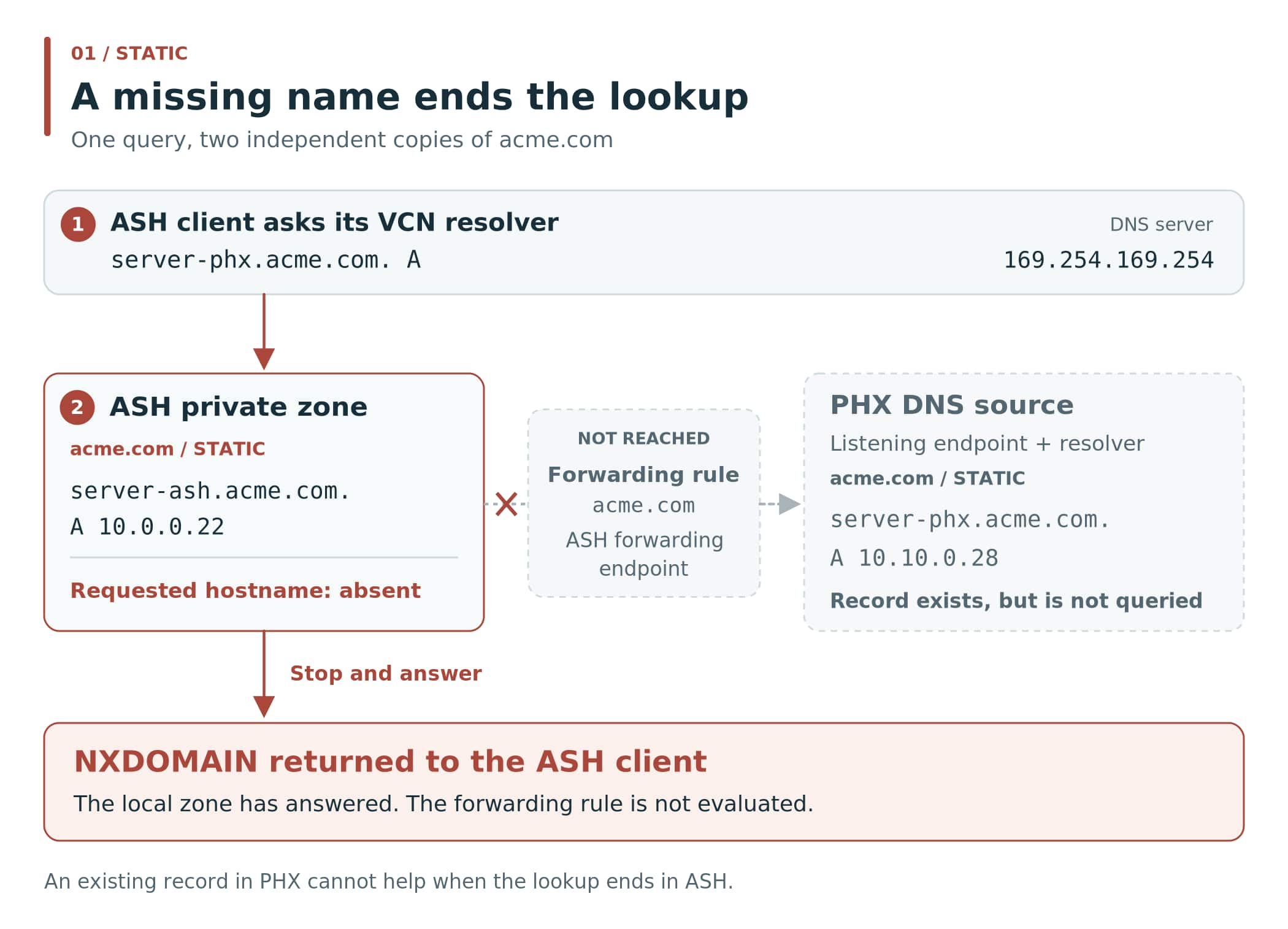
Why is NXDOMAIN considered an answer?
It is a valid DNS response stating that the requested name does not exist in the namespace being answered for. It is not a timeout or a request to try another server. Because the Static zone is authoritative for acme.com, the resolver accepts its negative answer and stops.
The ping error shows a name-resolution failure, but does not display the DNS response code. To inspect that code directly, query the resolver:
dig @169.254.169.254 server-phx.acme.com. AFor the Static setup described here, the expected status is NXDOMAIN. The final dot makes the queried name absolute. Static has not malfunctioned: it is appropriate when the zone should give the final answer for its namespace. It is simply not the behavior needed when this name is intentionally stored elsewhere.
Transparent mode: continue when the hostname is missing
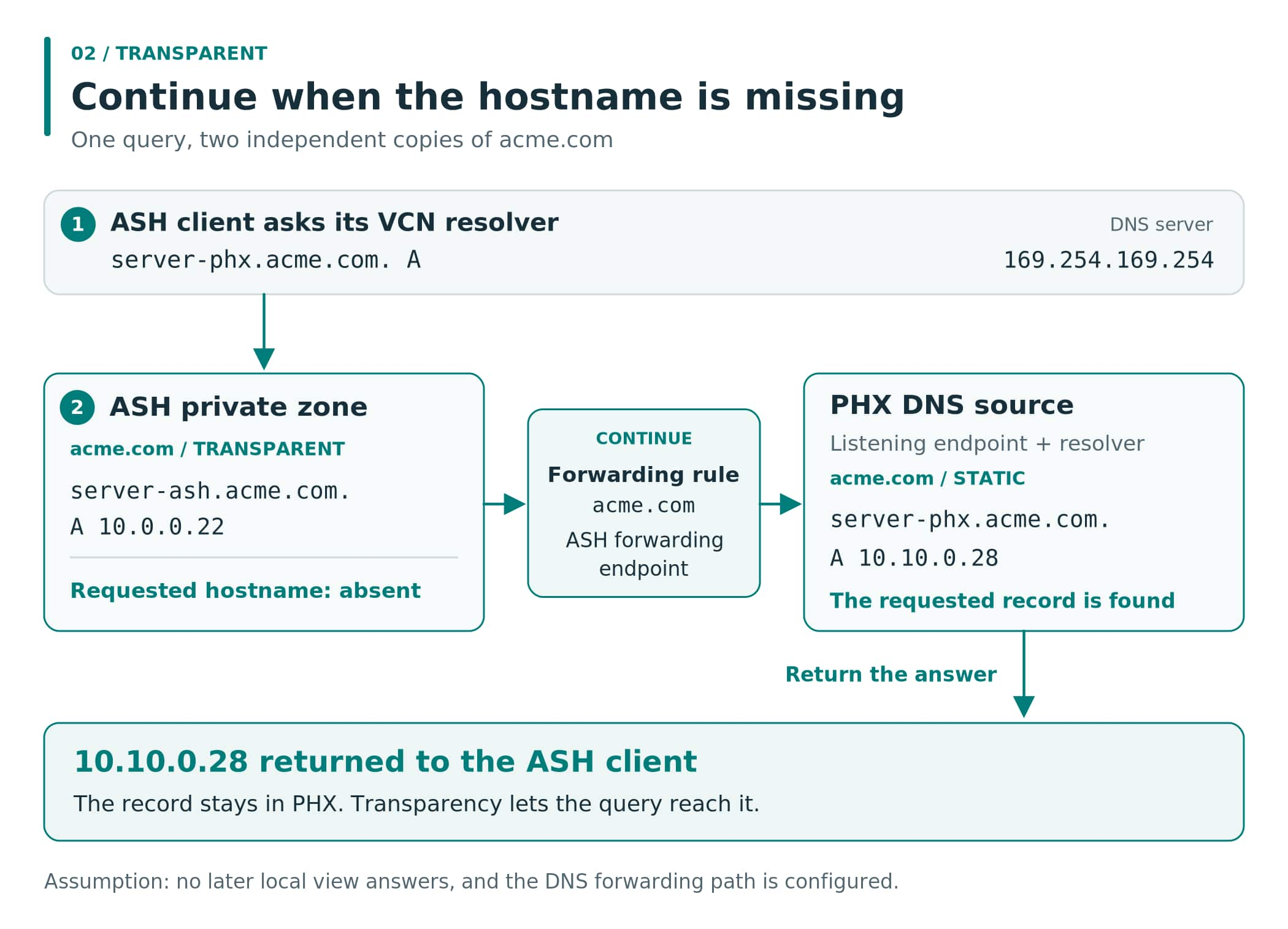
The PHX record is already in the right place. Instead of duplicating it in ASH, change how the ASH zone handles an absent hostname. Transparent mode allows the resolver to continue to the next view, or to forwarding rules once the views have been evaluated. In this example, that lets the query reach PHX.
Change the mode on the ASH & PHX dns private zone
- Open DNS management, then Private zones, and select the ASH
acme.comprivate zone. - On Details, select Edit next to Resolution mode.
- Choose Transparent, select Update, and wait for the zone to be Active before retesting.
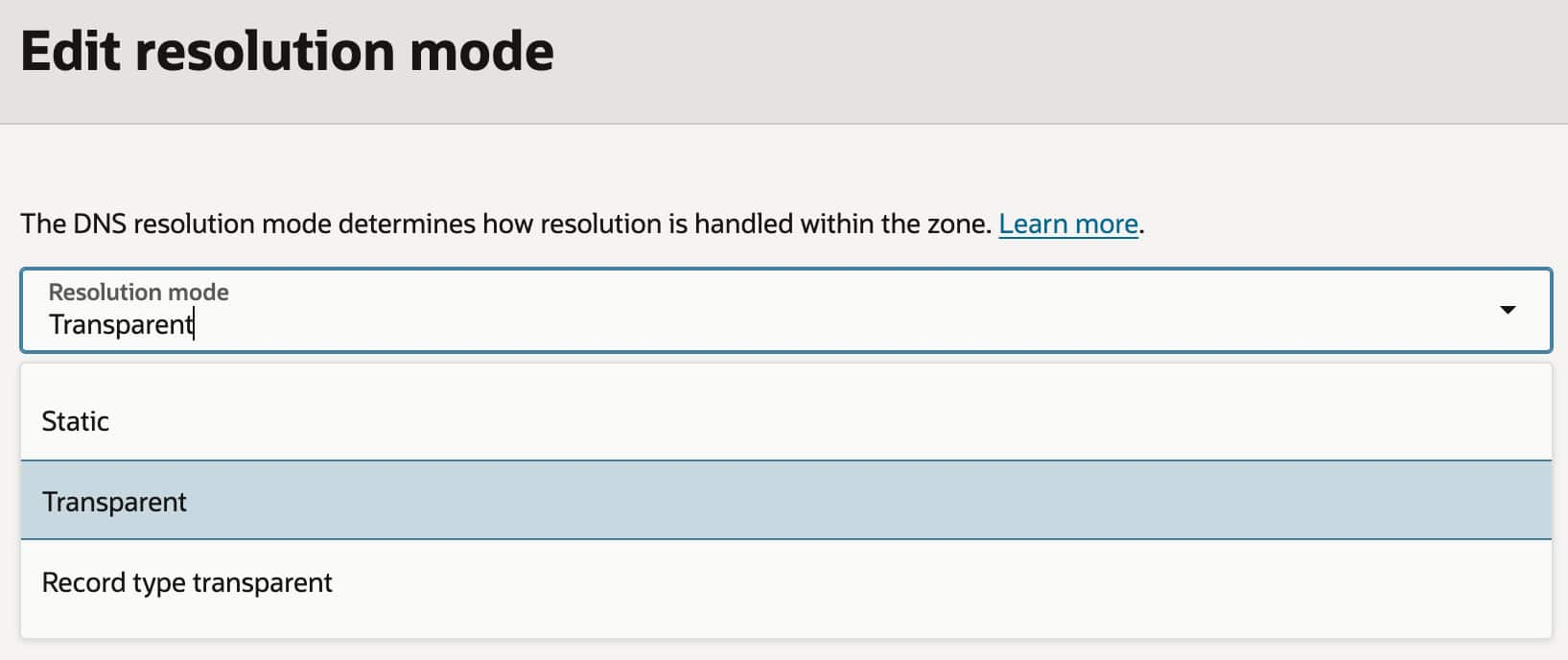
This is a zone setting, not a replacement for the forwarding rule or network configuration. For this direction of resolution, the earlier ASH zone needs to permit continuation; the PHX zone can still supply the final answer in Static mode.
Follow the query and repeat the test
The same hostname is still absent from the ASH zone. What changes is the next action: the resolver continues, the acme.com rule forwards the query, and the PHX resolver finds the A record for 10.10.0.28.
Run the same command again from ASH:
ping server-phx.acme.com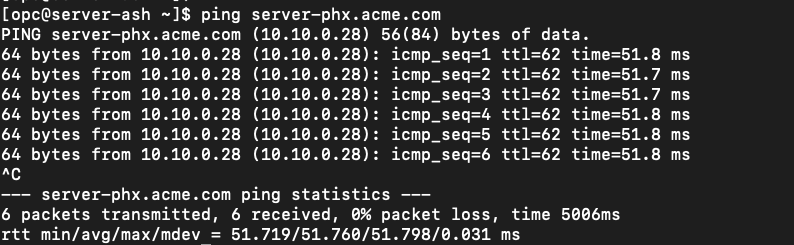
The address record has stayed in PHX throughout. Transparency changes the lookup path; it does not synchronize or merge the two zones. Records that already answer positively in the earlier zone still take precedence.
This makes Transparent mode useful when different DNS sources hold different hostnames beneath the same domain, including connected private networks and hybrid environments. But there is a second case to consider: what happens when the hostname already exists locally, and only the requested record type is missing?
Record Type Transparent: continue when the record type is missing
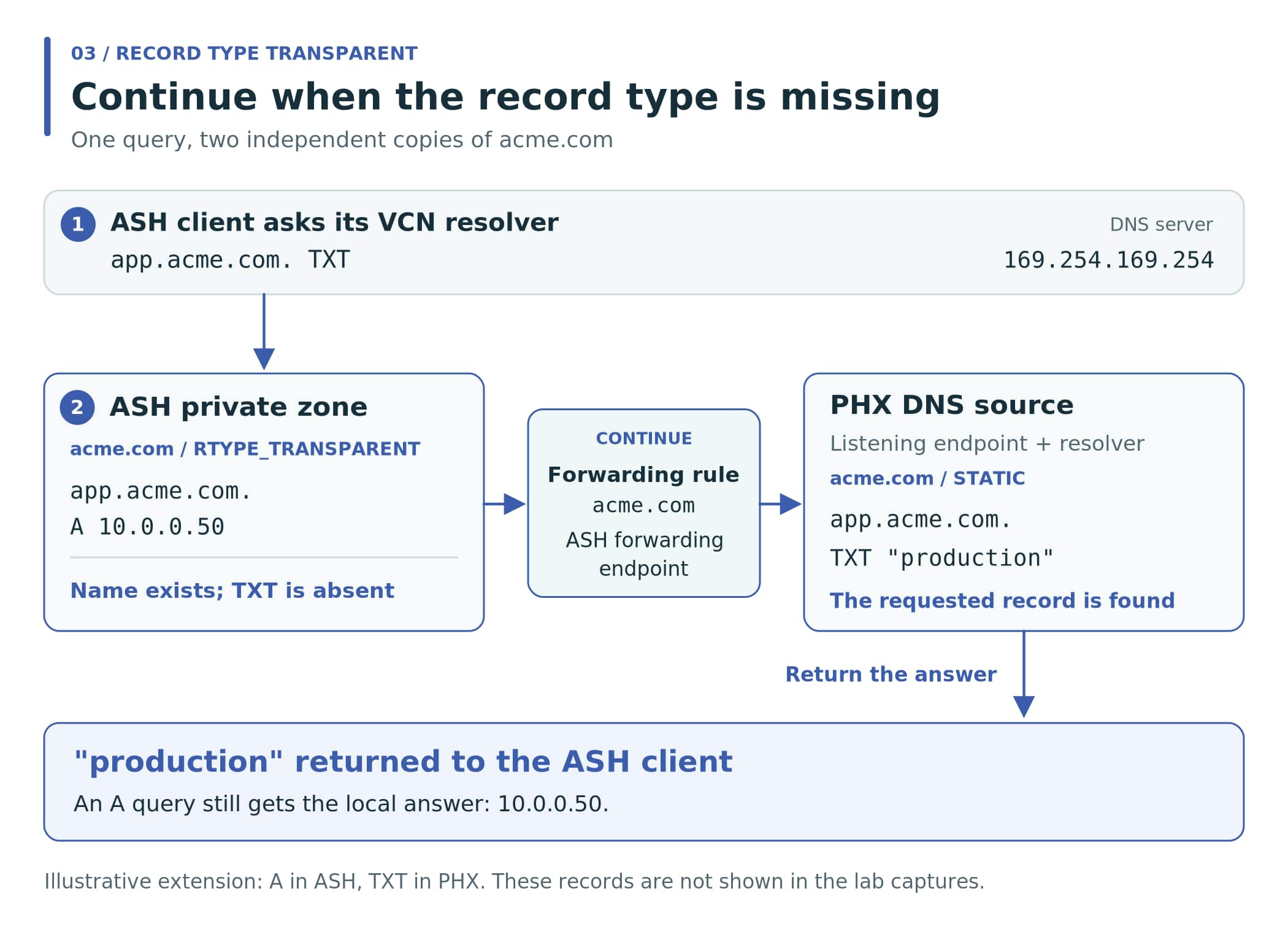
To make that distinction visible, keep the original server records and extend the same setup with the following app.acme.com records. This is an illustrative extension of the lab; these additional records and their test results are not shown in the preceding screenshots.
| Zone | Additional record | Purpose |
|---|---|---|
ASH acme.com | app.acme.com. A 10.0.0.50 | Provides the application’s local IPv4 address. No TXT record is added here. |
PHX acme.com | app.acme.com. TXT "production" | Provides a text record for the same hostname. |
Now ask the ASH resolver for the text record:
dig @169.254.169.254 app.acme.com. TXTThe ASH zone recognizes app.acme.com, because its A record exists. It has no TXT record, however. Both Static and ordinary Transparent mode stop with NODATA for this non-apex name. NODATA means that the name exists but the requested record type does not; in this example, dig would show NOERROR with no TXT answer, not NXDOMAIN.
Record Type Transparent, represented as RTYPE_TRANSPARENT in the CLI, allows the lookup to continue for this missing record type as well. The existing forwarding path can then reach PHX and obtain the TXT value. An A query still receives the local ASH address.
Change the mode on the ASH & PHX dns private zone
- Open DNS management, then Private zones, and select the ASH
acme.comprivate zone. - On Details, select Edit next to Resolution mode.
- Choose Record type transparent,, select Update, and wait for the zone to be Active before retesting.
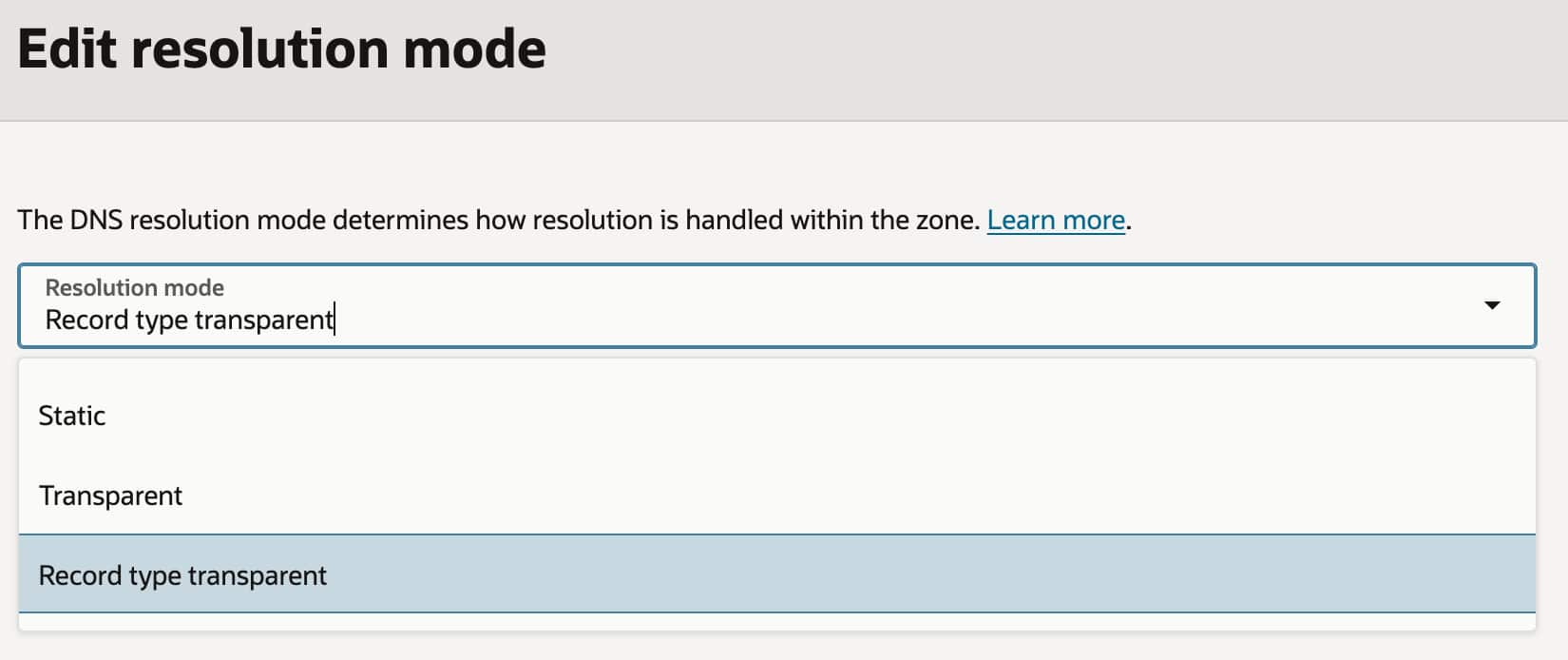
Verify the requested record type, not just the hostname
After the illustrative records and mode are configured, test both record types explicitly:
dig @169.254.169.254 app.acme.com. TXT +short
dig @169.254.169.254 app.acme.com. A +short| Query | Expected answer | Source |
|---|---|---|
app.acme.com. TXT | "production" | PHX, reached through forwarding. |
app.acme.com. A | 10.0.0.50 | ASH, answered locally. |
These are expected results for the illustrative extension, not captured output from an RTYPE lab run. A successful ping alone would not demonstrate this behavior: the difference is whether a TXT query can reach the later source when an A record already makes the name exist locally.
One detail matters when comparing the modes: ordinary Transparent mode can also continue for a missing record type at the zone apex, which is acme.com itself. Our example uses app.acme.com, a non-apex name, so it needs Record Type Transparent. RTYPE permits this behavior at both apex and non-apex names.
Choose the mode that matches the missing information
| Mode | Name is absent | Name exists; requested type is absent |
|---|---|---|
| Static | Stop with NXDOMAIN. | Stop with NODATA. |
| Transparent | Continue. | Continue at the zone apex; stop with NODATA at other names. |
| Record Type Transparent | Continue. | Continue at both apex and non-apex names. |
For the original server-phx.acme.com lookup, Transparent is sufficient: the entire hostname is missing from ASH. For the split A/TXT example, Record Type Transparent is required: the name exists locally, but the requested type is held elsewhere. Keep Static when the zone is meant to give the final answer for its namespace.
In both transparency modes, a later source must still contain the record and be reachable. Negative responses may also remain cached after a change, so allow the relevant cache lifetime when retesting. For reverse PHX-to-ASH resolution, review and test that path separately rather than assuming that the successful ASH-to-PHX test proves both directions.
References
The lab screenshots establish the original records and the ASH client tests. The additional A/TXT example is illustrative. The resolution rules and configuration options are documented in the following references.
[1] OCI Private DNS: resources, resolution order, and zone transparency
[2] RFC 2308: negative DNS responses and caching