

Trusting the human behind the action
An employee can sign in with valid credentials and deliver good work, yet not be the person the organization believes it hired. In Oct 2026, U.S. Department of Justice announced charges over North Korean remote IT workers infiltrating over 70 U.S. companies and generating ~$3 million in revenue. Such impersonations can expose your organization to intellectual property and data theft, as well as compliance risks. These threats expose a critical gap: authenticating an account does not necessarily verify the human behind it.
Oracle has a solution: Oracle Identity Assurance uses biometrics to assist in verifying the person behind an account. It connects biometrics, like a faceprint, fingerprint or voiceprint, and where configured, government ID documents in an effort to help confirm that the person is who they claim to be. This can provide evidence that the intended person is participating, helping organizations address impersonation. In the future, applications can request on-demand human verification before sensitive actions, including approvals requested by AI agents.
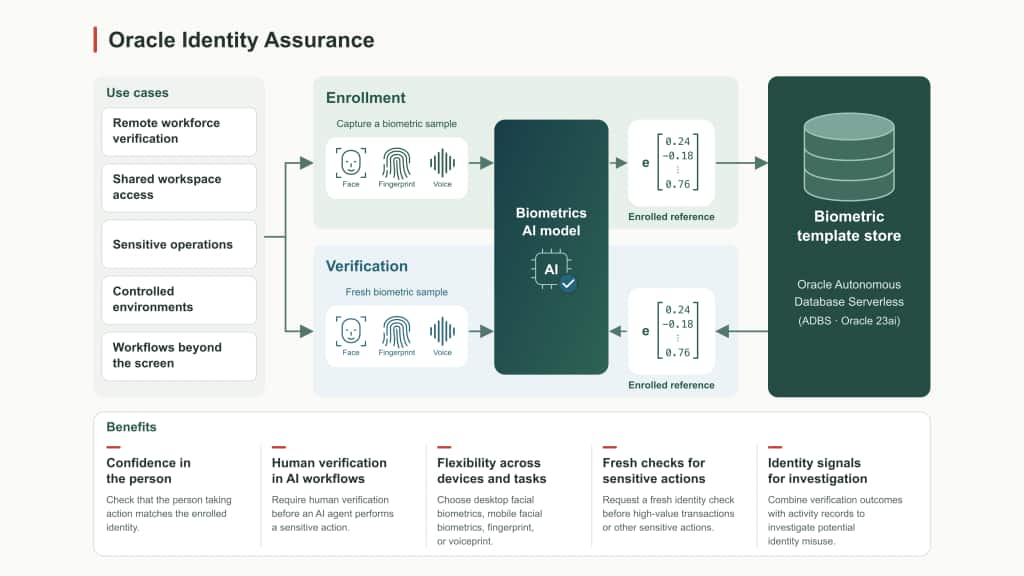
Identity Assurance works in two steps: enrollment and verification. During one-time enrollment, users create a protected biometric reference (a mathematical representation): a facial embedding, fingerprint template, or voiceprint. Encryption and modality-specific safeguards help protect these mathematical representations, with facial references stored in the cloud for desktop or on the user’s bound mobile device. During verification, a fresh sample is compared with the enrolled reference using applicable liveness and anti-spoofing checks. Applications can use the results for workflow decisions, audit, and risk evaluation.
Where Identity Assurance fits
Remote workforce verification: Contractors and employees often work across multiple devices, from personal phones during onboarding to corporate desktops. Facial biometrics can support identity verification on desktops and supported phones, helping organizations maintain confidence across remote workflows such as employee onboarding and account opening.
Shared workspace access: In healthcare, laboratories, and operational facilities, multiple individuals may share a workstation. Facial and fingerprint biometrics can help verify that the person accessing a shared workstation or performing a sensitive action is the enrolled individual, providing additional identity assurance beyond the active account session. Fingerprint verification can also support authorized workstations in facilities that restrict cameras and personal devices.
Sensitive operations: Actions such as bank-account updates, beneficiary changes, and privileged operations need stronger assurance than an earlier sign-in. Customers can select facial or fingerprint verification according to the setting and supported hardware, while the application enforces the transaction decision. Identity Assurance is planned to support step-up verification at these checkpoints, including Fusion HCM bank-account update workflows.
Human verification for AI agent workflows: An AI agent may prepare a payment, request a salary change, or initiate a privileged operation. Identity Assurance can let applications require fresh verification from the authorized person before proceeding. This check helps verify who approved, and the application controls what that person can authorize.
Workflows beyond the screen: Voice biometrics can compare speech with an enrolled voiceprint during hands-free interactions, such as clinical dictation or voice-driven applications. This can provide additional evidence of who spoke for audit and review without interrupting the workflow.
Reveal the Human Behind the Action
Identity Assurance sends verification signals to OCI Audit, providing security administrators and security operations center teams with additional evidence to investigate potential impersonation or identity misuse. Teams can correlate these signals with login history, IP addresses, and access privileges to identify suspicious activity and prioritize investigations. In the future, these signals are also planned to be available in OCI Cloud Guard to support threat detection and investigation. To learn more, read our blog: Turning Identity Assurance Signals into Risk Insights.
Protecting biometric data
Protecting biometric data is central to Oracle’s approach to identity assurance. Oracle combines encryption, access controls, and modality-specific safeguards designed to protect biometric data throughout enrollment and verification.
- Facial biometrics: Facial verification stores encrypted facial embeddings rather than original enrollment images, with data isolated by identity domain and stored separately from IAM. Mobile verification protects embeddings using hardware-backed keys (Secure Enclave on iOS and Android Keystore), while device binding, app attestation, and signed requests help secure the verification flow. Raw depth maps remain on the device.
- Fingerprint biometrics: Verification uses protected biometric templates instead of raw fingerprint images. Biometric Template Protection (BTP) helps prevent fingerprint reconstruction, while Presentation Attack Detection (PAD) helps identify spoofing attempts.
- Voice biometrics: Voice verification compares speech from an active interaction against an enrolled voiceprint. Voiceprints are securely stored, while speech recordings are not retained.
- Data privacy and user control: Oracle does not sell biometric data to third parties. Oracle has designed Identity Assurance to allow customers to obtain consent during facial enrollment, and Identity Assurance is configurable so that users can unenroll to delete their enrolled biometric data.
Strengthening Identity Security in the Age of AI
Oracle Identity Assurance helps organizations strengthen trust in digital interactions by aiding in verifying the person behind an account, not just their credentials. With flexible biometric options across devices and workflows, organizations can work to confirm human identity when it matters most, add verification to sensitive operations, and use security signals to investigate potential misuse. Together, these capabilities can help reduce impersonation risk while supporting user experiences designed to be secure and seamless in an increasingly AI-driven world.
Getting started
Start by identifying the interaction that needs additional identity assurance. Evaluate the biometric method against the setting, supported hardware, enrollment requirements, and privacy needs. Contact your OCI account representative to discuss which capabilities, integrations, and enrollment approach fit your application. To learn more, visit our Identity Assurance product page and read the Identity Assurance documentation, or reach out to your OCI account representative.