
We are excited to announce Workload Identity support for self-managed Kubernetes clusters in Oracle Cloud Infrastructure (OCI). With this capability, workloads can exchange their Kubernetes service account identity for a short-lived OCI token. They can then use that token to securely access OCI resources through Identity and Access Management (IAM) policies.
Kubernetes applications frequently need to invoke cloud service APIs. For example, a batch job might write its output to OCI Object Storage, a controller might create OCI resources, or an application might read secrets, metrics, or database connection details from an OCI service. While the easiest way customers authorize access is by placing long-lived credentials in a Kubernetes Secret, the recommended approach is to avoid static credentials altogether and let the workload authenticate with its own identity.
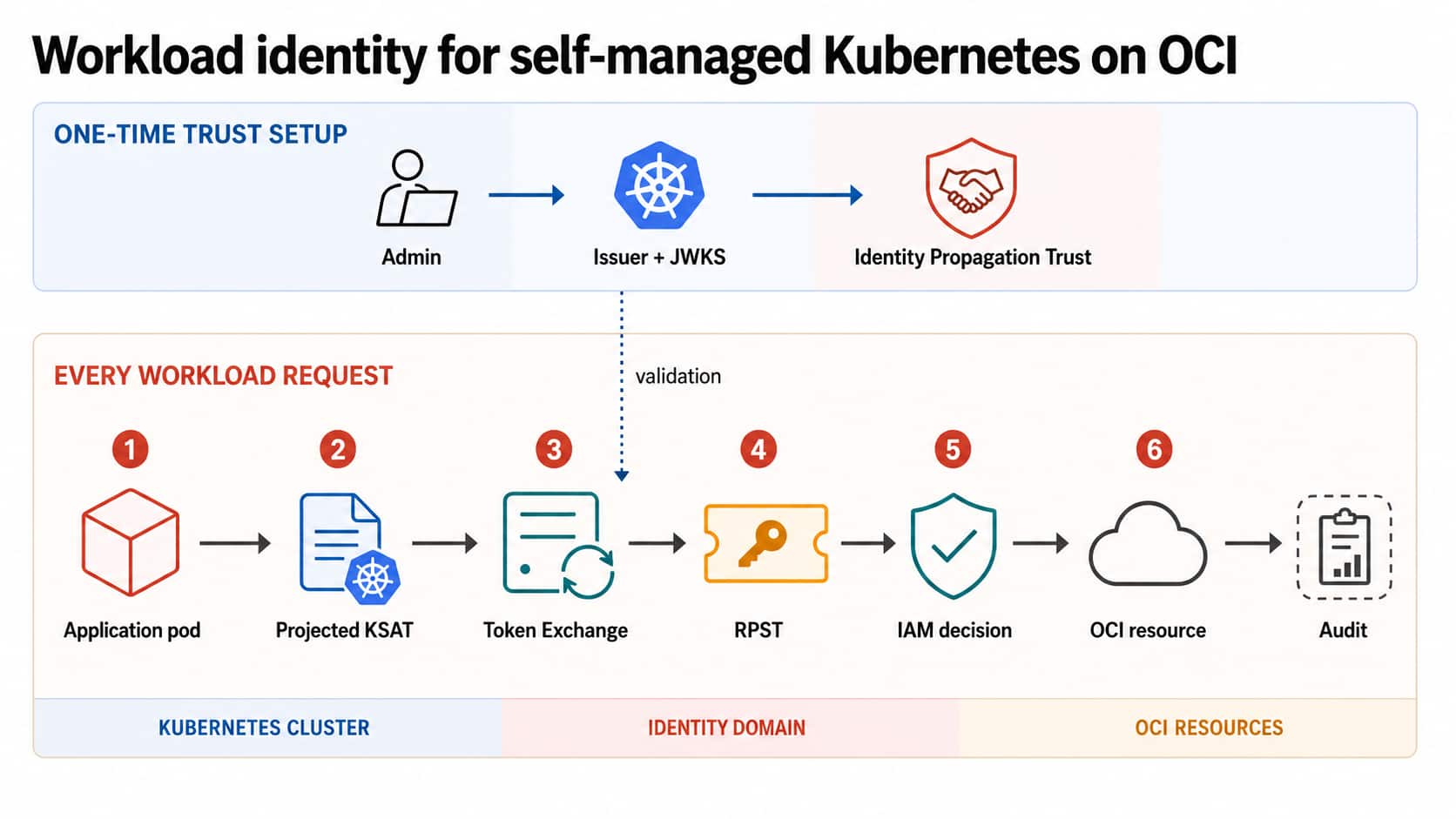
Self-Managed Kubernetes is the model where organizations deploy, operate, and maintain their own Kubernetes clusters on OCI while retaining full control over cluster infrastructure, configuration, upgrades, security, and lifecycle management. Some organizations use Self-Managed Kubernetes for deeper control, for example to leverage alpha APIs or make changes to control plane components. OCI simplifies operating such environments using open-source technologies and OCI infrastructure services. This approach gives teams flexibility to design and operate their own Kubernetes platform while building on OCI compute, networking, storage, and security services.
What is Workload Identity and why does it matter?
Workload Identity enables applications running in Kubernetes to securely authenticate to Oracle Cloud Infrastructure (OCI) using their Kubernetes identity. Instead of embedding OCI credentials in an application, or sharing the identity of the Kubernetes worker node, each workload authenticates as its own Kubernetes service account and receives temporary OCI credentials at runtime.
OCI has long supported Instance Principals, which allow applications running on OCI compute instances to authenticate without storing API keys. In a Kubernetes cluster, however, every pod running on the same worker node shares the node’s Instance Principal. This means all workloads on that node receive the same OCI identity and permissions, making it difficult to enforce least-privilege access for individual applications.
A Kubernetes service account is the native identity that a pod can use inside a cluster. Kubernetes clusters can be configured to project a short-lived service account token into the pod. Workload identity uses that token as the starting point for cloud authentication. Instead of storing an OCI API key in the pod, the application presents the Kubernetes service account token to OCI IAM. OCI IAM validates the token issuer and signature, maps selected claims into an OCI principal context and returns a Resource Principal Session Token (RPST). The OCI SDK can then use the RPST to sign requests to OCI services. This approach improves the security posture of Kubernetes applications in several ways:
- No long-lived OCI user keys or configuration files need to be stored in Kubernetes Secrets.
- Access can be scoped to a namespace and service account instead of to every workload running on a node.
- Tokens are short-lived and can be rotated automatically by Kubernetes and OCI IAM when configured appropriately.
- OCI IAM policies remain the central place to express authorization for OCI resources.
- OCI Audit can show which workload identity made OCI API calls, helping operators investigate activity and demonstrate compliance.
How to use Workload Identity with Self-Managed Kubernetes?
To use Workload Identity in a Self-Managed Kubernetes cluster, you rely on the OCI IAM Token Exchange Access Grants and an Identity Propagation Trust configuration. OCI IAM trusts the Kubernetes token issuer for your cluster, exchanges the Kubernetes service account token for an RPST, and includes selected claims from the Kubernetes token in the OCI request principal context. IAM policy conditions then decide which OCI resources the workload can access.
Prerequisites
- A Self-Managed Kubernetes cluster Kubernetes (non-OKE) cluster running on OCI with service account token volume projection enabled.
- OCI CLI access from an administrator workstation.
- Permission to manage identity domains and Identity Propagation Trust configurations in OCI IAM.
- Permission to create or update OCI IAM policies.
- An identity domain application to call the token exchange endpoint, or permission to use instance principals for the optional node-based token exchange authorization path.
- The latest OCI SDK.
Step 1: Choose the workload identity boundary
Start by deciding the exact Kubernetes identity that should receive access. In most cases this should be one namespace and one service account for one application component. The Kubernetes token subject uses the following format:
system:serviceaccount:<namespace>:<serviceaccount> For example, a service account named demo-user in the default namespace has the subject
system:serviceaccount:default:demo-user OCI IAM policy can later use this value as request.principal.name.
Step 2: Get the public key for the Kubernetes token issuer
OCI IAM needs the public key for the Kubernetes service account token issuer so it can verify the Kubernetes service account token presented during token exchange. On many kubeadm-based clusters, the public key is available on the control plane node:
cat /etc/kubernetes/pki/sa.pub Save the PEM-formatted public key, including the BEGIN PUBLIC KEY and END PUBLIC KEY markers. If service account issuer discovery is enabled for the cluster, you can also retrieve the key from the cluster JWKS endpoint:
curl -k https://<kubernetes-issuer-url>/openid/v1/jwks | jq If you use the JWKS endpoint, convert the public JWK to PEM format before creating the OCI trust configuration. Because this is a public key, it does not need to be treated as a secret, but you should still preserve its exact contents.
Step 3: Capture the issuer and subject claims
Create or obtain a Kubernetes service account token for the workload and decode its claims. From inside a pod, the projected token is typically available at /var/run/secrets/kubernetes.io/serviceaccount/token. From an administrator workstation, you can also use kubectl create token with the service account in many Kubernetes versions.
TOKEN=$(kubectl create token demo-user -n default)

echo "$TOKEN" | cut -d . -f2 | base64 --decode 2>/dev/null | jq .
Record these values from the decoded token:
- iss: The Kubernetes service account token issuer, commonly https://<control-plane-private-ip>:6443 or the issuer URL configured for the cluster.
- sub: The Kubernetes service account subject, such as system:serviceaccount:default:demo-user.
The issuer is important because it helps distinguish one self-managed cluster from another. The subject is important because it identifies the workload identity inside the cluster.
Step 4: Create an Identity Propagation Trust configuration
Create the trust configuration in the OCI identity domain that will be used for token exchange. The request tells OCI IAM which Kubernetes token issuer to trust, which public key to use, which OAuth client can request the exchange, and which Kubernetes claims should be propagated into the resulting RPST.
Create a file named request.json. The following example propagates the iss claim as ext_iss, which becomes available in policy as request.principal.ext_iss.
{
  "name": "Kubernetes workload identity trust for <cluster-name>",
  "issuer": "<value-of-iss-from-ksat>",
  "publicCertificate": "<pem-public-key-for-kubernetes-token-issuer>",
  "type": "JWT",
  "subjectType": "Resource",
  "active": true,
  "allowImpersonation": true,
  "impersonatingResource": "k8sworkload",
  "schemas": [
    "urn:ietf:params:scim:schemas:oracle:idcs:IdentityPropagationTrust"
  ],
  "oauthClients": [
    "<identity-domain-application-oauth-client-id>"
  ],
  "claimPropagations": [
    "ext_iss"
  ]
}
Use the domain URL for the identity domain and an access token for an identity domain administrator in that domain. The domain URL is visible on the identity domain details page in the OCI Console. The administrator can download a personal access token from My profile, Tokens and keys, My access tokens.
oci raw-request \
  --http-method POST \
  --target-uri "https://<id-domain-url>/admin/v1/IdentityPropagationTrusts" \
  --request-body file://request.json \
  --auth security_token \
  --security-token-file ~/token.tok
Step 5: Write OCI IAM policy for the workload
After token exchange, IAM policy evaluates the RPST claims. For a self-managed Kubernetes workload, use request.principal.type, request.principal.name, request.principal.domain.id, and the propagated issuer claim to scope access. The domain ID identifies the identity domain that contains the trust configuration. The ext_iss claim identifies the Kubernetes token issuer. The name claim identifies the Kubernetes service account subject.
For example, the following policy allows only the demo-user service account in the self-managed cluster to manage objects in a specific bucket:
Allow any-user to manage objects in compartment <compartment-name>
where all {
  target.bucket.name = '<bucket-name>',
  request.principal.type = 'identityfederateddomainapp',
  request.principal.name = 'system:serviceaccount:default:demo-user',
  request.principal.domain.id = '<identity-domain-ocid>',
  request.principal.ext_iss = '<value-of-iss-from-ksat>'
}
The combination of request.principal.domain.id and request.principal.ext_iss can uniquely identify the trusted cluster issuer, and request.principal.name identifies the workload in that cluster. As with all IAM policies, start with the narrowest compartment, resource type, and target resource condition that satisfies the application requirement.
Step 6: Use token exchange from the workload
The application needs to read its Kubernetes service account token and use the OCI SDK token exchange provider to obtain an RPST. The following Go pattern shows the key pieces. Store OCI_CLIENT_SECRET as a Kubernetes Secret if you use the OAuth client path, and avoid embedding credentials in the container image.
type FileTokenIssuer struct{}

func (fti *FileTokenIssuer) GetToken() (string, error) {
  tokenPath := os.Getenv("TOKEN_PATH")
  if tokenPath == "" {
    tokenPath = "/var/run/secrets/kubernetes.io/serviceaccount/token"
  }
  data, err := os.ReadFile(tokenPath)
  if err != nil {
    return "", err
  }
  return strings.TrimSpace(string(data)), nil
}

// Environment variables used by the provider:
// OCI_DOMAIN_URL, OCI_CLIENT_ID, OCI_CLIENT_SECRET, OCI_REGION,
// RES_TYPE, and optional TOKEN_PATH.
tokenIssuer := &FileTokenIssuer{}
rpstProvider, err := auth.TokenExchangeConfigurationProviderFromIssuer(
  tokenIssuer,
  os.Getenv("OCI_DOMAIN_URL"),
  os.Getenv("OCI_CLIENT_ID"),
  os.Getenv("OCI_CLIENT_SECRET"),
  os.Getenv("OCI_REGION"),
  "urn:oci:token-type:oci-rpst",
  os.Getenv("RES_TYPE"),
)

if err != nil {
  log.Fatalf("failed to create token exchange provider: %v", err)
}

client, err := objectstorage.NewObjectStorageClientWithConfigurationProvider(rpstProvider)
if err != nil {
  log.Fatalf("failed to create Object Storage client: %v", err)
}
Deploy the application with serviceAccountName set to the Kubernetes service account that is referenced in IAM policy. Keep automountServiceAccountToken enabled or explicitly project a bounded service account token into the pod.
apiVersion: v1
kind: Pod
metadata:
  name: demo-pod
  namespace: default
spec:
  serviceAccountName: demo-user
  automountServiceAccountToken: true
  containers:
  - name: app
    image: <your-image>
    env:
    - name: OCI_DOMAIN_URL
      value: "https://<id-domain-url>"
    - name: OCI_REGION
      value: "<oci-region>"
    - name: RES_TYPE
      value: "k8sworkload"
Optional: Authorize token exchange with instance principals
Instead of using an OAuth client secret in the cluster, you can allow the worker node instances to call the token exchange API with instance principals. This keeps authorization in IAM policy and reduces the number of secrets you need to distribute to workloads.
Create a dynamic group for the Kubernetes worker node instances:
ALL {instance.compartment.id = '<worker-node-compartment-ocid>'} Then create a policy that allows that dynamic group to request RPST tokens:
Allow dynamic-group <dynamic-group-name> to {GET_RPST} in tenancy If the dynamic group is not in the default identity domain, prefix the dynamic group name with the identity domain name in the policy. In the application, configure the token exchange builder with an instance principal provider instead of OCI_CLIENT_ID and OCI_CLIENT_SECRET. The IAM policy from Step 5 still controls which OCI resources the Kubernetes service account can access.
Step 7: Verify access
- Run the pod with the expected service account and confirm the application can perform the allowed OCI operation, such as listing objects in the target bucket.
- Change the IAM policy condition to a different service account name and confirm the same pod is denied.
- Run the pod with a different service account and confirm it is denied.
- Review OCI Audit events for the OCI API calls and confirm the workload identity context is visible.
- If token exchange fails, verify the Kubernetes issuer value, public key, identity domain URL, trust configuration status, OAuth client ID, and propagated ext_iss claim.
Conclusion
Workload identity is a foundational pattern for securing Kubernetes workload access to cloud services. OKE provides a managed workload identity experience for OCI Kubernetes clusters and is the recommended path for most production deployments on OCI. For self-managed Kubernetes clusters on OCI, Identity Propagation Trust and token exchange provide a way to use the same security model: Kubernetes service account tokens are short-lived, OCI IAM remains the authorization layer, and policies can be scoped to the specific workload that needs access.
As a next step, try out the flow with a low-risk OCI resource such as a dedicated Object Storage bucket, validate audit visibility, and then extend the pattern to additional workloads using least-privilege IAM policies.
Learn more
- OCI IAM Product Documentation
- OCI IAM Product Blog
- OCI Workload Identity Federation using Ephemeral RPST
- Create a Self-Managed Kubernetes cluster using Kubernetes Cluster API Provider for OCI
- Get started with Oracle Cloud Infrastructure today with our Oracle Cloud Free Trial