
In today’s cloud-first world, enterprises and Independent Software Vendors (ISVs) are increasingly transforming traditional applications into Software-as-a-Service (SaaS) offerings. A critical component of this transformation is the multi-tenant deployment model, which allows multiple customers to share the same application while ensuring security, performance, and cost efficiency.
Oracle Cloud Infrastructure (OCI) provides a robust set of services that make it easy to SaaSify applications, particularly using Shared Tenancy and Hybrid Approaches.
What is a Tenant?
It’s important not to confuse OCI Tenancy with the concept of a tenant in a SaaS application.
OCI Tenancy: This is the account a customer receives when they sign up for Oracle Cloud. It represents the customer’s root account and serves as the secure, isolated partition where they organize and manage their OCI resources.
Tenant (in SaaS context): Suppose a software vendor (ISV) builds a SaaS platform on OCI. When they onboard their own customers into the platform, each of those customers is considered a tenant. A tenant in this sense represents a customer organization, and each tenant can have multiple users associated with it.
In short, an OCI Tenancy refers to the Oracle Cloud account itself, while a tenant refers to an organization (like a SaaS customer) that uses an application hosted on OCI.
Architecture
This architecture represents a multi-tenant application deployment model on OCI, at a high level.
The following diagram illustrates this reference architecture:
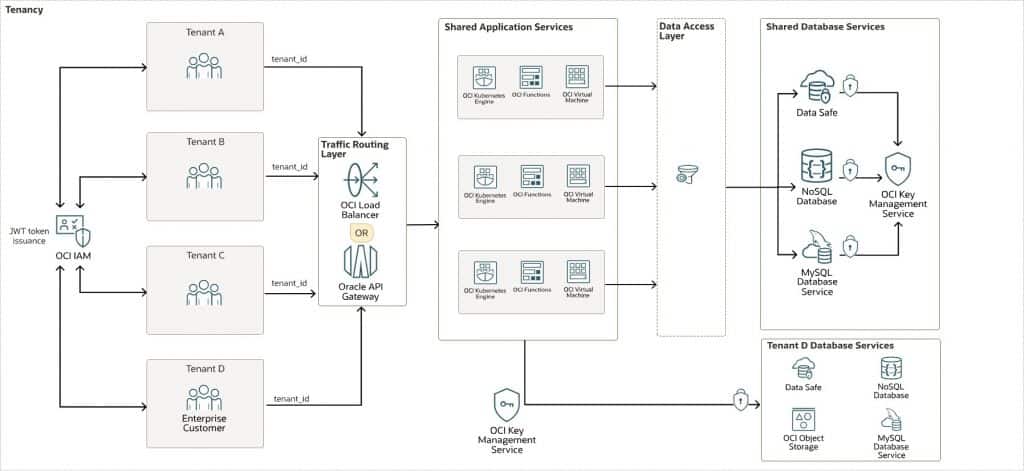
This flexible architecture is organized into three layers:
| Layer | Purpose | Key Action |
|---|---|---|
| Initial Authentication (OCI IAM) | Verify global identity | Issue JSON Web Token (JWT) after credential validation |
| Authentication Middleware | Verify per-request identity | Extract tenant and user context from JWT |
| Data Access Layer or ORM Hooks | Enforce data isolation | Automatically filter all queries by tenant_id |
Each layer is described below:
Initial Authentication and Tenant Context Establishment
- Authentication Service: The user logs in, typically by using a tenant-specific URL (for example mycompany.app.com) or by selecting a tenant during login.
- OCI Identity and Access Management (OCI IAM) as the Identity Provider: OCI IAM (specifically, a dedicated Identity Domain) validates the user’s credentials. Crucially, it confirms the user is not only valid but is also a member of the specific tenant group (for example, mycompany-users) they are trying to access.
- JWT Issuance: Upon successful authentication, the OCI IAM Identity Domain issues a signed JSON Web Token (JWT). This token includes the following critical claims:
- sub: The user’s unique identifier.
- groups: An array of OCIDs for the IAM groups the user belongs to. This is the key to identifying the tenant.
- A custom claim such as
tenant_idortenant_namecan be added by using custom attributes in OCI IAM. (Optional)
Authentication Middleware – “Who” layer
The backend must be designed to extract and propagate the tenant context securely. This architecture supports using either OCI API Gateway or OCI Load Balancer to perform per-request authentication and tenant context propagation.
- OCI API Gateway: This is the recommended entry point. It can perform JWT validation itself, offloading this responsibility from your application code. You configure it to validate the signature against the JWKS endpoint of your OCI IAM Identity Domain.
- OCI Load Balancer: Can handle SSL termination and routing but would pass the JWT to the authentication middleware for validation.
Action: OCI API Gateway validates the JWT’s signature and expiry. If invalid, it rejects the request immediately. If valid, it forwards the request to the upstream service, often passing the validated token or extracted claims in headers (for example, X-USER-ID, X-TENANT-ID).
If you are using OCI Load Balancer instead of OCI API Gateway, the first component of your application backend must be authentication middleware.
Action: Extract the JWT from the Authorization: Bearer <token> header, verify its signature using OCI IAM’s public keys, decode the claims, and inject the user_id and tenant_id (derived from the groups claim) into the request context for all subsequent layers to use.
Data Access Layer or Object-Relational Mapper (ORM) Hook – “What” Layer
This layer automatically injects the tenant ID into every SQL query.
- Example: A call to
getAllInvoices()is transformed intoSELECT * FROM invoices WHERE tenant_id = :tenant_id. - Enforcement: This is best enforced by a centralized data access layer or an ORM (such as Hibernate) hook or “tenant-aware” connection pool to avoid human error.
- ORM Hooks: The mechanism that enables true implicit tenant isolation by intercepting and modifying database operations at the application framework level.
Tenant Data Isolation Strategies:
This architecture supports two options for isolating and protecting your tenants’ data:
Option 1: Application Level
ORM Hooks/Scopes: Frameworks such as Hibernate (Java), Django ORM (Python), or Eloquent (PHP) allow you to define global scopes that automatically add the tenant filter to all queries for a specific model.
or
Option 2: Database Level
You can use a discriminator column, a separate schema per tenant, or a separate database per tenant:
- Discriminator Column (Most Common):A
tenant_idcolumn is added to every tenant-specific table or document.The application’s Data Access Layer (DAL) or ORM is responsible for automatically appending theWHERE tenant_id = ?clause to every query. This is achieved through:- Repository Pattern: All database access flows through a central class or set of classes. This repository automatically adds the tenant filter to every SELECT, INSERT, UPDATE, and DELETE operation based on the
tenant_idin the current request context. - Connection Context: For some SQL databases (such as Oracle HeatWave MySQL), the application can set a session variable (for example,
SET @tenant_id = 'mycompany123';) and then use it in views or stored procedures. However, the application layer is still responsible for setting this value per connection.
- Repository Pattern: All database access flows through a central class or set of classes. This repository automatically adds the tenant filter to every SELECT, INSERT, UPDATE, and DELETE operation based on the
- Schema Per Tenant:Each tenant has a dedicated database schema within the same database instance.The application logic, based on the tenant ID, must switch the database connection’s current schema.
- Connection Pool Per Tenant: Maintain a separate connection pool for each tenant, where each connection is pre-configured to use the tenant’s schema (for example,
USE tenant_mycompany;). - Dynamic Connection Switching: Use a connection pool that sets the schema on checkout based on the current tenant_id (for example, using a
SET search_path TO tenant_mycompany;command for PostgreSQL).
- Connection Pool Per Tenant: Maintain a separate connection pool for each tenant, where each connection is pre-configured to use the tenant’s schema (for example,
- Database Per Tenant:Each tenant has its own physically separate database instance with Bring Your Own Keys Encryption for Enterprises.The application needs a tenant data lookup service to map a
tenant_idto the correct database connection string.- The application holds connection pools to multiple databases.
- The DAL uses the tenant ID from the request context to get the correct connection from the pool and execute the query on the dedicated tenant database.
- Pros: Maximum isolation, security, and performance. Tenants can even be on different database versions or engine types.
- Cons: Highest operational overhead, cost, and complexity. Database migrations and patches must be run on every tenant database.
Considerations
When deploying this architecture, consider these options.
- Performance:
- Set tenant-based rate limiting on APIs
- Use Kubernetes resource quotas per namespace in OKE to limit pods, CPU, and memory per tenant
- Leverage dedicated node pools for high-demand tenants
- Set a per-tenant pool size on the Database connection
- Security:
- OCI IAM groups control which tenant a user can access. This is enforced by the JWT.
- Enable Oracle Cloud Guard to detect misconfigurations
- Cost:Evaluate based on your business needs whether you need table level, schema level, or a dedicated database for enterprise level customers. For example:
- Tier 1: Standard (Discriminator Column): Tenants share the same tables/schema.
- Tier 2: Premium (Schema per Tenant): Tenants get a dedicated schema within the same database.
- Tier 3: Enterprise (Database per Tenant): Tenants get a dedicated database instance.
- Patching and application updatesIn a single-instance, multi-tenant SaaS architecture, you cannot patch one tenant without patching them all. All your customers share the same application codebase, runtime, and infrastructure. This reality creates a significant challenge: how do you roll out updates safely, efficiently, and without causing disruptive downtime for your entire user base? The answer lies in modern DevOps deployment strategies designed specifically for this purpose: use zero-downtime deployment strategies to allow for seamless transitions between versions without forcing users offline.
- Blue–Green Deployment: This involves maintaining two identical production environments: one “Blue” (running the current version) and one “Green” (running the new version). After deploying and testing the new version in Green, you seamlessly switch all traffic from Blue to Green. If anything goes wrong, you instantly switch back, making rollback a non-event. The old Blue environment is then decommissioned.
- Canary Deployment: This strategy reduces risk by performing a gradual rollout. The new version is deployed to a small, controlled subset of users (the “canaries”). You monitor this group closely for errors or performance issues. If the metrics look good, you gradually roll out the update to more users until everyone is on the new version.
- Database considerationsYou cannot switch the database schema at the exact moment you switch the application version. Most SaaS companies avoid this by using:
- Backward-compatible database schema changes
- Feature flags/toggles
- Tenant metadata-based version control
Call to Action
Are you looking to modernize your applications and transition to a scalable, subscription-based SaaS model? Oracle Cloud Infrastructure (OCI) provides the performance, security, and cost efficiency needed to accelerate your SaaS transformation journey.
Take the next step: evaluate your current architecture, identify SaaS readiness gaps, and start mapping how OCI services can help you modernize, scale, and operate your application as a SaaS platform.
If you’d like to dive deeper or discuss real-world implementation approaches, feel free to reach out or continue the conversation.
Explore More
Learn more about multi-tenant application deployment.
Review these additional resources:
- Set up the infrastructure to host multiple single-tenant SaaS applications
- Oracle Private Cloud Appliance Writing Policies to Access Resources Across Tenancies
- Cross-tenancy access: AssumeRole in OCI (blog)
- Oracle Multitenant
- Oracle Cloud Infrastructure Documentation
- Well-architected framework for Oracle Cloud Infrastructure
- Cloud Adoption Framework