
Introduction: Revolutionizing Network Visibility into OCI
At Oracle Cloud Infrastructure (OCI), we recognize that the demands from your network have been continuously increasing to support diverse workloads across both on-premises and hybrid cloud environments. As this complexity increases, we remain committed to simplifying network management and security, making it as seamless and efficient as possible.
We introduced Zero Trust Packet Routing(ZPR) in September 2024, to simplify the management and application of policies across OCI resources. Using ZPR security attributes and policy customers can define their security intent using plain natural language, making it easier to ensure that only the necessary resources can communicate with each other.
To give our customers flexibility in how they configure and manage security policies, we have continued to support both Network Security Group (NSG) and Security List (SL) alongside ZPR. As more users adopt ZPR for its simplified approach, we expect a period of coexistence where ZPR, NSG and SL are all present in the network. We also recognize that troubleshooting network connectivity issues can be complex. Users need to quickly identify whether problems stem from missing or misconfigured Routing, ZPR, NSG and/or Security List policies. Our Network Path Analyzer (NPA) tool currently provides visibility into Routing, NSG and Security List policies to aid in troubleshooting. We are now extending NPA to include visibility into ZPR policies, enabling a more comprehensive and efficient troubleshooting experience.
Today, we’re thrilled to announce the integration of ZPR with Network Path Analyzer (NPA), a transformative enhancement that brings unparalleled visibility into your network security policies.
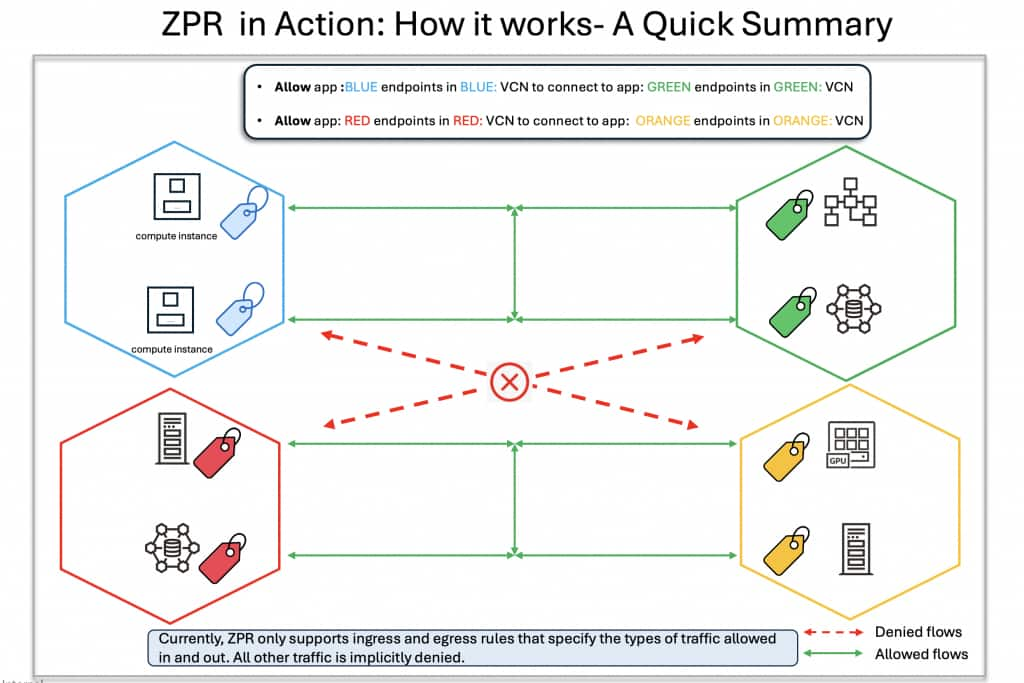
ZPR in Action: How it works- A Quick Summary
Imagine a scenario where resources are ZPR security attributes with Blue, Red, Green and Orange labels. The customer simply defines their intent—for example, specifying that resources with Blue label can communicate with those labelled Green, and resources with Red label can talk to resources with Orange label. These security attributes need to be applied at a VCN and VNIC level. Once tagging is complete, communication flows as defined: Blue-tagged resources can interact with Green-tagged resources, and Red-tagged resources with Orange-tagged ones.
Why This Integration Matters
Network connectivity issues can be complex, often stemming from misconfigurations in Routing, SLs, NSGs, or ZPR policies. Without clear insights, pinpointing the root cause is challenging. The ZPR-NPA integration addresses this by providing a comprehensive analysis of relevant security controls, clearly indicating whether ZPR policies, SLs, or NSGs permit traffic. This enables you to:
Quick fault isolation: With NPA integration with ZPR, you get visibility into the SL, NSG and ZPR security and routing policies—pinpointing issues instantly and speeding up resolution.
Proactive path validation: NPA can be used to proactively configure and test security policies by verifying whether network traffic is allowed between a chosen source and destination before any actual traffic is sent along the path.
Streamlined Resolution: NPA zeroes in on the failure points and provides a one-click access to relevant routing and security policies- so you can fix the problems fast.
The integration of ZPR with NPA expands NPA’s ability to analyze security policies by now including ZPR policies as well. When troubleshooting connectivity between selected endpoints, NPA along with SL, NSG and Routing policies, now also evaluates:
- ZPR policies: Analyzes hop-by-hop ZPR policies, providing visibility into which hops are allowing or blocking network traffic.
- ZPR Security Attributes: Offers visibility into the security attributes applied to each resource along the path, enabling users to identify and correct missing security attributes as needed.
How It Works: A Step-by-Step Experience
Here’s how you can leverage this integration to troubleshoot connectivity issues:
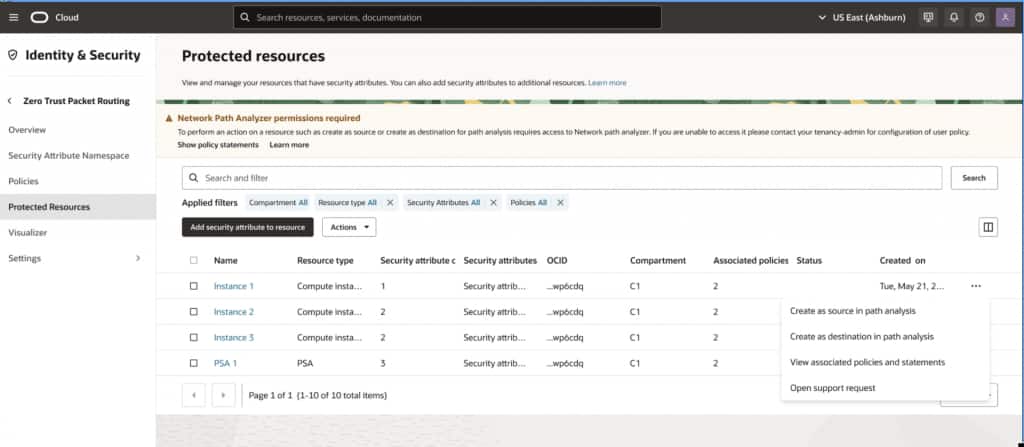
- Access the ZPR Console: Log in to the OCI Console and navigate to the ZPR Protected Resources table, which lists all resources tagged with ZPR security attributes.
- Select a Resource: Choose a resource (e.g., a compute instance tagged with app:webapp security-attribute) and click “Analyze.”
- Initiate NPA Troubleshooting: Select “Troubleshoot with NPA” and specify the source and destination endpoints (e.g., an on-premises IP 10.251.1.163 to a network load balancer in OCI over TCP port 443).
- View Detailed Results: NPA generates a visual analysis, detailing:
- Routing Status: Confirms if a valid path exists.
- SL and NSG Rules: Lists specific rules allowing traffic.
- ZPR Policy Evaluation: Indicates whether the ZPR policy permits communication, referencing security attributes (e.g., app:webapp allows traffic to data:sensitive).
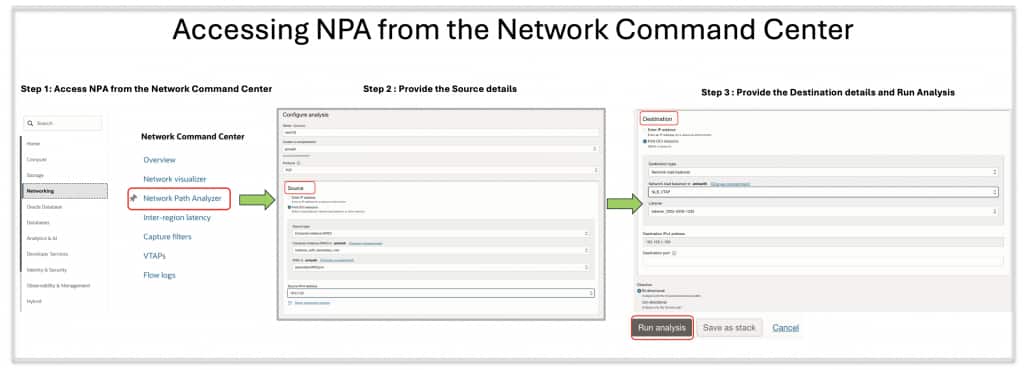
Alternatively, you can also access NPA from under the network command center, providing flexibility to users.
Here are a few example scenarios that illustrate the value ZPR integration with NPA delivers to our customers.
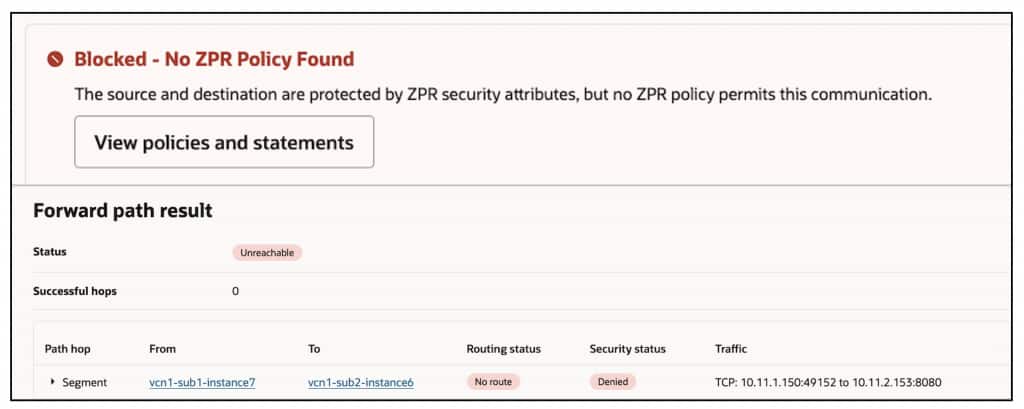
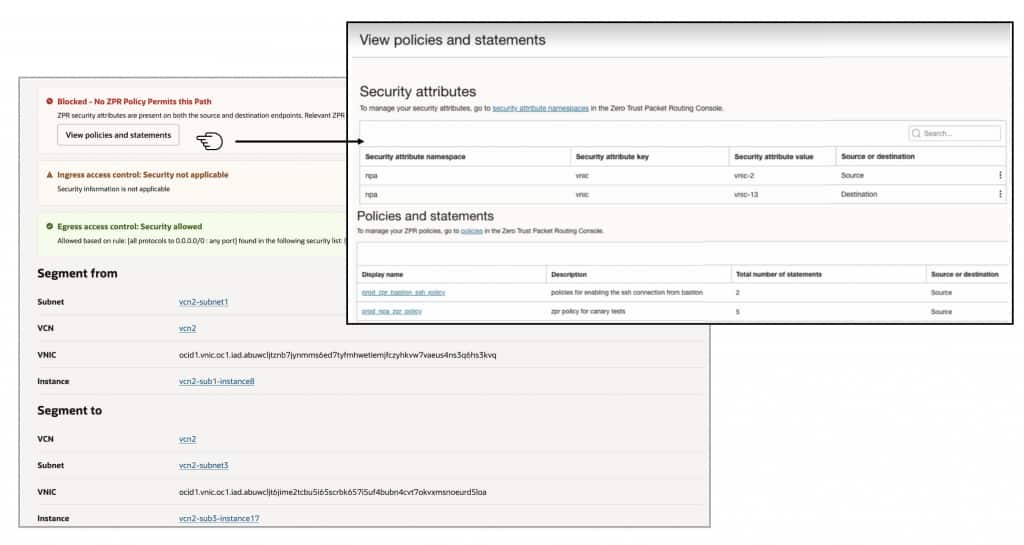
Scenario 1: Missing ZPR security policies on the chosen source AND destination endpoints
In this case, the user has assigned ZPR security attributes to both the source and destination. However, they haven’t configured the necessary policy to allow network communication between these security-attributes, resulting in traffic being denied between these endpoints. NPA simplifies troubleshooting by displaying a clear notification at the top, indicating that the relevant ZPR policies are missing. This eliminates the need for time-consuming hop-by-hop analysis to identify the root cause.
Scenario 2: ZPR policy misconfigured at one of the hops
In this second scenario, ZPR is misconfigured at one of the hops between the selected source and destination. NPA accurately identifies the specific hop where the misconfiguration occurs—either due to a policy or missing security attribute. To resolve this issue, the user should update the ZPR configuration at that hop.
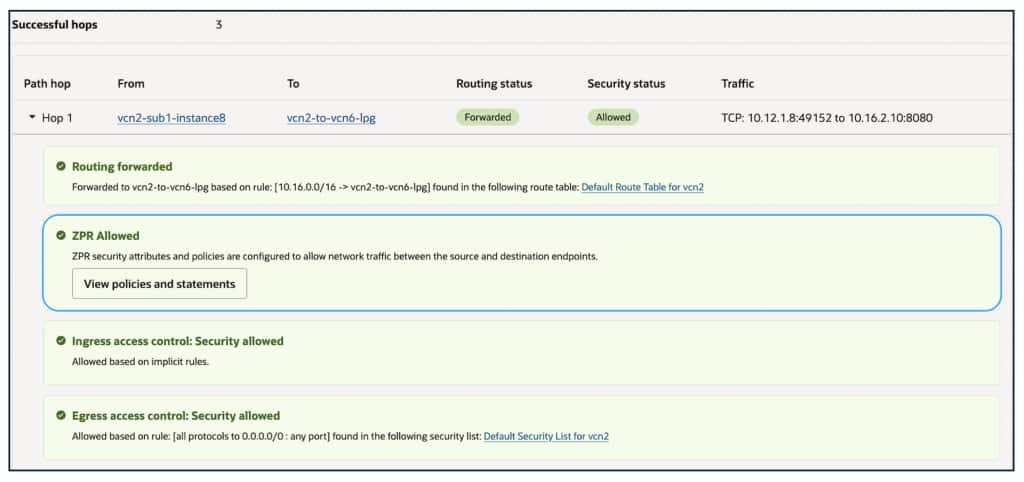
Scenario 3: ZPR permitting traffic- everything working as desired
In this scenario, the user has successfully resolved all issues related to ZPR security policies and attributes, and everything is functioning as expected. NPA provides a complete hop-by-hop trace of the entire path between the selected source and destination, offering visibility into the applicable routing and security policies at each hop. If desired, the user can click each hop in the topology to view the specific routing or security policies (SL, NSG and ZPR) in use at that point.
NPA also facilitates the analysis of network paths and security policies connecting resources tagged with and without ZPR security attributes.
Get Started Today
This ZPR-NPA integration is a significant milestone in our commitment to designing OCI to be the most secure and intuitive cloud platform. We’re actively exploring additional enhancements to further simplify network management, with more exciting updates to come.
Experience the power of ZPR integration with Network Path Analyzer now. Log in to the OCI Console to explore these capabilities and gain deeper insights into your network’s security posture. For more details, visit the OCI Networking documentation and ZPR documentation or contact your Oracle representative.