
Today we released an exciting service update to ensure that block-volume-device path names and hierarchies stay consistent and persist across reboots. This usability-related update simplifies the management and ordering of block storage devices and improves the user experience for many of the workloads that run on Oracle Cloud Infrastructure.
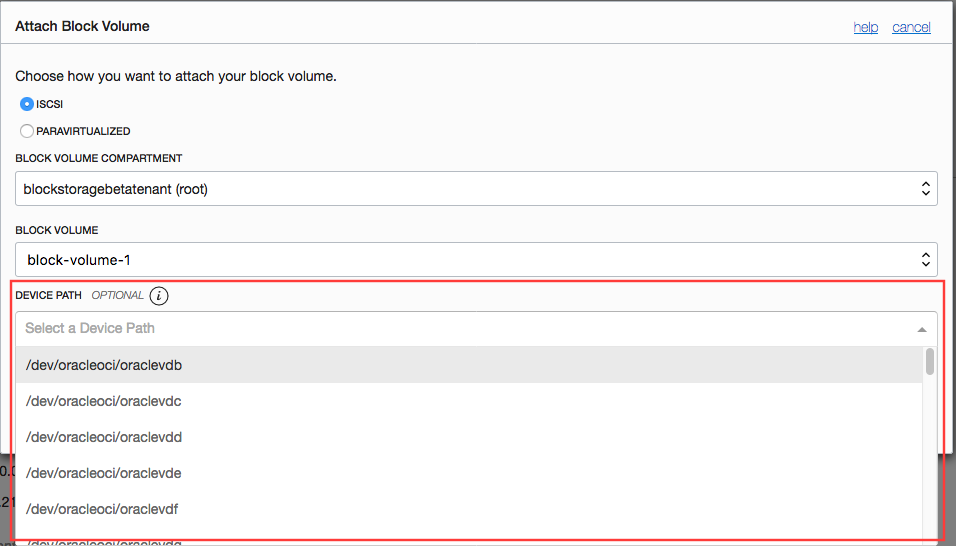
Now when you attach a volume to an instance, you can select a device path name from a drop-down list. Device path names have the format dev/oracleoci/oraclevdxx, where the value of xx ranges from a to af, corresponding to up to 32 volume attachments per instance. This new format is compatible and aligned with the direction of the open source community. It’s supported on all Linux OS flavors that are available on Oracle Cloud Infrastructure. However, it’s not supported for Windows OSs, legacy OSs and versions, and customer-provided OS images that aren’t enabled for this feature.
Like other service features, this update is available in the Oracle Cloud Infrastructure Console, CLI, SDK, and Terraform. Specifying a device path name for a volume attachment is straightforward in the Oracle Cloud Infrastructure Console with a click.
-
In the Compute section of the console, access the instance in the appropriate compartment.
-
When you attach a volume on the instance, select a device path from the drop-down list.
-
Confirm the device path for the attached volume.

To access the device on the instance and see the device path names, use the lsscsi and ll commands.
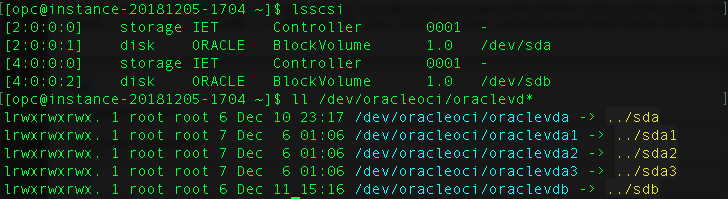
In the preceding example, the /dev/oracleoci/oraclevdb device path points to the /dev/sdb legacy path. Also note that the LUN # (4:0:0:2) for /dev/sdb is 2, which corresponds to b in /dev/oracleoci/oraclevdb.
Following are some examples of how to use consistent volume names on Linux based systems:
| Example Scenario | Previous Experience | New Experience with Consistent Volume Names |
|---|---|---|
| Creating partitions | fdisk /dev/sdb | fdisk /dev/oracleoci/oraclevdb |
| Creating a file system | /sbin/mkfs.ext3 /dev/sdb1 | /sbin/mkfs.ext3 /dev/oracleoci/oraclevdb1 |
| /etc/fstab changes | UUID=84dc162c-43dc-429c-9ac1-b511f3f0e23c /oradiskvdb1 xfs defaults,_netdev,noatime 0 2 | /dev/oracleoci/oraclevdb1 /oradiskvdb1 ext3 defaults,_netdev,noatime 0 2 |
| Mounting a file system | mount /dev/sdb1 /oradiskvdb1 |
mount /dev/oracleoci/oraclevdb1 /oradiskvdb1 |
Watch for announcements about additional service updates that continue to streamline the storage management experience. Let us know how we can help ease your cloud management or if you want more information about any topic.