
Migrating workloads to the cloud needs to be as simple as possible, and that’s especially true for complex Spark workloads. OCI Data Flow takes away the burden of cluster administration, but users want more compatibility with existing tools and processes to make migrations even simpler.
Introducing spark-submit compatibility
Spark-submit is the industry standard method for running applications on Spark clusters. Most of our customers are already familiar with this style of running Spark applications since it’s native to Apache Spark. Data Flow now lets you migrate existing spark-submit commands directly to Data Flow while still enjoying the benefits of Data Flow’s serverless runtime.
Using spark-submit in the Data Flow CLI
At a high level, running spark-submit in the OCI CLI is just a matter of copying your spark-submit arguments into an OCI CLI command. The following spark-submit compatible options are currently supported by Data Flow:
-
–conf
-
–files
-
–py-files
-
–jars
-
–class
-
–driver-java-options
-
main-application.jar or main-application.py
-
Arguments to main-application: Arguments passed to the main method of your main class (if any)
If you’re a Spark user, Data Flow enables you to take your existing spark-submit CLI command and quickly convert it into a compatible CLI command on Data Flow. If you already have a Spark application in any cluster, your spark-submit command can look the following code block:
spark-submit --master spark://207.184.161.138:7077 \

--deploy-mode cluster \

--conf spark.sql.crossJoin.enabled=true \

--files http://file1.json \

--class org.apache.spark.examples.SparkPi \

--jars  http://file2.jar path/to/main_application_with-dependencies.jar 1000
For running the same application on Data Flow, the CLI command looks like the following block:
oci data-flow run submit \

--compartment-id <your_compartment_id> \

--execute "--conf spark.sql.crossJoin.enabled=true --files oci://<your_bucket>@<your_namespace>/path/to/file1.json --jars oci://<your_bucket>@<your_namespace>/path/to/file3.jar oci://<your_bucket>@<your_namespace>/path_to_main_application_with-dependencies.jar 1000"
Most spark-submit arguments are copied over with only file paths changed. Instead of submitting to a fixed cluster you can choose your Spark version and size your cluster on the fly.
If you haven’t used the OCI CLI before, you can follow this detailed tutorial to complete all the prerequisites and then get started with Data Flow using spark-submit options.
If you’re already familiar with OCI, use the following steps to get to the spark-submit compatible option in Data Flow:
-
Upload the application files and dependencies in the OCI object store (including the main application).
-
Replace existing URIs in your spark-submit command with their corresponding “oci://<your_bucket>@<your_namespace>” URI. Here, <your_bucket> is the bucket-name in OCI object store, and <your_namespace> is the name of your tenancy.
-
Remove any unsupported or reserved spark-submit parameters. For example, –master and –deploy-mode are reserved for Data Flow and don’t need to be filled in by the user.
-
Add –execute parameter and pass in a spark-submit compatible command string. To build the –execute string, keep the supported spark-submit parameters, main-application, and its arguments maintaining their sequence, put them inside a quoted string, single-quote or double-quote.
-
Replace “spark submit” by OCI standard command prefix “oci data-flow run submit.”
-
Add mandatory argument and parameter pairs, such as –compartment-id.
Using spark-submit from UI or REST API
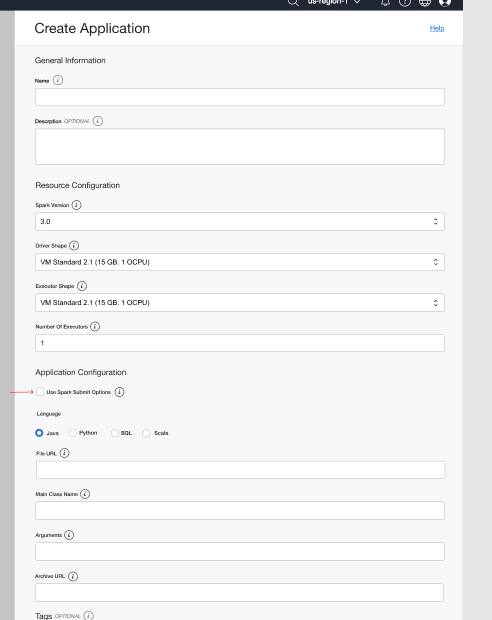
With the CLI, you can also use spark-submit compatible options from OCI Console. You can find the “Use spark-submit options” check box under the Application Configuration section.
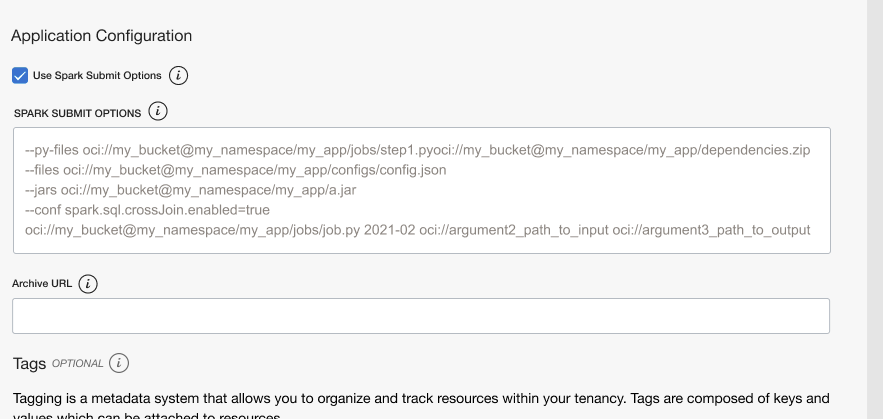
When you check the “Use spark-submit options” box, you can provide a set of most commonly used spark-submit parameters, main-application, and optional main-application arguments to configure your spark application.
For developers automating continuous integration and deployment (CI/CD) pipelines, you can submit Spark jobs using the OCI SDK of your choice.
See for yourself
Spark-submit compatibility is available now in all commercial regions. With no incremental charge associated with spark-submit compatibility. With Data Flow, you only pay for the infrastructure resources that your Spark jobs use while Spark applications are running. To learn more about spark-submit compatibility, see the Data Flow documentation.
To get started today, sign up for the Oracle Cloud Free Trial or sign in to your account to try OCI Data Flow. Try Data Flow’s 15-minute no-installation-required tutorial to see how easy Spark processing can be with Oracle Cloud Infrastructure.