
As we work on more and more MongoDB to Oracle migrations we find things that we should support better to make switching to Oracle simpler. We are happy to report that we made a ton of progress on delivering more and more capabilities into Autonomous AI Database and have rolled it out across the world.
Change Streams
We had customers happily capturing changes on an application moved from Mongo before. But with this release we are enabling the $changeStream command natively through the Mongo API.
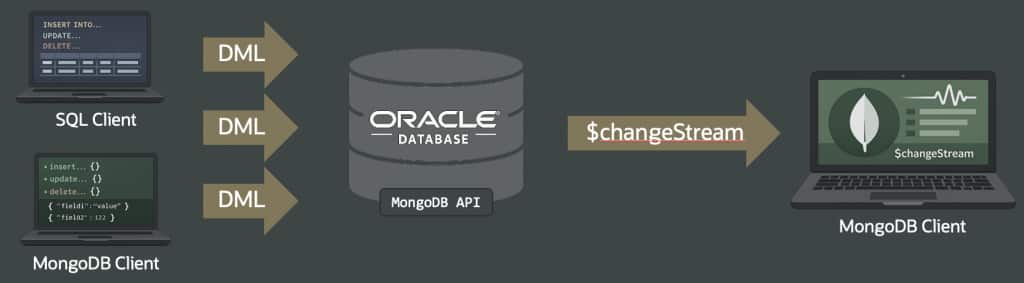
This means that you can now enable $changeStream on any JSON collection table and Duality View using a command like this and have the application listen for changes to the data:
db.runCommand({
    collMod: "tasks",
     enableChangeStream: {}});

-- listen for change events (Node.js Mongo driver):

client = await new MongoClient(uri).connect();

stream = client.db("admin")
               .collection("tasks")
               .watch();

stream.on("change", change => console.log(change));
If $changeStream is in your applications, and you are switching from MongoDB to Oracle then definitely reach out to your local Oracle teams and discuss how to enable this on your systems.
Comprehensive Support for $expr
Expanded support for `$expr` in query filters and aggregation `$match` stages enables comparison of fields in the same document, use aggregation expressions inside filters, and bind values through command-level `let` variables.
Example comparing two fields in a document:
```javascript
db.orders.find({
  $expr: {
    $gt: [ "$total", "$creditLimit" ]
  }
})
```
Example using `$expr` in an aggregation `$match` stage:
```javascript
db.orders.aggregate([
  {
    $match: {
      $expr: {
        $gte: [ "$total", 1000 ]
      }
    }
  }
])
```
Example using command-level `let` variables with an aggregation pipeline:
```javascript
db.orders.aggregate(
  [
    {
      $match: {
        $expr: {
          $eq: [ "$status", "$$targetStatus" ]
        }
      }
    }
  ],
  {
    let: {
      targetStatus: "OPEN"
    }
  }
)
```
Example using command-level `let` variables with a find command:
```javascript
db.runCommand({
  find: "orders",
  filter: {
    $expr: {
      $gte: [ "$total", "$$minimumTotal" ]
    }
  },
  let: {
    minimumTotal: 1000
  }
})
With this expanded support you can express dynamic filters directly in MongoDB API queries, including field-to-field comparisons and reusable command variables, instead of moving that logic into application code. This applies across common filtering operations such as find, update, delete, distinct, and aggregation matching where the Mongo API supports expression filters.
Comprehensive $lookup support
We expanded $lookup support so that correlated `$lookup` pipelines can now use `let` variables inside `$expr` filters, including more complex nested lookup pipelines. The Mongo API resolves the correct variable scope across nested pipeline levels, so equivalent MongoDB join pipelines no longer need to be rewritten in application code.
The examples here show this in action, including a second example with nested lookup stages:
```javascript
db.orders.aggregate([
  {
    $lookup: {
      from: "warehouses",
      let: {
        order_item: "$item",
        order_qty: "$ordered"
      },
      pipeline: [
        {
          $match: {
            $expr: {
              $and: [
                { $eq: [ "$stock_item", "$$order_item" ] },
                { $gte: [ "$instock", "$$order_qty" ] }
              ]
            }
          }
        },
        {
          $project: {
            warehouse: 1,
            instock: 1,
            _id: 0
          }
        }
      ],
      as: "stockdata"
    }
  }
])
```
```javascript
db.orders.aggregate([
{
$lookup: {
from: "customers",
let: { customer_id: "$customerId" },
pipeline: [
{
$match: {
$expr: { $eq: [ "$_id", "$$customer_id" ] }
}
},
{
$lookup: {
from: "addresses",
let: { address_id: "$defaultAddressId" },
pipeline: [
{
$match: {
$expr: { $eq: [ "$_id", "$$address_id" ] }
}
}
],
as: "defaultAddress"
}
}
],
as: "customer"
}
}
])
```Advanced Search Capabilities
One of the corner stones of each application is typically some sort of search. Instead of running a side car implementation, Oracle runs search in the database, using a variety of techniques and indexes. And one of the index types is of course vector.
With the latest release you can now use vector search through the Mongo API and you can create a nice hybrid search. To get the full scoop of how this works – and see a live demo – watch our AskTom Live session on search here. Below you see one of the “hybrid vector with key word” searches through the Mongo API that was discussed in that AskTom Live session:
db.MOVIES.aggregate([
  {
    $search: {
      text: {
        path: "title",
        query: "avengers"
      },
      hint: { "$preview": 1 }
    }
  },
  {
    $project: {
      _id: 0,
      title: 1,
      year: 1,
      source: { $literal: "text" }
    }
  },
  {
    $unionWith: {
      coll: "MOVIES",
      pipeline: [
        {
          $vectorSearch: {
            index: "summary_vec_idx",
            path: "summary_embedding",
            queryVector: queryVector6,
            limit: 3,
            exact: false,
            hint: { "$preview": 1 }
          }
        },
        {
          $project: {
            _id: 0,
            title: 1,
            year: 1,
            source: { $literal: "vector" }
          }
        }
      ]
    }
  },
  {
    $sort: { year: 1 }
  }
]);
The example here, which is relatively simple of course, does a union between a keyword search and a vector search in an aggregration pipeline.
Collections can be opened from other schemas
Collection operations support schema-aware paths so that an application can open and manage a collection that is stored in a different schema. Here is an example where two schemas are used during a single shell session:
```javascript
const sales = db.getSiblingDB("sales");
const support = db.getSiblingDB("support");

sales.events.insertOne({
  _id: "sales-1",
  type: "order-created"
})

support.events.insertOne({
  _id: "support-1",
  type: "case-opened"
})

sales.events.find({ type: "order-created" })
support.events.find({ type: "case-opened" })
```
The above example uses a single Mongo API client session on `sales.events` and `support.events` in separate collections in separate Oracle schemas.
Various Expansions of the API
Those are some of the major improvements. On top of these new additions, a number of other items are now added to the API, including:
- $getField
- $replaceAll
- $toDecimal
- $regexMatch
- $collStats – now supports the ‘count’ option
- collMod – modify or remove JSON Schema validation rules for a collection without dropping and recreating the collection
On top of these specific additions and augmented commands, a large number of optimizations, expansions, and other changes are rolled out. Review the latest documentation for all details.
In Summary
Switching just became simpler again! Interested in saving and consolidating your trusted data for your AI workloads? Read through this page and connect with your Oracle team on your next steps.
Credits
Of course, credits go to the whole team for delivering the key features. A special shout out to Josh Spiegel for the hard work: creating all the examples and providing a lot of the details.