
In Part 1, we connected Oracle AI Lakehouse to a Snowflake-generated Iceberg table by pointing Oracle to a specific Iceberg metadata.json file. That worked, but it had one drawback: when the table changes, Iceberg creates a new metadata file, so you must update Oracle to see the latest snapshot.
In Part 2, we made this easier to operate by introducing Snowflake Open Catalog (Polaris) as an external Iceberg REST catalog. Oracle stopped hardcoding a metadata file path and instead asked Polaris for the current snapshot metadata.
In this post (Part 3) instead of using Open Catalog as an intermediary, we’ll connect Oracle directly to Snowflake’s built-in Horizon Catalog via Iceberg REST API. This maybe a preferred option for Snowflake customers who is using Iceberg Native table and want to access it with Oracle.
What we’ll build
- Create a Snowflake-managed Iceberg table using CATALOG = ‘SNOWFLAKE’ (Horizon Catalog).
- Store table files in cloud storage via a Snowflake External Volume.
- Create a Snowflasnow ke role and user dedicated to Oracle access and grant SELECT on the Iceberg table.
- Use a Programmatic Access Token (PAT) to obtain short-lived OAuth access tokens for the Iceberg REST API.
- Configure Oracle ADB to resolve the latest Iceberg snapshot through the Horizon REST endpoint and read the required files from cloud storage.
Why this approach is better for Snowflake-first customers
When you use Horizon Catalog (Iceberg REST), Oracle doesn’t need a hardcoded metadata.json path. Instead:
- Oracle asks Snowflake’s catalog: “What is the latest snapshot for this table?”
- Snowflake returns the current metadata location.
- Oracle reads the required data and metadata files from cloud storage.
Compared to Part 2 (Open Catalog / Polaris), the difference is where governance lives:
- Part 2 (Open Catalog / Polaris): a separate catalog sits between engines (good for neutral, multi-engine governance).
- Part 3 (Horizon Catalog): the catalog is built into Snowflake, so access control stays in Snowflake roles/users (simpler for Snowflake-centric customers).
Flow at a glance
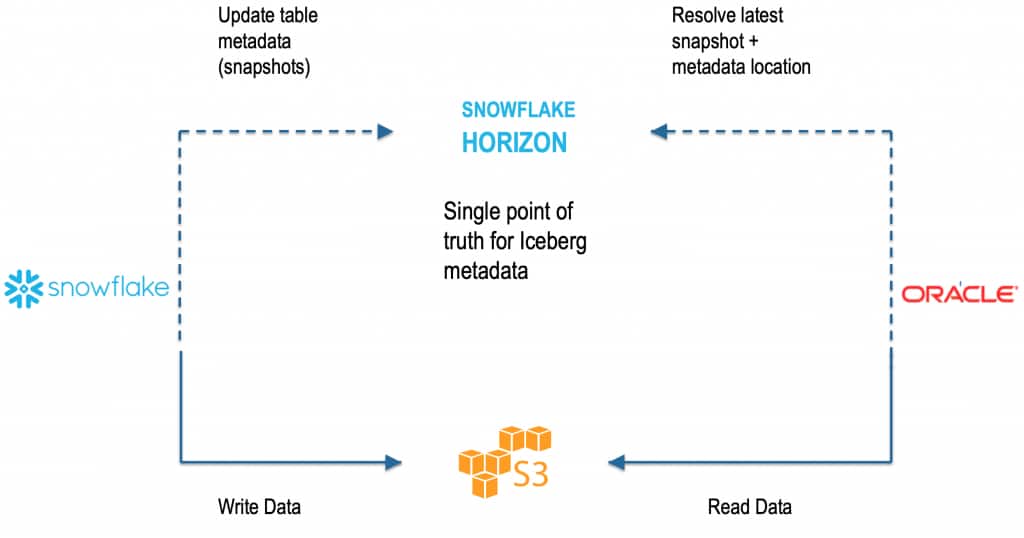
- Snowflake (compute + DML + governance)
- Writes Iceberg data/metadata files to S3/ADLS through an External Volume
- Manages Iceberg table metadata in Horizon Catalog
- Controls access using Snowflake roles/users
- Oracle ADB
- Calls Horizon Iceberg REST API to resolve the latest snapshot
- Reads the required files from S3/ADLS
Step 1 — Create a Snowflake-managed Iceberg table (Horizon Catalog)
This is the key difference from Polaris/Open Catalog: we use CATALOG = ‘SNOWFLAKE’.
-- Create a Table
CREATE OR REPLACE ICEBERG TABLE SALES_HZ (

  SALE_ID      INT,

  CUSTOMER_ID  INT,

  AMOUNT       NUMBER(10,2)

)

CATALOG = 'SNOWFLAKE'

EXTERNAL_VOLUME = 'ICEBERG_EXTERNAL_VOLUME_AWS'

BASE_LOCATION   = 'sales_hz';

-- Add a few rows into a table

INSERT INTO SALES_HZ VALUES

  (1, 101,  9.99),

  (2, 102, 19.99);

-- Check the results

SELECT * FROM SALES_HZ;
At this point:
- The table is managed by Snowflake’s built-in catalog (Horizon).
- The files are stored in the location defined by your External Volume + Base Location.
Step 2 — Get the account identifier and confirm storage details
You’ll need the account identifier for building the REST endpoint URL.
SELECT CURRENT_ORGANIZATION_NAME() || '-' || CURRENT_ACCOUNT_NAME() AS ACCOUNT_IDENTIFIER;Account identifier format is:
<ORG>-<ACCOUNT>Your Horizon (Iceberg REST) base URL typically looks like:
<a href=”https://<ORG>-https://<ORG>-<ACCOUNT>.snowflakecomputing.com/polaris/api/catalog/
Step 3 — Create a Snowflake role/user for Oracle and grant access
Create a role and a user that Oracle will “act as” when calling the REST API.
CREATE OR REPLACE ROLE ADB_HORIZON_ROLE;

CREATE OR REPLACE USER ADB_HORIZON_USER

  PASSWORD = '<STRONG_PASSWORD>'

  DEFAULT_ROLE = ADB_HORIZON_ROLE;

GRANT ROLE ADB_HORIZON_ROLE TO USER ADB_HORIZON_USER;

GRANT USAGE ON DATABASE MY_SALES_DB TO ROLE ADB_HORIZON_ROLE;

GRANT USAGE ON SCHEMA MY_SALES_DB.TOTAL_SALES TO ROLE ADB_HORIZON_ROLE;

GRANT SELECT ON ICEBERG TABLE MY_SALES_DB.TOTAL_SALES.SALES_HZ TO ROLE
ADB_HORIZON_ROLE;
Why this matters:
- Snowflake remains the single point of truth for authorization.
- You don’t have to mirror permissions in a separate catalog.
Step 4 — Create a Programmatic Access Token (PAT)
Snowflake can issue a PAT for the user. This token can be used like a “client secret” to request an OAuth access token.
ALTER USER ADB_HORIZON_USER

  ADD PROGRAMMATIC ACCESS TOKEN ADB_HORIZON_PAT

  DAYS_TO_EXPIRY = 7;
Snowflake returns a long token string. Do not publish it. Store it securely.
Step 5 — Exchange PAT for an OAuth access token (Iceberg REST)
Now request an OAuth token from the Snowflake endpoint:
<a href=”https://<ORG>-https://<ORG>-<ACCOUNT>.snowflakecomputing.com/polaris/api/catalog/v1/oauth/tokens
Example curl command:
curl -s -X POST "https://<ORG>-<ACCOUNT>.snowflakecomputing.com/polaris/api/catalog/v1/oauth/tokens" \
  -H "Content-Type: application/x-www-form-urlencoded" \
  --data-urlencode "grant_type=client_credentials" \
  --data-urlencode "scope=session:role:ADB_HORIZON_ROLE" \
  --data-urlencode "client_secret=<SNOWFLAKE_PAT>"
Response is an OAuth token (JWT-like). Let’s call it:
<SNOWFLAKE_OAUTH_ACCESS_TOKEN>
Notes:
- The scope ties the session to a Snowflake role (ADB_HORIZON_ROLE).
- PAT is usually longer-lived (days). OAuth access token is short-lived (minutes/hours).
One important note before you publish: rotate the AWS keys and Snowflake token from the draft and replace them with placeholders.
Here is a paste-ready draft for Step 6 and the Conclusion.
Step 6 — Oracle AI Lakehouse Side
Now we switch to Oracle Autonomous Database. On the Oracle side, this is a catalog-managed Iceberg pattern: AI Lakehouse uses the REST catalog to resolve the current snapshot and then reads the underlying Iceberg data and metadata files from object storage.
Although we are connecting to Snowflake Horizon Catalog, the REST endpoint still uses /polaris/api/catalog, and the Oracle definition still uses iceberg_catalog_type = "polaris". That is expected. Snowflake states that Apache Polaris is integrated into Horizon Catalog and that Horizon exposes the Iceberg REST API for external engines.
6a) Create the S3 credential
BEGIN
  BEGIN
    DBMS_CLOUD.DROP_CREDENTIAL('AWS_S3_CONN');
  EXCEPTION
    WHEN OTHERS THEN NULL;
  END;

  DBMS_CLOUD.CREATE_CREDENTIAL(
    credential_name => 'AWS_S3_CONN',
    username        => '<AWS_ACCESS_KEY_ID>',
    password        => '<AWS_SECRET_ACCESS_KEY>'
  );
END;
/
AI Lakehouse still needs a storage credential because it reads the Iceberg data and metadata files directly from S3.
6b) Create the Snowflake REST credential
BEGIN
  BEGIN
    DBMS_CLOUD.DROP_CREDENTIAL('SNOW_OAUTH');
  EXCEPTION
    WHEN OTHERS THEN NULL;
  END;

  DBMS_CLOUD.CREATE_CREDENTIAL(
    credential_name => 'SNOW_OAUTH',
    username        => 'bearer',
    password        => '<SNOWFLAKE_OAUTH_ACCESS_TOKEN>'
  );
END;
/
This credential stores the access token returned in Step 5. For a long-running production setup.
6c) Create the external table in ADB
BEGIN
  DBMS_CLOUD.CREATE_EXTERNAL_TABLE(
    table_name      => 'SALES_HZ_EXT',
    credential_name => 'AWS_S3_CONN',
    format          => q'[
{
  "access_protocol": {
    "protocol_type": "iceberg",
    "protocol_config": {
      "iceberg_catalog_type": "polaris",
      "rest_catalog_endpoint": "https://<ORG>-<ACCOUNT>.snowflakecomputing.com/polaris/api/catalog",
      "rest_catalog_prefix": "<SNOWFLAKE_DATABASE_NAME>",
      "rest_authentication": {
        "rest_auth_cred": "SNOW_OAUTH"
      },
      "table_path": ["<SCHEMA_NAME>", "<TABLE_NAME>"]
    }
  }
}
]'
  );
END;
/
Use your Snowflake database name for rest_catalog_prefix. In Snowflake’s Horizon examples, the database name is used as the warehouse/catalog identifier for the REST call, while Oracle’s Snowflake example uses rest_catalog_prefix to identify the target catalog namespace.
6d) Query the table
SELECT * FROM SALES_HZ_EXT;
At this point, Oracle no longer depends on a hardcoded metadata.json file. Instead, ADB asks the REST catalog for the current table metadata and then reads the required files from S3. That is the operational advantage of catalog-managed Iceberg: the external table follows the current snapshot automatically instead of being pinned to one metadata file.
Conclusion
With Horizon Catalog, Oracle Autonomous Database gets a simpler and more maintainable way to query Snowflake-managed Iceberg tables. Oracle no longer depends on a hardcoded metadata.json path and can resolve the latest snapshot dynamically through the Iceberg REST API, reducing operational overhead as the table evolves. This makes it easier for Oracle AI Lakehouse to deliver up-to-date access to external Iceberg data using familiar Oracle SQL and analytics, while keeping the integration cleaner and easier to operate.
Reference doc: Oracle Autonomous Database — Query Apache Iceberg Tables