
When we design workflows, the most common starting point is a sequence. One step completes, and the next one begins.
This works well for simpler processes. But as soon as multiple roles are involved, that model becomes harder to apply. In most real-world scenarios, work does not move in a strict sequence. Different actors operate independently, often at the same time, and only come together at specific points in the process. The challenge, then, is not just defining the steps, but modelling how those steps actually execute.
A simple way to observe this is through a typical employee onboarding scenario. Activities such as document collection, provisioning, and planning are usually handled by different roles. These do not happen one after another. They happen in parallel, and the process moves forward only when certain readiness conditions are met.
For example, in a typical Employee Onboarding Workflow. HR, IT, and hiring managers don’t wait for each other. They work in parallel, each with their own constraints, and only come together at specific checkpoints.
With Oracle APEX 26.1, workflows move closer to this execution model with the introduction of Parallel Flow, along with runtime improvements that make long-running workflow instances easier to manage. In addition, workflows can now incorporate AI-driven activities as part of the execution flow.
Oracle APEX 26.1 introduces:
- A Parallel Flow activity that enables multiple branches to execute independently
- Execution semantics that ensure predictable behaviour in parallel scenarios
- Runtime improvements that Automatically Resume Workflows suspended during upgrades
- A Generate Text with AI activity that allows workflows to invoke generative AI services
These changes address both how workflows are modelled and how they behave during application lifecycle operations, while also extending workflows to interact with Generative AI services as part of execution.
Why parallel execution matters
Parallel execution is not a special case. It is a common pattern across many business processes. In most systems, different actors contribute to a shared outcome. The system’s or Workflow role is to coordinate these contributions rather than enforce a strict order of execution.
This is where traditional sequential workflows become limiting. They either introduce unnecessary dependencies or require additional logic to simulate parallel behaviour. Parallel Flow provides a more direct way to represent this.
Parallel Flow in APEX Workflows
Parallel Flow allows you to define multiple branches within a workflow that execute independently. When the workflow reaches a Parallel Flow activity, all branches are activated. Each branch progresses based on its own set of activities, and the workflow continues only after all branches have completed.
This allows independent workstreams to be modelled explicitly, while still maintaining a clear point of convergence.
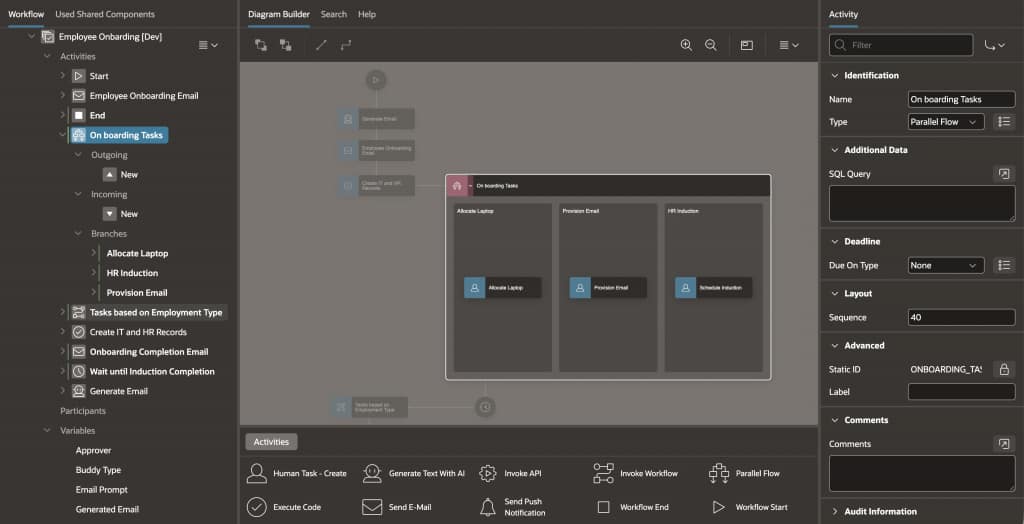
Note: Parallel execution is resource-dependent. Branches may not always run simultaneously, but the workflow semantics remain consistent.
Execution semantics and constraints
To ensure predictable behaviour, Parallel Flow introduced a set of constraints.
- Branches are isolated: You cannot define transitions from one branch to another, and you cannot transition from inside a branch to an activity outside the Parallel Flow. This ensures that branches remain independent.
- Completion is also clearly defined: The Parallel Flow completes only when all branches have finished execution. This is important for scenarios where multiple conditions must be satisfied before the workflow can proceed.
- Error handling follows a similar approach: If an activity in any branch results in a fault, the entire Parallel Flow is considered faulted. The workflow instance transitions to a faulted state.
- Structural constraints: Branches cannot contain Start or End (Complete) activities, and the overall lifecycle of the workflow remains outside the Parallel Flow construct.
- Another important consideration is shared state. If multiple branches attempt to update the same workflow variable, the outcome is non-deterministic.
Note: In practice, it is better to capture results independently (for example, in application tables) and evaluate them after the branches converge.
Example: Modelling parallel Flows
Consider a workflow that includes a readiness phase before moving to the next stage.
Instead of modelling all activities sequentially, you can define a Parallel Flow where each branch represents a separate workstream. These branches start together, execute independently, and converge when all required activities are complete.
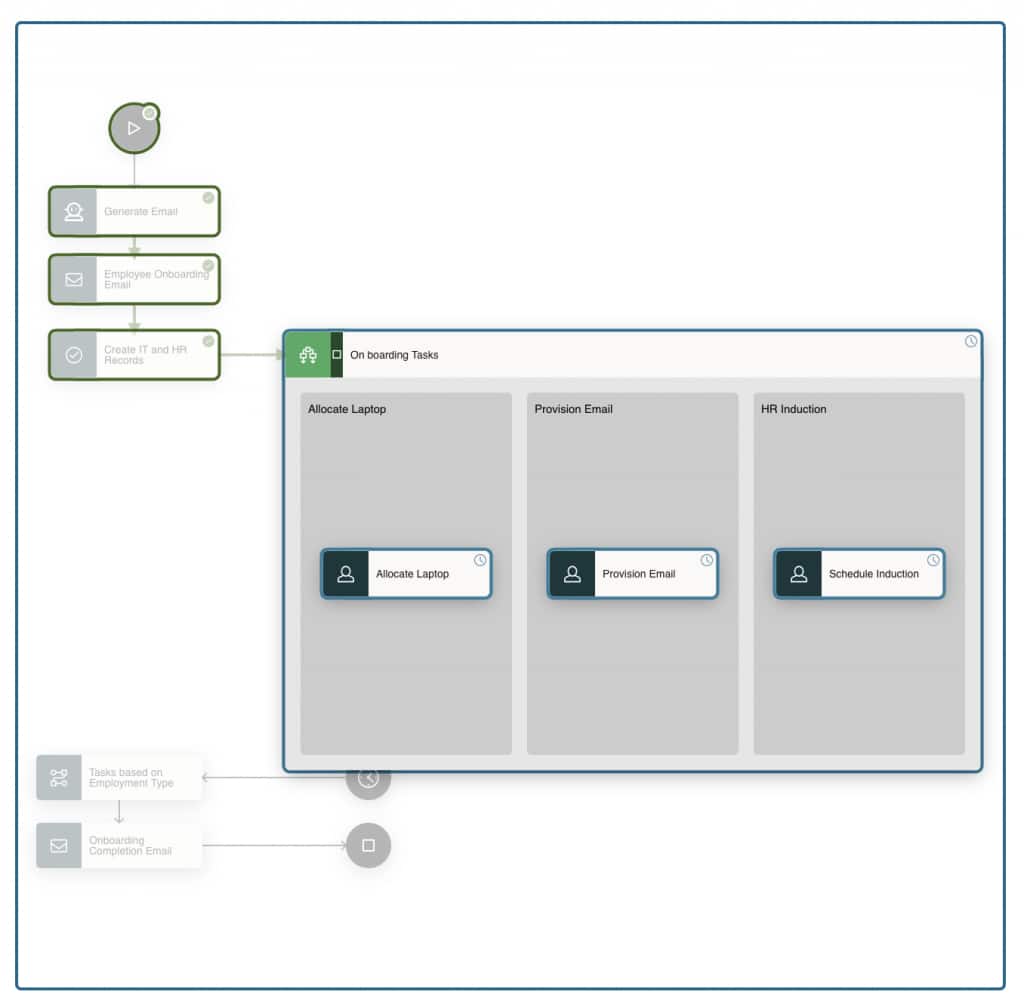
In this example, activities such as Allocate Laptop, Schedule Induction, and Provision Email are represented as separate branches. Each branch progresses independently, and the workflow moves forward only after all readiness conditions are Satisfied.
The example reflects a broader pattern that applies to many workflows beyond employee onboarding.
Incorporating AI within workflows
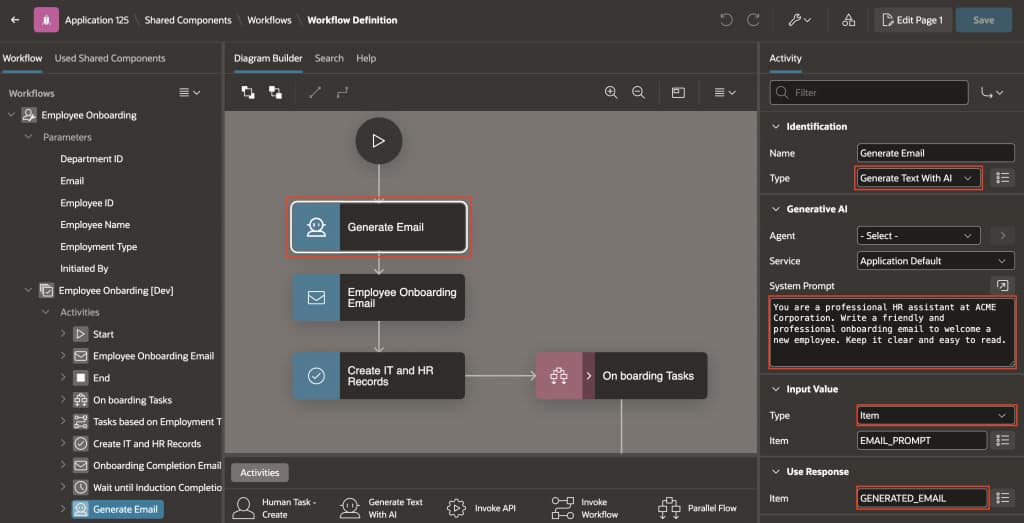
In addition to modelling execution, workflows can now include AI-driven steps using the Generate Text with AI activity.
This allows workflows to invoke a previously configured Generative AI service and use the response as part of the workflow state.
Before using this activity, the application must be configured with a Generative AI service underWorkspace Utilities. Without this configuration, the activity cannot be executed and results in an error.
How the activity fits into a workflow
The activity behaves like any other workflow step:
- It takes an input value (typically from a page item or workflow variable)
- Sends it to the configured Generative AI service
- Stores the response in a target item or variable
In practice, this can be used for:
- Generating summaries or descriptions
- Creating contextual messages or notifications
- Enriching workflow data before the next step
A typical configuration includes:
- Selecting an AI configuration
- Defining the input item used as Prompt
- Defining the output item used to store the response
When using workflow variables for the response, it is recommended to use a CLOB datatype to handle larger responses returned by the AI service.
Additional data can also be provided through SQL queries, allowing the AI prompt to be enriched with contextual information from the application.
Feature → Benefit → Impact
| 1 | Parallel Flow | Models independent workstreams | Requires careful handling of shared variables and dependencies |
| 2 | Workflow Console visibility | Improved tracking across branches | Better diagnostics and monitoring |
| 3 | Automatic resume after upgrade | Eliminates manual restart of workflows | Reduces operational overhead |
| 4 | Generate Text with AI activity | Integrates AI into workflow execution | Enables dynamic, context-driven processing |
Runtime improvements in Oracle APEX 26.1
In addition to modelling improvements, APEX 26.1 introduces changes to how workflows behave during upgrades.
To prevent inconsistent execution, workflows with active instances may be suspended during application upgrades. In earlier approaches, these instances needed to be manually resumed after the upgrade was complete.
With Oracle APEX 26.1, workflows suspended during upgrade are automatically resumed once the upgrade finishes. This ensures that execution continues from where it left off without manual intervention.
Design considerations
When working with Parallel Flow, it is useful to think in terms of independence and convergence.
Branches should represent work that can execute independently. If dependencies exist, they are better handled after the Parallel Flow completes.
Shared state should be handled carefully. Instead of updating the same variables across branches, it is more reliable to store outcomes independently and evaluate them at the join point.
It is also important to plan for failure scenarios, since a fault in any branch affects the entire workflow.
When incorporating AI activities, it is useful to:
- Clearly define input and output items
- Ensure response storage can handle larger payloads
- Avoid tightly coupling AI output with critical workflow decisions without validation
Final thoughts
Workflows are most effective when they reflect how work actually happens.
Parallel Flow provides a structured way to model independent workstreams while maintaining predictable execution behaviour. The constraints may feel restrictive at first, but they help ensure correctness as workflows become more complex.
The addition of AI activities extends this model further, allowing workflows to not just coordinate work, but also generate and enrich information as part of execution.
Combined with the runtime improvements in Oracle APEX 26.1, this makes workflows easier to design and more reliable to operate over time.