
Oracle APEX provides a platform for extending Oracle Fusion applications using Fusion applications REST APIs with Single Sign-On and identity propagation. The Oracle APEX Fusion starter application offers a preconfigured starting point, including an authentication scheme, a web credential, and sample REST data sources. The setup process is described in the Oracle APEX documentation on integrating APEX with Fusion Applications.
Fusion applications expose REST endpoints based on Oracle Application Development Framework (ADF), typically identified by /resources/ in their URLs, and Business Object Spectra Service (BOSS), identified by /api/boss/. Both support similar create, retrieve, update, and delete operations, but differ in how requests are structured, including some parameter names and interaction patterns. APEX provides distinct REST data source types to simplify working with each.
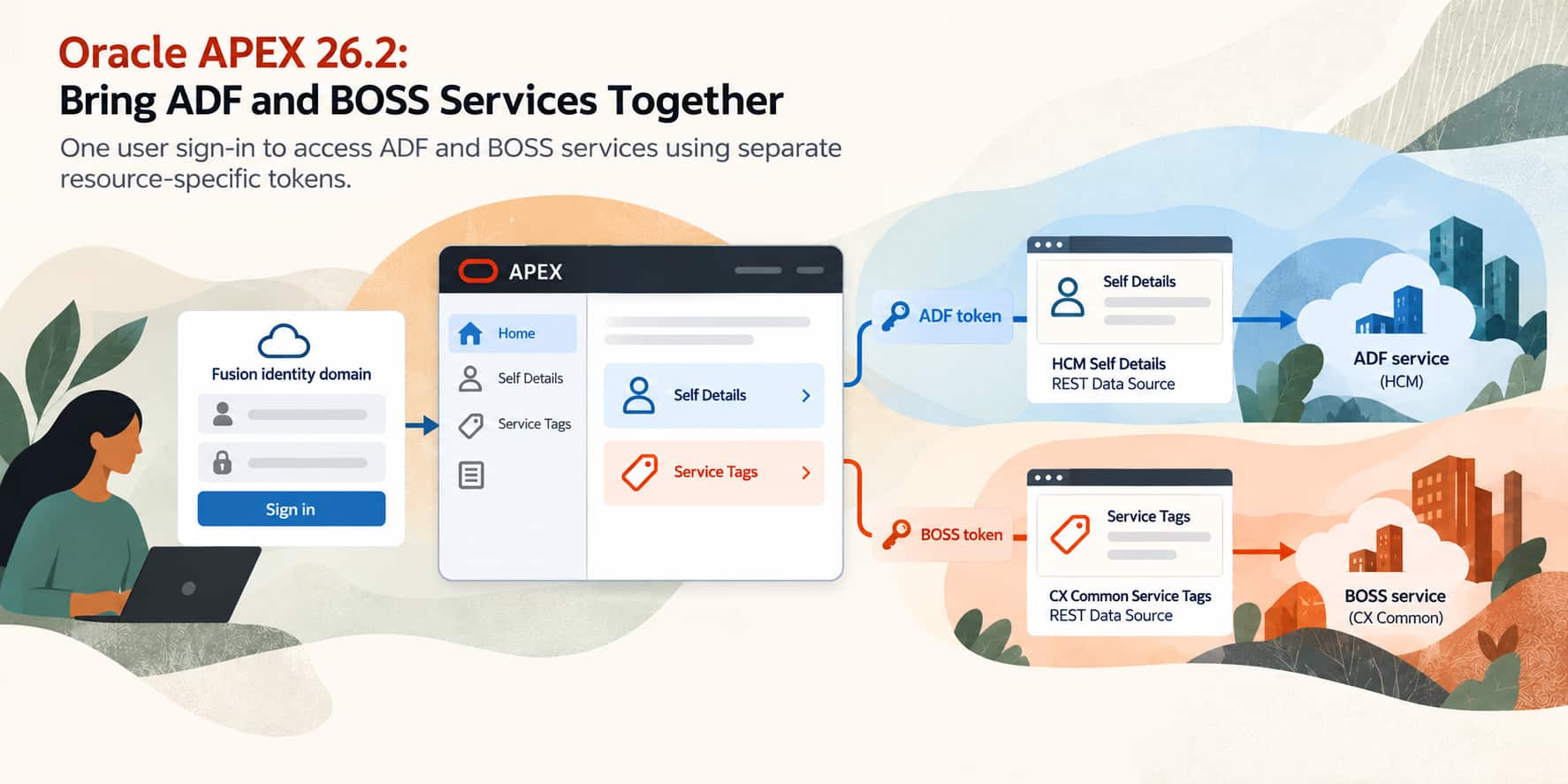
Oracle APEX 26.2 helps simplify access ADF and BOSS services in the same application with one sign-in. The enhanced Fusion integration starter application in Oracle APEX 26.2 configures authentication for the available ADF and BOSS resources, creates REST data sources that use the corresponding scopes, and includes a sample page that displays BOSS data. These additions help reduce the manual authentication configuration required to build extensions that access both.
What’s new in Oracle APEX 26.2?
Oracle APEX 24.2 introduced support for REST data sources that connect to Fusion application BOSS REST services. However, before APEX 26.2 the Fusion integration starter application’s generated configuration focused on ADF REST services. Combining ADF and BOSS endpoints in the same application required additional authentication and scope configuration.
APEX 26.2 reduces that setup work. When the integration is configured with both resources, the generated starter application:
- Includes the ADF and BOSS scopes in its authentication scheme, together with the
urn:opc:resource:multiresourcescopenamed scope. - Uses ADF and BOSS configuration supplied by the Database Tools Fusion integration wizard through the
AUTHENTICATION_SUBSTITUTIONSinstance parameter to configure authentication and resource scopes. - Configures its web credential with two named scopes:
OAUTHfor ADF andBOSSfor BOSS. - Configures both an ADF and a BOSS example REST data source to use the appropriate named scope.
- Caches access tokens and refresh tokens against the corresponding named scope.
The result is an application with a single sign-on that can access configured ADF or BOSS services, subject to the user’s permissions, with each using its own resource-specific access token automatically.
Configure the Fusion integration
Before creating the starter application, use the Database Tools Fusion Integration Wizard to configure the connection between your Fusion Applications environment and the database where APEX resides.
For this walkthrough, the integration must include both the ADF and BOSS resource scopes. The generated application reflects the scopes available in the integration configuration.
The integration supplies configuration to APEX through the AUTHENTICATION_SUBSTITUTIONS instance parameter. The starter application generator uses this information to configure authentication and the sample REST data sources.
Create the starter application
In your APEX workspace:
- Open App Builder and click Create.
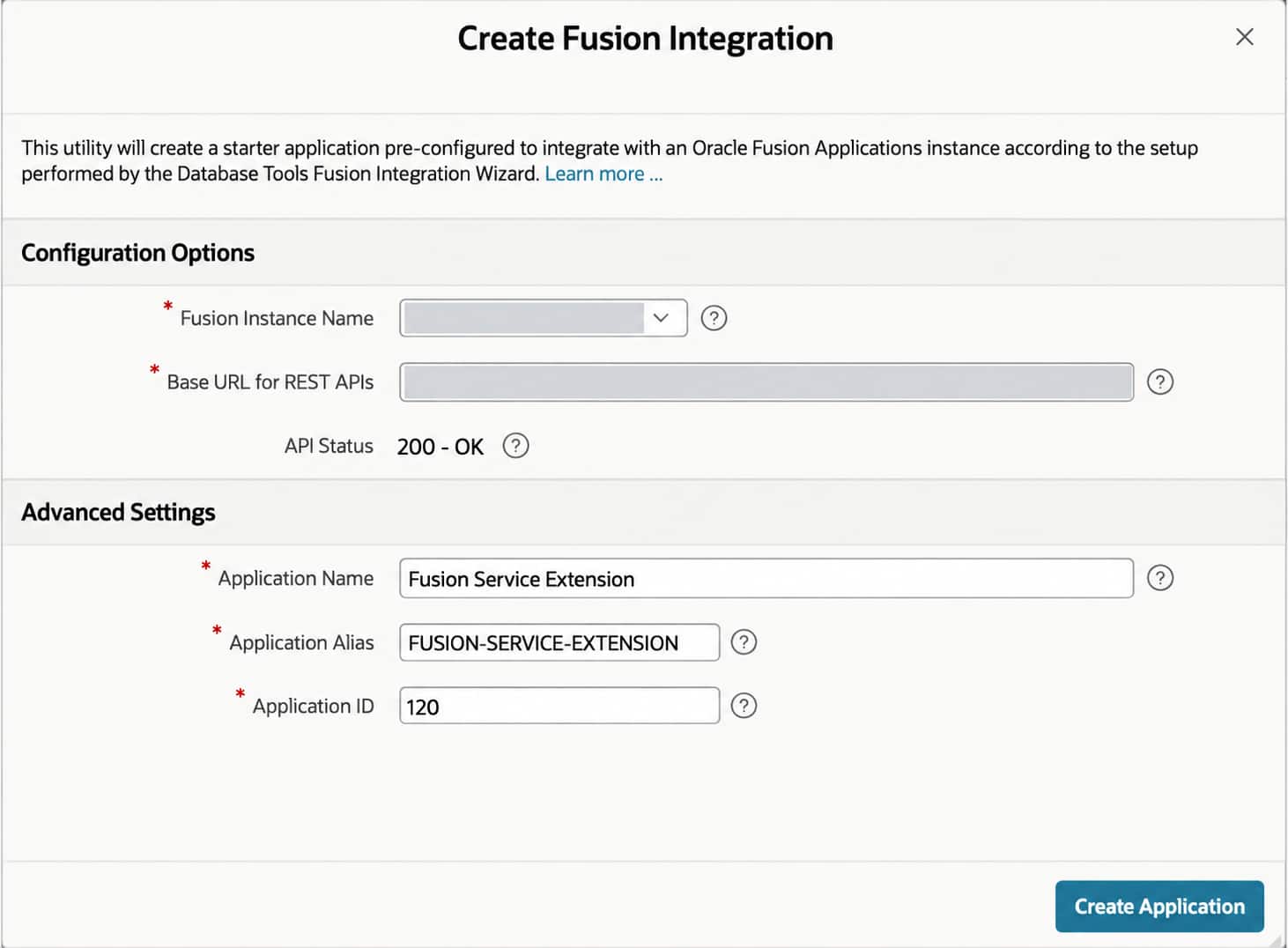
- Select Create Fusion Integration.
- Under Configuration Options, select the configured instance in Fusion Instance Name.
- Verify Base URL for REST APIs and review API Status.
- Under Advanced Settings, review Application Name, Application Alias, and Application ID.
- Click Create Application.
The wizard generates the application and its integration components, including a remote server, web credential, authentication scheme, and sample REST data sources.
Explore ADF and BOSS Services in the Fusion Starter Application
Run the generated application and sign in through the identity domain associated with your Fusion Applications environment. Then explore the two sample pages.
Self Details: User Information Through ADF
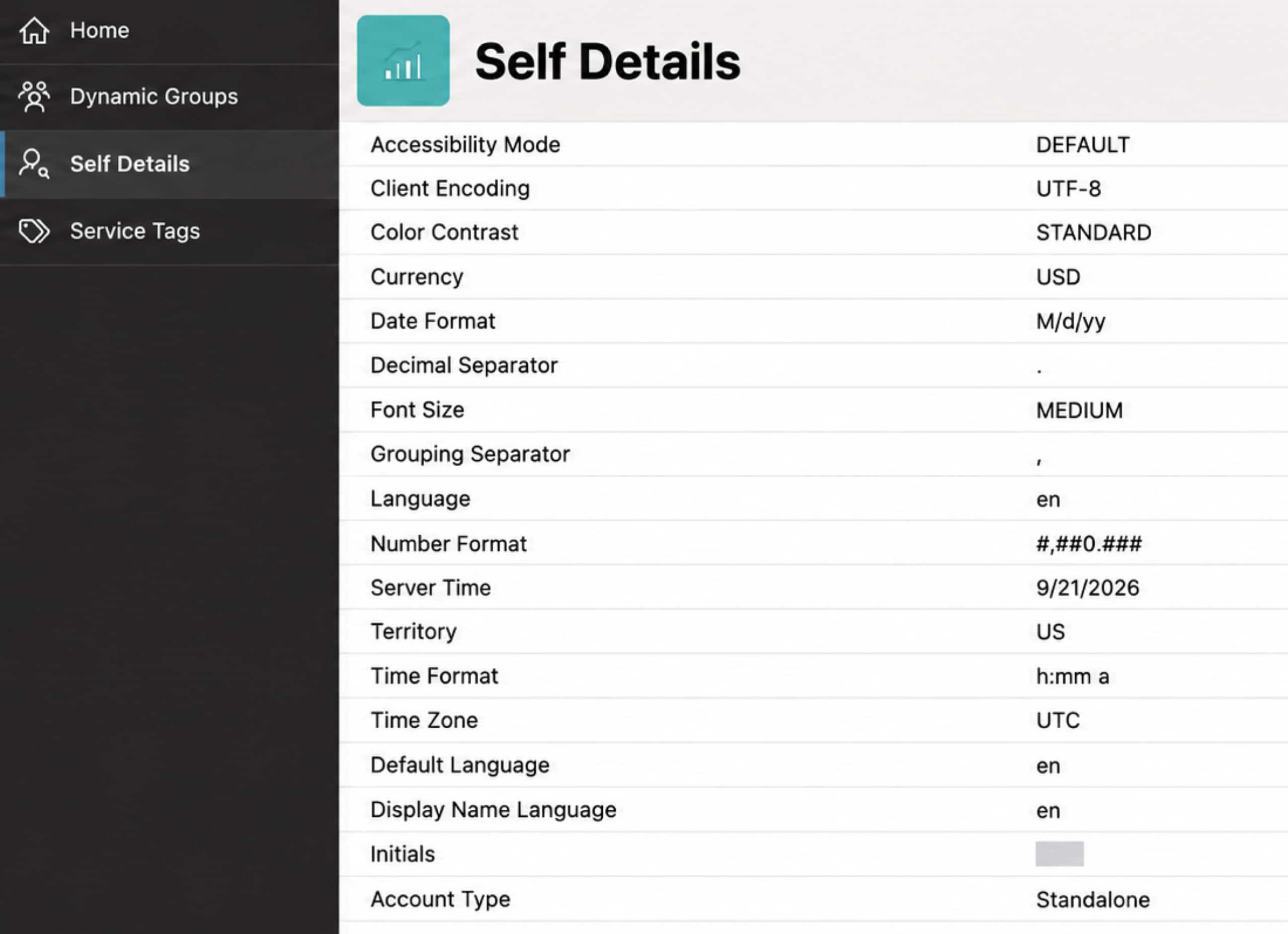
Open Self Details. This page uses the HCM Self Details REST data source to retrieve information about the currently signed-in user through an ADF REST service. The response includes details such as language, date format, and time zone.
Service Tags: Service Data Through BOSS
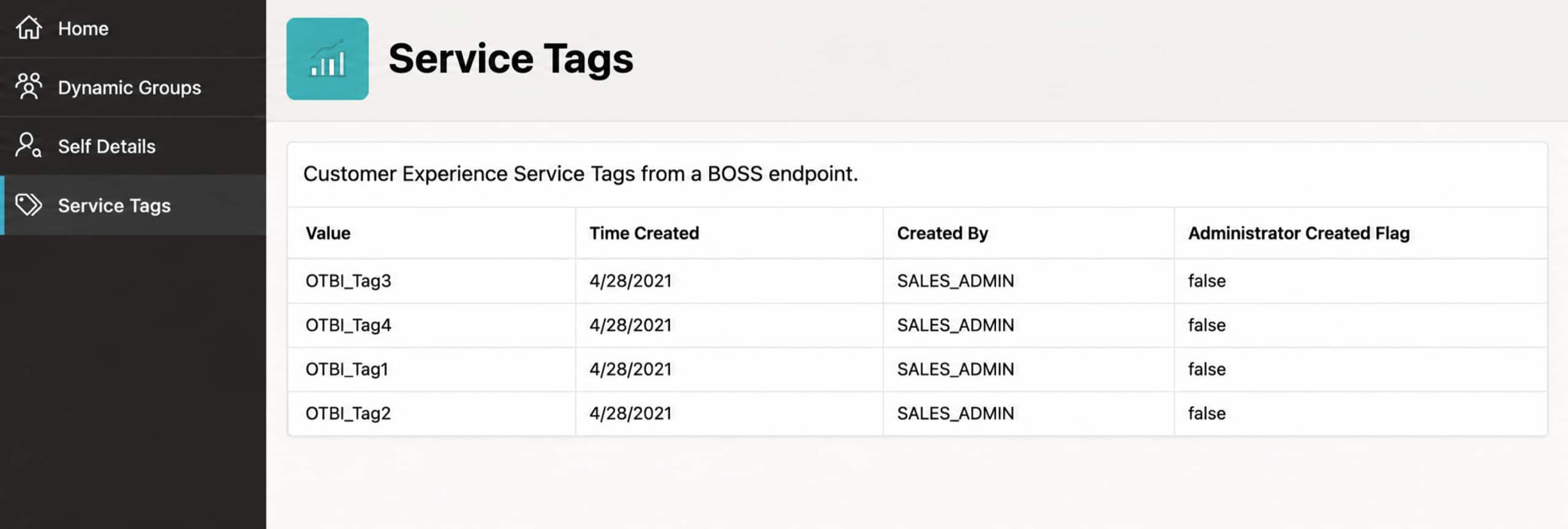
Next, open Service Tags. This page uses the CX Common Service Tags REST data source to retrieve tags through a BOSS endpoint.
The report displays tag values and related information, including when each tag was created and who created it. In the Fusion service, tags help describe and classify service requests.
Note: The signed-in user must have the required Fusion applications roles and privileges to access the CX BOSS endpoint. If the page returns an access error, ask your Fusion applications administrator to verify the user’s permissions.
Inspect How Each REST Data Source Selects Its Scope
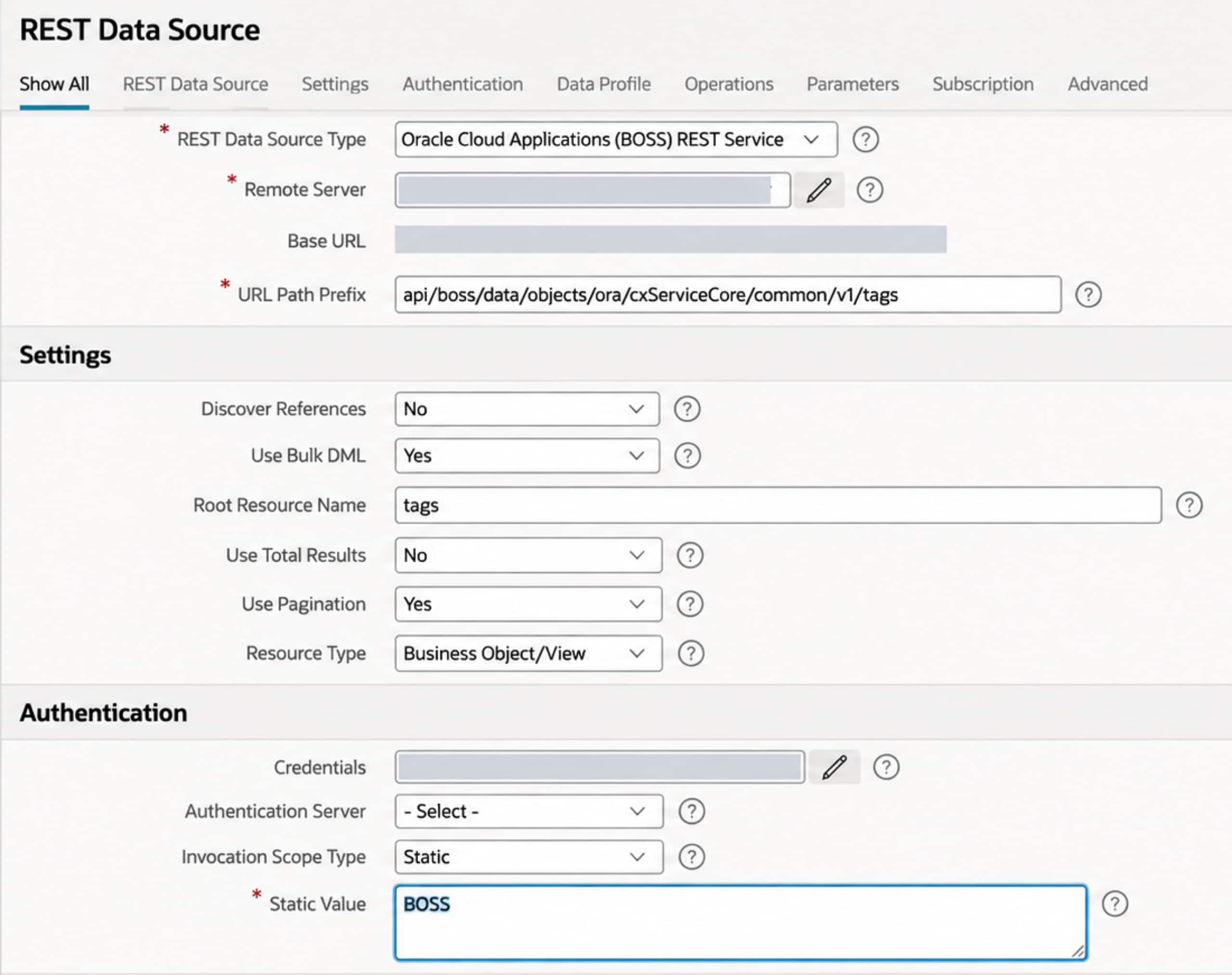
To review the BOSS example, open your application in App Builder and navigate to Shared Components → REST Data Sources → CX Common Service Tags.
Review the following settings:
| Setting | Value |
| REST Data Source Type | Oracle Cloud Applications (BOSS) REST Service |
| URL Path Prefix | api/boss/data/objects/ora/cxServiceCore/common/v1/tags |
| Credentials | The generated Fusion integration Web Credential |
| Invocation Scope Type | Static |
| Static Value | BOSS |
The Static Value references a Named Scope in the Web Credential. This mapping tells APEX which resource-specific token to use when invoking the endpoint.
The HCM Self Details REST data source uses OAUTH for its invocation scope.
| Application page | REST Data Source | Invocation Scope | Token used |
| Self Details | HCM Self Details | OAUTH | ADF resource access token |
| Service Tags | CX Common Service Tags | BOSS | BOSS resource access token |
Understand The Authentication Configuration
Navigate to Shared Components → Authentication Schemes and open the generated authentication scheme.
Its scope includes the configured ADF and BOSS scopes, along with: urn:opc:resource:multiresourcescope
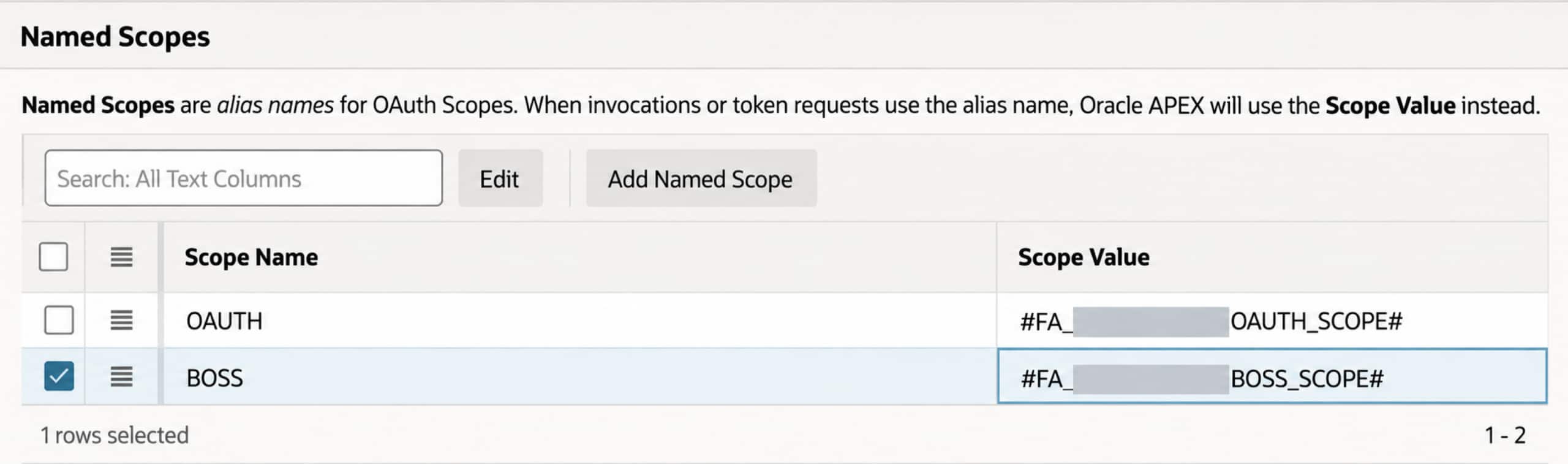
This special scope enables the authentication request to obtain separate access tokens for multiple resources. APEX processes the multiple-token response and caches the returned access tokens and any refresh tokens against their corresponding named scopes. When a REST data source executes, its invocation scope identifies the token to use.
To see the mapping, open the generated web credential and review named scopes. For this example, the entries are OAUTH and BOSS. These names act as aliases for the configured OAuth scopes.
Dynamic Groups: Authorization Based on Fusion Applications Roles
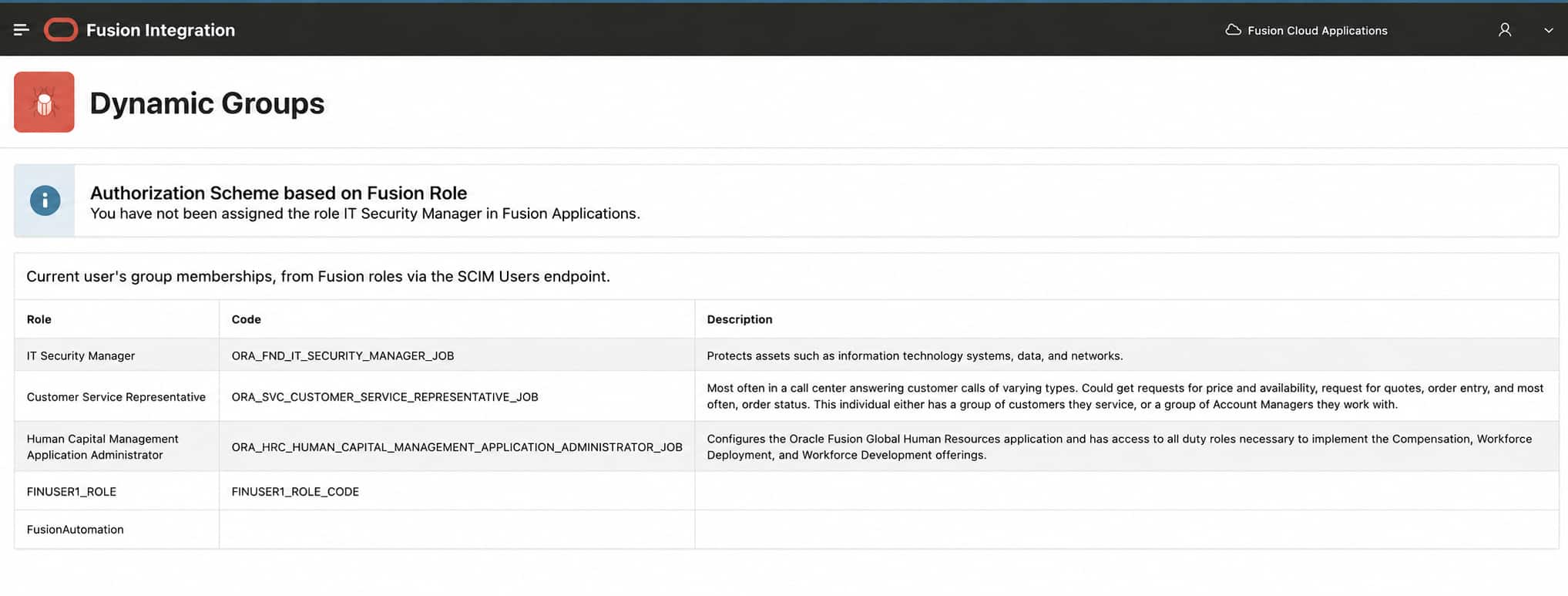
The starter application also includes an example authorization scheme named IT Security Manager Role, demonstrating how Fusion applications roles can control the visibility of APEX components. On the Dynamic Groups page, an alert region appears when the signed-in user does not have the IT Security Manager role. The alert is hidden when the user has that role. Dynamic Groups and role-based authorization are existing starter application capabilities that complement the ADF and BOSS integration enhancements
This role-based authorization example is an existing starter application capability that complements the ADF and BOSS integration enhancements.
Add BOSS Access To An Existing Application
Existing ADF-based applications (i.e., those APEX applications generated via the Fusion Integration Wizard prior to 26.2) can continue using their existing authentication configuration after upgrading to Oracle APEX 26.2. The upgrade does not automatically add BOSS scopes or sample pages.
To introduce BOSS access:
- Update the IDCS confidential app to include the BOSS resource scope. Then manually add the actual BOSS scope value, rather than a substitution variable, to the application’s authentication scheme alongside
urn:opc:resource:multiresourcescope, and configure the correspondingBOSSnamed scope in the web credential - Adapt the application’s authentication scheme and web credential named scopes.
- Configure the REST data source invocation scope settings for the resources it accesses.
Generate a new Fusion integration starter application as a working reference for these changes. Creating that reference application does not modify your existing application.
For a first look at the enhanced integration, run Self Details and Service Tags, then inspect their invocation scope settings. These examples show how to build Fusion application extensions that bring ADF and BOSS services together with one sign-in.