
When building applications with workflows and human tasks, the initial focus is usually on modelling the process.
Defining approvals, assigning tasks, and orchestrating how work moves across roles. That part is relatively straightforward.
What becomes more challenging over time is operating those workflows in a real environment. Tasks accumulate. Some become irrelevant. Others remain in intermediate states longer than expected. And occasionally, you need to understand or reproduce what happened in a specific workflow instance.
At that point, the problem shifts from how the workflow is designed to how its lifecycle is managed.
This becomes especially visible in applications that are both task-heavy and long-running.
Oracle APEX 26.1 continues to focus on this operational aspect, with improvements around controlled cleanup of workflow and task instances, portability of runtime state across environments, and additional controls for managing tasks and workflow execution at runtime.
Oracle APEX 26.1 introduces:
- Public APIs to delete workflow and human task instances for controlled cleanup
- Support for exporting and importing workflow and task runtime instances
- Public API to update activity due dates in running workflows
- Support for assigning tasks using Authorization Schemes (group-based participants)
- API support to exclude specific participants from tasks at runtime
- Enhancements that improve operability of long-running, task-heavy applications
These changes extend the operational model further by addressing not just cleanup and portability, but also how workflows behave while they are still in progress.
Why task lifecycle management becomes important
In workflow-driven applications, runtime data grows naturally over time.
Consider a typical Employee onboarding-style application as an example. A case is created, and multiple tasks are assigned across roles such as HR, managers, and IT. These tasks move through different states—completed, overdue, cancelled, faulted, or terminated—depending on how the process evolves.
In addition, real-world variability introduces additional complexity:
- Start dates may change
- Cases may be cancelled or duplicated
- Workflow definitions may evolve across versions
- Task ownership may not always be tied to a single individual
- Deadlines may need to be adjusted after a workflow has already started
As a result, the system accumulates workflow and task instances that are no longer relevant but still exist in the system.
Two operational patterns typically emerge:
- The need to clean up instances faster than retention or purge cycles allow
- The need to move or reproduce runtime state across environments for validation or troubleshooting
- The need to intervene in running workflows when they do not behave as expected
Both of these require more control than what is typically available through standard lifecycle handling.
Cleanup of workflow and task instances
Oracle APEX 26.1 introduces public APIs that allow controlled deletion of workflow and task instances.
These include:
- apex_workflow.delete_workflows
- apex_human_task.delete_tasks
These APIs are designed for cleanup scenarios where instances are no longer relevant and need to be removed explicitly.
In earlier approaches, cleanup was often indirect. Instances would be terminated and then removed later through retention or purge processes. While this works for general lifecycle management, it can be too slow or too coarse for operational needs.
With these APIs, cleanup becomes more immediate and targeted.
How cleanup can be scoped
Both workflow and task deletion APIs support filtering based on multiple criteria.
For workflow instances:
- Application scope
- Workflow definition (static ID)
- Instance states
- Option to include instances across versions
For task instances:
- Application scope
- Task definition (static ID)
- Task states
- Option to include tasks associated with workflows
This allows cleanup to be applied precisely to a subset of instances, rather than broadly across all runtime data.
Example: Handling cancelled or duplicate cases
A common scenario in real applications is early cancellation.
For example, in the Employee Onboarding Use case, a case may be cancelled before it progresses, or a duplicate case may be created unintentionally.
In such situations, associated workflows and tasks may continue to exist unless explicitly handled.
A typical pattern would involve:
- Updating application data to mark the case as cancelled
- Terminating associated workflows and tasks
- Cleaning up instances that are in terminal states
BEGIN
    APEX_WORKFLOW.DELETE_WORKFLOWS(
        P_APPLICATION_ID       => :APP_ID,
        P_STATES               => APEX_T_VARCHAR2(APEX_WORKFLOW.C_STATE_FAULTED, APEX_WORKFLOW.C_STATE_TERMINATED),
        P_INCLUDE_ALL_VERSIONS => TRUE
    );
END;
Note: This procedure should be invoked with caution and only as a data clean-up measure.
And for task cleanup:
BEGIN
    APEX_HUMAN_TASK.DELETE_TASKS(
        P_APPLICATION_ID         => :APP_ID,
        P_STATES                 => APEX_T_VARCHAR2(APEX_HUMAN_TASK.C_TASK_STATE_CANCELLED, APEX_HUMAN_TASK.C_TASK_STATE_ERRORED),
        P_INCLUDE_WORKFLOW_TASKS => TRUE
    );
END;Note: This procedure removes human task instances for a given application. If the p_include_workflow_tasks flag is not set, only those instances that are not created through a workflow will be deleted. If the p_include_workflow_tasks flag is true, all human task instances will be deleted.
This approach helps reduce unnecessary entries in task lists and improves overall system clarity.
Managing workflows while they are running
Cleanup handles what is no longer needed. But in many cases, the challenge is dealing with workflows that are still active.
Updating activity due dates
In long-running workflows, it is not uncommon for timelines to change after execution has already started.
APEX 26.1 introduces a public API to update the due date of a workflow activity instance:
- apex_workflow.set_activity_due_date
This is particularly useful in cases where:
- A workflow is suspended and resumed later
- A wait activity has exceeded its due time
- External dependencies cause delays
Example:
BEGIN
    APEX_WORKFLOW.SET_ACTIVITY_DUE_DATE(
        P_INSTANCE_ID        => 1234,
        P_ACTIVITY_STATIC_ID => 'WAIT_STEP',
        P_DUE_DATE           => SYSTIMESTAMP + INTERVAL '1' DAY
    );
END;
This allows workflows to be corrected and continued instead of being restarted.
Flexible Task Assignment using Authorization schemes
In many applications, tasks are not owned by a single user, but by a group or function.
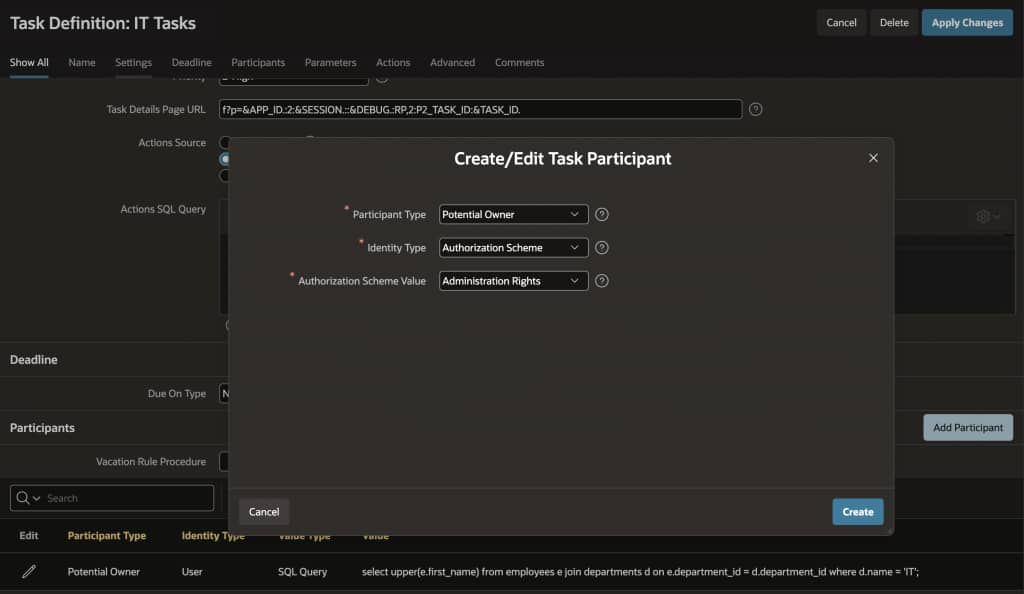
Oracle APEX 26.1 introduces support for defining task participants using Authorization Schemes.
This allows tasks to be assigned to a group of users rather than individual users.
Instead of specifying users directly, the task definition can reference an authorization scheme that determines eligible participants dynamically.
This is useful in scenarios such as:
- Department-based approvals (HR, Finance, Operations)
- Shared responsibility across teams
- Dynamic assignment based on application logic
When a task is assigned to an authorization scheme, it can remain unassigned until an eligible user takes action.
Oracle APEX 26.1 also introduces two additional participant types:
EXCLUDED_OWNEREXCLUDED_ADMIN
These allow specific users to be excluded from task participation, even when tasks are assigned using a broader Authorization Scheme. This is useful in situations where task assignment is generally role-based, but certain users should not participate in a specific task.
For example:
- Excluding users who are unavailable
- Handling conflict-of-interest scenarios
- Restricting participation for sensitive approvals
- Preventing specific administrators from managing a task
This adds more flexibility to task assignment without requiring changes to the workflow definition itself.
Handling exceptions in task participation
In addition to group-based assignment, APEX 26.1 also introduces the ability to exclude specific participants at runtime.
This is useful when:
- A user is unavailable
- A conflict of interest exists
- A task needs to be restricted to a subset of a group
A public API is provided for this:
BEGIN
    APEX_APPROVAL.EXCLUDE_POTENTIAL_OWNER(
        P_TASK_ID         => :TASK_ID,
        P_POTENTIAL_OWNER => 'USER1'
    );
END;
This allows finer control over task execution without changing the underlying workflow definition.
Requesting information from alternate users during task execution
Another useful enhancement in APEX 26.1 improves how information requests are handled during active approval tasks.
Previously, when additional information was requested for a task, the request was typically limited to the original initiator of the workflow.
APEX 26.1 now allows that request to be redirected to a different user at runtime.
This is especially useful in real-world workflows where the initiator may no longer be the right person to provide the required information.
For example:
- A procurement request may require clarification from Finance
- An onboarding workflow may need updated information from HR
- A compliance approval may require input from another reviewer or project lead
Instead of blocking the workflow or restarting the process, tasks can continue while requesting information from the most appropriate user.
This makes human task workflows more flexible and better aligned with how business processes actually operate.
Export and import of runtime instances
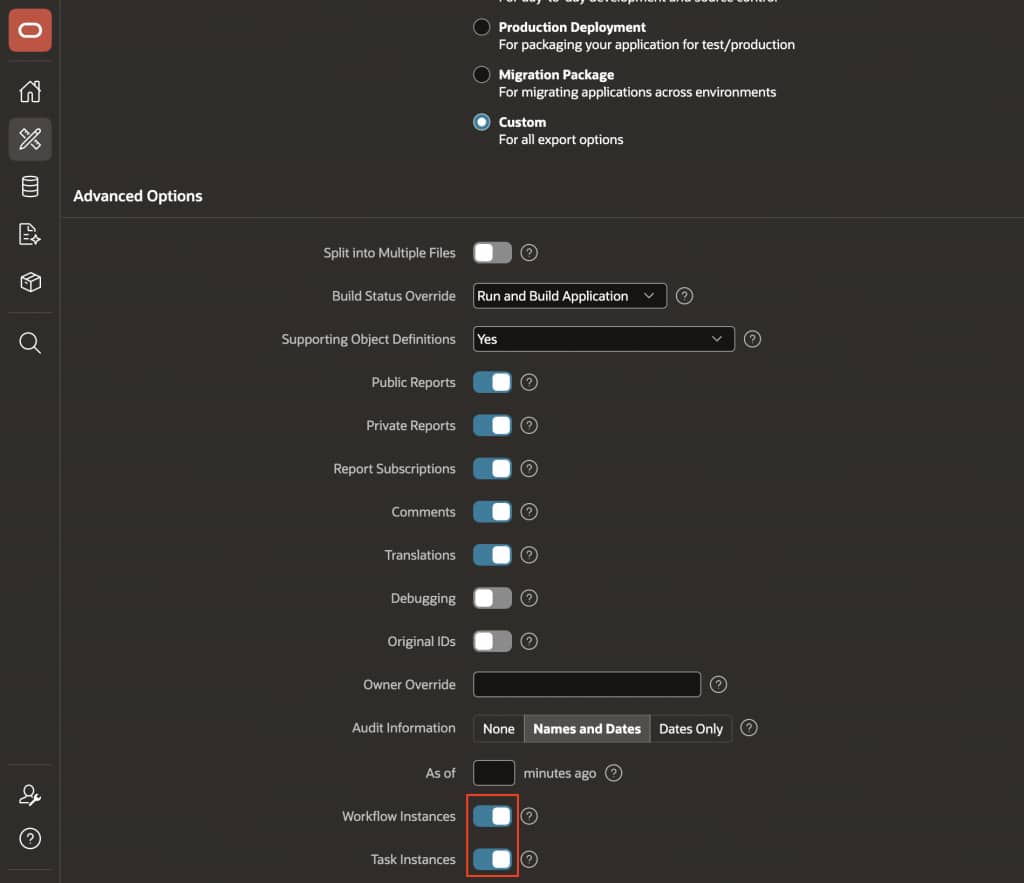
In addition to cleanup, APEX 26.1 introduces support for exporting and importing workflow and task runtime instances.
The App Builder export experience now allows inclusion of:
- Workflow instances (along with associated task instances)
- Task instances that are not associated with workflows
This enables runtime data to be packaged along with the application definition.
Why this matters for long-running workflows
In many applications, workflows are not short-lived.
They may span days, weeks, or even months, depending on the process.
During that time:
- New versions of the application may be deployed
- Issues may need to be investigated in non-production environments
- Testing may require reproducing specific workflow states
Without runtime export/import, recreating these scenarios can be time-consuming and error-prone.
With this capability:
- In-flight workflows can be preserved during environment transitions
- Task assignments and states remain intact
- Validation and troubleshooting can be performed with real data
From Product Capabilities to Business Value
| Delete workflow instances API | Enables targeted cleanup of irrelevant workflows | Requires governance and clearly defined deletion policies |
| Delete human task instances API | Keeps task lists clean and manageable | Requires careful scoping to avoid deleting active work |
| Set activity due date API | Allows correction of running workflows | Helps recover stuck or delayed processes |
| Authorization scheme participants | Enables group-based task assignment | Aligns workflows with real organizational structures |
| Exclude participant API | Provides fine-grained control over task participation | Helps handle edge cases without redesign |
| Export/import runtime instances | Preserves in-flight work across environments | Enables reproducible debugging and safer deployments |
Implementation considerations
Introducing these capabilities requires some additional planning.
It is useful to define an instance lifecycle policy:
- Which states are safe to delete
- Which should be retained or archived
- When cleanup should occur
Access to cleanup and runtime control APIs should be restricted to administrative roles, with appropriate logging and confirmation steps.
For deployments, it is also useful to include runtime handling in the release process:
- Decide whether to include runtime instances in exports
- Validate task lists after import
- Ensure workflow continuation behaves as expected
- Reconcile workflow state with application data
Final thoughts
As workflows become central to application design, their lifecycle becomes equally important.
It is no longer sufficient to define tasks and approvals. It is also necessary to manage how those tasks evolve, adapt, and respond to real-world conditions.
The improvements in Oracle APEX 26.1 extend this operational model. They provide better control over cleanup, enable safer movement of runtime state across environments, and introduce more flexibility in how tasks are assigned and managed while workflows are running.
Taken together, these changes make workflow-driven applications more maintainable and predictable over time.