
A few years ago, I authored a blog post series about modernizing an Oracle Forms application to an Oracle APEX app. With the introduction of the MCP Server for Oracle AI Database, there should be a faster way to modernize these forms, and that’s the purpose of this first blog post: to evaluate how efficient you can be using MCP.
What do you need?
- Access to a schema in Oracle AI Database
- AI Service Provider
- SQL Developer Extension for VS Code, which includes:
- SQLcl
- MCP server
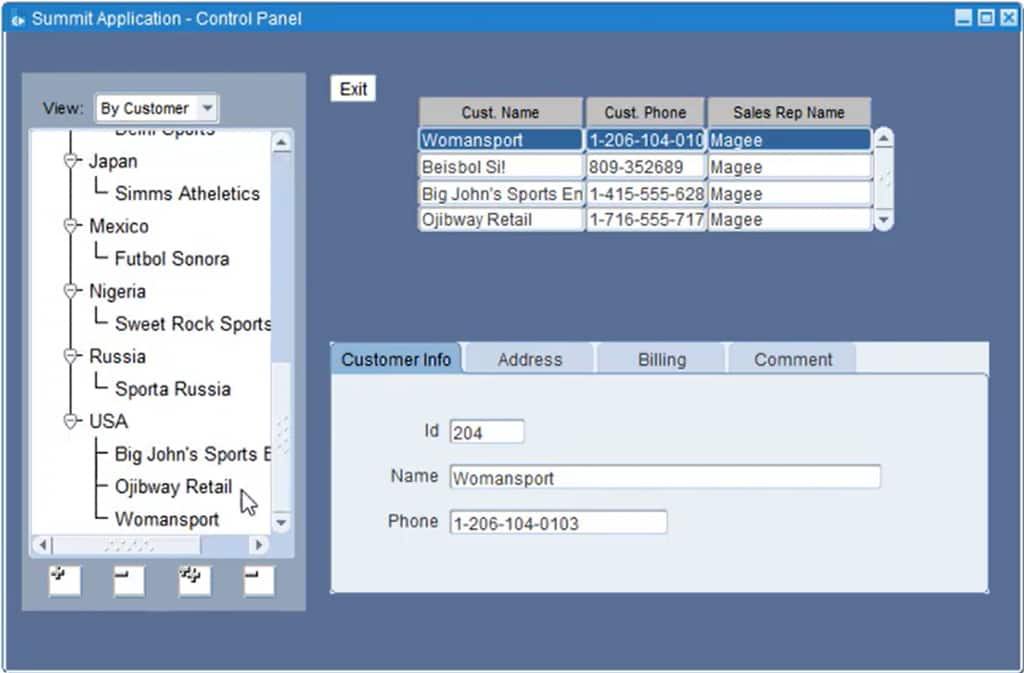
Let’s use a simple sample form: Customers.
Steps
Convert the form (FMB) to XML.
Simply use the Forms2XML Conversion Tool to convert the form. Read this [Forms to APEX] Converting FMBs to XML blog post for the step-by-step instructions.
Understand the form’s logic and purpose.
The first thing you probably want to know about the form you’re modernizing is its business purpose, right?
By this step, you need to have installed the SQL Developer Extension for VS Code. To learn the details, please read: Getting Started with our MCP Server for Oracle Database.
Back to our topic, let’s ask about the purpose of the form: Describe the business purpose of this form and enable the XML as context:
Verify that all the database objects are in the Oracle AI Database schema.
First, connect to your schema to check the database objects and then confirm that the form is compatible with the schema:
Move the key business logic to the Oracle AI Database.
One important part of modernizing your Forms apps to APEX is to push the business logic inside the form to the database. In the past, this step was time-consuming as you had to review the form, determine what was valuable, and create a package, procedure, or function.
Let’s ask to identify the relevant business logic and create a package from it.
In this scenario, there were no stored procedures in the database that were related to the Form. If you have a PL/SQL investment on the database side, you should check how this new logic can be integrated with it.
Build the APEX App
In the next blog post, I’ll show you how to build the APEX app based on the business requirements of the form. Stay tuned!
Summary
The MCP + AI approach significantly reduces the time required to analyze the form, evaluate its logic, and migrate key business logic to the database. Having this part ready allows you to focus 100% on building your app, either with AI or from scratch. When working on your modernization project, consider including all related forms to ensure sufficient context for pushing the logic to the database.
Lastly, it’s essential to take care of the security of your database, review what is being processed, and what is being created to guarantee your assets and the success of your modernization project.