
Key contributors:
- Abhiram Gujjewar – Lead Principal Product Manager, FDI Platform
- Sathish Krishnamurthy Kannan – Consulting Member of Technical Staff, FDI Engineering Lead
- Divya Kunisetty – Data Engineer, FDI Engineering Lead
- Solomon Ronald – Principal Data Engineer, FDI Engineering Lead
This is Part 2 of a two-part article on how to use the FDI platform for downstream integrations.
- Read Part 1 to learn how to configure the FDI Data Share feature and publish FDR-enabled tables to Object Storage.
- This part discusses how to consume FDI data using the Table Change Format change feed.
Introduction: What Is Table Change Format in FDI?
Oracle Fusion Data Intelligence (FDI) enables enterprise analytics teams to access trusted, curated data in Oracle AI Lakehouse and share it with external targets such as Oracle Object Storage using Data Share. But to drive downstream actions and integrations, they also need visibility into the data changes introduced during the FDI refresh process.
For example, organizations might need to populate another lake or warehouse, synchronize downstream systems, update operational stores, support audit workflows, or trigger business processes based on data changes. In these scenarios, knowing that a table changed isn’t enough; integration teams need to know which rows changed, how they changed, and the order in which those changes should be applied downstream.
Table Change Format (TCF) is a technology-neutral change feed produced by FDI for this purpose. It utilizes FDI Data Share capabilities to persist the changed data in the OCI Object Storage Service with each data refresh and organizes table-level change data in a predictable layout so downstream consumers can discover datasets; identify completed batches of changes; apply inserts, updates, and deletes in sequence; and maintain their own progress independently.
Table Change Format isn’t meant to replace any downstream formats. Instead, it gives FDI customers a common row-level change feed that can be materialized into one or many targets. A single TCF feed can drive a Delta Lake pipeline, an Iceberg pipeline, a warehouse loading process, or a custom application workflow without each consumer recreating change-capture logic.
Why Table Change Format Matters
Most downstream systems need changes to be reliable before they can act on them. A change feed should answer several practical questions:
- Which datasets are available?
- Which change batches are complete and safe to process?
- What is the schema for the rows in a specific batch?
- Which rows are inserts, updates, or deletes?
- Is a batch a full refresh or an incremental change?
- What was the last successfully applied change for each dataset?
TCF is designed around those questions. It represents changes by dataset and System Change Number (SCN), includes schema information with each change batch, uses marker files to identify valid processing windows, and supports watermark-based processing so consumers can resume safely after each successful batch.
Core Concepts
TCF is organized around three core concepts: dataset, SCN, and change set.
- A dataset is a logical table or subject area published by FDI. Each dataset has its own folder in Object Storage, which allows consumers to discover available datasets and process them independently.
- An SCN is a monotonically increasing identifier that represents a batch of changes for a dataset. Each SCN has its own folder, and that folder is self-contained: it includes completion metadata, schema information, and the row-level change files for that batch.
- A change set is the collection of row-level changes for one dataset at one SCN. The change set includes rows classified as inserts, updates, or deletes. Consumers can apply those rows to a downstream target using the dataset primary key and the schema associated with that SCN.
TCF Storage Layout
A typical TCF dataset layout looks like this:
/data/cdf/<source_type>/<dataset_name>/
 markers/
  _latest_scn_<scn_id>.marker
  _latest_full_refresh_scn_<scn_id>.marker
 fdi_scn_id=<scn_id>/
  _DONE
  _schema.json
  fdi_table_change_type=<full|incremental|transient_refresh>/
   fdi_change_type=insert/
    part-*.parquet
   fdi_change_type=update/
    part-*.parquet
   fdi_change_type=delete/
    part-*.parquet
The markers/ directory identifies the latest available SCN and the latest full refresh SCN for a dataset. When consumers don’t provide an explicit SCN range, the TCF reader can use these markers to determine the valid default window: from the latest full refresh forward to the latest available SCN.
- Each fdi_scn_id=<scn_id>/ folder represents one change batch.
- The _DONE file signals that the batch has been fully written and is safe to process.
- The _schema.json file provides the dataset schema and primary key metadata needed to interpret and apply the rows correctly.
- The fdi_table_change_type partition identifies whether the batch represents a full refresh or an incremental change.
- The fdi_change_type partitions contain the row-level insert, update, and delete files.
This layout is intentionally predictable. It allows a downstream pipeline to enumerate SCNs, process only completed batches, read the correct schema for each batch, and apply changes in order.
Reading TCF with Spark
TCF can be consumed through a Spark data source using the fdi-tcf format. From a Spark job, reading TCF should feel similar to reading any other structured source:
tcfSourceDataset = (
   spark.read
     .format("fdi-tcf")
     .option("path", sourceDatasetPath)
     .option("startingScn", startingScn)  # optional
     .option("endingScn", endingScn)      # optional
     .load()
)
Note that the complexity of the TCF layout stays behind a standard Spark interface. Once the data is available as a Spark DataFrame or Dataset, downstream logic can use familiar Spark operations such as projection, filtering, joins, and writes.
The optional startingScn and endingScn values let a consumer narrow a read to a specific SCN range. If those values aren’t provided, the reader can use the dataset markers to read from the most recent full refresh SCN through the latest available SCN.
Finding Pending SCNs
A scalable downstream process shouldn’t reread every change every time. It should know the last SCN that was successfully applied for each dataset, find newer SCNs, and process them in deterministic order.
A Spark job can identify pending SCNs like this:
Dataset<Row> pendingScns = sparkSession.read()
  .format("fdi-tcf")
  .option("startingScn", lastProcessedScn + 1)
  .load(datasetRootPath)
  .select("fdi_scn_id")
  .distinct()
  .sort("fdi_scn_id");
This produces the set of SCNs newer than the last successful watermark. Sorting is important because changes should be applied in SCN order. This makes processing deterministic and helps consumers reason about restart behavior.
Applying Change Sets Safely
After a pipeline has the pending SCNs, it can process each SCN as an atomic unit of work:
pendingScns.forEach(scn -> {
  DatasetSchema schema = source.getSchema(datasetName, scn);
  Dataset<Row> changeset = source.readChangeSets(datasetName, scn);

  WriteSummary result = sink.applyChangeSets(datasetName, changeset, schema);

  if (result != null && "SUCCESS".equalsIgnoreCase(result.getStatus())) {
      waterMark.save(datasetName, scn);
    } else {
       throw new TcfPipelineException(
         String.format("Write failed for dataset=%s scn=%s", datasetName, scn)
        );
    }
});
This pattern is simple but important:
- getSchema(datasetName, scn) reads the schema for the specific SCN being processed.
- readChangeSets(datasetName, scn) reads the insert, update, and delete rows for that SCN.
- applyChangeSets(…) encapsulates the logic required by the downstream target.
- The watermark advances only after the target confirms success.
If processing fails, the watermark isn’t advanced. On the next run, the pipeline resumes from the last successful SCN for that dataset. This gives consumers ordered processing, safe restarts, and a clear point of recovery.
Full, Incremental and Transient Refresh Changes
TCF supports both full refresh and incremental processing. A full refresh represents a complete rebuild point for a dataset. An incremental change contains the rows that changed since the prior SCNs.
The batch-level change type is available through the table change metadata, while row-level actions are represented by the row change type. In practice, a consumer typically checks the table change type once for the SCN, then applies the row-level insert, update, and delete operations according to the target system.
For example:
Dataset<Row> changeset = spark.read()
  .format("fdi-tcf")
  .option("startingScn", scn)
  .option("endingScn", scn)
  .load(path);

Row row = changeset.select("fdi_table_change_type").first();
boolean isFullRefresh = "full".equalsIgnoreCase(row.getString(0));
When the SCN is a full refresh, a downstream target might rebuild or overwrite the table before applying rows. When the SCN is incremental, the target can merge deletes, updates, and inserts using the primary key from _schema.json.
Example: Materializing Table Change Format into Delta Lake
To illustrate the usage of this feature, here’s a detailed description of how to do it with Delta Lake. The same pattern can be adapted to Iceberg, Snowflake, or another target.
At a high level, the sample custom pipeline for Table Change Format does the following:
- Initialize the TCF source, target sink, and watermark store from a manifest.
- Discover available datasets under the source path.
- For each dataset, read the last applied SCN from the watermark.
- Find pending SCNs greater than the last applied SCN.
- Process each pending SCN in order.
- Read the schema and row-level change set for the SCN.
- Apply the changes to the target.
- Save the watermark only after the target update succeeds.
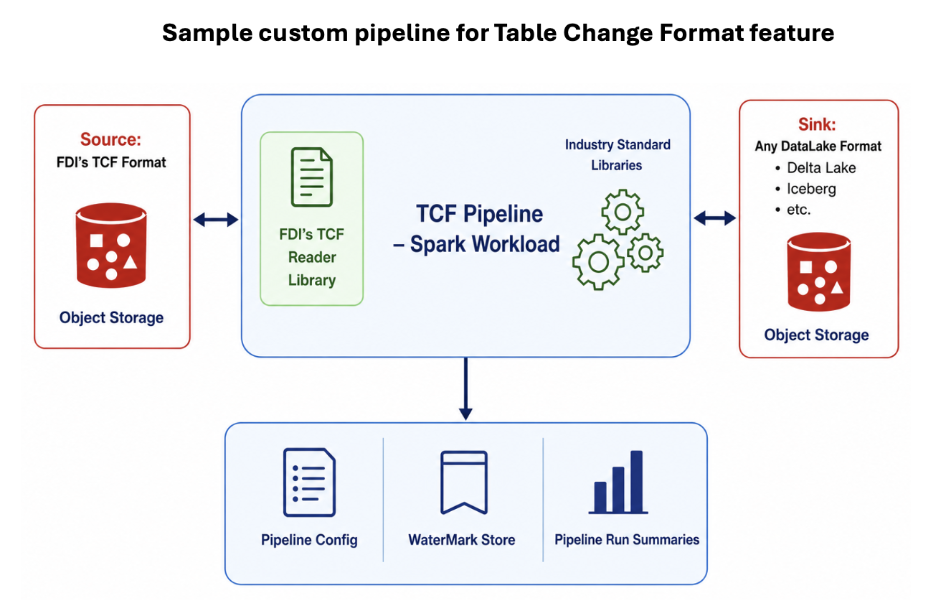
For a Delta Lake target, full refresh handling can create or rebuild the table schema, while incremental handling can use Delta merge semantics:
- fdi_change_type = delete removes matching rows by primary key.
- fdi_change_type = insert inserts rows that don’t exist.
- fdi_change_type = update updates matching rows or upserts, depending on target rules.
The result is a current-state table per dataset, built from an ordered sequence of TCF change sets. The TCF feed remains available for other consumers that might want to materialize the same changes into a different target.
Running a TCF Pipeline on OCI Data Flow
A Spark-based TCF pipeline can be operationalized with OCI Data Flow, so it runs as a managed Spark application against Object Storage.
The Data Flow application typically needs:
- A Spark workload JAR that contains the TCF pipeline.
- A manifest file that identifies the source and sink locations.
- Permissions to read the TCF source location in Object Storage.
- Permissions to write the target tables and watermark files.
Once the maven build is done locally, the jar (datashare-idf-pipeline-1.1.0-SNAPSHOT.jar) will be located under datashare-idf-pipeline/target folder.
The application can pass the manifest URI as an argument, for example:
-f oci://<manifest_bucket>@<namespace>/<path_to_manifest>/<manifest_name>.json A sample manifest can identify the TCF source and the downstream target:
{
 "name": "tcf_to_deltalake",
 "source": {
  "format": "fdi_tcf",
  "type": "OCI_OBJECT_STORAGE",
  "path": "oci://<source_bucket>@<namespace>/<source_prefix>/"
  },
  "sink": {
   "format": "delta_lake",
   "type": "OCI_OBJECT_STORAGE",
   "path": "oci://<sink_bucket>@<namespace>/<sink_prefix>/"
  }
}
During each run, the Spark application uses the manifest to discover datasets, find pending SCNs, apply each change set to the target, and update the watermark for each dataset after success.
A watermark file can store the last applied SCN per dataset:
{
 "datasetName": "<DATASET_NAME>",
 "lastAppliedChangeId": "fdi_scn_id=<last_applied_scn>",
 "updatedAtEpochMs": <updated_at_epoch_ms>
}
On the next run, only SCNs greater than the last applied value are considered pending for that dataset.
Design Considerations for using Table Change Format
When building downstream processes on TCF, keep these practices in mind:
- Treat each SCN as an ordered unit of work.
- Process only completed SCN folders.
- Read the schema associated with the SCN being applied.
- Use primary keys from the schema for updates and deletes.
- Advance the watermark only after the target confirms success.
- Make target writes idempotent where possible.
- Keep target-specific logic in the sink layer so the same TCF feed can serve multiple consumers.
These practices help maintain correctness as datasets grow, and as more downstream consumers use the same change feed.
Conclusion
Table Change Format gives FDI customers a detailed, accurate, and scalable way to understand row-level changes and act on them downstream. It provides a common change feed that’s independent of any one target technology, while still being practical to consume with familiar Spark patterns.
By combining dataset discovery, SCN-based ordering, schema-per-change-batch metadata, row-level change types, and watermark-based restart ability, TCF helps teams build downstream pipelines that are both flexible and operationally safe.
Call to Action
This post focused on the high-level concepts behind consuming TCF-formatted data with Spark and OCI Data Flow.
- Refer to the full technical documentation and sample code README here- https://github.com/oracle-samples/fdi-custom-extractors/tree/main/samples/tcf-data-extractor
- Public documentation available here- Capture Data Changes