
This is part of a series of “best practice” articles for Oracle Analytics.
The first step in tuning session variable initialization blocks is to follow the recommendations from another article in this series, Performance Issues Signing-in when Oracle Analytics Cloud Uses Data Gateway or Remote Data Connector. That article deals entirely with optimizing session variable initialization blocks.
Enable usage tracking
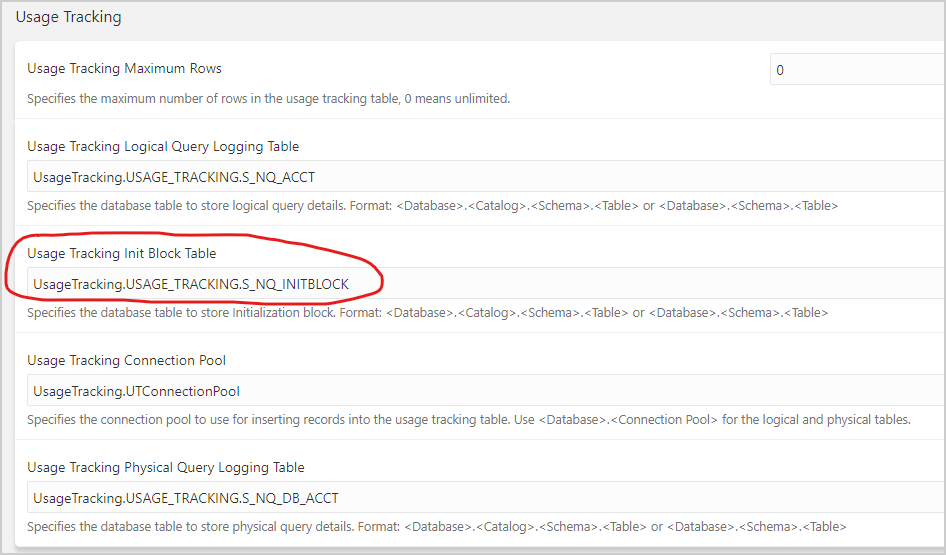
Once the initial round of optimizations is complete, enable usage tracking for initialization blocks to understand their performance better.
Table names for usage tracking in Oracle Business Intelligence Enterprise Edition (OBIEE) are used in this article. The actual names can be anything, but they should identify each table’s contents, such as PHYSICAL, LOGICAL, or INITBLOCK.
Enable usage tracking in the System Settings. Restart the Business Intelligence (BI) Server to start usage tracking.
Monitor initialization blocks
After enabling usage tracking, log in to Oracle Analytics. All session variable initialization blocks not deferred run at login and populate the initialization block usage tracking table.
Log in to SQL Developer, SQL*Plus, or another SQL entry tool.
Run the following query against the initialization block usage tracking table using a SESSION_ID obtained from a session log (for example, -1883570176).
SELECT USER_NAME, SESSION_ID, BLOCK_NAME,
TO_CHAR(START_TS,'DD-MM-YYYY HH24:MI:SS') START_TIME,
TO_CHAR(END_TS,'DD-MM-YYYY HH24:MI:SS') END_TIME
FROM USAGE_TRACKING.S_NQ_INITBLOCK
WHERE SESSION_ID = -1883570176
ORDER BY SESSION_ID, START_TS, END_TS
Don’t filter using the USER_NAME. Instead, note the START_TIME and a USER_NAME of a row from a session log that you’re interested in.
Filter the query using the SESSION_ID associated with the USER_NAME and optionally, the START_TIME.
This query result looks like this:
| USER_NAME | SESSION_ID | BLOCK_NAME | START_TS | END_TS |
| DBCooper | -1883570176 | SIGNNING ON | 11/14/22 16:40:25 | 11/14/22 16:40:37 |
| DBCooper | -1883570176 | SIGNED ON | 11/14/22 16:40:25 | 11/14/22 16:40:37 |
| BISystemUser | -1883570176 | Get_S_YEAR_PREVIOUS_MTH | 11/14/22 16:40:37 | 11/14/22 16:40:37 |
| BISystemUser | -1883570176 | Verify ORCL DSN | 11/14/22 16:40:37 | 11/14/22 16:40:37 |
| BISystemUser | -1883570176 | get_DATES | 11/14/22 16:40:37 | 11/14/22 16:40:37 |
| BISystemUser | -1883570176 | get_HR_JOB_NAME | 11/14/22 16:40:37 | 11/14/22 16:40:37 |
| BISystemUser | -1883570176 | get_IRIS_USER | 11/14/22 16:40:37 | 11/14/22 16:40:37 |
| BISystemUser | -1883570176 | get_MIF_USER | 11/14/22 16:40:37 | 11/14/22 16:40:37 |
| BISystemUser | -1883570176 | get_HISTP_USER | 11/14/22 16:40:37 | 11/14/22 16:40:37 |
| BISystemUser | -1883570176 | get_RAPID_USER | 11/14/22 16:40:37 | 11/14/22 16:40:37 |
| BISystemUser | -1883570176 | get_EPRODR_USER | 11/14/22 16:40:37 | 11/14/22 16:40:37 |
| DBCooper | -1883570176 | get_PROSP_USER_LEVEL | 11/14/22 16:41:12 | 11/14/22 16:41:12 |
| DBCooper | -1883570176 | SIGNED OFF | 11/14/22 16:40:25 | 11/14/22 17:01:42 |
Usage tracking for initialization blocks makes the following three system calls during a user session:
- SIGNING ON
- SIGNED ON
- SIGNED OFF
If you’re not investigating specific login problems, ignore the three blocks named SIGNING ON, SIGNED ON, and SIGNED OFF.
SESSION_ID can be a negative number.
There are two different USER_NAME values for the same SESSION_ID; BISystemUser and the actual user name.
Initialization blocks can be specified as deferred. These run as needed using the original user name.
All session variable initialization blocks not deferred run at login and populate the initialization block usage tracking table. They run using the BISystemUser user name.
The table above shows that the SIGNING ON and SIGNED ON calls take 12 seconds. Then the SIGNED OFF call shows that the user logged off after 21 minutes of activity. Administrators can see exactly how long things are taking and where corrective action is needed.
Tune initialization blocks in Oracle Analytics Server (OAS)
This section applies to Oracle Analytics Server (OAS) only.
A significant change to Oracle Analytics in 2022 is that session variable initialization blocks are run in parallel.
The NUM_INIT_BLOCK_THREADS_PER_USER parameter governs the number of initialization block threads that can run in parallel.
It’s defined in the SECURITY section of the NQSCONFIG.INI file, as shown in this example:
NUM_INIT_BLOCK_THREADS_PER_USER = 4;
NUM_INIT_BLOCK_THREADS_PER_USER specifies the number of parallel threads used to run initialization blocks for a user. The default value is 4, sufficient if the initialization blocks are optimized. Increase the NUM_INIT_BLOCK_THREADS_PER_USER value to 8 and restart the BI Server if session variable initialization blocks take longer than expected.
The maximum value is 16.
Call to action
Be sure to optimize initialization blocks for all Oracle Analytics instances to provide the best login and visualization experience. Once optimized, initialization block usage tracking can assist in pinpointing bottlenecks in your instances.
For additional information on usage tracking, refer here for OAC and here for OAS.
For OAS, more information about the NQSCONFIG.INI settings can be found here.
To learn more about Oracle Analytics, visit oracle.com/analytics, follow us on twitter@OracleAnalytics, and connect with us on LinkedIn.