

Learn how to collect, enrich, validate, and load OCI cost reports for analysis in Oracle Analytics Cloud.
Part 1 of a three-part series
Accurate cost decisions depend on a dependable data foundation. Oracle Cloud Infrastructure (OCI) cost reports provide detailed consumption records, but teams often need business context such as ownership, application, and environment to investigate changes. This article describes a sample pipeline that collects, enriches, validates, and loads reports into Oracle Autonomous AI Lakehouse for analysis in Oracle Analytics Cloud (OAC).
Use a governed source for cost reports
OCI Cost Analysis provides built-in cost visualization and reporting. The sample pipeline described in this article doesn’t replace Cost Analysis. Instead, it makes enriched business dimensions, such as accountable owner, application, and environment, available for analysis in OAC.
OCI cost reports, including FinOps Open Cost and Usage Specification (FOCUS) reports, are stored in an Oracle-managed Object Storage bucket in your tenancy’s home region. Review the OCI Cost Reports documentation for access requirements and report details.
Before you deploy the sample pipeline code, ensure that the service user has the required IAM policy to read the reports. Open the navigation menu and select Billing & Cost Management. Under Cost Management, select Cost and Usage Reports.
Oracle recommends you design the downstream solution as a regularly refreshed analytical pipeline rather than a real-time stream.
Design a reliable sample pipeline
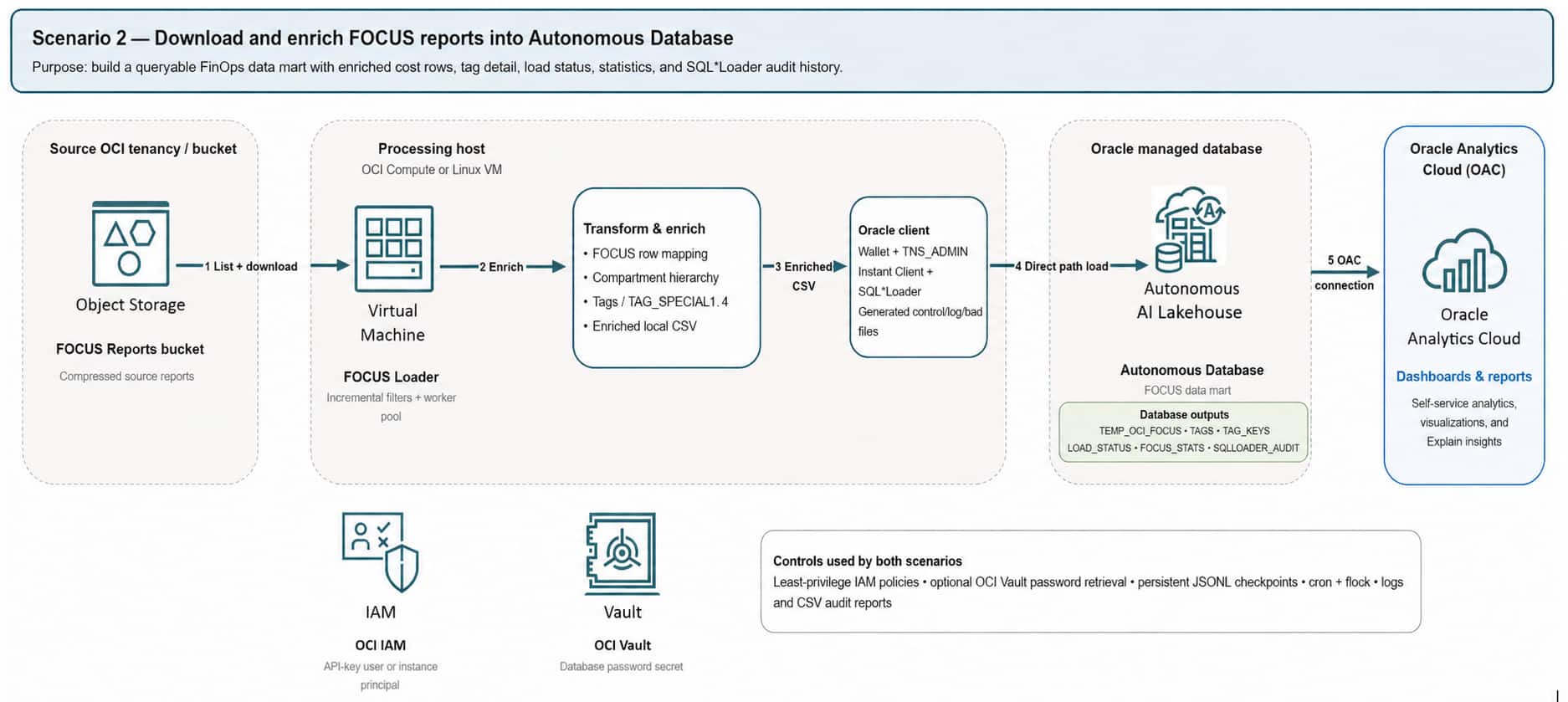
Figure 1 illustrates the sample pipeline pattern. FOCUS reports are collected from Object Storage, processed by a custom extract, transform, and load (ETL) process, enriched with operational context, and loaded into Oracle Autonomous AI Lakehouse. OAC then queries the curated data.
The ETL process in this article is a custom sample, not an Oracle product feature. Before production use, assess its ownership, security controls, licensing, support model, and operational fit.
Apply five operational controls
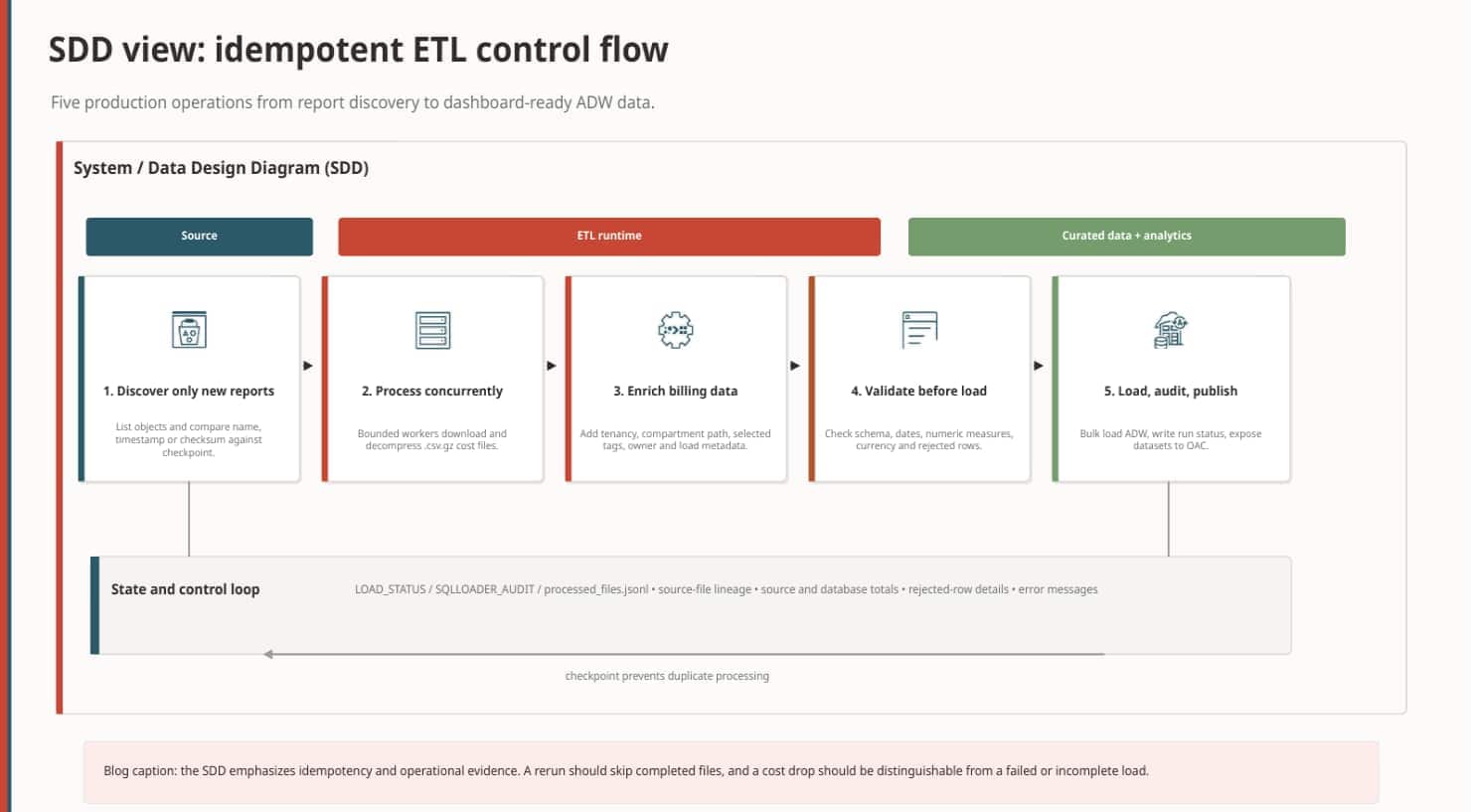
A production pipeline performs five core operations.
1. Discover only new reports
List the available report objects and compare them with a persistent checkpoint or load-audit table. Each file must have a unique identifier, such as its object name, creation timestamp, checksum, or a combination of these values. This makes the process idempotent: rerunning the job doesn’t create duplicate cost records. A historical start date is useful for the first load; subsequent executions process only files that didn’t complete successfully.
2. Process files concurrently
Cost history becomes large quickly when several tenancies are included. A configurable worker pool reduces the time required for backfills and scheduled refreshes. Control concurrency: the objective is to balance Object Storage throughput, CPU (Central Processing Unit) and memory use, database loading capacity, and operational predictability rather than to start as many workers as possible.
3. Enrich the billing data
Raw reports contain identifiers that are technically accurate but difficult for business users to interpret. Before loading Oracle Autonomous AI Lakehouse, enrich each record with tenancy and compartment display names, the complete compartment hierarchy, selected tags, application or environment labels, accountable owner, tagged-versus-untagged status, source file, and load timestamp. This enrichment is the foundation of allocation and accountability.
4. Validate before loading
Validate file structure, data types, values, and rejected rows, then reconcile loaded totals with OCI Billing and Cost Management. Because the sample pipeline code is experimental, testing, least-privilege access, backups, and reconciliation remain essential.
5. Load, audit, and publish status
After validation, bulk load the data into Oracle Autonomous AI Lakehouse and record the source file, start and completion time, rows read, rows loaded, rows rejected, processing status, error details, source cost total, and database cost total. This history makes it possible to distinguish a genuine cost drop from a failed or incomplete load.
Prepare for monitoring
The curated model retains both cost values and load-status metadata. This makes it easier to distinguish a genuine consumption change from an incomplete or failed load. See the Oracle Analytics Cloud documentation to learn more about connecting data and building visualizations.
Continue to Part 2
Next, use this foundation to monitor OCI consumption in Oracle Analytics Cloud. Continue to Part 2: Monitor OCI consumption in Oracle Analytics Cloud to build the dashboard workflow.