
Enterprise data teams need to build reliable data products while supporting a growing mix of analytics engines, AI workloads, and operational requirements. Traditional data lake tables can make this difficult as concurrent updates might be complex, schema changes can be disruptive, and moving or copying data between platforms creates avoidable overhead.
Oracle AI Data Platform now supports Apache Iceberg tables, extending its data management capabilities with an open table format designed for these requirements. With ACID transactions, snapshots, schema evolution, and scalable metadata management, Iceberg helps teams build trustworthy data products that can serve analytics and AI workloads over time. Managed and external Iceberg tables bring these capabilities into a governed AI Data Platform environment for creating, operating, and sharing data products across the enterprise.
Why Iceberg?
Modern data products must do more than store large volumes of data. They need to support reliable concurrent updates, reproducible analysis, evolving business requirements, and access from more than one analytics or AI environment.
Apache Iceberg is an open table format that defines how data files, table metadata, and changes are organized in data-lake storage. In Oracle AI Data Platform, Iceberg tables bring database-like reliability to this storage layer. ACID transactions make inserts, updates, deletes, and merges atomic, while snapshot isolation ensures readers see a consistent version of a table even as pipelines write new data.
Each committed change creates a snapshot of the table. Teams can query a specific historical version to reproduce an analysis, investigate data-quality issues, compare results over time, or restore a table to a known-good state. Iceberg also scales through metadata designed for large tables, hidden partitioning, and maintenance operations that keep file layout efficient as data and workloads grow.
Why Iceberg alongside Delta Lake?
Apache Iceberg and Delta Lake are open table formats for large scale data storage in data lake and lakehouse architectures. Both provide ACID transactions, schema evolution, version history, and time travel, helping teams manage reliable tables at scale. The important distinction is not the core capabilities, but the environments and access patterns each format was designed to support.
Apache Iceberg uses a metadata architecture based on snapshots and manifest files. This enables engines to identify the files relevant to a query efficiently, supports schema and partition evolution, and helps the same table remain usable across multiple processing environments. Its design is well suited to open data products that must serve a distributed analytics and AI estate.
Delta Lake records table changes through a transaction log and checkpoints. It is deeply established in Spark-centered environments, where teams benefit from mature Delta-based pipelines. Delta Lake has expanded its interoperability, but its strongest native experience remains within the Spark ecosystem.
| Use cases | Data format |
| Cross-platform analytics requiring a common, open table format | Apache Iceberg |
| Data products accessed through AI Data Platform and Autonomous Database | Apache Iceberg |
| Long-lived data products that require portable access and evolving partition strategies | Apache Iceberg |
| Existing Spark-centered pipelines, analytics, and operational practices | Delta Lake |
| Workloads already standardized on Delta-native governance and engineering tooling | Delta Lake |
Iceberg adds an open-table option for data products intended to operate beyond a single processing environment. AI Data Platform can use Iceberg for managed or external tables, while the same data product can remain accessible to compatible engines and services, including Autonomous Database. Delta Lake can continue to support established workloads where it is already the operational standard. Iceberg extends the architecture for workloads where cross-platform reuse and open access are central requirements.
The key takeaway is that the two formats can coexist. The table format should reflect the data product’s intended consumers and operating environment.
AI and Analytics Use Cases
AI Data Platform enables teams to build governed data products for analytics, data science, machine learning, and AI applications. Analysts can work with curated customer, product, financial, and operational data, while data scientists can develop training, and feature datasets and AI applications can use approved business data to provide relevant, traceable responses.
For example, a service agent can retrieve order, product, and account context. A finance agent can analyze approved business data to explain variances, and an analytics copilot can answer questions using curated enterprise tables. These experiences depend on trusted data products with well-defined schemas, controlled change, and appropriate governance.
Iceberg is one table-format option for implementing these data products in AI Data Platform. Its particular value is in scenarios where the same data product is accessed from multiple processing engines. An Iceberg table created or managed in AI Data Platform can support data engineering, analytics, and AI workloads while also being made available to compatible engines and services, such as Autonomous Database through supported integrations.
This allows teams to build the data product once and reuse it across multiple consumers without making a separate copy for each environment. Iceberg extends the AI and analytics use cases with an open, cross-platform table format for workloads that require that level of interoperability.
Creating Managed and External Iceberg Tables
AI Data Platform supports two ways to work with Apache Iceberg tables:
- create a new managed table for data products built in AI Data Platform
- register an existing Iceberg table as an external table
A managed Iceberg table is the right choice when AI Data Platform is the primary environment for creating and maintaining the data product. Teams can create the table in a standard catalog schema using SQL or the AI Data Platform interface, define its columns and partitioning strategy, and then load data through inserts, merges, or pipelines. AI Data Platform manages the table definition and its underlying data lifecycle, making managed tables well suited to curated bronze, silver, and gold datasets.
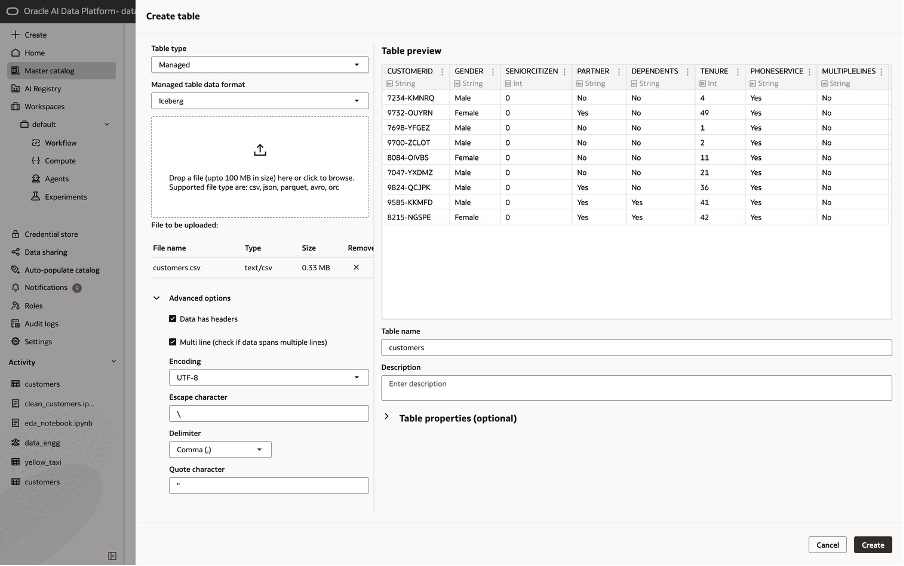
External Iceberg tables are designed for data that already exists outside AI Data Platform. Rather than copying that data into a new location, teams register the existing Iceberg table and work with it through AI Data Platform. This is valuable when Iceberg data is already maintained by another engine or platform and must remain available to multiple consumers. The table stays in its established storage location while AI Data Platform provides a governed path for discovery, querying, transformation, and downstream use.
The difference is especially important for lifecycle management. Dropping a managed table removes both its definition and managed data. Dropping an external table removes the AI Data Platform table definition but leaves the underlying source data intact. Teams should choose deliberately between managed tables for AI Data Platform owned data products and external tables for shared or independently operated Iceberg datasets.
Once created or registered, both table types support familiar SQL operations, including inserts, updates, deletes, merges, schema changes, and snapshot-based queries. Appropriate catalog and schema permissions ensure that only authorized users can create, modify, or consume these data products.
Building Incremental Data Pipelines
Data products lose value when refresh processes are slow, fragile, or require full-table rebuilds. Iceberg enables incremental pipelines that apply only new or changed data while maintaining a consistent, queryable table for downstream users.
In AI Data Platform, teams can use INSERT, UPDATE, DELETE, and MERGE operations to load new records and apply corrections to existing ones. For example, an order pipeline can merge new orders and status changes into a curated table, while a customer pipeline can update account attributes as source systems change. Because each write is committed atomically, readers continue to see either the earlier consistent version or the newly committed version, not a partially updated table.
This model supports common engineering patterns:
- Change data capture: Apply inserts, updates, and deletes from operational systems as they arrive.
- Micro-batch ingestion: Process periodic files or events without rebuilding historical data.
- Upserts into curated tables: Merge source changes into customer, product, inventory, or financial data products.
For high-volume workloads, pipeline design should include table maintenance. Small files and growing metadata can reduce query efficiency over time, so teams can use Iceberg maintenance procedures to rewrite data files and manifests. This separates data freshness from physical optimization: pipelines can commit changes quickly, while compaction and metadata maintenance run on an appropriate schedule. The result is a more reliable operating model for data engineering. Pipelines can continuously improve a shared data product, analytics teams can query stable snapshots, and AI applications can use a current, governed data foundation without waiting for a full refresh cycle.
Evolving Data Without Disruption
Business data rarely stands still. New products introduce new attributes, regulatory requirements change, source systems are modernized, and analytics teams need different ways to organize the same information. In traditional data lakes, these changes can trigger expensive rewrites, brittle pipeline updates, or disruptive downstream failures.
Iceberg separates a table’s logical schema from its physical data files. This enables teams to add, drop, rename, reorder, and update column types without routinely rewriting the table. Column identity is preserved independently of position, so a renamed column remains the same logical field rather than becoming a new, disconnected attribute.
In AI Data Platform, teams can use ALTER TABLE operations to evolve an Iceberg table as requirements change. For example, a customer data product can add consent preferences, rename a legacy account field, or introduce a more precise data type while continuing to serve existing data and downstream workloads.
Schema evolution should still be governed. Data owners should assess how a change affects dashboards, pipelines, models, and AI applications, communicate breaking changes, and validate updates against representative workloads. Iceberg reduces the operational cost of evolution, but it does not remove the need for good data-product ownership. The result is a more adaptable foundation for enterprise data. Teams can improve the data product over time without treating every schema change as a migration project or forcing consumers to wait for a full table rebuild.
Optimizing Iceberg Table Performance
Iceberg tables are designed to scale, but performance still depends on how data is written, organized, and maintained. As tables grow, frequent incremental writes can create many small files and expanding metadata. Without maintenance, this can increase planning time, reduce scan efficiency, and raise the cost of analytical workloads.
In AI Data Platform, teams can optimize Iceberg tables by managing file size, data distribution, and metadata. During writes, properties such as target file size and hash-based write distribution can help produce files that are better suited to parallel processing. Partitioning should reflect common query patterns. For example, use time-based partitions for event data or a business dimension that consistently narrows large queries, while avoiding excessive numbers of small partitions.
Iceberg maintenance procedures provide the operational tools to keep tables healthy:
- rewrite_data_files compacts small files or reorganizes data files to improve scan efficiency.
- rewrite_manifests consolidates metadata files to improve query planning as a table evolves.
- Table properties can define defaults for file format, target file size, and write distribution.
These operations should run on a schedule that matches the workload. A high volume streaming or micro-batch table may need frequent compaction, while a periodically refreshed analytical table may only require maintenance after larger loads. Teams should also separate ingestion from optimization where possible.
Performance tuning is iterative. Monitor data volume, file counts, query latency, and workload concurrency; then adjust partitioning, write settings, and maintenance schedules as usage changes. With this discipline, Iceberg tables can remain efficient for large-scale analytics, feature engineering, and AI applications as both data and demand grow.
Time Travel, Rollback, and Data Retention
Every successful Iceberg write creates a new table snapshot. These snapshots provide a durable record of how a data product changed over time, giving teams the ability to query earlier versions, recover from bad writes, and manage historical data deliberately.
In AI Data Platform, time-travel queries allow users to read a table as it existed at a specific snapshot or point in time. This is useful when validating a report, reproducing a model-training dataset, investigating a data-quality incident, or explaining why an analytical result changed. Rather than relying on a separate backup copy, teams can refer to the version of the table that was actually used.
Rollback extends this capability into recovery. If an incorrect merge, faulty pipeline run, or unintended update reaches a table, an authorized operator can restore the table to a previous known good snapshot. This shortens recovery time and reduces the operational risk of incremental pipelines.
Snapshots should be retained intentionally. Keeping more history improves auditability and recovery options, but it also increases metadata and storage overhead. Iceberg supports snapshot-expiration procedures so teams can apply retention policies that reflect the value and sensitivity of the data product. For example, retaining longer history for regulated financial data and a shorter window for high-volume operational event data.
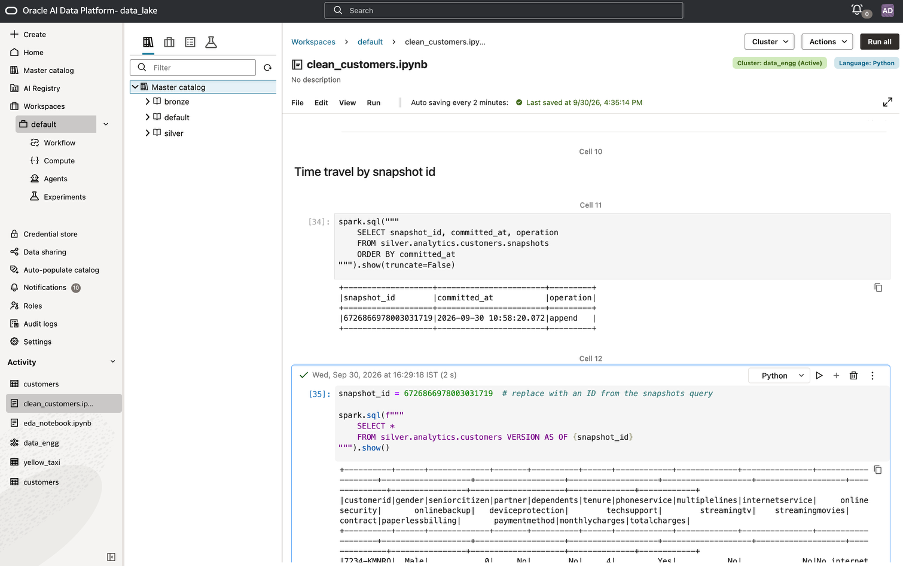
A practical operating model is to define retention requirements alongside the table itself: how long historical versions must remain available, who can run rollback or expiration operations, and how those choices affect downstream reports, models, and AI applications. With a clear policy, snapshots become a governed foundation for reproducibility and resilience rather than an unmanaged accumulation of historical files.
You can find sample code for time travel, roll back, and retention here.
Integrating AI Data Platform Iceberg Tables with Autonomous Database
Apache Iceberg makes it possible to share a data product from AI Data Platform to Autonomous Database without first creating a database specific copy of the data set. Autonomous Database can register an Iceberg table from AI Data Platform as an external table and query the same table metadata and data files.
This pattern is useful when AI Data Platform performs data engineering, transformation, and data preparation, while Autonomous Database provides SQL access for database users, applications, or reporting workloads. Iceberg remains the shared table format, each platform accesses the governed data product through its own compute and query environment.
To register the Iceberg table in Autonomous Database, create an OCI credential with permission to read the Object Storage location, then use DBMS_CLOUD.CREATE_EXTERNAL_TABLE. Refer to the code snippet below to understand how to create an external table in Autonomous Database, replace the placeholders with values for your environment:
BEGIN
  DBMS_CLOUD.CREATE_EXTERNAL_TABLE (
    table_name      => '<ADW_EXTERNAL_TABLE_NAME>',
    credential_name => '<OCI_CREDENTIAL_NAME>',
    format          => '{
      "access_protocol": {
        "protocol_type": "iceberg",
        "protocol_config": {
          "iceberg_catalog_type": "hadoop",
          "iceberg_warehouse": "https://objectstorage.<REGION>.oraclecloud.com/n/<NAMESPACE>/b/<BUCKET>/o/<WAREHOUSE_FOLDER>",
          "iceberg_table_path": "<ICEBERG_NAMESPACE>.<ICEBERG_TABLE_NAME>"
        }
      }
    }'
  );
END;
/
In this example:
- <ADW_EXTERNAL_TABLE_NAME> is the name exposed to SQL users in Autonomous Database.
- <OCI_CREDENTIAL_NAME> is the database credential authorized to access the Iceberg warehouse.
- <WAREHOUSE_FOLDER> is the Hadoop catalog warehouse location in OCI Object Storage.
- <ICEBERG_NAMESPACE>.<ICEBERG_TABLE_NAME> identifies the Iceberg table within that warehouse.
Finding the Hadoop Catalog Location and Iceberg Table Path
To register an AI Data Platform Iceberg table in Autonomous Database, first obtain the Hadoop catalog warehouse location and the Iceberg table path from AI Data Platform and OCI Object Storage.
- In AI Data Platform, open the Iceberg table and view Table details to identify its managed location.
- In OCI Object Storage, browse the catalog-managed object tree to the table metadata file:
<catalog>.cat/<schema>.db/<table>/metadata/version-hint.text
- Open the Actions for
version-hint.textand select View Object Details. Copy its object URL, then retain only the URI up to and including the.catobject. Use that value asiceberg_warehouse. Do not use the fullversion-hint.textURL as the warehouse location. - Construct iceberg_table_path from the AI Data Platform schema and table name. In Object Storage, the schema is represented as:
<schema_name>.db
The period in .db must be URL-encoded as %2E. For example, the AI Data Platform schema named analytics becomes analytics%2Edb. Append the table name after an unencoded period.
For an AI Data Platform table named customers in the analytics schema, the configuration is:
“iceberg_warehouse”: “https://objectstorage.<REGION>.oraclecloud.com/n/<NAMESPACE>/b/<BUCKET>/o/<CATALOG_ID>.cat”,
“iceberg_table_path”: “analytics%2Edb.customers”
In this example, analytics%2Edb represents the Object Storage schema path analytics.db, and customers is the Iceberg table name. Use the exact .cat URI and encoded table path shown in the catalog-managed Object Storage location.
After registration, users can query the table with standard SQL:
SELECT *
FROM <ADW_EXTERNAL_TABLE_NAME>
FETCH FIRST 100 ROWS ONLY;
This creates a useful division of responsibility: AI Data Platform can build and maintain open Iceberg data products, while Autonomous Database can make those products available to SQL consumers without an additional ingestion pipeline. Teams should ensure the database credential, Object Storage permissions, and Iceberg warehouse path are governed consistently across both environments.
Conclusion: Build Once, Use Everywhere
Apache Iceberg gives organizations an open, reliable foundation for data products that must serve analytics, AI, and operational consumers over time. In AI Data Platform, managed and external Iceberg tables combine ACID transactions, snapshots, incremental processing, schema evolution, and performance maintenance in a governed environment.
Teams can create new data products in AI Data Platform, extend existing Iceberg datasets without unnecessary duplication, and share the same open tables with platforms such as Autonomous Database. This reduces the friction between data engineering, analytics, and AI development while preserving the flexibility to use the right compute engine for each workload. The result is a more durable data architecture: data products remain trustworthy as they evolve, recoverable when issues occur, and reusable across the enterprise.