
Introduction: Why external data matters
Modern data ecosystems are inherently distributed. Critical business data no longer resides in a single system, it spans transactional databases, cloud data lakes, data warehouses, and a growing number of SaaS platforms. While this diversity enables flexibility and scale, it also introduces a fundamental challenge: data fragmentation.
Teams often find themselves navigating multiple tools, credentials, and interfaces just to access the data they need. Analysts switch between query engines, data scientists duplicate datasets into isolated environments, and engineers build custom pipelines to bridge gaps between systems. This not only slows down development but also leads to inconsistencies, governance risks, and increased operational overhead.
What organizations increasingly need is not another data store, but a unified way to access and work with data. No matter where it lives.
This is where AI Data Platform comes in. It provides a cohesive environment that brings external data directly into the workflow. By integrating external catalogs, data from different sources by using connectors, secure credential management, and interactive workspaces, AI Data Platform enables teams to seamlessly discover, query, and analyze data across systems from a single interface.
The result is a more streamlined, secure, and productive data experience, one that allows teams to focus less on where the data is, and more on what they can do with it.
What is AI Data Platform?
AI Data Platform is an integrated environment designed to simplify how teams work with data across the entire lifecycle, from exploration and analysis to model development and operational workflows. It brings together data access, compute, and tooling into a single, cohesive interface so that data practitioners don’t have to constantly switch contexts.
At its core, the AI Data Platform focuses on enabling:
- Unified data access across multiple sources
- Interactive development environments, such as notebooks, for analysis and experimentation
- Centralized data discovery and organization through cataloging capabilities
- Secure and governed access to data using built-in credential and access management
- Seamless querying and data operations without requiring complex data movement
Rather than acting as just another data tool, AI Data Platform serves as a control plane for working with data wherever it resides. This is where external data integration becomes essential.
External data integration is not an add-on, it is a foundational capability. By allowing users to connect to, explore, extract and operate on data in external systems directly from AI Data Platform’s workbench, the platform reduces friction in accessing distributed datasets. This ensures that teams can work with the most current data, maintain governance, and accelerate development workflows—all within a single environment.
Architecture for external data integration
At a high level, external data integration in AI Data Platform follows a streamlined flow that connects disparate data sources into a unified, interactive experience.
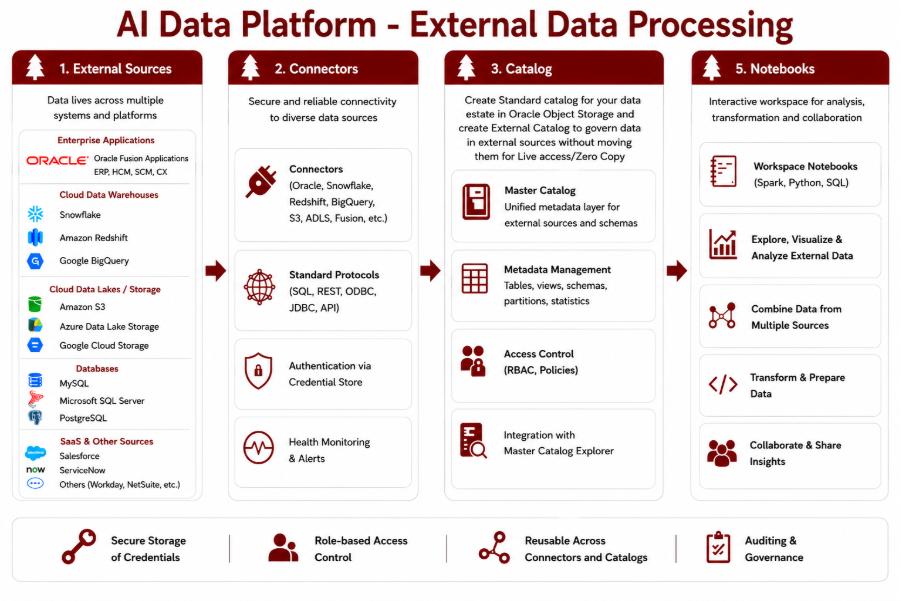
Each layer in this flow plays a specific role in abstracting complexity and enabling seamless data access:
- External Sources: These are the systems where data physically resides, such as relational databases, cloud object stores, data warehouses, and SaaS platforms.
- Connectors: Connectors act as the bridge between AI Data Platform and external systems. They handle the underlying protocols, authentication mechanisms, and connectivity details, allowing users to interact with diverse data sources in a consistent way.
- Catalogs: Data can either be ingested into AI Data Platform and cataloged in standard catalogs, or accessed in place with zero copy through external catalogs. These catalogs provide a structured metadata layer that makes datasets discoverable and easier to understand. Instead of interacting with raw endpoints, users work with well-defined schemas, tables, and objects.
- Notebooks: At the top of the stack, workspace notebooks provide an interactive environment for analysis, transformation, and experimentation. Users can combine data from multiple external sources, visualize results, and build workflows, all within a single interface.
Together, these components create a cohesive architecture that allows users to move from ingestion to insight without friction. In the following sections, we’ll explore each of these components in more detail and see how they come together in real-world workflows.
Connecting to external data sources
AI Data Platform provides multiple ways to work with external data, but it’s important to clearly distinguish between data ingestion and in-place access via external catalogs (using zero copy). These are complementary capabilities, not interchangeable ones.
Connectors for data ingestion
For data engineering workflows, AI Data Platforms supports a rich set of ingestion connectors that are used to bring data into the platform for processing, transformation, and downstream use.
These connectors support a wide variety of sources, including:
- Oracle ecosystem sources (such as Autonomous Transaction Processing, Autonomous AI Lakehouse, Oracle database, Oracle Exadata)
- External databases via JDBC (Hive, Microsoft SQL Server, MySQL, PostgreSQL)
- Read data from excel
- Ingest data from custom JDBC, refer sample here
- Read data from streaming data sources like OCI Streaming
- YAML based ingestion
Through the ingestion framework, users can:
- Define ingestion pipelines using configuration-driven approaches (e.g., YAML-based ingestion)
- Support both read-only and read-write connectors
- Handle batch, streaming, and multi-cloud ingestion scenarios
- Integrate with Oracle ecosystem services as well as external systems
The key idea here is data movement; these connectors are designed to bring external data into AI Data Platform for further processing.
External catalogs
In contrast, external catalogs are designed for querying data where it already resides, without moving it into the platform.
An external catalog represents metadata for data stored in external systems such as:
- Oracle Autonomous AI Database
- Oracle Autonomous Transaction Processing
- Oracle Autonomous AI Lakehouse
- Oracle Database
- Oracle Exadata
Once configured, the catalog allows users to:
- Discover schemas, tables, and objects as catalog entries
- Run SQL queries
- Access only the data they are authorized to see
It’s important to note:
- External catalogs provide a logical abstraction layer, not a data ingestion mechanism
- They rely on connection details provided during catalog setup
In short, external catalogs enable federated access, while ingestion connectors enable data movement.
Credential store
When working with external data sources, one of the most critical concerns is how to securely manage access credentials. Hardcoding usernames, passwords, or tokens in notebooks and pipelines is not only risky but also difficult to manage at scale. This is where the Credential Store in AI Data Platform becomes essential.
The Credential Store provides a centralized and secure way to store credentials such as API tokens, database passwords, and access keys. Instead of embedding sensitive information directly in code, users can store these secrets once and reference them when needed.
This is particularly valuable for data ingestion use cases:
- When extracting data from systems like Fusion, external databases, or APIs, credentials are required to authenticate each request
- By storing these credentials in the Credential Store, users can retrieve them securely at runtime within notebooks or pipelines
- This enables seamless integration with external systems without exposing sensitive information
Beyond security, the Credential Store also improves usability:
- Reusability: The same credential can be used across multiple notebooks, ingestion jobs, or workflows
- Consistency: Teams follow a standardized approach to accessing external systems
- Governance: Access to credentials is controlled through permissions, ensuring only authorized users can use them
In essence, the Credential Store decouples security from implementation, allowing users to focus on extracting and working with data while the platform handles safe and governed access to external systems.
Putting it together
AI Data Platform offers a flexible model for working with external data:
- Ingestion connectors helps bring data into the platform
- External catalogs enables users to query data in place
This separation of concerns allows teams to choose the right approach based on their use case: whether they need to move data for processing or access it directly where it lives, all while maintaining security and governance.
Now let us see this in action with an example. Below is a sample code with placeholders to extract data from Fusion and the credentials are retrieved from credential store.
# Retrieve secrets from your workspace's credential mechanism
fusion_user = aidputils.secrets.get(name=<<cred_name>>, key="key_name")

fusion_password = aidputils.secrets.get(name=<<cred_name>>, key="key_name")

# Fusion extract via the built-in AI Data Platform connector

fusion_df = spark.read.format("aidataplatform") \
    .option("type", "FUSION_BICC") \
    .option("fusion.service.url", "<FUSION_SERVICE_URL>") \
    .option("user.name", fusion_user) \
    .option("password", fusion_password) \
    .option("schema", "<OFFERING_NAME>") \
    .option("fusion.external.storage", "<EXTERNAL_STORAGE_NAME>") \
    .option("datastore", "<PVO_NAME>") \
    .load()

fusion_df.show()
where:
- fusion.service.url = Fusion Apps service URL or hostname
- Schema = BICC offering
- fusion.external.storage = External storage configured in BICC
- Datastore = Fully qualified datastore name to extract.
Once the data is read from the source, users can apply transformation logic in spark and write the data into a standard catalog or external catalog of choice using the 3-part namespace as shown below:
fusion_df.write.saveAsTable("<CATALOG_ID>.<SCHEMA>.<TARGET_TABLE_NAME>") Security and governance considerations
As AI Data Platform enables access to data across multiple external systems, security and governance are built into every layer of the experience: from how users authenticate to what data they can see and operate on.
Role-based access
Access within AI Data Platform is governed through role-based access control (RBAC). Permissions are enforced at multiple levels:
- Credential access: Only authorized users can retrieve or use stored secrets
- Catalog visibility: Users see and access only the schemas and tables they are permitted to access
- Notebook and workspace actions: Execution and modification rights are controlled based on access control policies
This ensures that users interact only with the data and resources relevant to their responsibilities.
Credential isolation
The Credential Store enforces strong isolation of sensitive information:
- Credentials (tokens, passwords, keys) are securely stored and not hardcoded in notebooks or pipelines
- Access to credentials is explicitly granted, preventing unintended exposure
- Different teams or projects can maintain separate credentials for the same external system, ensuring isolation across environments
This design minimizes the risk of credential leakage while enabling safe reuse across workflows.
Auditability
AI Data Platform provides auditability for critical operations, particularly around credential usage and access:
- Tracking of who accessed or modified credentials
- Visibility into when and how credentials are used in workflows
This is essential for compliance, troubleshooting, and maintaining trust in shared environments.
Data access boundaries
When working with external data, AI Data Platform respects source-level access controls:
- External catalogs expose only the schemas and tables a user is authorized to access
- Queries are executed within the permissions defined in the source system
This ensures that data access policies are not redefined in multiple places, reducing the risk of inconsistencies.
Together, these capabilities ensure that while AI Data Platform Workbench simplifies access to distributed data, it does so without compromising on security, control, or governance, making it suitable for enterprise-scale data operations.
Benefits and use cases
By bringing external data directly into a unified workbench experience, AI Data Platform enables both efficiency gains and new ways of working with data. The combination of ingestion capabilities, external catalogs, and secure access patterns translates into tangible benefits for data teams.
Faster Onboarding for Data Scientists
AI Data Platform reduces the time it takes for data scientists to start working with real data:
- No need to manually configure multiple connections across tools
- Data is discoverable through catalogs with clear schema visibility
- Notebooks provide an immediate environment for exploration and analysis
This allows new users to move from setup to insight much faster.
Reduced data duplication
With support for both live access to data using zero copy in external catalogs, teams can avoid unnecessary data movement:
- Query external systems directly without replicating datasets
- Ingest data when transformation or persistence is required
- Maintain a single source of truth across systems
This not only reduces storage costs but also minimizes data inconsistency.
Real-Time Analytics on External Systems
External catalogs enable users to run queries directly on live data:
- Access up-to-date data without waiting for ingestion pipelines
- Perform analysis on operational systems where appropriate
- Leverage pushdown capabilities for efficient execution at the source
This makes it possible to build near real-time insights without complex data pipelines.
Cross-team collaboration
AI Data Platform creates a shared environment where different roles can work together seamlessly:
- Data engineers define ingestion pipelines and connectors
- Analysts and data scientists explore data via catalogs and notebooks
- Shared credentials and governed access enable controlled collaboration
By standardizing how data is accessed and used, teams can collaborate without friction while still maintaining clear boundaries.
Together, these benefits position AI Data Platform as a platform that not only simplifies access to distributed data but also accelerates how teams derive value from it.
Best practices
To get the most out of AI Data Platform while maintaining clarity, performance, and governance, it’s important to follow a few practical best practices.
Naming conventions for catalogs
Well-structured naming makes catalogs easier to discover and use across teams:
- Use source-aware naming (e.g., fusion_finance, atp_sales, lakehouse_marketing)
- Include environment context where relevant (e.g., dev, test, prod)
- Keep names consistent and intuitive across teams
- Avoid overly generic names like catalog1 or test_data
A clear naming strategy improves discoverability and reduces confusion as the number of catalogs grows.
Credential management hygiene
Since credentials are centrally managed, good hygiene is critical:
- Never hardcode secrets in notebooks or pipelines
- Use Credential Store for all sensitive information (tokens, passwords, keys)
- Apply least-privilege access, only grant permissions to users for resources that they really need to work with
- Regularly rotate credentials and update dependent workflows
- Use separate credentials per environment or use case where appropriate
This ensures secure, auditable, and maintainable access to external systems.
When to use external catalogs vs ingest data
Choosing between querying data in place and ingesting it into AI Data Platform is a key design decision:
Use External Catalogs when:
- You need real-time or near real-time access
- Data is already governed and managed in the source system
- You want to avoid duplication and storage overhead
- Workloads are primarily read-heavy or light transformations
Use Ingestion when:
- You need complex transformations or joins across multiple sources
- Data needs to be persisted, versioned, or curated
- Performance is critical for repeated workloads
- You are building downstream pipelines, ML features, or training datasets
Following these practices ensures that teams not only use AI Data Platform effectively, but also maintain a balance between performance, security, and scalability as their data ecosystem evolves.
Conclusion
As data continues to be distributed across systems, platforms, and clouds, the challenge is no longer just accessing data, it’s doing so efficiently, securely, and consistently. AI Data Platform addresses this by bringing together ingestion capabilities, external catalogs, and governed access into a single, cohesive experience.
By enabling both data movement (through ingestion connectors) and live access (through external catalogs), the platform gives teams the flexibility to choose the right approach for each use case. Combined with secure credential management and interactive workspaces, this results in faster onboarding, reduced duplication, and more streamlined collaboration.
At its core, AI Data Platform delivers on a simple but powerful idea: unified data access. Instead of navigating multiple tools and systems, users can discover, query, and analyze data, wherever it lives, from one place.
This shift not only simplifies workflows but also empowers teams to focus on what truly matters: deriving insights and building value from data.
For more information
Check out the following resources: