
Introduction, outbound call flow, LiveKit role, and OCI landscape
Introduction
Modern enterprises need conversational AI that meets people where they already are: on the phone, in the browser, and on mobile. For many business workflows, voice is still the fastest way to confirm a delivery, qualify a lead, schedule an appointment, or conduct a structured interview.
The challenge is not creating a chatbot. The real challenge is coordinating live audio, phone networks, AI models, enterprise data, security, and observability without building a fragile one-off integration.
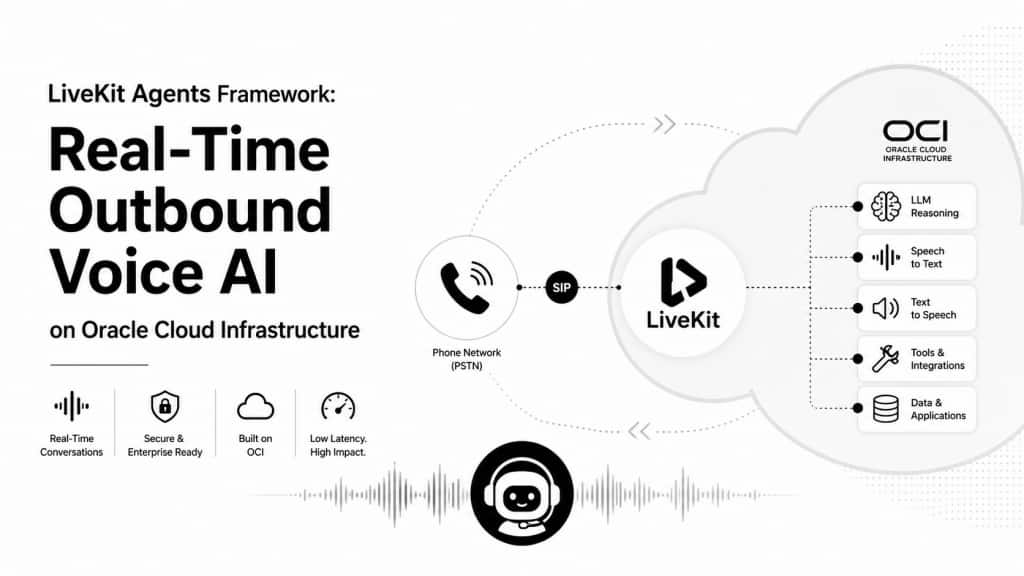
LiveKit’s open-source Agents framework can be self-hosted and used for commercial workloads under its Apache-2.0 license, combined with Oracle Cloud Infrastructure AI services and OCI infrastructure, gives teams a practical way to build and operate real-time voice agents they can own, monitor, and extend. This first section starts with the fundamentals: what happens during an outbound AI phone call, how LiveKit connects the pieces, and how the same framework can be contained inside OCI.
How an Outbound AI Phone Call Works
An outbound AI phone call is a bridge between two worlds. On one side, the customer receives a normal phone call. On the other side, an AI agent joins a real-time LiveKit room, listens to the caller, reasons over the conversation, and speaks back through the same call.
The terms can sound intimidating at first, but the idea is simple: LiveKit keeps the AI agent and the phone caller in the same live audio session.
| Term | Plain meaning |
| WebRTC | A real-time audio and video method used by browsers and apps. |
| SIP | A call-control protocol used by phone systems to start, manage, and end calls. |
| SIP trunk | The configured route or account that lets a system place calls through a phone provider. |
| PSTN | The public phone network behind mobile and landline numbers. |
| Twilio or SIP provider | A carrier platform that connects cloud applications to the public phone network. Twilio is one common example. |
| SIP bridge | The LiveKit telephony layer that connects LiveKit room audio to the phone-network side of the call. |
Outbound Call Flow: Step by Step
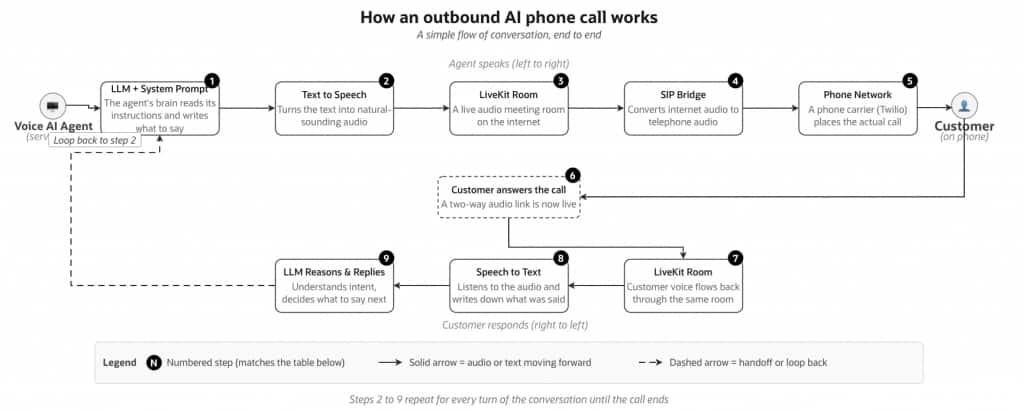
1. LLM prepares the first message: The LLM reads the system prompt, which tells it the agent’s role, goal, and tone. For example, a delivery confirmation agent should greet the customer, ask whether the package arrived, and keep the call short. Based on this, the LLM writes the first message the agent will say.
2. Text to speech creates the agent’s voice: The LLM’s response is still text, so a text-to-speech engine converts it into natural-sounding audio. Modern engines can start streaming the voice within a fraction of a second, allowing the agent to begin speaking without waiting for the full sentence to finish.
3. LiveKit Room carries the live audio: Think of a LiveKit Room as a private online audio room for the call. The AI agent joins this room as a participant and publishes its voice into it, like someone speaking into a microphone. LiveKit then routes that audio to the next part of the call flow.
4. SIP Bridge connects internet audio to phone audio: LiveKit handles audio over the internet, while regular phone networks use SIP. The SIP Bridge translates between these two worlds in real time, so the agent’s voice from the LiveKit Room can travel to a customer’s normal phone call.
5. Phone network rings the customer: The translated audio is handed to a phone carrier, such as Twilio, which connects to the public phone network and dials the customer’s number. From the customer’s point of view, it appears as a normal incoming call with no app or special hardware required.
6. Customer answers and the call becomes live: The customer picks up and a two-way audio link is open. The agent’s voice travels out through steps 2, 3, 4, and 5 to reach them, and the customer’s voice can now travel back the same way in reverse. The call is officially live.
7. Customer voice returns to the LiveKit Room: When the customer speaks, their voice travels back through the phone carrier and SIP Bridge into the same LiveKit Room. The agent is listening there in real time and can immediately pass the audio to the next step.
8. Speech to text captures the customer’s words: The customer’s audio is streamed to a speech-to-text engine, which converts spoken words into text. This can happen while the customer is still speaking, helping the agent understand the reply and prepare the next response quickly.
9. LLM Reasons and Replies: The transcribed words are passed back to the LLM along with the conversation history so far. The LLM decides what to do next. It may simply answer in words, or it may call a tool to look up an order, save a result, or transfer the call. Whatever it decides, the answer flows straight back into step 2 and the loop continues.
Loop to Repeat Steps 2 to 9: Steps 2 through 9 repeats for every turn of the conversation, with the LLM holding the running context. The loop ends when the LLM decides the call is complete the customer hangs up.
The Sequential Voice Pipeline: VAD to STT to LLM to TTS
Once the phone call is live, the AI agent follows a simple but powerful voice pipeline. Each stage has one clear job.
Audio in → VAD → STT → LLM → TTS → Audio out
1. Voice Activity Detection
Voice Activity Detection, or VAD, helps the agent understand when the customer is speaking. It separates real speech from silence, background noise, or short pauses.
When it detects that the customer has started speaking, the audio is passed to the next stage.
A short pause may mean the customer is thinking, not that they have finished speaking enabling careful tuning for real conversations.
2. Speech to Text
The customer’s audio is streamed into an STT engine, which produces a transcript. Modern STT engines can send partial words or phrases while the customer is still speaking. This helps reduce delay because the agent does not need to wait for the full sentence before it starts preparing a response.
3. Large Language Model
It receives the customer’s transcript, the system prompt, the conversation history, and any available tools. Based on this context, it decides what to do next. It may answer directly, ask a follow-up question, look up an order, save a call result, or transfer the call.
4. Text to Speech
The LLM may produce a response, and the TTS engine turns that sentence into natural-sounding voice audio. TTS should stream audio as soon as possible instead of waiting for the full response to be completed.
5. Audio Transport
For browser or mobile experiences, this usually happens through WebRTC. For phone calls, the audio travels through SIP and the telephone network.
How LiveKit Glues the Components Together
A voice agent has many moving parts. One component listens to the customer. Another converts speech to text. The LLM decides what to say next. Text to speech turns that answer into voice. The phone network carries the audio to and from the customer.
Without a coordination layer, this can quickly become a fragile chain of separate services.
LiveKit gives us that coordination layer.
LiveKit connects these moving parts into one live conversation. Instead of treating each component as a separate step that runs in isolation, LiveKit provides the shared real-time space where the customer, the AI agent, and the phone call come together.
For an outbound call, LiveKit uses an outbound SIP trunk to dial the customer and bring the phone call into the LiveKit Room. Once the customer answers, the AI agent and the customer are connected in the same live session. The customer speaks through a normal phone call, while the agent listens and responds through LiveKit.
This is where LiveKit Agents becomes powerful. AgentSession brings the voice pipeline into one operating flow: incoming audio, voice activity detection, speech to text, LLM reasoning, text to speech, interruptions, tool calls, and session events. Instead of writing custom glue code around every service, the application can manage the conversation from a single session layer.
OCI Landscape: LiveKit Framework on OCI
The OCI deployment pattern is straightforward: keep the public edge small and keep the agent runtime private. The LiveKit media entry point and any required load balancer live in a public subnet. Agent workers, tool servers, databases, secrets, and AI-service calls stay in private subnets or managed OCI services.
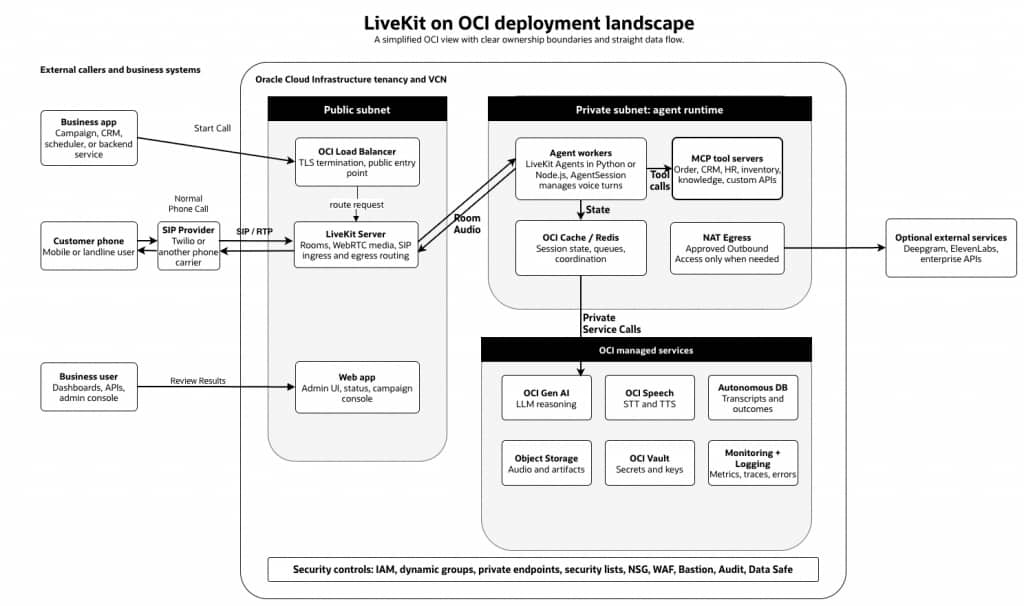
In this landscape, the public subnet handles only the connectivity that must be reachable from outside, such as WebRTC media, SIP connectivity, and TLS entry through an OCI Load Balancer. The private subnet runs the LiveKit agent workers, MCP tool servers, queue or cache services, and any application logic that should not be exposed directly to the internet.
Agent workers call OCI Generative AI for reasoning, OCI Speech for speech services where applicable, Autonomous Database for transcripts and outcomes, Object Storage for recordings and artifacts, and OCI Vault for secrets. Monitoring, Logging, Audit, IAM, network security groups, private endpoints, and Bastion access provide the operational and security controls needed for production deployment.
This approach keeps the LiveKit framework close to OCI AI and enterprise data while still allowing controlled integration with phone providers and optional external AI services when a specific use case requires them.
Read more on the next blog:
https://blogs.oracle.com/ai-and-datascience/livekit-powered-cargo-company-ai-delivery-confirmation-agent↗