

Objective
- Define a reference architecture / landing zone for MCP hosting.
- Develop and validate a fully supported end-to-end blueprint.
- Provide clear customer-facing guidance on recommended patterns, tooling, and security architecture.
Introduction
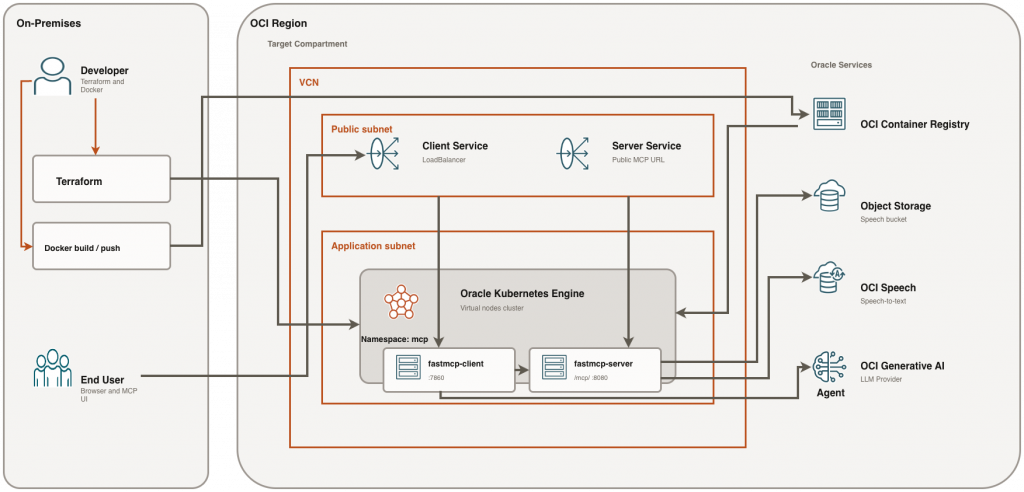
The Model Context Protocol (MCP) provides a standardized way for AI agents to discover and invoke external tools. In this architecture, tools are exposed through an MCP server (for example, an audio-processing server), while a separate MCP client offers an interactive interface to consume those capabilities.
Deploying both the MCP server and client on Oracle Kubernetes Engine (OKE) enables a fully cloud-native, scalable, and operationally efficient setup. By leveraging OCI Container Registry (OCIR) for image management and OKE Virtual Nodes for serverless Kubernetes execution, this approach removes the need to manage worker nodes while maintaining flexibility and isolation between components.
This guide demonstrates how to deploy a self-hosted MCP solution on OKE using Terraform, Docker, OCIR, and Kubernetes manifests. It follows a hands-on, developer-focused approach—starting with architecture and prerequisites, then provisioning infrastructure, building and pushing container images, deploying workloads, and validating endpoints.
The deployment model keeps things simple and practical: both the MCP server and client are exposed via Kubernetes LoadBalancer Services. Once the server endpoint is available, the client is configured with the public MCP URL, enabling seamless interaction between the UI and the tool-serving backend.
Technologies Powering This Solution
- Oracle Kubernetes Engine (OKE) – Managed Kubernetes service: Oracle Cloud Infrastructure’s fully managed, scalable, and highly available Kubernetes service for running containerized workloads. OKE simplifies cluster lifecycle management (provisioning, upgrades, integrations) while providing CNCF-conformant Kubernetes for cloud-native deployments.
- OKE Virtual Nodes – Serverless Kubernetes compute: A managed “serverless” compute option for OKE where pods run on OCI-managed capacity without you provisioning or maintaining worker node VMs. Virtual Nodes reduce operational overhead for node management while still using standard Kubernetes constructs (Deployments, Services, namespaces, etc.).
- OCI Container Registry (OCIR) – Container image storage: OCI’s private container registry for securely storing and distributing Docker/OCI images. OCIR integrates with OCI IAM and Kubernetes image pull secrets, enabling controlled image access and a clean path from build to deployment.
- Terraform – Infrastructure as Code provisioning: An Infrastructure as Code (IaC) tool used to declaratively define, provision, and manage OCI resources (networking, OKE, registry-related components) in a repeatable and auditable way. Terraform helps standardize environments and reduces manual configuration drift.
- Model Context Protocol (MCP) – Standardized AI tool interface: An open protocol that standardizes how AI agents and clients connect to external tools/services through an MCP server. MCP helps reduce custom integration effort by defining consistent interfaces for tool discovery and invocation across different agent frameworks and deployments.
Architecture Overview
- OKE cluster deployed with Virtual Nodes
- MCP server container running in Kubernetes
- Service type LoadBalancer for external access
- MCP client connecting via MCP_URL environment variable
Prerequisites – Oracle Cloud Infrastructure
- OCI account with required permissions for OKE, Networking, and OCIR
- Terraform 1.10.x installed
- Docker installed and configured
- kubectl configured for your OKE cluster
- Python 3.x installed for MCP client
Getting Started with the Sample Repository (oracle-mcp-oke)
The open-source GitHub project oracle-mcp-oke is provided to help readers quickly get started. It includes:
- An MCP server with sample tools
- An MCP client
- Terraform scripts to provision the required OCI infrastructure
The steps below are based on that GitHub project.
Step-by-step Deployment
Following are the steps to deploy the MCP server on Oracle Kubernetes Engine (OKE).
1. Configure Terraform Variables
Define the OCI configuration parameters Terraform will use to build the environment.
Copy terraform.tfvars.example to terraform.tfvars.
cp terraform.tfvars.example terraform.tfvarsEdit terraform.tfvars and define:
tenancy_ocid = "ocid1.tenancy.oc1..."

compartment_ocid = "ocid1.compartment.oc1..."

region = "us-ashburn-1"
2. Provision Infrastructure Using Terraform
Create the network, OKE cluster (with Virtual Nodes), and OCIR repositories required for the MCP server/client images.
Run the following commands from ‘terraform’ folder:
terraform -chdir=terraform init
terraform -chdir=terraform apply -var-file=terraform.tfvars -auto-approve
Capture and verify outputs:
terraform -chdir=terraform output
terraform -chdir=terraform output -raw cluster_id
terraform -chdir=terraform output -raw mcp_server_repository_path
terraform -chdir=terraform output -raw mcp_client_repository_path
terraform -chdir=terraform output -raw oci_namespace
terraform -chdir=terraform output -raw speech_bucket_name
3. Configure kubeconfig for new cluster
Generate and download kubeconfig credentials so kubectl can authenticate to the new OKE cluster.
CLUSTER_ID="$(terraform -chdir=terraform output -raw cluster_id)"
oci ce cluster create-kubeconfig \
  --cluster-id "$CLUSTER_ID"\
  --file "$HOME/.kube/config"\
  --region us-chicago-1 \
  --token-version 2.0.0 \
  --kube-endpoint PUBLIC_ENDPOINT
Verify:
kubectl get nodes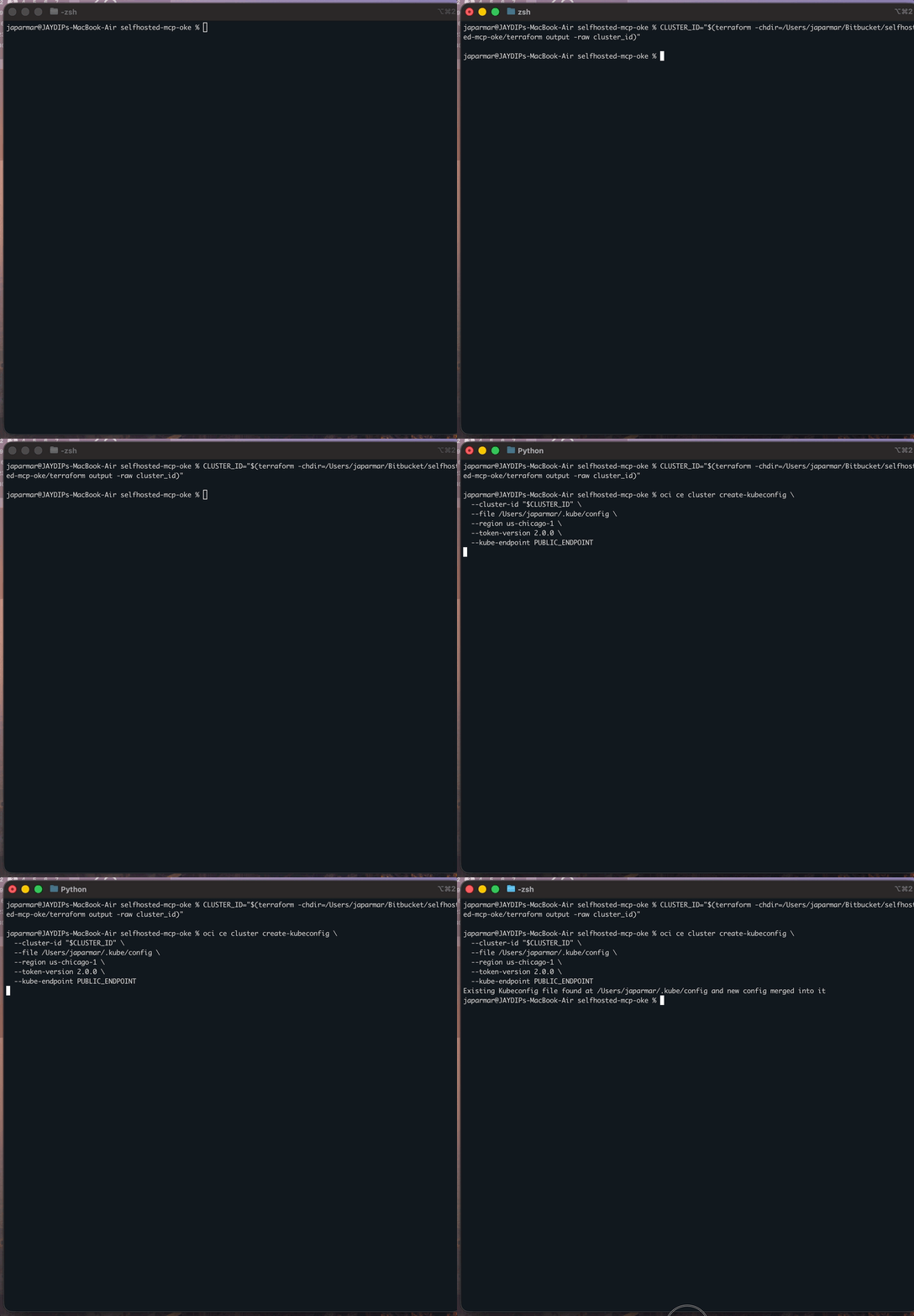
4. Build and push MCP image
Build the MCP server container image and push it to your private OCIR repository so Kubernetes can pull it.
SERVER_IMAGE_PATH="$(terraform -chdir=terraform output -raw mcp_server_repository_path)"
OCI_NAMESPACE="$(oci os ns get --query 'data' --raw-output)"
IMAGE_TAG="latest"

docker login ord.ocir.io -u "${OCI_NAMESPACE}/<oci-username>"

### it will ask for password, use your OCI Auth token as password

docker buildx build --platform linux/amd64 -t "${SERVER_IMAGE_PATH}:${IMAGE_TAG}" ./mcp-audio --push
Verify push ends with digest line and image has linux/amd64:
docker manifest inspect "${SERVER_IMAGE_PATH}:${IMAGE_TAG}" | jq -r '.manifests[]?.platform | "os=\(.os) arch=\(.architecture)"'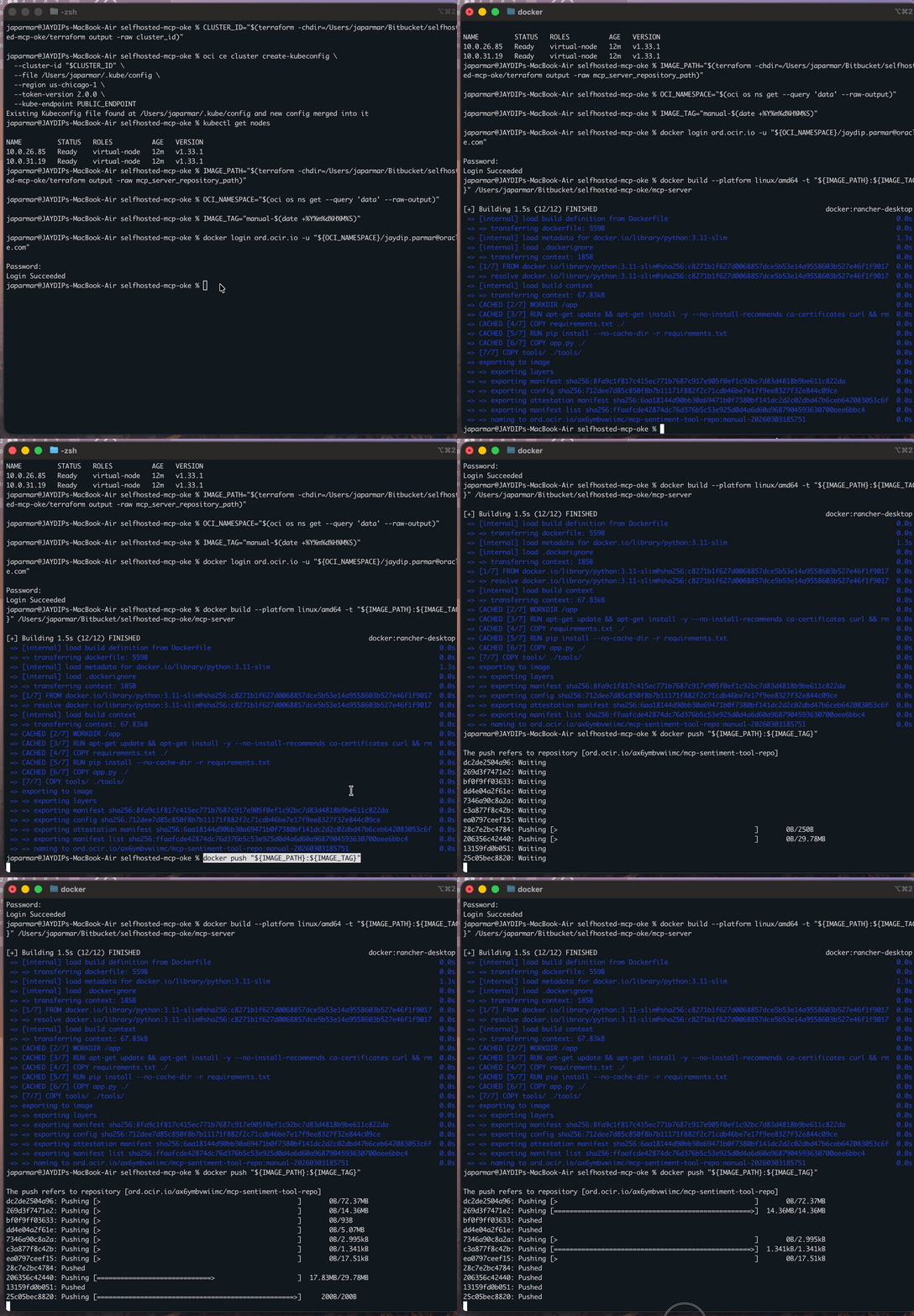
5. Create namespace and pull secret
Create a namespace for MCP resources and pull secrets so the cluster can pull images from OCIR.
kubectl create namespace mcp ||true

kubectl -n mcp delete secret ocirsecret --ignore-not-found

kubectl create secret docker-registry ocirsecret \
  --docker-server=ord.ocir.io \
  --docker-username="${OCI_NAMESPACE}/<your-oci-username>"\
  --docker-password='<your-auth-token>'\
  --docker-email='<your-email>'\
  --namespace mcp
Verify:
kubectl -n mcp get secret ocirsecret
docker login ord.ocir.io -u "${OCI_NAMESPACE}/<your-oci-username>"
docker pull "${SERVER_IMAGE_PATH}:${IMAGE_TAG}"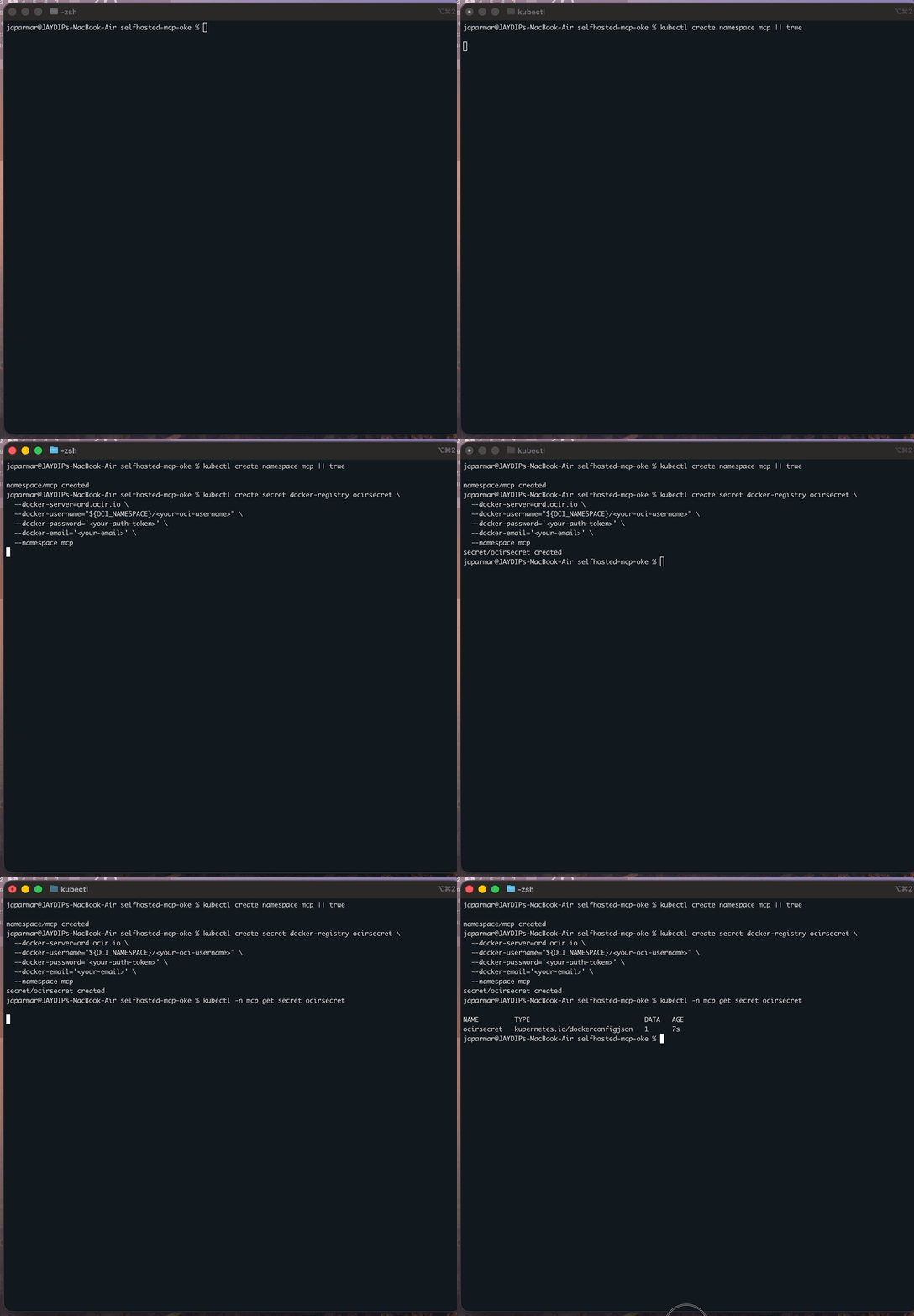
6. Create runtime env secret
Store MCP server runtime configuration in a Kubernetes secret and mount it into the deployment.
Required keys in mcp-audio/.env:
check mcp-audio/.env.example for more details, example
# Required
FASTMCP_APP_NAME=mcp-audio
FASTMCP_HOST=0.0.0.0
FASTMCP_PORT=8080

# Runtime auth mode
# Use ENVIRONMENT=dev for local OCI config/profile auth.
# For non-dev runtimes, runtime principals are used.
ENVIRONMENT=dev
# OCI_CONFIG_PROFILE=DEFAULT
# OCI_CONFIG_FILE=~/.oci/config
# OCI_REGION=us-chicago-1

# Required for speech + text analysis calls
COMPARTMENT_ID=ocid1.compartment.oc1....
OCI_NAMESPACE=your-namespace
SPEECH_BUCKET=audio-bucket

# Optional speech defaults
SPEECH_OUTPUT_PREFIX=transcriptions
SPEECH_MODEL_TYPE=WHISPER_LARGE_V3T
SPEECH_LANGUAGE_CODE=en
SPEECH_DIARIZATION_ENABLED=false
Create secret:
kubectl -n mcp delete secret mcp-secrets --ignore-not-found
kubectl create secret generic mcp-secrets \
  --from-env-file=mcp-server/.env \
  -n mcp
Verify:
kubectl -n mcp get secret mcp-secrets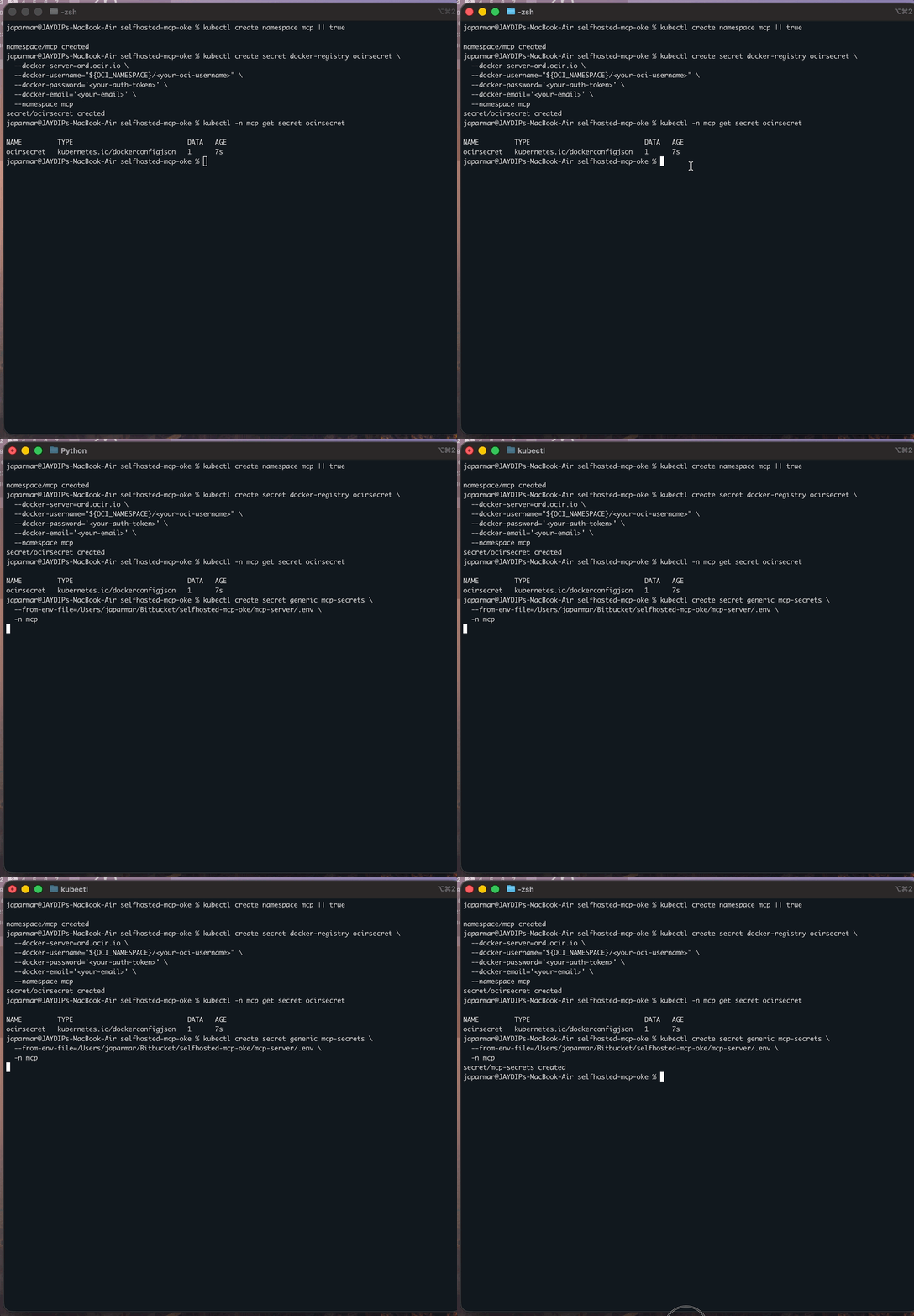
7. Deploy manifest and set image
Apply the Kubernetes resources and ensure the deployment references the correct image in OCIR. If your manifest still contains placeholders, run replacements first:
MANIFEST="mcp-audio/k8s/manifest.yaml"

export SERVER_IMAGE_PATH="$(terraform -chdir=terraform output -raw mcp_server_repository_path)"
export CLIENT_IMAGE_PATH="$(terraform -chdir=terraform output -raw mcp_client_repository_path)"
export OCI_NAMESPACE="$(terraform -chdir=terraform output -raw oci_namespace)"
export SPEECH_BUCKET="$(terraform -chdir=terraform output -raw speech_bucket_name)"
export COMPARTMENT_OCID="$(awk -F'=' '/^[[:space:]]*compartment_id[[:space:]]*=/{gsub(/["[:space:]]/,"",$2); print $2; exit}' terraform/terraform.tfvars)"
export IMAGE_TAG="latest"
export MANIFEST="mcp-audio/k8s/manifest.yaml"

echo "$SERVER_IMAGE_PATH"
echo "$CLIENT_IMAGE_PATH"
echo "$OCI_NAMESPACE"
echo "$SPEECH_BUCKET"
echo "$COMPARTMENT_OCID"
echo "$IMAGE_TAG"
echo "$MANIFEST"

grep -nE '<mcp-audio-image-tag>|<mcp-server-image-tag>|<mcp-client-image-tag>|<Compartment_OCID>|<OCI_NAMESPACE>|<SPEECH_BUCKET>|<Notification_Topic_OCID>' "$MANIFEST" || true

sed -i '' -e "s|<mcp-audio-image-tag>|$SERVER_IMAGE_PATH:$IMAGE_TAG|g" "$MANIFEST"
sed -i '' -e "s|<mcp-server-image-tag>|$SERVER_IMAGE_PATH:$IMAGE_TAG|g" "$MANIFEST"
sed -i '' -e "s|<mcp-client-image-tag>|$CLIENT_IMAGE_PATH:$IMAGE_TAG|g" "$MANIFEST"
sed -i '' -e "s|<Compartment_OCID>|$COMPARTMENT_OCID|g" "$MANIFEST"
sed -i '' -e "s|<OCI_NAMESPACE>|$OCI_NAMESPACE|g" "$MANIFEST"
sed -i '' -e "s|<SPEECH_BUCKET>|$SPEECH_BUCKET|g" "$MANIFEST"
sed -i '' -e "s|<Notification_Topic_OCID>||g" "$MANIFEST"

if grep -qE '<mcp-audio-image-tag>|<mcp-server-image-tag>|<mcp-client-image-tag>|<Compartment_OCID>|<OCI_NAMESPACE>|<SPEECH_BUCKET>|<Notification_Topic_OCID>' "$MANIFEST"; then
  echo "ERROR: unreplaced placeholders still exist in $MANIFEST"
  grep -nE '<mcp-audio-image-tag>|<mcp-server-image-tag>|<mcp-client-image-tag>|<Compartment_OCID>|<OCI_NAMESPACE>|<SPEECH_BUCKET>|<Notification_Topic_OCID>' "$MANIFEST"
  exit 1
fi

grep -n 'image:' "$MANIFEST"
Note: If the placeholder check still shows any `<...>` values, stop here and fix them first. Deploy and roll out:
export SERVER_IMAGE_PATH="$(terraform -chdir=terraform output -raw mcp_server_repository_path)"

export IMAGE_TAG="latest"

kubectl apply -f mcp-audio/k8s/manifest.yaml
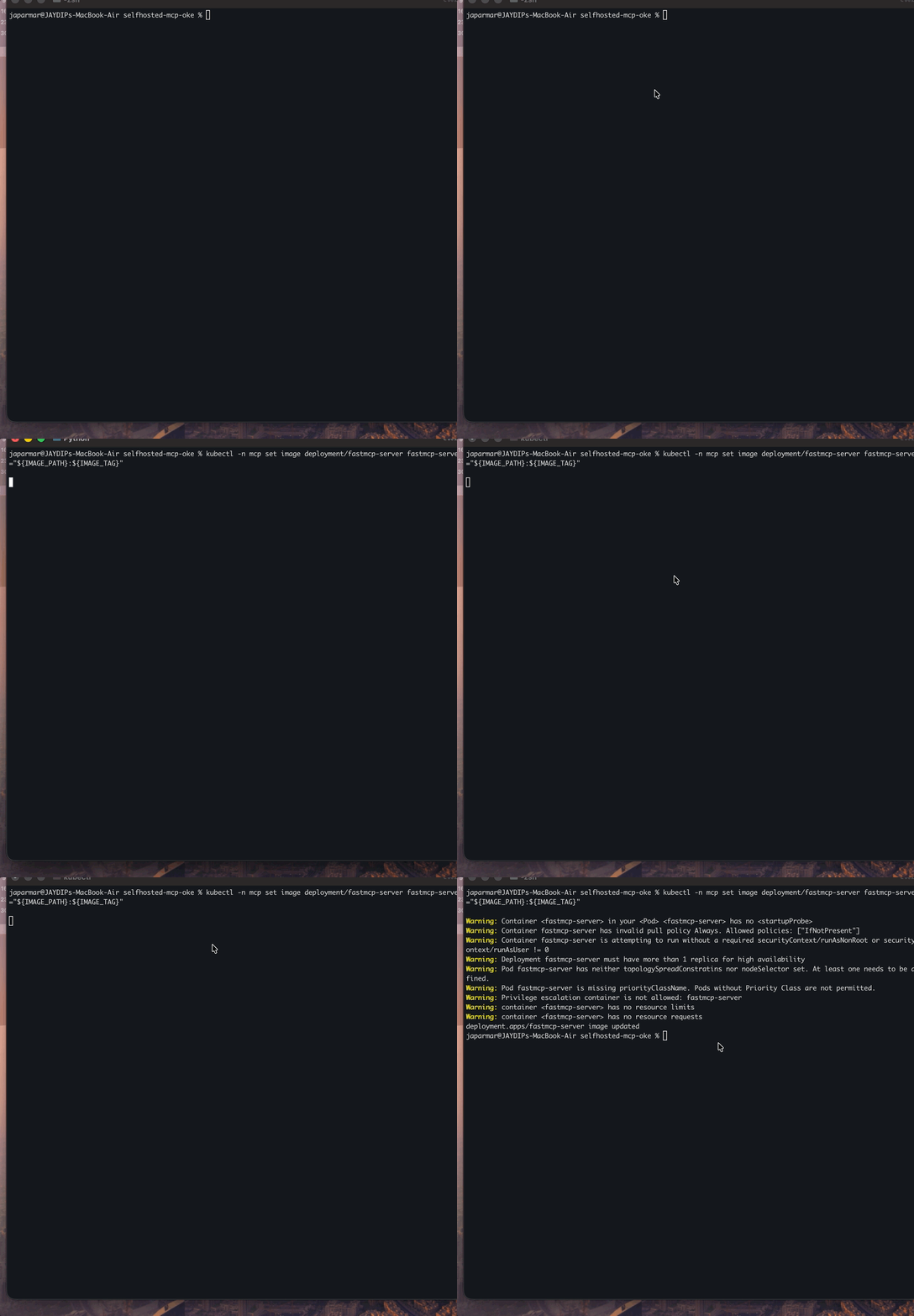
kubectl -n mcp set image deployment/fastmcp-server fastmcp-server="${SERVER_IMAGE_PATH}:${IMAGE_TAG}"

kubectl -n mcp rollout restart deployment/fastmcp-server
kubectl -n mcp rollout status deployment/fastmcp-server --timeout=300s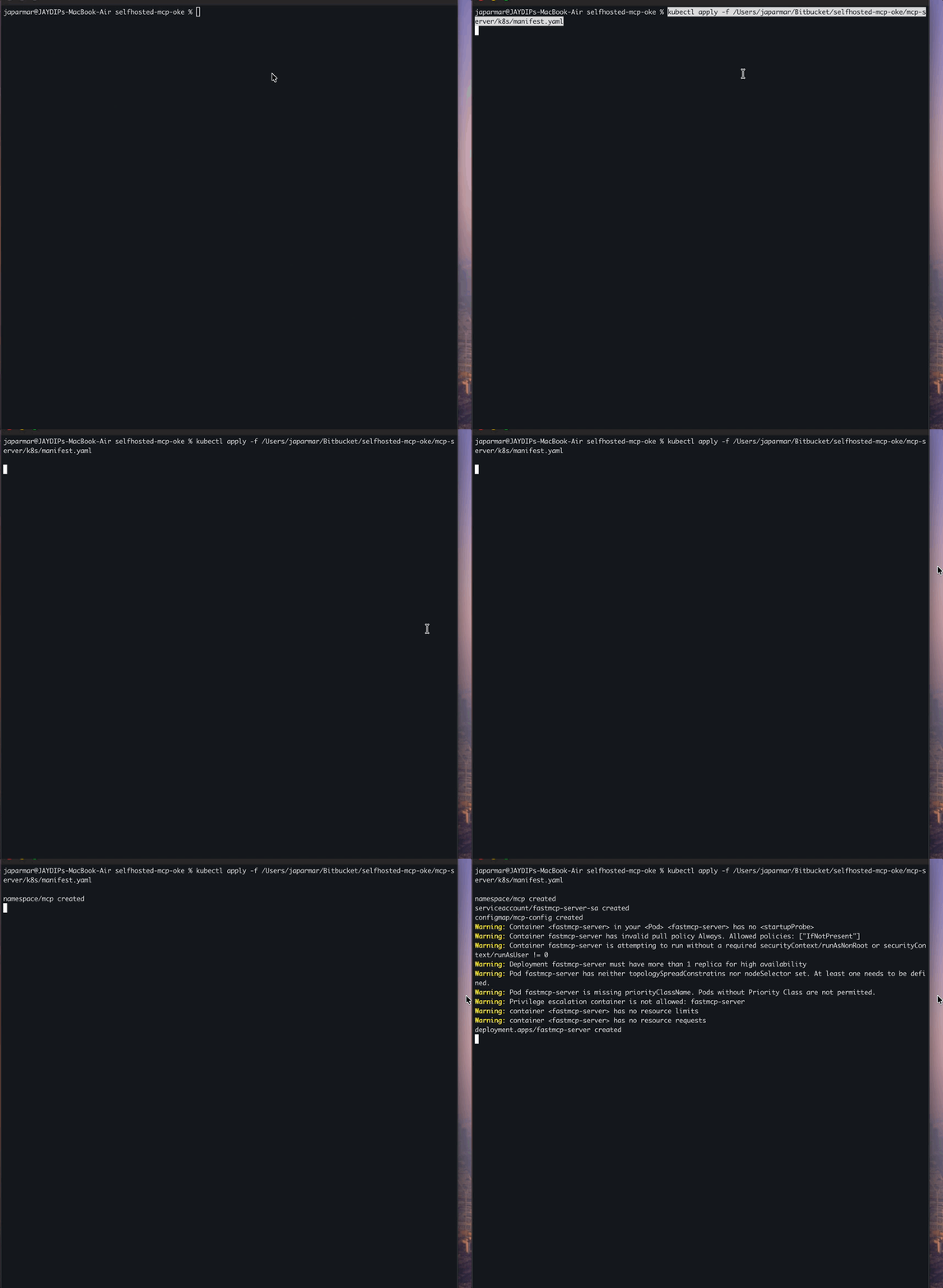
8. Validate deployment image and pods
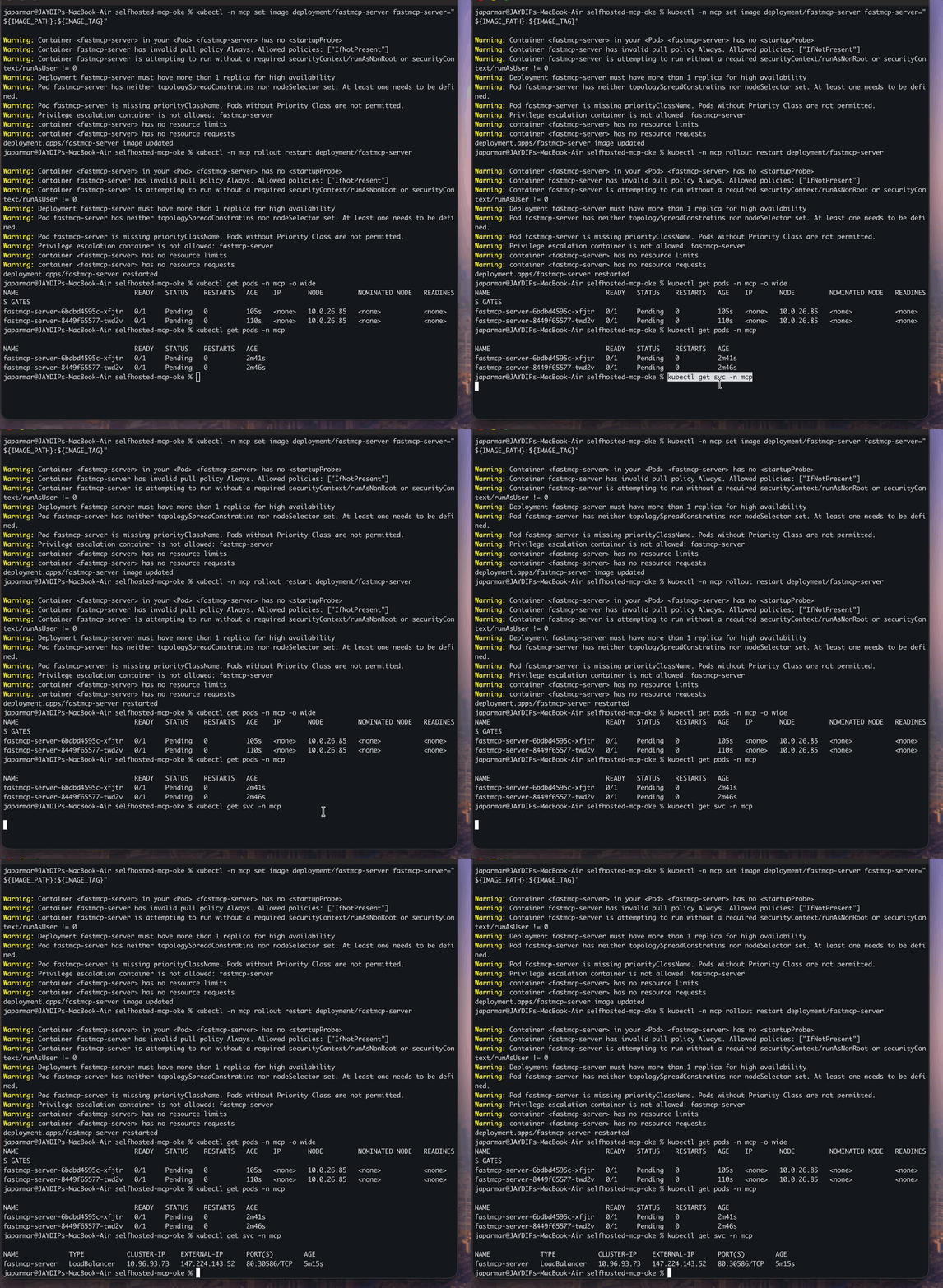
Confirm the correct image is running and validate the service endpoint and /health check.
kubectl -n mcp get pods -o wide
kubectl -n mcp get deploy fastmcp-server -o jsonpath='{.spec.template.spec.containers[0].image}{"\n"}'
Expected image should end with :latest.
Validate service and health endpoint
SERVER_IP="$(kubectl get svc fastmcp-server -n mcp -o jsonpath='{.status.loadBalancer.ingress[0].ip}')"
echo "$CLIENT_IP"
curl -i "http://${SERVER_IP}/health"
MCP URL: http://<EXTERNAL_IP>/mcp/
9. Validate using MCP Client
Configure the client to use the MCP endpoint and run a basic end-to-end test.
cp mcp-client/.env.example mcp-client/.envSet:
MCP URL = http://<SERVER_IP>/mcp/Run client:
cd mcp-client
python3 -m venv .venv
source .venv/bin/activate
pip install -r requirements.txt
python oracle_agent.py
Troubleshooting
Quick checks
Use these commands for a fast first pass to spot obvious scheduling, config, or runtime errors.
kubectl get events -n mcp --sort-by=.lastTimestamp |tail -n 40
kubectl -n mcp describe pod <pod-name>
kubectl -n mcp logs deploy/fastmcp-server --tail=300
High-signal checks
Validate that the most common dependency points (secrets and image reference) are present and correct.
kubectl -n mcp get secret ocirsecret
kubectl -n mcp get secret mcp-secrets
kubectl -n mcp get deploy fastmcp-server -o jsonpath='{.spec.template.spec.containers[0].image}{"\n"}'
Critical OCIR secret trap
Avoid auth failures caused by Docker credential helpers (e.g., osxkeychain) by creating the OCIR pull secret explicitly.
kubectl -n mcp delete secret ocirsecret --ignore-not-found
kubectl create secret docker-registry ocirsecret \
  --docker-server=ord.ocir.io \
  --docker-username='<namespace>/<oci-username>'\
  --docker-password='<oci-auth-token>'\
  --docker-email='<your-email>'\
  --namespace mcp
Validate secret payload
Inspect the generated .dockerconfigjson to confirm the registry server and credentials are correctly encoded.
kubectl -n mcp get secret ocirsecret -o jsonpath='{.data.\.dockerconfigjson}'| base64 --decodeRepush and restart if needed:
docker push "${IMAGE_PATH}:latest"
kubectl -n mcp rollout restart deployment/fastmcp-server
kubectl -n mcp rollout status deployment/fastmcp-server --timeout=300s
Fast reset if Terraform is already fine
Use this when Terraform resources are healthy and you need to fully reset only the Kubernetes application layer.
# 1) Cleanup K8s app resources
kubectl delete -f mcp-audio/k8s/manifest.yaml --ignore-not-found
kubectl delete pod -n mcp --all --ignore-not-found
kubectl -n mcp delete secret ocirsecret mcp-secrets  --ignore-not-found
kubectl delete ns mcp --ignore-not-found

# 2) Recreate namespace and secrets
kubectl create namespace mcp
kubectl create secret generic mcp-secrets \
  --from-env-file=mcp-audio/.env \
  -n mcp


OCI_NAMESPACE="$(oci os ns get --query 'data' --raw-output)"
kubectl create secret docker-registry ocirsecret \
  --docker-server=ord.ocir.io \
  --docker-username="${OCI_NAMESPACE}/<your-exact-oci-username-from-console>" \
  --docker-password='<NEW_OCIR_AUTH_TOKEN>' \
  --docker-email='<your-email>' \
  --namespace mcp

# 3) Push latest image and redeploy
SERVER_IMAGE_PATH="$(terraform -chdir=terraform output -raw mcp_server_repository_path)"

docker login ord.ocir.io -u "${OCI_NAMESPACE}/<your-exact-oci-username-from-console>"
docker build --platform linux/amd64 -t "${SERVER_IMAGE_PATH}:latest" mcp-audio

docker push "${SERVER_IMAGE_PATH}:latest"

kubectl apply -f mcp-audio/k8s/manifest.yaml
kubectl -n mcp set image deployment/fastmcp-server fastmcp-server="${SERVER_IMAGE_PATH}:latest"

kubectl -n mcp rollout restart deployment/fastmcp-server
kubectl -n mcp rollout status deployment/fastmcp-server --timeout=300s

kubectl -n mcp get pods -o wide
Cleanup
If you want to clean up old deployment/state, run this at the end.
Clean Kubernetes resources:
kubectl delete -f mcp-audio/k8s/manifest.yaml --ignore-not-found
kubectl delete pod -n mcp --all --ignore-not-found
kubectl -n mcp delete secret ocirsecret mcp-secrets  --ignore-not-found
kubectl delete ns mcp --ignore-not-found
Terraform destroy
NS="$(oci os ns get --query 'data' --raw-output)"
oci os object bulk-delete -ns "$NS" -bn audio-bucket --force --region us-chicago-1 ||true
oci os object bulk-delete -ns "$NS" -bn audio-bucket --force --region us-chicago-1 ||true

terraform -chdir=terraform init
terraform -chdir=terraform destroy -var-file=terraform.tfvars -auto-approve
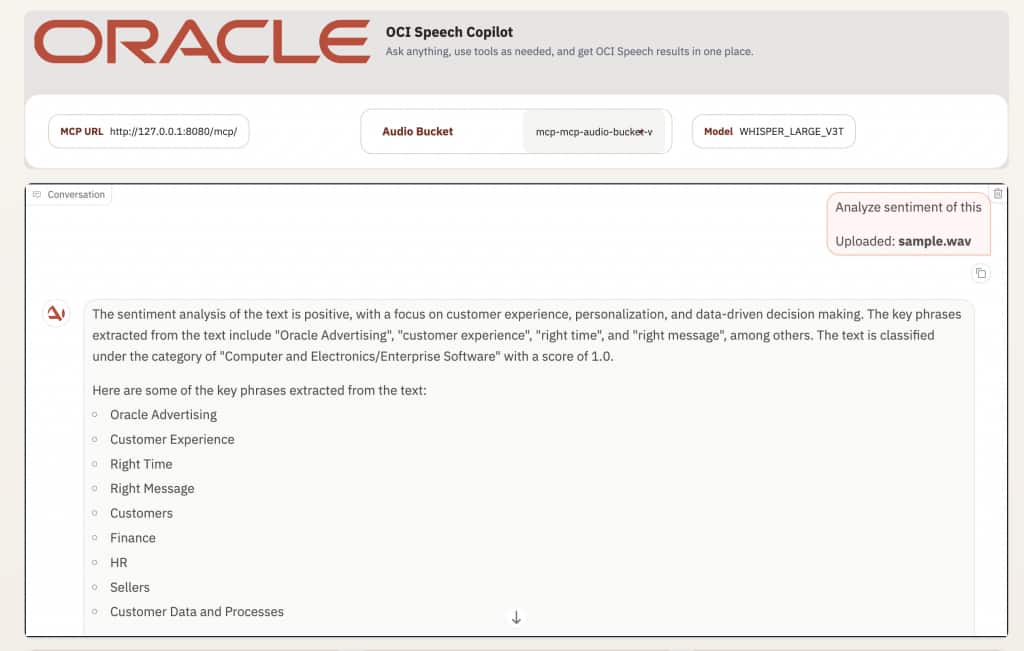
Sentiment Analysis Demo
– After uploading or transcribing content, click “Analyze sentiment”
– You can also type prompts like “Analyze sentiment of this”
– The client calls the sentiment tool and renders the summarized sentiment result directly in the conversation panel
Conclusion
This deployment demonstrates a practical, OCI-native way to run an MCP audio server and an MCP client on OKE. Terraform handles the infrastructure, OCIR stores images, Kubernetes manages the workloads, and the client is wired to the server through both internal cluster networking and a public MCP endpoint for external access.The architecture provides scalability, simplified infrastructure management, and standardized AI tool integration using the Model Context Protocol.
Repo: https://github.com/oracle-devrel/ai-solutions/tree/main/apps/oracle-mcp-oke