


Multi-turn LLM applications—chat assistants, agents, and support copilots—often spend a surprising amount of time recomputing the same work as a conversation continues. As context gets larger in the conversation, the LLM can end up recomputing previously seen input tokens, wasting compute and memory. LMCache addresses this by caching and reusing the transformer key-value (KV) computations and avoids redundant processing of prompts that share common prefixes or prior turns. In this post, we’ll walk through how to enable LMCache in OCI Data Science AI Quick Actions and show how it can deliver near 2× throughput improvements and 50%+ reductions in time-to-first-token (TTFT) in conversational workloads .
What is LMCache?
During text generation, an LLM produces tokens one at a time and needs to attend to all previous tokens. KV cache stores the attention keys and values from earlier tokens. Traditional LLM inference computes the KV cache for every request, even when the requests share common prefixes (like system prompts) or when continuing multi-turn conversations. This redundant computation creates significant overhead. LMCache is a key-value (KV) cache management layer for inference and serving engine vLLM. It addresses the issue by storing computed KV cache entries and serving them for subsequent requests that share the same prefix, allowing the model to skip redundant prefill computation and jump directly to generating new tokens.
Deploy LLM with LMCache Enabled
LMCache operates in several modes. Below is a tutorial of how to deploy a LLM with LMCache enabled in OCI Data Science AI Quick Actions for the Granite 3.3 8B Instruction model. In this tutorial, we use the kv_both role, which means the deployment both stores KV cache entries and retrieves them for reuse. For this setup, the cache is stored in CPU memory as it provides the best latency characteristics.
- In the OCI Console, Navigate to Data Science, select Notebook session
- Create a new notebook session or open an existing one, go to Launcher, click on AI Quick Actions
- In the Model Explorer, search for and select the
ibm-granite/granite-3.3-8b-instructmodel.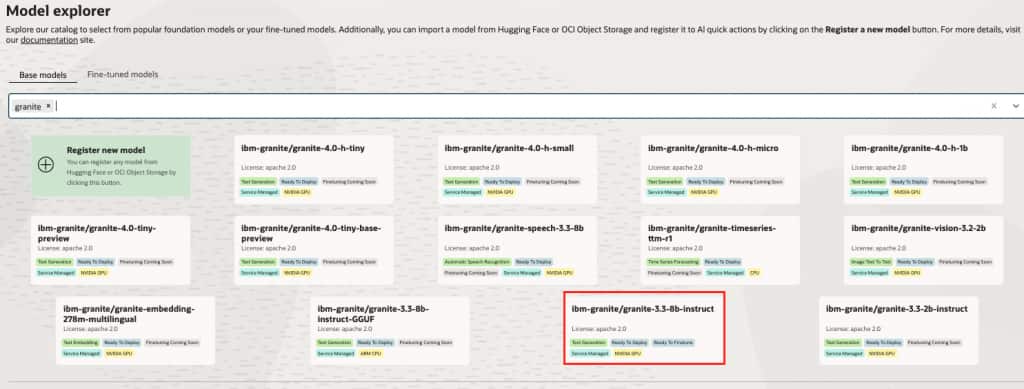
- Click Deploy and configure the following settings:
- Change model deployment name to ibm-granite/granite-3.3-8b-instruct
- Select the GPU shape. VM.GPU.A10.1 or larger is recommended for this model.
- Select your Log Group and Log for monitoring.
- Under Show Advanced Options, add the following to the Model deployment configuration. Ensure that there are no spaces in the value provided for they kv-transfer-config key.
–max-model-len 24000 –gpu-memory-utilization 0.90 –kv-transfer-config {“kv_connector”:”LMCacheConnectorV1″,”kv_role”:”kv_both”}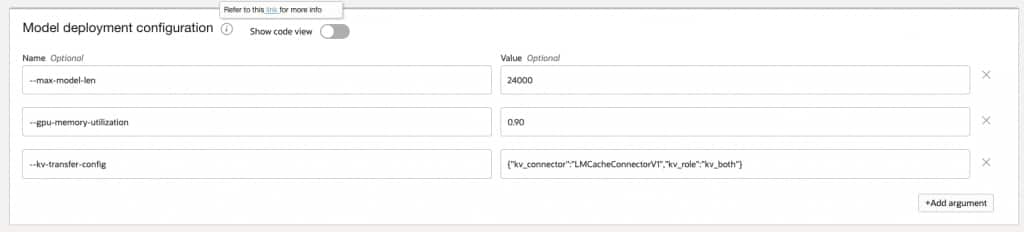
- Configure the Environment Variables section with the following LMCache parameters
Variable Value Description PYTHONHASHSEED 0 Ensures deterministic hashing for cache key generation LMCACHE_TRACK_USAGE false Disables usage tracking LMCACHE_CHUNK_SIZE 256 Size of KV cache chunks in tokens LMCACHE_LOCAL_CPU True Enables CPU memory as the cache storage backend LMCACHE_MAX_LOCAL_CPU_SIZE 50 Maximum CPU cache size in GB 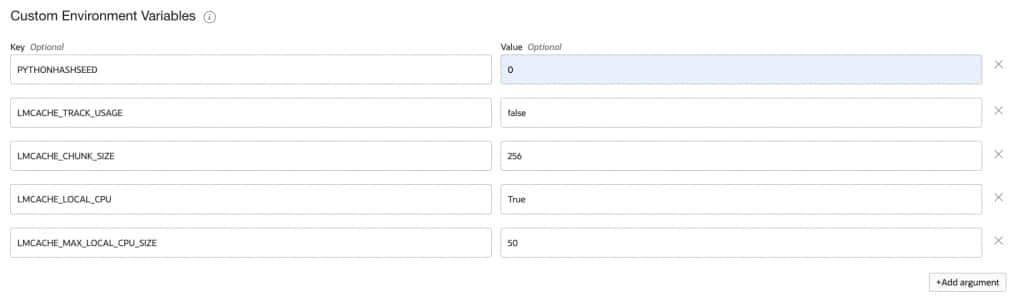
- Click Deploy and wait for the deployment to complete (approximately 15-20 minutes)
- Monitor the deployment by clicking Open logs in terminal.
Benchmark the Deployment
To validate the performance improvements from LMCache, run a multi-turn conversation benchmark that simulates realistic conversational workloads. We can use the benchmarking script from vLLM’s repo here.
- Clone the vLLM repository and navigate to the benchmark directory. Open a terminal. Type in
git clone https://github.com/vllm-project/vllm.git
cd vllm/benchmarks/multi_turn - Install the required dependencies:
pip install aiohttp numpy pandas transformers oracle-ads httpx- The benchmark script benchmark_serving_multi_turn.py uses aiohttp for HTTP requests. To work with OCI Data Science Model Deployment endpoints which require resource principal authentication, apply these minimal changes in the benchmarking script:
# add these imports at the top of benchmark_serving_multi_turn.py
import httpx
from ads.aqua import get_async_httpx_client- In the main() function, add OCI authentication before the argument parser:
import ads ads.set_auth("resource_principal")
- Replace the send_request function’s HTTP client logic. Change the aiohttp session-based request to use httpx with OCI authentication:
async with get_async_httpx_client(timeout=httpx.Timeout(timeout_sec)) as client:
      if stream:
          async with client.stream("POST", chat_url, json=payload, headers=headers) as resp:
          # Process streaming response...
      else:
	  resp = await client.post(chat_url, json=payload, headers=headers)
      # Process non-streaming response...
The key change is replacing aiohttp.ClientSession with get_async_httpx_client() which automatically handles OCI resource principal authentication for Model Deployment endpoints.
- Follow the instructions to set up the data for the benchmarking script. To simulate constant input token lengths of 5k for benchmarking, update the generate_multi_turn.json file to set
prefix_num_tokenswith"distribution": "constant"and"value": 5000. - Run the benchmark in three phases:
a. Baseline (No LMCache): Deploy the same model without the--kv-transfer-config parameter.
b. Cold Cache: First run with LMCache enabled, cache is empty.
c. Hot Cache: Second run with LMCache, cache contains entries from previous run.
python benchmark_serving_multi_turn.py
--model ibm-granite/granite-3.3-8b-instruct \
--input-file generate_multi_turn.json \
--num-clients 10
--max-active-conversations 10 \
--url <model_deployment_url>/predictWithResponseStream \
--seed 42 \
--request-timeout-sec 360 \
--no-early-stop
Interpreting the Results
The following table shows representative benchmark results comparing baseline, cold cache, and hot cache performance. Note that the below metrics will change with different models, shapes and configuration settings.
| Metric | Baseline | Cold Cache | Improvement | Hot Cache | Improvement |
| Benchmark Duration | 520.6 sec | 298.8 sec | -42.6% | 262.3 sec | -49.6% |
| Request Throughput | 0.37 req/s | 0.64 req/s | 74.1% | 0.73 req/s | 98.4% |
| Mean TTFT | 16380ms | 8651 ms | 7 | 7317 ms | -55.3% |
| Median TTFT | 18506 ms | 8670 ms | -53.1% | 8032 ms | -56.6% |
| P99 TTFT | 24705 ms | 18259 ms | -26.1% | 11991 ms | -51.5% |
| Mean TPOT | 91.8 ms | 56.2 ms | -38.8% | 51.4 ms | -44.0% |
| Mean E2E Latency | 25413 ms | 14183 ms | -44.2% | 12376 ms | -51.3% |
TTFT Improvement is Substantial
The approximately 53% reduction at the median confirms that LMCache is effectively hitting on cached KV entries from the common prefix and previous conversation turns. The median TTFT dropped from 18.5 seconds to 8.0 seconds with a hot cache, confirming that KV cache reuse eliminates redundant prefill computation for the shared prefix and conversation history.
Near 2× Throughput Improvement
Request throughput increased from 0.37 req/s to 0.73 req/s with a hot cache, demonstrating that LMCache effectively doubles serving capacity for multi-turn conversation workloads. This improvement comes from the reduced compute time per request, allowing the GPU to process more requests in the same time window.
TPOT Also Improved Significantly
Time Per Output Token (TPOT) improved from 91 ms to 56 ms even with a cold cache. This suggests reduced memory pressure or better batching efficiency when prefill is offloaded to the cache. The decode phase benefits indirectly from the reduced memory bandwidth consumption during prefill.
Tail Latency Dramatically Improved with Warm Cache
The P99 TTFT showed modest improvement with cold cache (-26%) but substantial improvement with hot cache (-51.5%). This indicates that cross-conversation prefix sharing becomes significant once the cache is populated. Users with similar queries benefit from each other’s cached computations.
Cold Cache Captures Most Benefits
The cold-to-hot delta is relatively small (approximately 12% additional throughput), showing that intra-conversation KV reuse during a single benchmark run provides the majority of performance gains. This means you see benefits immediately, even before the cache is fully warmed up.
Production Considerations
Memory Planning
It is important to allocate sufficient CPU memory for the LMCache. A good starting point is:
LMCACHE_MAX_LOCAL_CPU_SIZE = (number of concurrent conversations) × (max context length) × (KV cache size per token)
For the Granite 3.3 8B instruct model with 24K context length, approximately 50 GB provides headroom for multiple concurrent conversations.
Chunk Size Tuning
The LMCACHE_CHUNK_SIZE parameter affects cache granularity:
| Chunk Size | Trade-offs |
| Smaller (128-256) | More fine-grained sharing, higher memory overhead |
| Larger (512-1024) | Less memory overhead, but requires longer matching prefixes |
For multi-turn conversations with varying turn lengths, smaller chunk sizes (256) typically work better.
Conclusion
Enabling LMCache through OCI Data Science AI Quick Actions is a low friction change that can deliver outsized performance gains for multi-turn conversational workloads. By reusing previously computed KV cache entries instead of recomputing them on every request, LMCache reduces redundant prefill work—translating directly into faster time-to-first-token and higher overall throughput. With a simple change in setting, enabling LMCache becomes one of the simplest ways to improve user experience and serving efficiency without changing your model or application logic.