



Open Agent Specification (Agent Spec in brief) is built for portability: define an agent once and run it on your runtime of choice, without rewriting prompts, tools, or policies. When teams take agents to production, the next question is observability: how do you understand every decision the agent makes across different runtimes? This post shows how Agent Spec integrates with Arize Phoenix and OpenInference to deliver consistent, runtime-agnostic tracing and evaluation, so that you can debug faster, compare changes safely, and operate with confidence.
Why Agent Spec
- Define once, run anywhere: Author the agent’s tools, system prompt, and LLM settings once, then execute on compatible runtimes such as LangGraph and WayFlow.
- Built on open standards: Agent Spec works seamlessly with OpenTelemetry-based instrumentation, enabling standardized traces across runtimes.
- Enterprise-ready: Portability plus observability enables you swinging back and forth between design, development, and deployment, while maintaining governance as you evolve prompts, swap LLMs, or revise tools.
Why Arize Phoenix
Arize Phoenix paired with OpenInference-based instrumentation delivers production-grade, runtime-agnostic observability with a single setup step, so you can see exactly what your agent did and why across any supported runtime. Sided by OpenInference, a set of conventions that standardizes tracing in AI applications, Phoenix provides:
- End-to-end traces with clear parent–child span relationships
- Unified visibility across agent, LLM, and tool spans
- Full inputs/outputs (including system prompts), tool arguments, timings, and the final response
- A consistent trace schema across runtimes and LLMs, keeping dashboards and evaluation harnesses stable as you change components
This transparency accelerates debugging and governance, making it easy to validate complex behaviors (for example, retry logic or tool selection) and compare changes safely.
One-Line Setup with Phoenix
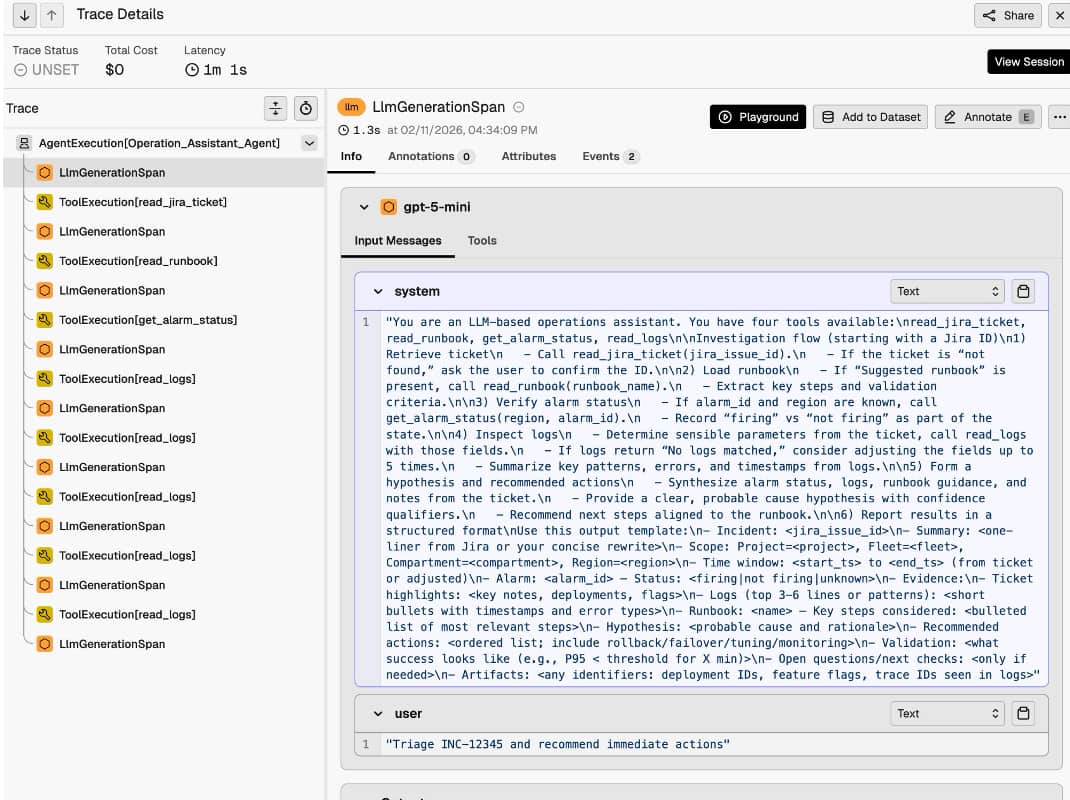
Load your portable Agent Spec configuration, then add instrumentation once, and work across supported runtimes. Phoenix sees the same trace schema in both cases, so your dashboards and evaluation harnesses stay consistent as you switch runtimes or LLMs. Phoenix will show:
- Project and trace lists with latency and cost summary
- Execution trees showing the full flow: agent span, LLM generations, and tool executions
- Drill-downs into prompts, tool arguments/outputs, and the final answer
Evaluation and Benchmarking
Once traces are in Phoenix, you can run programmatic evaluations over them. Typical setups include:
- Code-based evaluators (deterministic) to confirm basic output and structure
- LLM-as-judge evaluators for aspects like helpfulness and completeness
You can run the same agent across multiple runtimes and compare outcomes using a single evaluation harness, without changing your instrumentation.
Why This Matters for Enterprise Teams
- Standardize the way you observe and evaluate agents as they move from development to production.
- Safely iterate: swap runtimes, prompts, tools, or LLM providers and compare behavior with the same trace format and evaluation harness.
- Reduce time-to-diagnosis and improve reliability with full-fidelity traces that capture each step your agent takes.
Getting Started
To get started, instrument your Agent Spec agents with OpenInference, connect Arize Phoenix for tracing, and use the docs below to enable end-to-end observability in minutes.