Overview
ManagedScheduledExecutorService extends from ManagedExecutorService,
all the methods from ManagedExecutorService are supported in
ManagedScheduledExecutorService, so prior to this article please read Part One: ManagedExecutorService.
ManagedScheduledExecutorService
extends from java.util.concurrent.ScheduledExecutorService, so it also
provides methods(schedule, scheduleAtFixedRate, scheduleAtFixedDelay)
from ScheduledExecutorService for scheduling tasks to run after a given
delay, or periodically. Besides, ManagedScheduledExecutorService
provides new methods itself for tasks to run at some custom schedule
based on a Trigger. All those tasks are run on threads provided by
WebLogic Server.
Weblogic Server provides a preconfigured, default ManagedScheduledExecutorService for each application, and we can easily use it in web or EJB components without any configuration. Let’s begin with a simple example that uses default ManagedScheduledExecutorService in a ServletContextListener.
Example-1: Use Default ManagedScheduledExecutorService to Submit a Periodical Task
Step1: Write a task to log data.
public class LoggerTask implements Runnable {
@Override
public void run() {
// collect data and write them to database or file system
}
}
Step2:
SomeListener.java injects the default ManagedScheduledExecutorService,
schedules the task periodically in contextInitialized, and cancels the
task in contextDestroyed.
@WebListener
public class SomeListener implements ServletContextListener {
Future loggerHandle = null;
@Resource ManagedScheduledExecutorService mses;
public void contextInitialized(ServletContextEvent scEvent) {
// Creates and executes LoggerTask every 5 seconds, beginning at 1 second later
loggerHandle = mses.scheduleAtFixedRate(new LoggerTask(), 1, 5, TimeUnit.SECONDS);
}
public void contextDestroyed(ServletContextEvent scEvent) {
// Cancel and interrupt our logger task
if (loggerHandle != null) {
loggerHandle.cancel(true);
}
}
}
Runtime Behavior
ManagedScheduledExecutorService provides all the features described in Runtime Behavior of Part One: ManagedExecutorService.
As
mentioned earlier, ManagedScheduledExecutorService can run task
periodically or at some custom schedule, so that a task can run multiple
times. Please note that for a long-running task, even if a task can be
executed more than once, WebLogic Server creates only one thread for
this long-running task at the time of the first run.
Configuration
Configure ManagedScheduledExecutorService
ManagedScheduledExecutorService has the same configurations(Name, Dispatch Policy, Max Concurrent Long Running Requests, and Long Running Priority) as ManagedExecutorService. And the way to get and use the customized ManagedScheduledExecutorService is also similar to ManagedExecutorService.
Example-2: Configure a ManagedScheduledExecutorService in weblogic.xml
Step1: defining ManagedScheduledExecutorService:
<!– weblogic.xml –>
<work-manager>
<name>customizedWM</name>
<max-threads-constraint>
<name>max</name>
<count>1</count>
</max-threads-constraint>
</work-manager>
<managed-scheduled-executor-service>
<name>customizedMSES</name>
<dispatch-policy>customizedWM</dispatch-policy>
<long-running-priority>10</long-running-priority>
<max-concurrent-long-running-requests>20</max-concurrent-long-running-requests>
</managed-scheduled-executor-service>
Step2: obtaining the ManagedScheduledExecutorService instance to use
@WebServlet(“/SomeServlet”)
public class SomeServlet extends HttpServlet {
@Resource(mappedName=”customizedMSES“)
ManagedScheduledExecutorService mses;
protected void doGet(HttpServletRequest request, HttpServletResponse response) throws ServletException, IOException {
Runnable aTask = new Runnable() {
…
};
mses.schedule(aTask, 5, TimeUnit.SECONDS);
…
}}
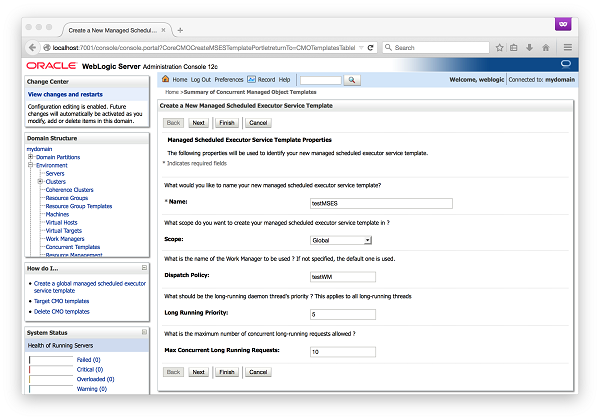
Example-3: Configure a ManagedScheduledExecutorService template using WebLogic Administration Console
Step1: in WebLogic Administration Console, a ManagedScheduledExecutorService
template can be created by clicking on the “New” button from the
“Summary of Concurrent Managed Object Templates” page. This brings up
the “Create a New Managed Scheduled Executor Service Template” page
where the name and other parameters of the
new ManagedScheduledExecutorService template can be specified. In this
example, a ManagedScheduledExecutorService called “testMSES” is being
created to map to a pre-defined work manager “testWM”.
Step2:
Once a ManagedScheduledExecutorService template is created, any
application in the WebLogic Server can get its own
ManagedScheduledExecutorService instance to use.
@WebServlet(“/SomeServlet”)
public class SomeServlet extends HttpServlet {
@Resource(mappedName=”testMSES“)
ManagedScheduledExecutorService mses;
protected void doGet(HttpServletRequest request, HttpServletResponse response) throws ServletException, IOException {
Runnable aTask = new Runnable() {
…
};
mses.schedule(aTask, 5, TimeUnit.SECONDS);
…
}}
Related Articles:
- Concurrency Utilities support in WebLogic Server 12.2.1
- Concurrency Utilities support in WebLogic Server 12.2.1, Part One: ManagedExecutorService
- Concurrency Utilities support in WebLogic Server 12.2.1, Part Three: ManagedThreadFactory
- Concurrency Utilities support in WebLogic Server 12.2.1, Part Four: ContextService
- Concurrency Utilities support in WebLogic Server 12.2.1, Part Five: Multitenancy
See for more details Configuring Concurrent Managed Objects in the product documentation.