

Does your Customer 360 view clearly show how your customers are engaging and interacting with your organization?
If the answer is no, or your users need to click around to find out, it might be that adding simple Timeline Components can dramatically improve user experience, which in turn can make understanding a customers journey more seamless.
Timeline controls are a simple data visualization component available in Siebel CRM, yet tremendously powerful. They let you see your data through time – which helps users make smart decisions. They help you:
- Track how things are trending
- Compare this month to last month (or this year to last year)
- Spot when important numbers suddenly change
- See the touchpoints of a customers journey with your brand
These quick insights are useful for understanding interaction patterns with your customers, service interactions, sales history etc and in turn helps your users figure out future sales, planning budgets, managing inventory, and seeing if your marketing campaigns are working. Need to know why something happened? Just zoom in on that specific time period.
Observing timelines is relevant for all personas across industries, especially for contact center agents and sales representatives who would like to know the 360-degree interaction timeline for the customer when talking to them.
Timeline controls help you notice seasonal patterns, understand what made a difference, and figure out where to put your resources. In fast-moving markets, being able to flip between what’s happening right now and what happened before can give you a real edge. In addition, when the market shifts, you can react faster. Bottom line? Timeline controls turn your raw numbers into insights you can serve up to your users allowing them to make your business better.
Siebel Timeline Control provides a comprehensive customer interaction timeline by allowing you to show data from several entities, including as Opportunities, Orders, SRs, Activities, etc., in a single timeline.
Timeline Control: Under the Hood:
The Timeline control is a powerful data visualization feature in Siebel CRM that helps users navigate and analyze time-based data.
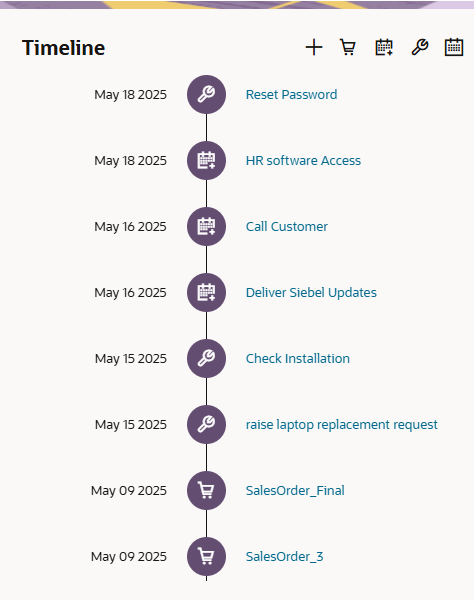
Here’s an overview of what this component typically includes:
Core Components
- Custom date range input fields for precise period selection
- Toggle Mechanism for hiding or showing selected objects
- Configurable Entities for including specific objects (for example, Activities etc)
- Drill-down capabilities for reviewing detailed views of the objects
- Different icons for different entity types
- Customizable – can be used for different Siebel entities
How to Create a Timeline
The Siebel Timeline Applet is based on a VBC (Virtual Business Component) that aggregates the necessary data from the various BCs (Business Components) – for example, Service Requests, Activities, Orders etc. The aggregation and mapping are achieved using a Data Map. You can configure a Timeline Control to delight your users in about the same time as having your morning coffee. To get the exact details of the configuration steps, please refer to Siebel Bookshelf.
Conclusion
Implementing Timeline Controls in Siebel CRM transforms your organization’s ability to visualize and analyze time-based data. By carefully following the configuration steps, from cloning the Timeline VBC to setting up proper data mapping with mandatory fields, you can create a powerful visual indicator tailored to your specific business requirements. Anyone with a fundamental understanding of Siebel CRM can build this quickly, if your requirements are well-defined. Adding Timelines to your Customer 360 dashboard is extremely effective and will provide users with quick insights that drive your business forward.