
One common question in Siebel Pricing implementations is, Can Siebel Pricing apply discounts based on location or other nonproduct attributes?
Yes, when the relevant product attributes and context data are available to the pricing process.
Oracle Siebel CRM provides discount matrices, a structured framework for creating rule-based pricing adjustments. Discount matrices allow you to define prices and adjustments for products based on customer attributes, market factors, and other qualifying criteria. For many implementations, this approach works well.
However, advanced pricing scenarios often need more flexibility. A discount may need to be applied earlier in the pricing sequence, use dynamic contextual data, evaluate criteria beyond standard product-based rules, or support greater flexibility without adding unnecessary system complexity.
This is where Attribute Adjustments can help. They allow Siebel Pricing to evaluate multiple dimensions before applying the matching adjustment, making them useful for criteria-based discounts that depend on both product and customer context.
How Attribute Adjustments help
Attribute Adjustments can evaluate dimensions such as
- Product attributes, such as color and storage capacity
- Context fields, such as country, state, city, or postal code
- User-defined criteria based on pricing rules
- Adjustment type and adjustment amount as pricing outcomes
When configured as a Multiple Dimension Attribute Adjustment, these dimensions become part of a rules matrix generated by Siebel. At runtime, Siebel evaluates the configured dimensions and applies the matching discount when the criteria match.
Business use case
Imagine you want to apply a 25% discount when MyPhone is sold with color Onyx Black, storage capacity 128 GB, country USA, and state CA.
The solution uses a Multiple Dimension Attribute Adjustment with attribute-based dimensions for Color and Storage Capacity, context-based dimensions for Country and State, and a system-generated rules matrix. In the standard pricing flow, this adjustment can be applied before volume discounts, promotion discounts, aggregate discounts, and manual discounts. The calculated price then becomes the start price for downstream pricing logic. If your implementation uses customized pricing procedures, validate the sequence before deployment.
How to configure
This infographic summarizes the end-to-end configuration flow for criteria-based discounts in Siebel Pricer.
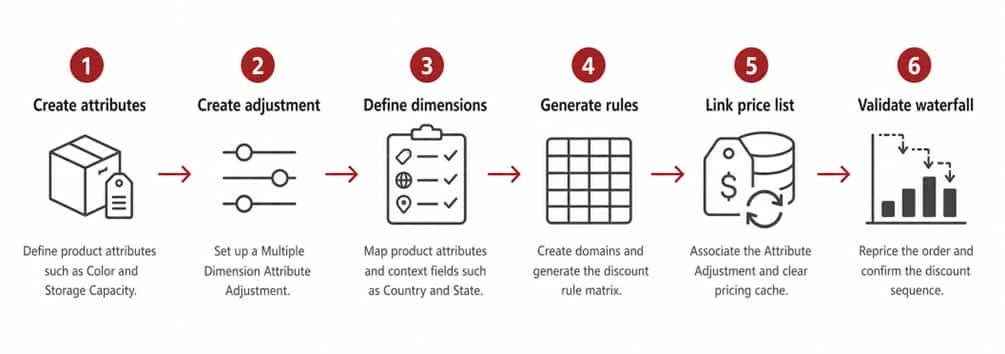
Use this flow as a quick checklist before validating the discount in the pricing waterfall.
Step 1: Create the product attributes, class, and product
Product Attributes:
- Navigate to Administration – Product > Attribute Definitions.
- Create the Color attribute with enumerated values, such as Onyx Black and Crystal Purple.
- Create the Storage Capacity attribute with required values, such as 64 GB, 128 GB, 256 GB, and 512 GB.
- Release the attributes.
Product Classes:
- Navigate to Administration – Product > Product Classes.
- Create the CBD_Class product class.
- Associate the Color and Storage Capacity attributes.
- Define default values as needed.
- Release the product class.
Product:
- Create the MyPhone product in Product Definitions.
- Associate CBD_Class.
- Release the product.
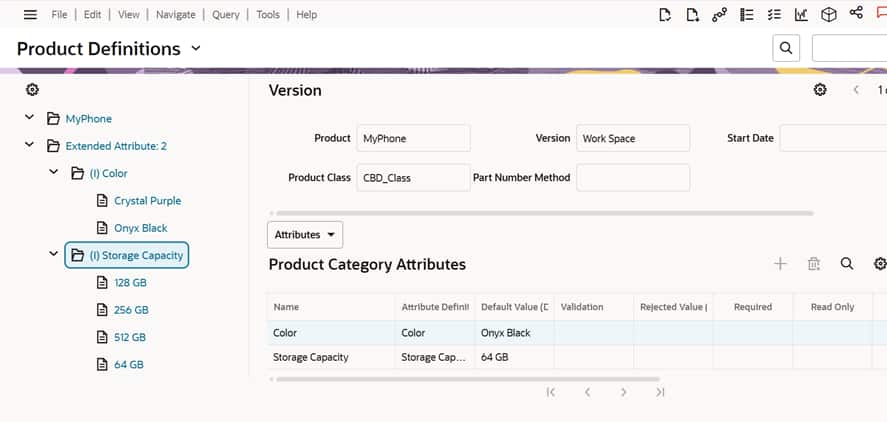
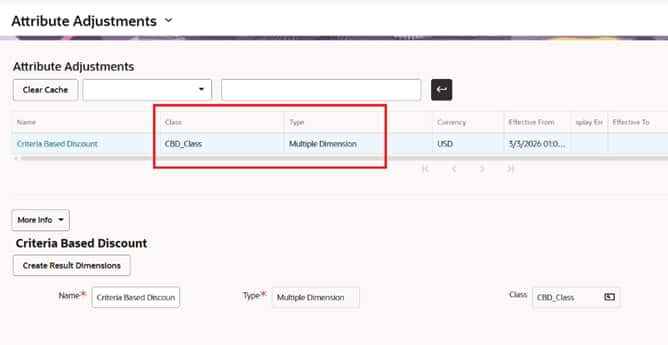
Step 2: Create the Attribute Adjustment
- Navigate to Administration – Pricing > Attribute Adjustments.
- Create a record named Criteria Based Discount.
- Set Type to Multiple Dimension and associate the CBD_Class product class.
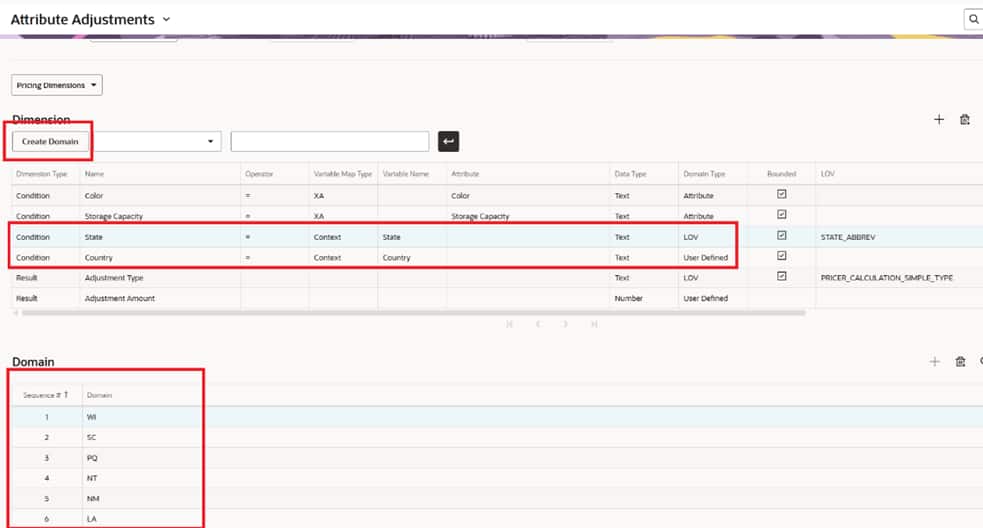
Step 3: Define pricing dimensions
- Click Create Result Dimensions to create the Adjustment Type and Adjustment Amount.
- Add the condition dimensions for Color and Storage Capacity, State, and Country.
| Name | Variable Map Type | Domain Type | Variable Name | Attribute | LOV |
| Color | XA | Attribute | Color | ||
| Storage Capacity | XA | Attribute | Storage Capacity | ||
| State | Context | LOV | State | STATE_ABBREV | |
| Country | Context | User Defined | Country |
Note: You can use an LOV for State with STATE_ABBREV; Country can also be LOV-based depending on the implementation. Context mapping allows Siebel Pricing to read runtime values, such as Account Address, when the appropriate variable maps are configured.
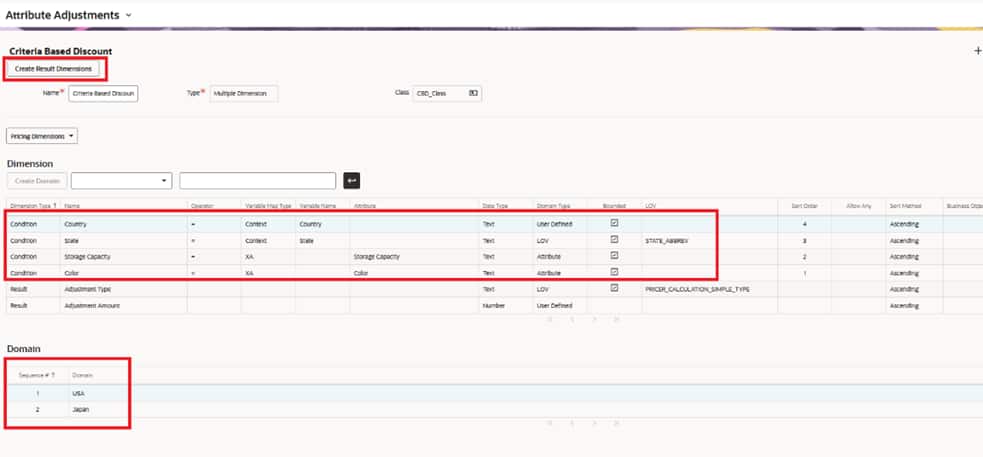
Step 4: Generate domains and rules
- Click Create Domain. For LOV-based dimensions, Siebel auto-populates values.
- For user-defined domains, manually enter valid values in the Domain applet.
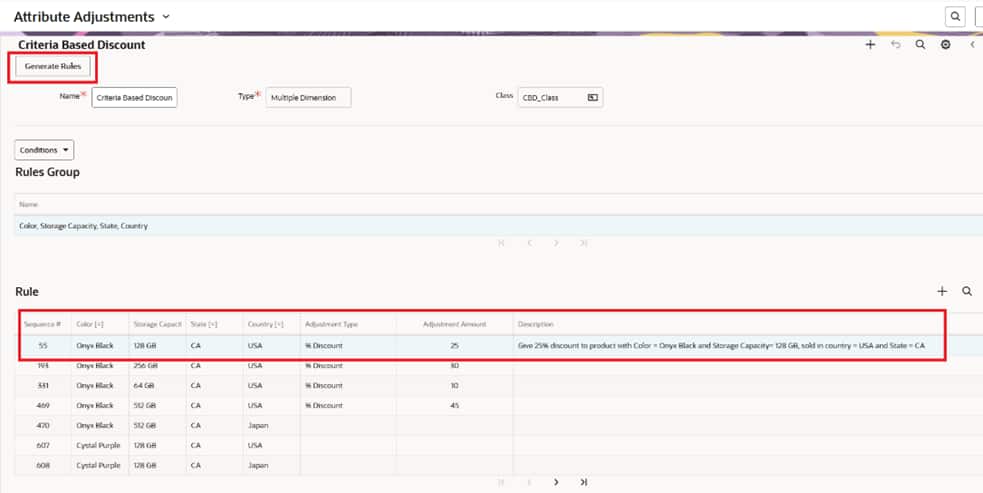
- Open Conditions dropdown and click Generate Rules to create the rules matrix.
- Populate Adjustment Type, such as % Discount or Discount Amount.
- Enter the Adjustment Amount.
For this scenario, the matching rule applies a 25% discount.
Step 5: Associate the adjustment and refresh pricing
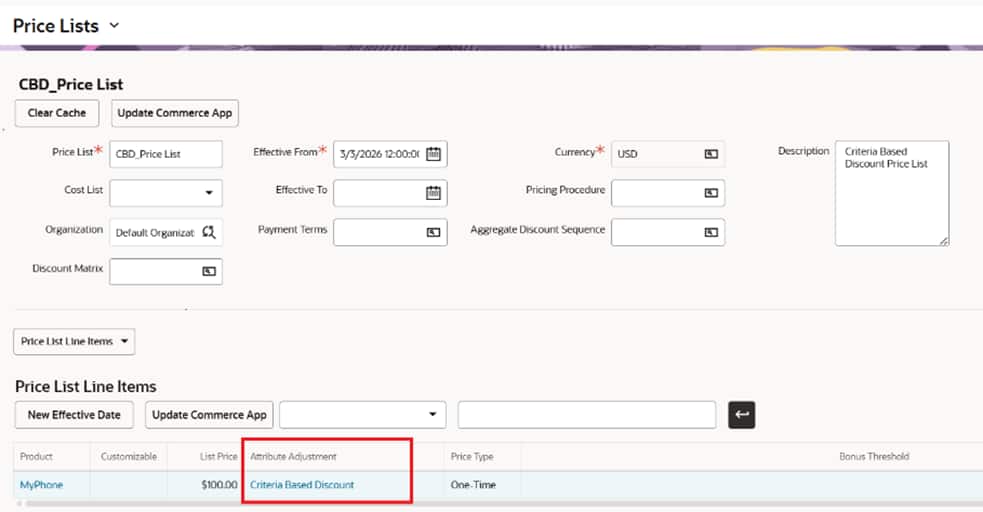
- Navigate to Administration – Pricing > Price Lists.
- Open the target price list and associate the Attribute Adjustment with the product in Price List Line Items.
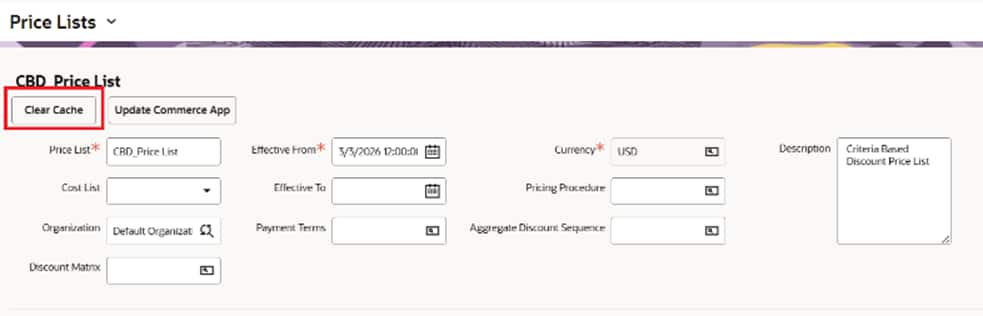
- Click Clear Cache to update the runtime pricing application.
Missing this step can cause confusion when the discount does not appear during validation.
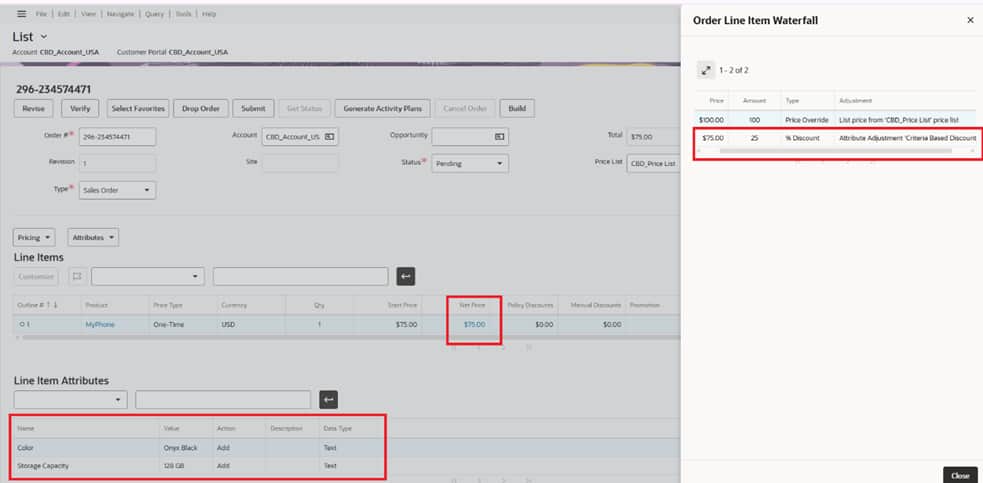
Step 6: Validate the runtime result
- Create an account with the required Country and State and associate the correct price list.
- Create a sales order, add MyPhone, set the required product attributes, and click Reprice All.
- In the Order Line Item Waterfall, verify that the base price is fetched from the price list, the Attribute Adjustment discount is applied first, and the resulting price becomes the start price for downstream discounts.
Best practices
- Use LOV-driven domains where possible to reduce maintenance.
- Confirm that context fields are mapped and available to the pricing process.
- Clear cache after pricing configuration changes.
- Test both matching and nonmatching combinations.
- Document assumptions, especially when pricing procedures are customized.
As pricing requirements become more dynamic and multidimensional, the ability to evaluate product and contextual data together is essential. Attribute Adjustments provide this flexibility while keeping pricing logic clean and positioned correctly within the pricing flow.
When designed thoughtfully, this configuration-led approach helps functional consultants, pricing teams, and solution architects support location-based and attribute-based discounts within standard Siebel CRM capabilities, without adding any custom logic.