
Redwood UX for Siebel CRM is a constantly evolving modern UI solution. We introduced Redwood UX for Siebel with our 24.6 release, and while this updated experience was warmly received, we also heard consistent feedback that the beloved Tab Layout—long a standing feature of the Siebel UI—was missing.
As a result we have introduced Tab Layout in the Redwood UX for Siebel CRM. Our customers wanted a more structured, yet intuitive way to navigate complex workflows and move across related tasks without losing context. By incorporating Tabs, we are ensuring that essential information stays accessible while the interface remains clean and modern.
The rewards are instant and quantifiable:
- Cleaner, minimal UI: Provides direct access to different screens and views. Instead of overwhelming users with all fields at once, each tab shows only relevant items.
- Faster navigation: Minimizes the number of clicks required to switch between tabs, without losing context. This provides better productivity.
- Better organization of information: Visually organizes views into a sequence, helping users understand the flow to reviewing data or completing a task. This prevents long scrolling pages.
- Saves screen space: Ability to multitask and stay organized. Instead of adding new pages or expanding forms, tabs use the same screen area more efficiently.
The Tab Layout can be configured per user responsibility. Administrators can use the Responsibilities view (Responsibility Detail – Tab Layout View) in the Administration – Application screen to define a default Tab Layout for each responsibility. Administrators can administer both view access and default Tab Layout from this view.
Each user can modify personal Tab Layout settings by using the Tab Layout view in the User Preferences screen (Tools, and then User Preferences). Once the user has modified the Tab Layout, these settings will always override the default Tab Layout associated with the user’s primary responsibility.
If you’re using Open UI, you can customize Tabs using:
- Manifest Administration
- Custom CSS/JS
- Theme customizations
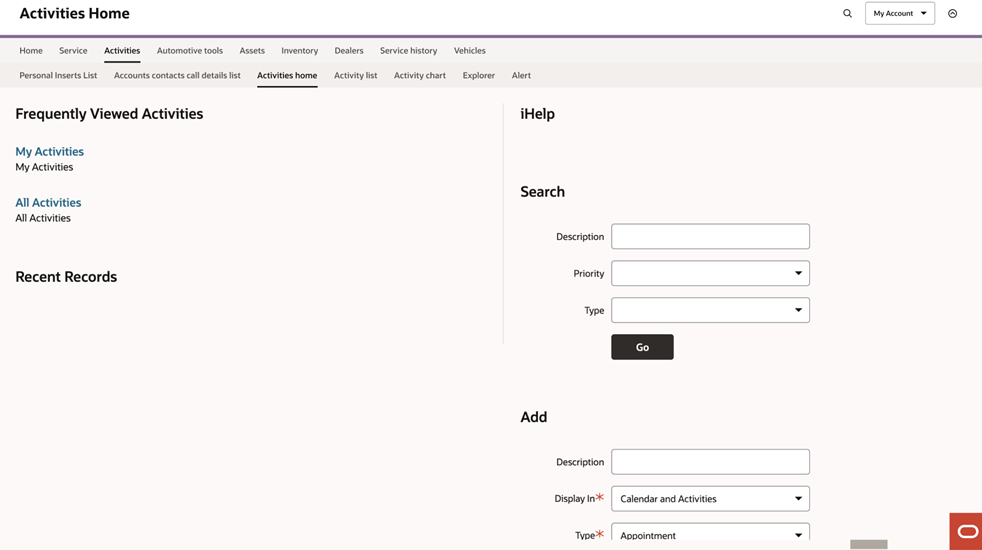
The Redwood UX is a testament to our commitment to continuous improvement and user satisfaction. We believe it will significantly enhance your experience with Siebel, making your daily tasks faster, easier, and more enjoyable. We invite you to try the new Redwood UX today and experience the difference for yourself. Your feedback is invaluable to us—please share your thoughts so we can continue to evolve and meet your needs.