
Many organizations rely on Siebel CRM for their Contact Center operations to manage customer relationships and maximize business opportunities. For example, a large healthcare management agency in the US has implemented the Siebel Call Center application, including Computer telephony integration (CTI) and Chat to support customers all year around. More than 10,000 agents are using Siebel CTI and Siebel Chat to manage claims and provide customer service. With this solution, the customer is able to achieve increased agent productivity and improved customer satisfaction.
Oracle Siebel Contact Center provides reliable infrastructure and seamless workflows to enable multi-channel communications through Siebel CTI and Siebel Chat modules. These two classic channels of service are considered critical for most Contact Centers:
- Siebel CTI: provides voice-channel support for Call Center agents. In 2024, about 71% of organizations are using CTI technology as part of their customer service operations, especially for handling complex issues and escalations. This is particularly beneficial for improving customer experience and agent productivity by automatically routing calls, displaying customer information, and integrating call data with other systems.
- Siebel Chat: a customer-contact channel whereby users can chat with a customer service representative in real time. Live chat continues to be another major customer service channel, with significant growth in usage. According to reports, around 67% of global consumers have used chatbots for customer support, highlighting the increasing reliance on this technology for instant, 24/7 service. Additionally, businesses utilizing live chat tools are seeing improvements in customer satisfaction, with a 73% satisfaction rate for chat-based interactions.
Modernize CTI Channel through Client-Side SCAPI
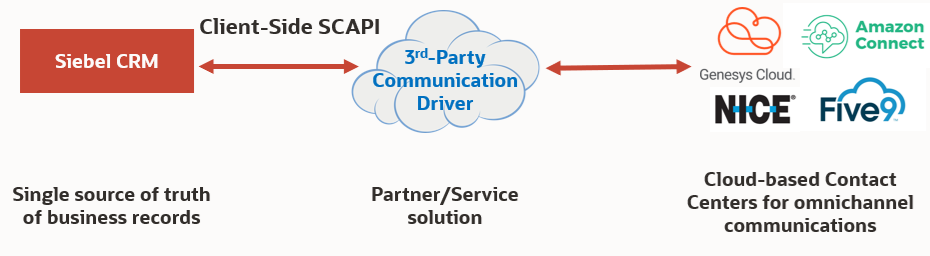
While we continue to support server-side Siebel Communications API (SCAPI) to enable integration with Siebel Contact Center, we now offer client-side SCAPI to customers who want to build cloud-base integration with Siebel application. Customers are shifting to cloud-based Contact Center as a Service (CCaaS) for omni-channel communications. With the new client-side SCAPI, customers and partners can build integration between cloud-based Contact Center applications and Siebel application. The new CCaaS model will help businesses to reduce cost of internal IT support and improve overall productivity of Contact Center agents.
Enhanced Usability Features for Contact Center:
Recently, the following new usability enhancements have been added to Siebel Contact Center:
Elapsed Time Indicator
Siebel CTI users can configure a custom Elapsed Time Indicator on Communications Toolbar. The new timer continuously counts the total working time even when a call is put on hold. This feature enables agents to accurately track service time when working with customers. Additionally, it allows service supervisors to efficiently measure the call response time and effectively manage agent workload and availability.
To configure Elapsed Time Indicator:
- Log into Siebel Web Tools.
- Click on the Edit icon and select ‘Toolbar’ type.
- In Object Explorer, navigate to Toolbar -> Toolbar Item.
- Click the create icon and enter the following details:
- Name: WorkItem Time
- HTML Type: Timer
- Position: Enter a unique Position ID of your choice.
- Deliver your Workspace change from Siebel Web Tools.
- Log into Siebel Call Center as a CTI agent.
- Launch Siebel Communications Panel. A new Time Indicator is displayed on your Communications Toolbar.
Note: If an agent is taking more than one phone call, they can switch between calls. The Elapsed Time Indicator will show the total working time for the call on focus.
Siebel Chat Filters
Siebel Chat users can filter Frequently Used Text (FUT) based on locales and languages. This is a very useful feature for customers who have large global Contact Center implementation. It will shorten response times for Chat agents when interacting with customers, resulting in improved customer satisfaction.
To configure filters:
- Log into Siebel Call Center as a Chat agent.
- Launch Siebel Communications Panel. Siebel Chat Pane appears at the bottom.
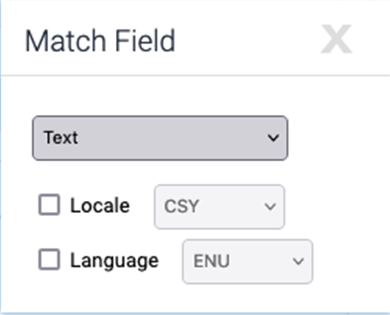
- Click on the icon next to the Toggle FUT button. The Match Field screen appears.
- Select the desired locale and/or language for FUT matching.
Self-Service and AI Chat-Bot Services
Digital assistants are virtual devices that help users accomplish tasks through natural language conversations. Each digital assistant contains a collection of specialized skills. When a user engages with the digital assistant, the digital assistant evaluates the user input and routes the messages to and from the appropriate skills.
Oracle Digital Assistant (ODA) is a platform that allows you to create and deploy digital assistants for your users. To learn more about Siebel CRM and ODA, click Siebel CRM with Oracle Digital Assistant.
Look out for more intuitive usability features with Siebel Contact Center! We are integrating Oracle OCI AI Service and GenAI into the Siebel Contact Center. Stay tuned to discover how these new technologies can enhance Siebel Contact Center productivity!