

Keeping Oracle Database Appliance (ODA) software current is important for maintaining a secure and supportable environment. Systems that remain outdated face greater exposure to known security vulnerabilities, increasingly limited Oracle Support options, and more complex upgrade paths and maintenance.
For ODA systems that have remained on older releases, getting current may no longer be a straightforward update operation. Depending on the starting point, it can require multiple upgrade hops, an operating system transition, database upgrades, or rebuilding and restoring the appliance.
To help customers choose the safest, most predictable, and supportable path, Oracle has published “KB918808 – ODA Recommended Upgrade and Patching Strategies for Older Releases”. The article provides practical guidance based on your current ODA and Oracle Database versions, Oracle’s validated N-4 patching window, and your availability requirements.
Planning your upgrade path
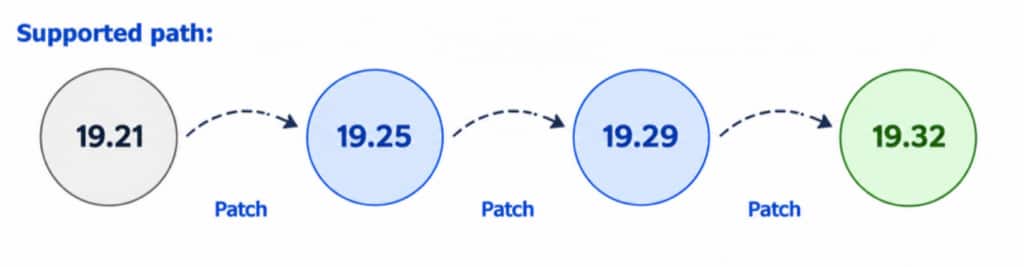
Oracle validates direct ODA patching within the N-4 window, where N is the target release. For ODA 19.32 bare-metal deployments, releases 19.28 through 19.31 are within that window. If your deployment is older, the recommended approach depends primarily on your current ODA release and whether the environment uses Oracle Data Guard.
Choose a upgrade path based on your starting point
| Source ODA SW version | Data Guard | Recommended Approach |
| Within the N-4 window | Optional | Patch directly to the target release |
| 19.21 or later, but outside N-4 | Yes | Multi-hop patching with Data Guard rolling |
| Older than 19.21 (Oracle Linux 7) | Yes | Reimage, redeploy, and migrate using ZDM |
| 19.21 or later, but outside N-4 | No | Multi-hop patching, combined with local patching on HA models |
| Older than 19.21 (Oracle Linux 7) | No | Backup, reimage, redeploy, and restore |
KB918808 provides the detailed decision matrix, including alternative approaches for environments with specific requirements.
Plan for older environments
For significantly older ODA environments, particularly Oracle Linux 7-based releases, rebuilding directly on a current ODA release is generally the preferred approach. A rebuild provides a clean software baseline and avoids carrying years of accumulated configuration forward.
Other options, including Data Preserving Reprovisioning (DPR), are available for certain older releases and specific requirements. KB918808 explains when these alternatives may apply and the additional considerations associated with them.
Recommended Examples
Consider availability and recovery
Your availability requirements can also influence the upgrade strategy. For environments using Oracle Data Guard, rolling approaches can help minimize application downtime. For older environments requiring a rebuild, Oracle Zero Downtime Migration (ZDM) can help migrate databases between ODA systems.
Backup and recovery planning is equally important, particularly when rebuilding older environments. KB918808 describes the available backup, restore, and migration approaches and the considerations for selecting the appropriate method.
Check database and hardware compatibility
The appliance release and database release are separate planning decisions. ODA 19.32 supports models X8-2 and newer. It supports Oracle Database 19c and Oracle AI Database 26ai on DB systems, so verify that the target database version matches your hardware and deployment model before committing to a migration plan.
KB918808 provides guidance for coordinating the appliance and database upgrades and identifying compatibility considerations before you begin.
Make recovery part of the upgrade
Backup and recovery planning is an important part of the upgrade strategy, particularly when rebuilding older environments. KB918808 describes the available backup, restore, and migration approaches and the considerations for selecting the appropriate method.
Stay current and make the next upgrade easier
Keeping ODA software current helps reduce exposure to known security vulnerabilities, maintain full Oracle Support, and keep your environment within Oracle’s validated patching paths. Regular updates also make future maintenance simpler and more predictable.
If your ODA environment has fallen behind, KB918808, ODA Recommended Upgrade and Patching Strategies for Older Releases, provides the detailed guidance to assess your options and plan the right path forward.