

Oracle Database Appliance has always focused on simplifying database infrastructure, from deployment and patching to day-to-day administration. Oracle Database Appliance software release 19.31 introduces new power management capabilities for Oracle Database Appliance X11 that help administrators better manage energy consumption and operating costs. As organizations look for ways to reduce energy usage and meet sustainability goals, these capabilities provide greater control over energy consumption while maintaining the performance and availability expected from Oracle Database Appliance.
Oracle Database Appliance software release 19.31 introduces two complementary power management capabilities for Oracle Database Appliance X11:
- Power Saving Mode, which reduces overall system power consumption during periods of low utilization.
- CPU Power Limits, which allow administrators to configure processor power limits based on operational requirements.
Power Saving Mode
Many Oracle Database Appliance environments have predictable periods of low utilization, such as development, test, QA, training, and departmental systems. Even production environments often have well-defined periods of lower activity.
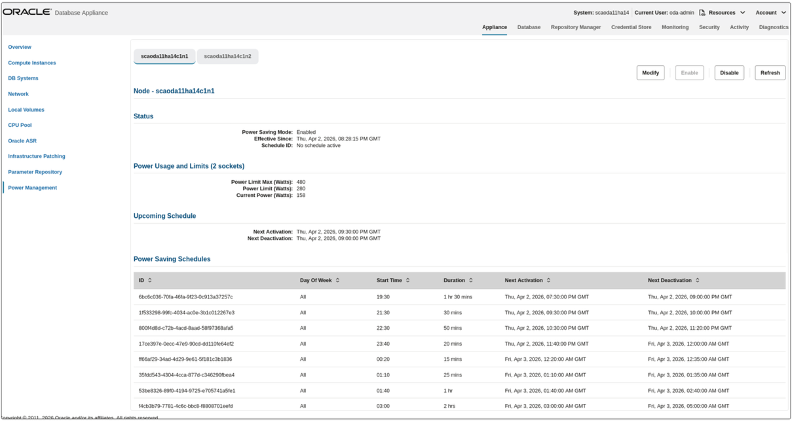
Power Saving Mode is designed for these scenarios. Administrators can enable it manually or configure recurring daily or weekly schedules that align with business hours. Once configured, schedules persist across system restarts.
Power Saving Mode continuously monitors system activity, including CPU utilization, storage I/O, and network throughput. When workload exceeds predefined thresholds for a sustained period, the appliance automatically returns to normal operation, ensuring applications remain responsive without requiring administrator intervention.
Depending on the appliance model and workload characteristics, Power Saving Mode can reduce system power consumption by up to 50W per server, during periods of low utilization.
CPU Power Limits
Oracle Database Appliance software release 19.31 also introduces CPU Power Limits for Oracle Database Appliance X11, giving administrators direct control over processor power consumption. Unlike Power Saving Mode, which automatically reduces overall system power consumption during periods of low utilization, CPU Power Limits allow administrators to define a maximum power envelope across all CPU sockets.
CPU power limits can be configured in 20 W increments, allowing administrators to reduce the maximum processor power to as little as 50% of the supported maximum. This capability gives customers greater control over power consumption to meet operational or data center requirements. Because CPU Power Limits reduce the maximum power available to the processors, they also reduce peak processing capacity under CPU-intensive workloads. Administrators should choose power limits that balance energy efficiency with application performance requirements.
Choosing the Right Capability
Power Saving Mode and CPU Power Limits address different use cases.
Use Power Saving Mode to automatically reduce system power consumption during predictable periods of low utilization. Use CPU Power Limits when you need to enforce processor power limits to meet operational or data center policies, and when a reduction in peak processing capacity is acceptable for your workload.
Both features can be configured using the Browser User Interface (BUI) or the odacli command-line interface. For prerequisites, supported configurations, and deployment guidance, refer to the Oracle Database Appliance X11 Deployment and User Guide.
Learn More
Power management is becoming an increasingly important consideration for modern IT environments. Oracle Database Appliance software release 19.31 introduces new capabilities for Oracle Database Appliance X11 that help administrators better align system power consumption with workload requirements and operational policies, while preserving the simplicity of Oracle Database Appliance.
To learn more about Power Saving Mode, CPU Power Limits, supported configurations, and deployment prerequisites, refer to the Oracle Database Appliance X11 Deployment and User Guide.