
Modern API workloads rarely look like a single user making a single request. Real systems handle bursts of concurrent traffic, mixed request types (some “fast,” some “slow”), and strict tail-latency expectations. With the Select AI for Python 1.3 release, developers can now use connection pooling in their applications with:
- select_ai.create_pool()
- select_ai.create_pool_async()
Prior to the 1.3 release, applications relied on standalone connections, which can become a scaling bottleneck under concurrency. This article shows what changed, what we measured by integrating pooling into a FastAPI service, and helps you choose a more optimal pool size for your use case. We chose Fast API since it is one of the most widely used modern Python frameworks for building high performance APIs.
What’s new in Select AI 1.3: predictable concurrency
Connection pooling is a foundational building block for concurrent services. It enables multiple requests to perform database calls in parallel (up to pool limits) and provides predictable connection management under load. Further, it improves both throughput and tail latency (p95/p99), which matter most for user experience.
Test setup (realistic API traffic)
To evaluate concurrency behavior under load, we used a representative Python API stack:
- Web server: FastAPI (asynchronous-first, commonly deployed with multiple workers). In our setup, we deployed FastAPI with 2 workers each with 40 worker threads.
- Workload: 3 endpoints
- /chat (LLM response)
- /show_sql (SQL generation)
- /translate (short translation)
- Load tool: Locust
- Concurrency profile: 100 users, spawn rate 10 users/sec, 3 minutes
- Database: Oracle AI Database 26ai on Autonomous AI Database Serverless, using 2, 4, and 8 ECPUs.
We tested the following scenarios using the same workload in each case:
- Synchronous Standalone (thread-local connections)
- Synchronous Pool (min 5 / max 10 / increment 5)
- Synchronous Pool (min 10 / max 20 / increment 10)
- Synchronous Pool (min 20 / max 40 / increment 20)
- Asynchronous Standalone (single connection per event loop)
- Asynchronous Pool (min 5 / max 10 / increment 5)
- Asynchronous Pool (min 10 / max 20 / increment 10)
- Asynchronous Pool (min 20 / max 40 / increment 20)
Here is an example Locust command:
locust -f locustfile_fastapi.py --host http://localhost:8000 --users 100 --spawn-rate 10 --run-time 3mResults summary
Key metrics below include total active connections, total requests, throughput, and tail latencies. Although we tested with 2, 4 and 8 ECPUs, the following statistics are for the 8 ECPU case as it scaled linearly.
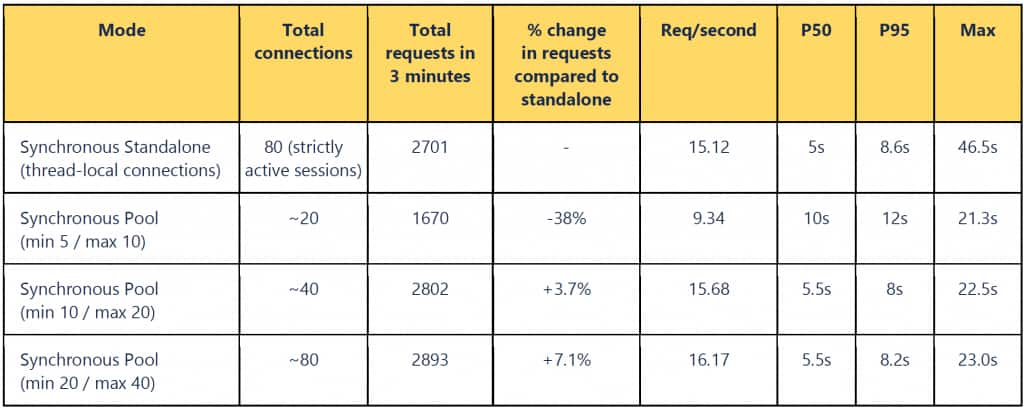
Table 1: Comparing results using synchronous standalone and synchronous pool
What stands out for the standalone case?
- We achieved 3.7% more requests than the synchronous standalone test, but with half the number of open connections. In contrast, 80 active connections (the line below) is underutilizing the connection pool. A shared connection pool of size 20 across 40 workers gives optimal performance with both workers and pools being fully utilized.
- Increasing the pool size without adding enough workers and ECPU can plateau the throughput. As such, right pool size matters – setting the minimum, maximum, and increment needs to be tuned as per your workload, available database ECPU, and number of FastAPI worker threads.
- Pooling dramatically improves asynchronous performance. Asynchronous standalone is constrained by a single-connection bottleneck, resulting in very high timings for p95 and p99.
- Synchronous with pooling achieved the best overall tail latency in this test.
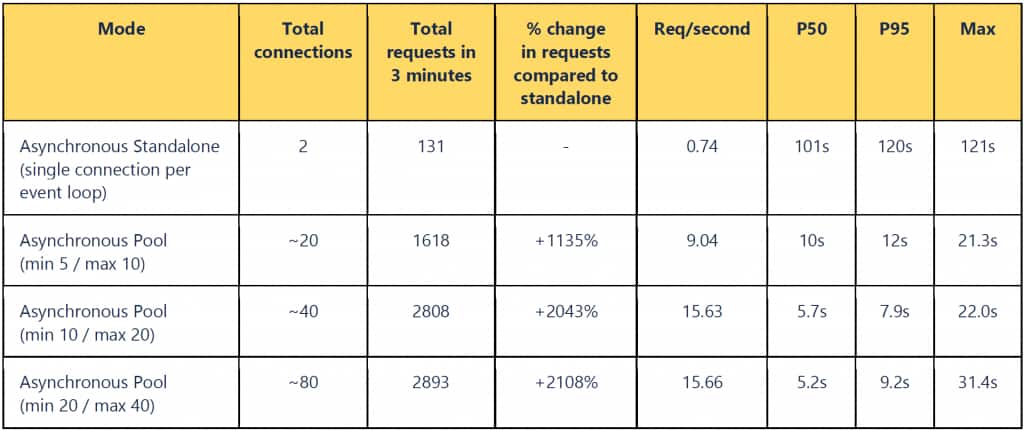
Table 2: Comparing results using asynchronous standalone and asynchronous pool
What stands out for the asynchronous case?
- Asynchronous with pooling delivered strong scalability, closing much of the gap with synchronous mode while preserving the asynchronous programming model. Pooling helps to reduce tail latencies in both the asynchronous and synchronous cases.
Why asynchronous standalone doesn’t scale: event loop + single connection
Concurrency in FastAPI depends on the endpoint style.
Synchronous endpoints run in a threadpool, where FastAPI dispatches non-asynchronous endpoints to a threadpool. With thread-local standalone connections, each thread tends to get its own connection. Once the threadpool is saturated, requests queue, and p95/p99 rises quickly. The threadpool size is often implicit (and can be difficult to tune precisely).
Asynchronous endpoints run inside a single event loop thread per worker process. The event loop can multiplex many in-flight requests—but if Select AI is using a single standalone connection, then all database calls serialize on that one connection. That serialization is the root cause of the greater latency and low throughput in the asynchronous standalone baseline.
Pooling removes the bottleneck. A pool provides multiple connections that can be checked out concurrently, enabling true parallel database work from many threads (synchronous endpoints) or many coroutines (asynchronous endpoints).
Recommendations: when to use pooling vs standalone
We recommend using pooling for most APIs as it is typically the right choice when you have:
- high concurrency and bursty traffic
- mixed “slow + fast” operations (chat + SQL + translation)
- strict p95/p99 latency goals
- a need for predictable capacity limits
Use standalone in specific narrow use cases that involve single-user scripts, CLI tools, or simple, low-concurrency batch jobs.
FastAPI integration: create the pool at startup
FastAPI provides a lifespan hook to initialize shared resources (and clean them up on shutdown). The following is a simple code example in Python using environment variables and Select AI pooling.
import os
from contextlib import asynccontextmanager
from fastapi import FastAPI
import select_ai

app = FastAPI()

MODE = os.getenv("SELECT_AI_MODE", "pool")  # "pool" or "standalone"
USER = os.getenv("SELECT_AI_USER")
PASSWORD = os.getenv("SELECT_AI_PASSWORD")
DSN = os.getenv("SELECT_AI_DB_CONNECT_STRING")

POOL_MIN = int(os.getenv("SELECT_AI_POOL_MIN", "20"))
POOL_MAX = int(os.getenv("SELECT_AI_POOL_MAX", "40"))
POOL_INC = int(os.getenv("SELECT_AI_POOL_INC", "10"))

@asynccontextmanager
async def lifespan(app: FastAPI):
    if MODE == "pool":
        select_ai.create_pool(
            user=USER,
            password=PASSWORD,
            dsn=DSN,
            min_size=POOL_MIN,
            max_size=POOL_MAX,
            increment=POOL_INC,
        )
    else:
        select_ai.connect(user=USER, password=PASSWORD, dsn=DSN)

    app.state.select_ai = select_ai
    yield

    select_ai.disconnect()

app.router.lifespan_context = lifespan
Set pool sizing based on the expected concurrency and database capacity. A pool that is too large can overwhelm a small database; a pool that is too small can constrain throughput. In multi-worker deployments, each worker process typically creates its own pool—factor that into total database connections.
Takeaway
If you’re building concurrent Python services with Select AI, connection pooling in Select AI for Python 1.3 is the simplest and most impactful way to improve throughput under load, tail latency (p95/p99), and operational predictability for concurrent traffic.
Resources
For more information, see:
- Oracle Select AI for Python documentation
- Oracle Select AI documentation
- DBMS_CLOUD_AI Package
- Oracle Select AI Agent documentation
- DBMS_CLOUD_AI_AGENT Package
- Connection Pooling documentation
Acknowledgement
Thanks to Abhishek Singh who provided the benchmark results for this post.