
Introduction
As enterprise databases grow into the multi-terabyte and petabyte range, database recovery has become one of the most challenging operational tasks. Traditional recovery procedures work well for small and medium-sized databases, but may not be optimized for Very Large Databases (VLDBs) – which can span 100+ terabyte into petabytes and often contain years of historical data that rarely changes while only a small percentage of the data remains active.
Restoring the entire database after a disaster—even when only currently active business data is immediately needed—can significantly extend Recovery Time Objectives (RTOs). Organizations therefore need strategies that prioritize business continuity without compromising data integrity.
This blog demonstrates a refined RMAN recovery approach for Oracle Database 19c and 26ai by separating active and historical table partitions into different tablespaces. During recovery, active tablespaces (read-write) are restored first so the database becomes operational more quickly, while archive (rarely updated or read-only) tablespaces are restored afterward in the background.
The architecture, implementation, and benefits of this recovery strategy are outlined below.
The Challenge with Traditional VLDB Recovery
Consider a database containing:
- Current operational transactions
- Five to ten years of historical records
- Large partitioned tables
- Multiple terabytes of archive data
In many production environments:
- Only recent partitions are actively updated.
- Historical partitions are rarely or never updated and queried infrequently.
- Recovery procedures restore everything regardless of business priority.
The result is:
- Long restore windows
- Increased downtime
- Missed Service Level Agreements (SLAs)
For businesses operating around the clock, waiting several additional hours to restore historical data can unnecessarily delay critical applications that need immediate read-write access to active operational data.
Progressive Tablespace Recovery Method using Separate Online and Archive Data Tiers
This method addresses the prolonged RTO issue by creating two logical categories of tablespaces – online (active read-write) and archive (rarely updated or read-only), where online tablespaces are recovered first for read-write access by critical applications.
The overall outline is discussed below and summarizes the step-by-step technical brief.
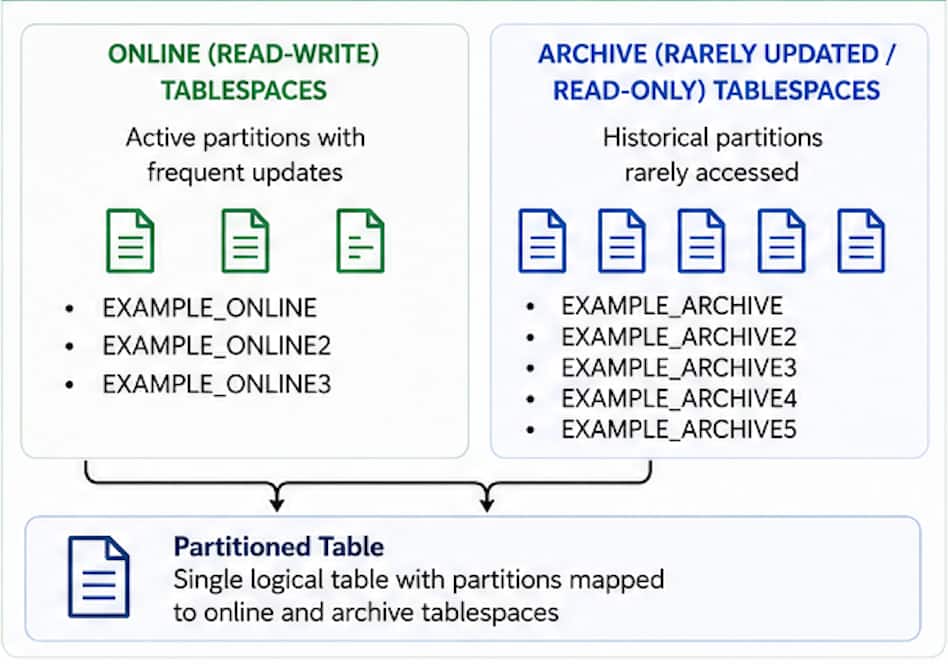
Create Online and Archive Data Tiers
- Online (Read-write) Tablespaces
These store the active partitions that receive ongoing inserts and updates.
E.g.
• EXAMPLE_ONLINE
• EXAMPLE_ONLINE2
• EXAMPLE_ONLINE3 - Archive (Rarely updated / Read-only) Tablespaces
These contain historical partitions that rarely or never change.
E.g.
• EXAMPLE_ARCHIVE
• EXAMPLE_ARCHIVE2
• EXAMPLE_ARCHIVE3
• EXAMPLE_ARCHIVE4
• EXAMPLE_ARCHIVE5
The setup creates separate tablespaces specifically for online and archive partitions before loading the partitioned table.
Partitioning the Data
The setup uses a partitioned table where:
- Invoice partitions 1–3 reside in example_online tablespaces.
- Older invoice partitions (4-7, DEFAULT) reside in example_archive tablespaces.
This design allows Oracle to physically separate frequently accessed data from historical data while maintaining a single logical table for applications.
The partition-to-tablespace mapping is verified after table creation to ensure each partition resides in its intended storage location.
Why This Architecture Matters
This separation enables administrators to treat current and historical data differently during backup and recovery.
Benefits include:
- Faster production recovery
- Smaller restore operations
- Reduced business downtime
- Flexible backup strategies
- Better utilization of storage
Instead of treating every tablespace equally, you restore only what critical business applications immediately require.
Recovery Exercise 1: Progressive tablespace recovery from Level 0 Backup
The first recovery scenario demonstrates restoring a database after all database files have been deleted.
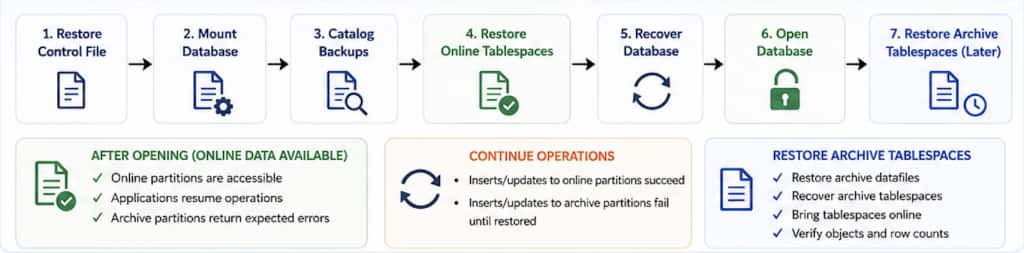
The workflow includes:
- Restore the control file.
- Mount the database.
- Catalog available backup sets.
- Restore only the online tablespaces.
- Recover the restored database.
- Open the database.
- Recover archive tablespaces afterward.
Recovering Only the Online Tablespaces
Instead of restoring every datafile immediately, RMAN skips archive tablespaces during the initial restore and recovery.
Once recovery completes:
- The database opens successfully.
- Online partitions are immediately accessible.
- Business applications can resume processing.
Attempts to access archive partitions generate expected errors because those tablespaces have not yet been restored. The expected behavior is that:
- Inserts into online partitions succeed.
- Inserts into archive partitions fail until recovery completes.
This confirms that business operations dependent on current data can resume even though historical tablespaces remain offline.
Recover Archive Tablespaces Later
After the online partitions can be accessed, the archive tablespaces can then be restored in the background
The process includes:
- Restoring archive datafiles
- Recovering archive tablespaces
- Bringing tablespaces online
- Verifying object availability
- Validating row counts
After completion, the entire database returns to its original state with both active and historical data available.
Recovery Exercise 2: Progressive Tablespace Recovery with Read-Only Archive Tablespaces
The second scenario extends the concept by introducing read-only tablespaces.
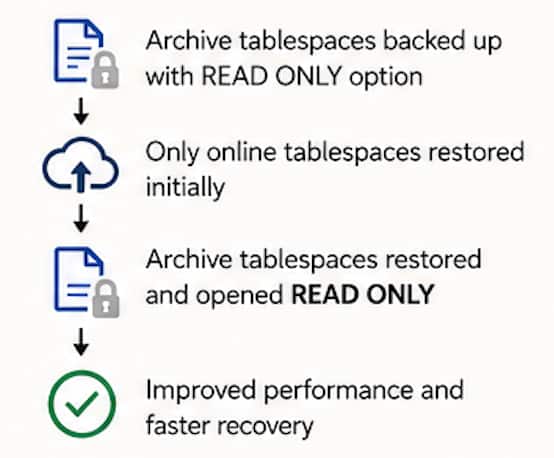
Rather than backing up static archive partitions repeatedly, archive tablespaces are switched to read-only mode.
RMAN Backup Optimization feature is then enabled so unchanged read-only datafiles are skipped during subsequent backups, reducing overall backup windows.
Advantages of Read-Only Archive Tablespaces
When archive partitions no longer change:
- Backup windows are reduced.
- Storage consumption is reduced.
- Redundant backup sets are avoided.
Recover from Multiple Level 0 Backups
In this exercise, an initial L0 backup is taken for all database files.
Secondly, an L0 backup is taken excluding read only data files, which minimizes backup window.
In this Recovery exercise, RMAN first recovers:
- Current online tablespaces from the latest backup.
Then, progressive recoveries are done for:
- Historical archive tablespaces from the earlier full backup.
RMAN Restore Preview and Restore Validate can be used to help identify and validate backup pieces that are required before the recovery begins, making planning simpler and reducing unnecessary restore operations.
Verify Data Access
The last step post-recovery is to validate data file status is correct (online or read-only) and can be accessed.
- Tablespace status
- Datafile status
- Partition availability
- Record counts
- Successful access to both online and archive partitions
These verification steps confirm that progressive recovery strategy maintains database consistency while enabling earlier access to operational data.
Best Practices
Organizations considering this recovery model should keep several best practices in mind:
- Design partitioning around business usage, not just data age.
- Keep active partitions in separate tablespaces.
- Move historical partitions into read-only archive tablespaces when appropriate.
- Enable RMAN Backup Optimization for static data.
- Test disaster recovery procedures regularly.
- Validate restored objects before returning systems to production.
Business Benefits
Implementing this approach offers measurable operational advantages:
- Reduced Recovery Time Objective (RTO) allowing faster access to the most critical active data
- Reduced Backup Windows by skipping redundant backups of static, read-only data
- Lower Storage Costs by eliminating redundant backups
- Improved SLAs by providing flexibility in prioritizing restore of critical vs. less critical data
Conclusion
As database volumes continue to grow, recovery strategies must also grow and adapt to optimize recovery time objectives. Separating active and historical partitions into dedicated tablespaces allows RMAN to prioritize getting business-critical back online for read-write access as quickly as possible.
The approach demonstrates how progressive tablespace recovery using online and read-only tablespaces work together to minimize backup windows and reduce downtime while preserving complete recoverability.
For organizations managing VLDBs, optimizing recovery by selective tablespaces provides a practical path toward faster disaster recovery, lower backup overhead, and improved operational resilience.