
A successful out-of-place recovery depends on preparation and recovery drills that are completed long before an actual outage. The destination needs the recovery metadata, security material, access, and tested procedures required to configure the destination and confidently recover your database.
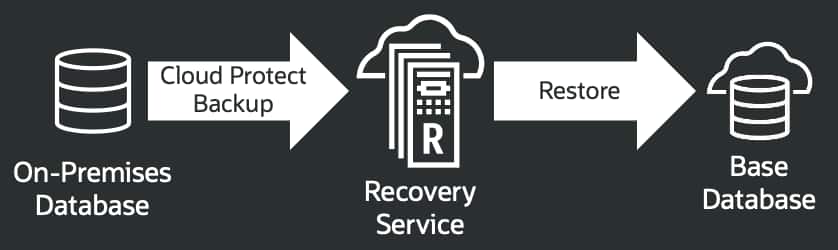
This blog explains how to prepare for and recover an on-premises Oracle Database to a new OCI Base Database system after an on-premises outage, but the concept works would also apply to Exadata Database Service in OCI. It focuses on recovery metadata, point-in-time RMAN recovery through Recovery Service, bottleneck analysis, and rehearsal.
Prepare recovery metadata before an outage
An out-of-place recovery needs more than backup pieces. Information and files must be collected from the source to recover to a new destination environment. The Oracle Recovery MCP server can be used to guide your collection process.
Before using the Recovery Service MCP server, follow the current installation and AI client configuration instructions in the GitHub repository (https://github.com/oracle/mcp/tree/main/src/oci-recovery-mcp-server).
The database administrator (DBA) who runs the prompt needs operating system and database privileges to query the source configuration and read the recovery artifacts being collected. The AI client can guide the collection process, but the DBA must review each proposed command and its results.
Below is an example of a prompt to use in the AI client (for example, ChatGPT):
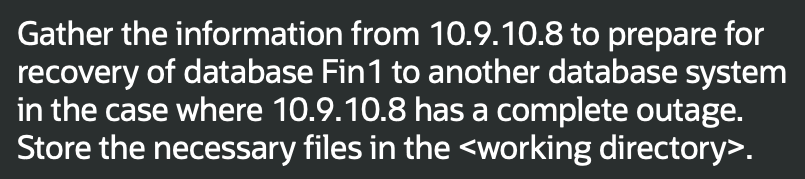
Examples of information and files to Examples of information and files to capture and protect before an outage include:
- TDE wallet files and the Oracle Database password file
- DBID, DB unique name, database version, and incarnation
- Network and Oracle Net details
- Storage and ASM configuration
- A usable initialization parameter file and control file
- Recovery Service connection metadata required to generate the RMAN environment
Best practices:
- Review every AI-proposed command before execution, and verify that the collected artifacts match the source database.
- Retrieve the TDE wallet and Oracle Database password file through your company’s approved secrets-management or encrypted-storage process. Do not give the AI client direct access to the secrets store or include plaintext host or database credentials in prompts or scripts.
- Create and validate the recovery process during normal operations, refresh the recovery artifacts as the database changes, and make them available to the incident team through controlled access.
Recover out of place to OCI
During a complete on-premises outage, a new OCI Base Database system can serve as a recovery destination. The following high-level workflow reflects the controls used in a validated point-in-time recovery runbook:
- Validate the destination identity, available storage capacity, and network isolation. For ASM systems, use the ASM command-line utility to review disk group capacity. If the destination host already contains a database, obtain explicit authorization and verify its identity before any deletion.
asmcmd lsdg - Securely stage the recovery package, including the TDE wallet, Oracle Database password file, recovery metadata, and OCI authentication material. Verify the integrity of all staged artifacts before use.
- Install SQLcl, configure Recovery Service authentication, and connect through the named Recovery Service connection for the protected database.
- In SQLcl, confirm that the available restore range includes the approved recovery time. Then generate the RMAN restore template and environment file.
SQL> rcv show restore_range
SQL> rcv configure rman_env - Load the generated RMAN environment file. Then use the RMAN command and restore template returned by rcv configure rman_env.
$ source <generated_path>/rman_env.sh - Start the auxiliary database in NOMOUNT with the source identity and destination-specific Oracle Managed Files, ASM, and wallet configuration.
$ sqlplus / as sysdba
SQL> startup nomount pfile='<path_to_initialization_parameter_file>’; - Use standard RMAN restore commands while connected to the Recovery Service with the environment (rman_env) in step 4. Set the source DBID, restore the control file and database, recover to the approved time, and open the database with RESETLOGS. The abbreviated example below identifies the major commands rather than a complete recovery script.
SET DBID <source_dbid>;
RESTORE CONTROLFILE FROM AUTOBACKUP;
ALTER DATABASE MOUNT;

RUN {
  SET UNTIL TIME
    "TO_DATE('<approved_utc_time>',
             'YYYY-MM-DD HH24:MI:SS')";
  RESTORE DATABASE;
  RECOVER DATABASE;
}

ALTER DATABASE OPEN RESETLOGS;
8. Validate the recovered database, PDBs, wallet, recovery state, and datafile status. Keep application traffic isolated until the application owner accepts the recovered point and approves cutover.
Best Practices:
- OCI systems use Coordinated Universal Time (UTC), while the on-premises system may use a different local time zone. Convert the approved on-premises recovery time to UTC using the offset in effect on the recovery date.
- Stop if the restore-range output does not explicitly include the UTC point in time required. Do not use the destination host’s current time as the recovery point.
- Be sure to test this workflow in your environment since database size, network throughput, backup layout, target storage performance, and redo volume will materially affect a real recovery.
- The OCI database system can serve as a temporary operating location for application workloads while the on-premises infrastructure is rebuilt. After the on-premises infrastructure is ready, an organization can plan a controlled move back, such as a Data Guard-based migration.
Tune your recovery configuration
After the initial recovery test, AI can also help identify a recovery bottleneck. In figure 4, the prompt refers to the recovery workflow and commands shown in the previous section, then asks whether additional RMAN channels would shorten the restore.
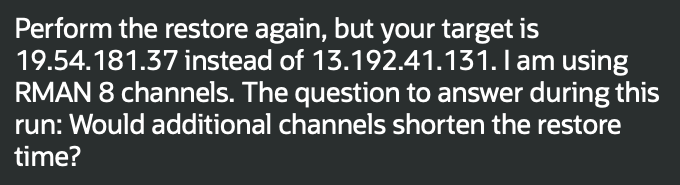
Figure 4 – AI prompt to monitor RMAN channel usage
AI can now help measure channel activity, recovery progress, CPU, network capacity, and target-storage latency. In figure 5, AI analysis of the observed metrics indicates that additional channels would not materially reduce recovery time because destination write latency and ordered redo apply were the limiting factors. For example, change the shape for the Base Database Service for greater I/O throughput. Re-test storage latency before increasing RMAN channels.
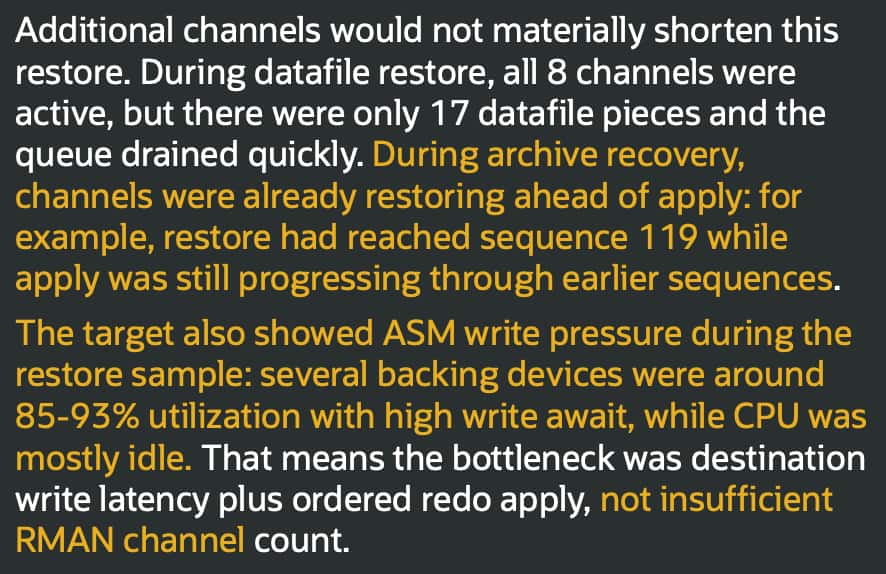
Figure 5 – Results from AI analysis of RMAN activity and bottleneck
Test the scenarios that matter to your estate
Data Guard physical standby, non-CDB-to-PDB, cross-version, cross-platform, and RAC recovery scenarios require a controlled rehearsal specific to each configuration, database version, storage design, and operational requirements. Don’t expect a workflow tested for one configuration to work universally across all scenarios and environments.
AI can help collect configuration details and prepare a reviewable checklist, but it should not select a recovery path or execute commands for these scenarios without qualified human review and an approved test.
Make recovery rehearsal a normal operating practice
A recovery workflow is only credible when it has been rehearsed. Cloud Protect and Autonomous Recovery Service provide the protection foundation, but recovery still depends on sound design, secure access, accurate documentation, and regular tests.
Be sure to run an out-of-place recovery rehearsal for a representative on-premises database. Validate the recovery package, the target landing zone, network paths, wallet handling, RMAN workflow, and post-restore checks. Then record the observed recovery time and the constraints discovered. That is how a backup strategy becomes a recovery capability.
Summary
Cloud Protect and Recovery Service provide the protection foundation, but successful out-of-place recovery also depends on preparation, secure access, accurate recovery metadata, and tested procedures. Capture and protect the required recovery artifacts before an outage, confirm that the requested recovery time is available, validate the results, and use AI to help identify performance bottlenecks. This blog completes the two-part series by applying the recovery-ready backup strategy from the first blog to a tested recovery workflow.
Learn more
Oracle Database Autonomous Recovery Service documentation
https://docs.oracle.com/en-us/iaas/recovery-service/doc/index.html
Cloud Protect documentation
https://docs.oracle.com/en-us/iaas/recovery-service/doc/add-premises-database-recovery-service-using-cloud-protect.html
Recovery Service MCP server
https://github.com/oracle/mcp/tree/main/src/oci-recovery-mcp-server
Base Database Service scaling documentation (https://docs.oracle.com/en/cloud/paas/base-database/scale-dbs/index.html)
AskTOM session includes an example of AI-assisted Cloud Protect configuration and recovery
https://youtu.be/eFiVlqFKtkM