
Microservices have been one of the emerging technologies and are beginning to get mainstream adoption thanks to several other emerging technologies like containerization, cloud but most importantly the business demands to be agile, scalable and fast. A well-written article — <a class="av cg mc md me mf" href="https://www.enterpriseirregulars.com/131859/why-microservices-will-become-a-core-business-strategy-for-most-organizations/?source=post_page—————————" style="font-family: medium-content-serif-font, Georgia, Cambria, "Times New Roman", Times, serif; font-size: 21px; letter-spacing: -0.004em; box-sizing: inherit; color: inherit; text-decoration-line: none; -webkit-tap-highlight-color: transparent; background-repeat: repeat-x; background-image: url("data:image/svg+xml;utf8,"); background-size: 1px 1px; background-position: 0px calc(1em + 1px);”>Why Microservices Will Become a Core Business Strategy for Most Organizations by Dion Hinchcliffe gives a good summary on the business impact of Microservices.
Why Oracle GraalVM Enterprise Edition?
GraalVM Enterprise Edition 19.0 is a new product released by Oracle after putting in years of investments in research and productization and now it is ready for production deployment. GraalVM Enterprise Edition is a high-performance, embeddable, polyglot Virtual Machine for running applications written in JavaScript, Python, Ruby, R, JVM-based languages like Java, Scala, Kotlin, and LLVM-based languages such as C and C++ and allows efficient interoperability between programming languages. A list of benefits of GraalVM Enterprise Edition can be viewed on GraalVM Enterprise Edition’s website.
Where do GraalVM Enterprise Edition and Microservices come together?
One of the features of GraalVM Enterprise Edition is native-images (available as an early adopter at the point of writing this) that works with many Java microservices frameworks. Projects such as Quarkus, Micronaut and Helidon have accepted this technology as native-images significantly reduce runtime memory requirements and startup time.
What are we going to do ?
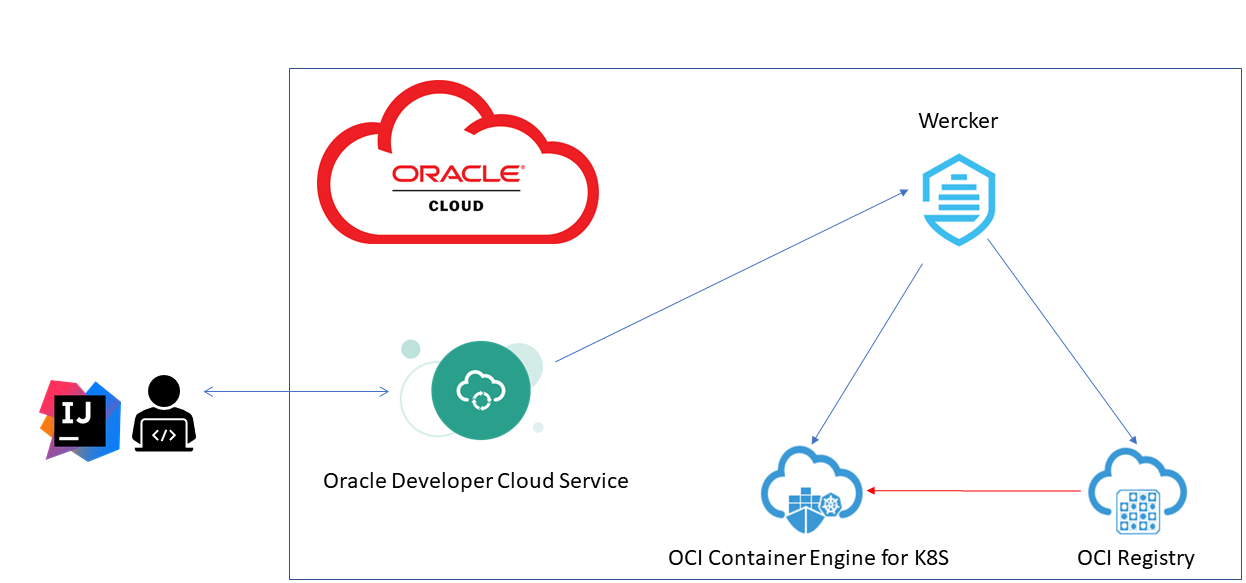
In this article, we will be showing how we can develop microservices with GraalVM Enterprise Edition and Micronaut on Oracle Cloud Infrastructure (OCI). The diagram below depicts the cloud services we are using in this setup and how each of the cloud services interact with one another.


Let’s Get Started (Working with Windows 10)
Steps Summary


Step 1: Software Installation
- IntelliJ CE for Windows (I prefer this)
- Plugins: GIT, Terraform, Docker
- Docker for Windows 10 (increase the memory allocation to Docker if system exit during native-image generation)
- Micronaut
- KubeCtl
- OCI Tool for Windows
Step 2: Create a project in ODCS
- Create a Project and setup a GIT repository


- Clone the sample project from GitHub to ODCS


- If you are working in a team, add your team members and give them appropriate rights.
Step 3 (Optional): Using IntelliJ for your development.
If you are not making any changes to the codes or configurations, proceed directly to Step 4.
- Check out project
- IntelliJ → VCS | Checkout from Version Control | Git


Step 4: Setup Docker Repository on OCIR
- Create a repository — the name will be used to make the changes in the wercker.yml / kubernetes_deployment.template.yaml
- Ensure that it is set to public (this is to save a few more steps to setup secrets, if you know how to deal with K8S secrets, go ahead and make this private)


Step 5: Setting up OKE instance
There are 2 ways that you can setup OKE — using the web UI (follow this <a class="av cg mc md me mf" href="https://www.oracle.com/webfolder/technetwork/tutorials/obe/oci/oke-full/index.html?source=post_page—————————" style="box-sizing: inherit; color: inherit; text-decoration-line: none; -webkit-tap-highlight-color: transparent; background-repeat: repeat-x; background-image: url("data:image/svg+xml;utf8,"); background-size: 1px 1px; background-position: 0px calc(1em + 1px);”>tutorial) or <a class="av cg mc md me mf" href="https://github.com/oracle-terraform-modules/terraform-oci-oke?source=post_page—————————" style="box-sizing: inherit; color: inherit; text-decoration-line: none; -webkit-tap-highlight-color: transparent; background-repeat: repeat-x; background-image: url("data:image/svg+xml;utf8,"); background-size: 1px 1px; background-position: 0px calc(1em + 1px);”>terraform scripts.
Upon successful creation of your OKE instance, get the values needed for the Wercker’s environment in Step 8.
Ensure your Kubernetes are running by following this set of instruction.
- Download your kubeconfig
- Run your Kubernetes Dashboard
Step 6: Setup Wercker
- After login into Wercker, Click on (+) and “Add Application”. Go through the wizard.
- Select the “User”, and SCM → Oracle Developer Cloud Service


- Select the repository you have created for this project and complete the setup wizard.


Step 7: Creating the Wercker Pipeline
In the sample code, there are 2 pipelines in the workflow (build, deploy-to-oke). This pipeline will be triggered once a new check-in is pushed to the Master branch. The build pipeline will compile the codes, create a docker image and push it to the image repository and the deploy-to-oke will then take the newly created image from the OCIR to be deployed on OKE.
A good example of Wercker in general can be found here.
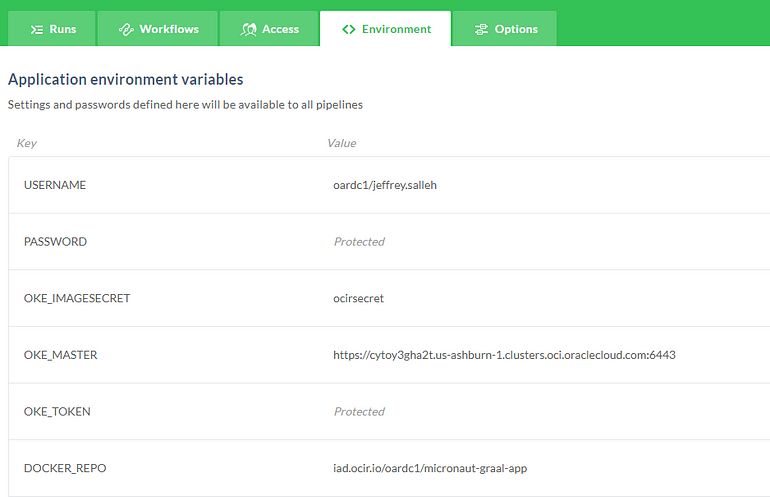
Step 8: Define the Wercker Environment
These environment variables are important for the tutorial. For the Wercker pipeline these are the key variables needed.

Step 9: Modify the config files and Start the Wercker Pipeline
- Make a modification to your the wercker.yml and kubernetes_deployment.template.yaml (Edit lines marked with #TODO:)
- Commit and push the to files to the master branch to trigger the Wercker pipeline


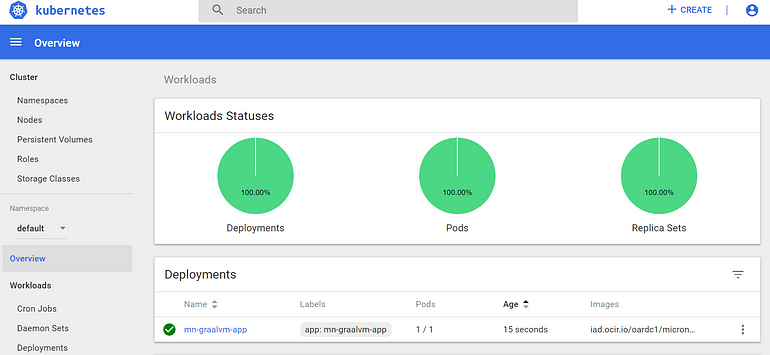
Step 10: Check your K8s dashboard and access the application
- Enter: http://<external_endpoints>/meetup/random on your browser (Random conferences)
- Enter: http://<external_endpoints>/abs/java/<number> (Absolute number)



Try GraalVM Enterprise Edition now:
GraalVM Enterprise Edition is free for development and evaluation usage from the Oracle Technology Network.
GraalVM Enterprise Edition is available for purchase and is free on Oracle Cloud.
The full documentation for GraalVM Enterprise Edition is now available on the Oracle documentation page.
Keep an eye out for more information via blog posts on graalvm.org.
Credit to Joseph Che for the codes