
A practitioner’s guide to the five building-block categories that power orchestration, reasoning, and execution inside Oracle Fusion Workflow Agents.
If you’ve spent any time inside Oracle’s AI Agent Studio, you’ve probably noticed that Workflow Agents aren’t just flowcharts with an LLM bolted on. They’re composed of distinct node types — each with a clear job — that snap together to form enterprise-grade, agentic processes. Understanding these node types is the fastest way to go from “I built a demo” to “this thing runs production.”
In this post, we’ll walk through all five node categories, why each one exists, what specific nodes live inside each category, and the best practices that separate good workflows from great ones. Whether you’re designing a leave-request handler in HCM, an invoice-exception resolver in ERP, or a customer-case triage bot in CX — the building blocks are the same.
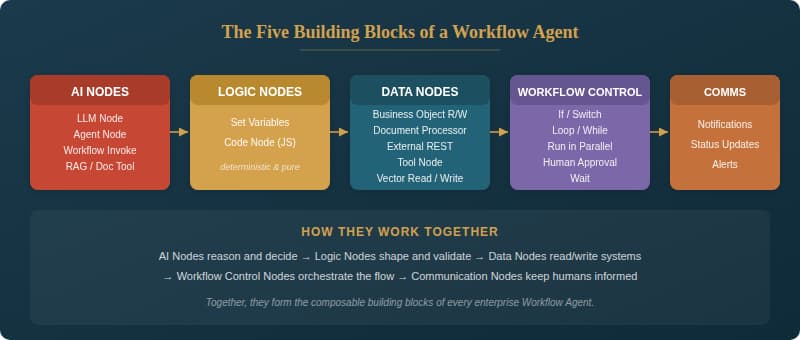
Figure 1 — The five node categories and their constituent building blocks
Why Node Types Matter
Traditional enterprise workflows tend to be rigid: hard-coded rules, fixed branching, manual handoffs. Workflow Agents in Oracle AI Agent Studio take a fundamentally different approach. Instead of treating the entire flow as a monolith, they decompose it into typed nodes — each with a clear contract, a specific runtime behavior, and a set of best practices.
Think of it like building with specialized Lego bricks rather than carving from a single block of wood. Each node type is purpose-built: AI Nodes handle the “thinking,” Logic Nodes handle the deterministic “shaping,” Data Nodes handle the “connecting,” Workflow Control Nodes handle the “choreography,” and Communication Nodes handle the “telling.” When you understand what each brick does, you can assemble remarkably sophisticated processes — and, crucially, you can debug, test, and reuse them independently.
1. AI Nodes — The Brain
AI Nodes are what make a Workflow Agent “agentic.” They’re the points in your flow where a large language model interprets intent, extracts entities, classifies inputs, summarizes content, or generates structured outputs. They can also delegate work to specialist agents or sub-flows, and ground their decisions in retrieved knowledge from policies, documents, or runbooks.
LLM Node — Structured reasoning and generation. Feed it an invoice description; get back a JSON payload with employeeName, startDate, location, and role. Use it for intent extraction, classification, or summarization.
Agent Node — Calls a domain-specialist agent. For example, a Benefits Agent validates eligibility and required documents for a life-event change. An AP Exception Agent analyzes a PO/receipt/invoice mismatch and proposes a resolution with a risk level.
Workflow Invoke (Sub-flow) Node — Calls a published, reusable workflow. Think “Supplier Onboarding Sub-flow” that runs sanctions check, tax validation, banking verification, and approval routing, then returns a standardized status object.
RAG / Document Tool Node — Retrieves semantically matched evidence from a curated corpus. “Can I expense AirPods?” → retrieves the expense policy → returns whether it’s allowed, the threshold, and whether approval is required, complete with evidence citations.
| BEST PRACTICE Use schemas for LLM outputs — never let freeform text propagate downstream where structured data is expected. Reserve LLM calls for genuine decision points; if the logic is deterministic (a threshold check, a date comparison), use a Logic Node instead. Always validate the output of an AI Node before acting on it. |
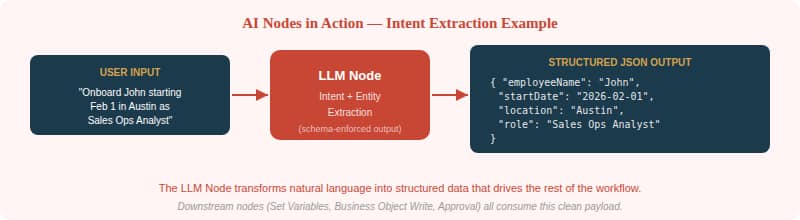
Figure 2 — An LLM Node extracting structured entities from a natural-language request
2. Logic Nodes — The Spine
Logic Nodes are the deterministic workhorses of a workflow. They normalize and shape payloads between steps, compute thresholds, format requests, validate schemas, and store intermediate results and flags for later routing. If AI Nodes are the brain, Logic Nodes are the spine — keeping everything aligned and predictable.
Set Variables Node — Persists state within the workflow: IDs, decisions, extracted fields, status flags. After an LLM extracts intent and entities, you store them so downstream nodes can reference them reliably.
Code Node — Runs JavaScript for deterministic parsing, mapping, business math, and validations. Unlike the LLM, a Code Node has no token limits and executes in milliseconds. Use it to convert dates and currencies into canonical formats, compute variance percentages, validate schemas, or shape payloads into the exact contract a REST call expects. Outputs can be Arrays, Booleans, Numbers, Objects, or Strings.
| BEST PRACTICE Keep logic nodes side-effect free — they should never write to systems of record. Validate contracts early so you fail fast with clear error messages. Centralize repeatable transformations into reusable helpers or sub-flows. The Code Node has a 5-second execution limit, 10,000 max iterations, and 50 KB of serialized output — design accordingly. |
3. Data Nodes — The Connectors
Data Nodes are how your workflow touches the real world. They read from and write to Fusion business objects, call external REST services, process documents, and persist semantic state via vector databases. If you’re building an agent that actually does something in your enterprise — not just talks about it — Data Nodes are where the rubber meets the road.
Business Object Node (Read/Write) — Fetches or updates Fusion objects: invoices, employees, POs, receipts. Read example: fetch Invoice, Supplier, PO, and Receipt for INV-1432. Write example: update Invoice.status = “ReadyForApproval.”
Document Processor — Parses runtime documents (PDFs, forms, attachments) into usable text. Ideal for extracting line-item tables from a PDF invoice for three-way match validation.
External REST Node — Integrates with third-party systems. Read: call a sanctions/risk API during supplier onboarding. Write: create an ITSM ticket for provisioning.
Tool Node — Makes platform tools available as workflow nodes: Deep Link, Chat Attachments Reader, Intent Change Indicator, and User Session.
Vector Read / Write — Stores and retrieves semantic state. Write normalized summaries for future retrieval. Read to find similar past cases and recommend next-best actions.
| BEST PRACTICE Separate reads (parallel-friendly) from writes (serialize carefully). Add idempotency and retry handling for every external call. Normalize entities before they reach downstream reasoning nodes. For vector operations: store durable “knowledge capsules,” not raw dumps; always attach rich metadata; use UPSERT/OVERWRITE for updates and DELETE for stale entries. |
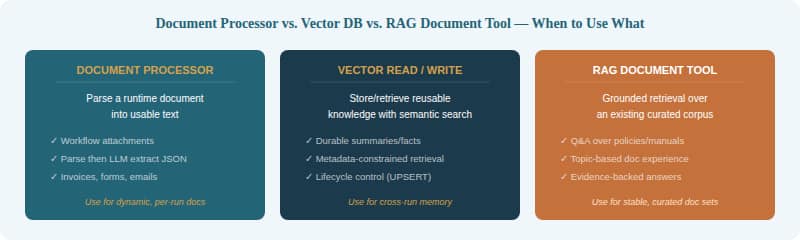
Figure 3 — Choosing the right data retrieval approach for your use case
4. Workflow Control Nodes — The Choreographer
Workflow Control Nodes determine the shape of execution. They’re the directors of the production — deciding what happens next, what runs in parallel, when to loop back, and when to pause for a human decision. Without them, you’d have a linear chain; with them, you have adaptive, resilient enterprise processes.
If — Simple binary branching. If invoiceAmount > policyThreshold, route to Manager Approval; otherwise, auto-approve.
Switch — Multi-route decisioning. Route based on exceptionType (missing receipt, price variance, duplicate, supplier mismatch) to invoke the correct resolution sub-flow.
Loop / For-each — Iterate across items. For each invoice line item, validate quantity/price/tax against the PO and receipt; accumulate variances.
While — Loop until a condition is met. While required fields are missing after document extraction, re-run extraction with improved instructions.
Run in Parallel — Execute multiple branches simultaneously and merge results. Fetch PO details, supplier risk, payment history, and policy thresholds all at once.
Human Approval — Pauses the workflow and presents an approval card (via email or chat) with context: what will change, why, and evidence links. Resumes on Approve, Reject, or Request Info.
Wait — Holds execution until a timeout threshold is met (up to 60 minutes). Useful for letting async events settle.
| BEST PRACTICE Treat approvals as first-class steps — design the approval card with enough context that the approver can decide without digging through other systems. Use loops to self-correct and improve outcomes. Parallelize analysis, but never parallelize conflicting writes to the same system of record. |
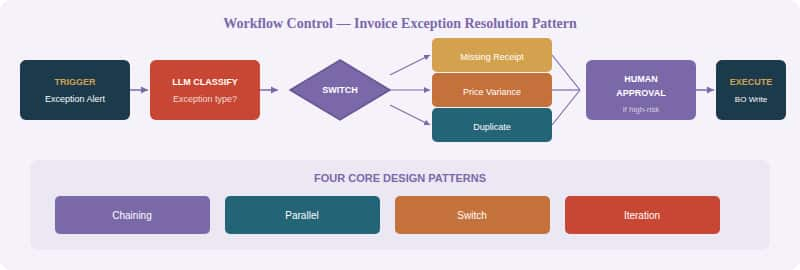
Figure 4 — Invoice Exception Resolution Pattern showing Switch branching, approval, and the four core design patterns
5. Communication Nodes — The Messenger
Communication Nodes are the simplest category, but don’t underestimate their importance. They notify users about status, exceptions, and outcomes — keeping humans informed without requiring them to open the workflow or actively monitor it. Think of them as the “last mile” of your agent’s work: the part where the system tells stakeholders what happened and what (if anything) they need to do.
In practice, communication nodes fire at critical junctures: when an exception is detected, when an approval is needed, when a resolution has been applied, or when an SLA is about to be breached. They can target different channels — email, chat, or in-app notifications — depending on urgency and audience.
| BEST PRACTICE Be thoughtful about notification fatigue. Not every workflow step needs a notification — focus on decision points, exceptions, and completions. Include enough context that the recipient can act without leaving their current context. And always consider the audience: a finance manager needs different detail than an operations coordinator. |
Putting It All Together
The real power of these node types isn’t any single one in isolation — it’s how they compose. A typical enterprise workflow agent might start with an AI Node to classify an incoming request, use Logic Nodes to normalize the extracted data and compute policy flags, branch with a Switch to route to the appropriate sub-flow, read and write business objects through Data Nodes, pause for Human Approval when the stakes are high, and close by firing a Communication Node to notify all stakeholders.
| Node Category | Core Purpose | Key Nodes | Think of it as… |
| AI Nodes | Reasoning, grounding, delegation | LLM, Agent, Workflow Invoke, RAG/Doc Tool | The brain |
| Logic Nodes | Deterministic transforms & state | Set Variables, Code Node | The spine |
| Data Nodes | Read/write systems & memory | Business Object, Doc Processor, REST, Tool, Vector | The hands |
| Workflow Control | Orchestration & governance | If, Switch, Loop, While, Parallel, Approval, Wait | The choreographer |
| Communication | Notify & inform humans | Notifications, Status Updates, Alerts | The messenger |
This composability is what makes the Workflow Agent architecture so compelling for Fusion Applications. The same node types power use cases across HCM (leave and accommodation requests), SCM (supply disruption recovery), ERP (dispute-to-credit/rebill), and CX (case-to-resolution). The patterns are universal; only the business objects, policies, and approval hierarchies change.
Final Thoughts
If there’s one takeaway from this summary, it’s this: good workflow agents aren’t built by throwing an LLM at a business process and hoping for the best. They’re built by thoughtfully combining typed, purpose-built nodes — each with a clear contract and well-understood behavior — into flows that are transparent, testable, and resilient.
The five node categories give you a mental model for decomposing any enterprise process. When you’re staring at a new use case, ask yourself: where does this workflow need to reason (AI Nodes)? Where does it need to transform or validate (Logic Nodes)? Where does it touch systems of record (Data Nodes)? What’s the shape of execution — sequential, parallel, iterative, conditional (Workflow Control)? And how do we keep humans in the loop without drowning them in noise (Communication Nodes)?
Answer those questions, and you’ll have the skeleton of a workflow agent that’s not just intelligent — it’s engineered for production.