
Large Payroll Balance conversions require careful preparation of initialization elements, manageable batch sizes, and coordination between HCM Data Loader and the Load Initial Balances process. Preparing the elements before the full load and running Load Initial Balances processes in parallel can help reduce the overall conversion window.
This article outlines a practical loading sequence and a proposed configuration. Validate the batch sizes and concurrency settings in your test environment based on the data volume before using them for a production conversion.
This blog does not include all the steps from scratch on how to build balance initialization header and batch files, refer to the following documentation for details on how to get started.
Prepare Balance Initialization elements
Payroll Balance Initialization Elements should be generated with about 20 Input Values each for optimal performance. Balance initialization elements are auto created from the distinct balances included in a batch. Target approximately 20 input values per initialization element by preparing small sample batches containing groups of up to 20 distinct balances.
For example, if 90 distinct balances require initialization, prepare 5 sample batches: 4 containing 20 balances each and one containing the remaining 10. You can use 5 test employees with dummy balance values for this preparation exercise as you only need to run Load Initial Balances in Validate mode for Balance Initialization elements to be created. There is NO need transfer these batches. Review the system generated elements for input value count before proceeding with the full conversion load.
Configure HDL transfer processing
For batches containing approximately 200,000 lines, use a Transfer Group Size of 20,000 in Configure HCM Data Loader. This divides the HDL Load into 10 threads. Verify the actual thread utilization in your environment rather than assuming that the group size alone guarantees 10 concurrent threads.
Navigation: Setup and Maintenance -> Search for “Configure HCM Data Loader”
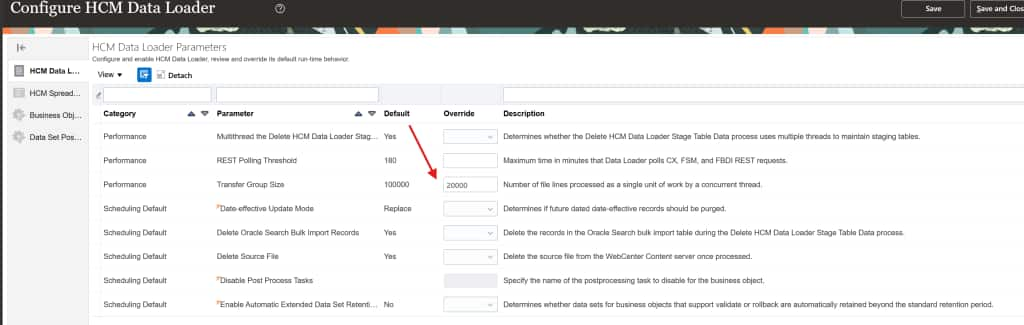
Plan the conversion batches
Use approximately 200,000 balance lines per batch as the sizing target. For Example, for a total of 5.1 million balance initialization records, prepare 25 batches containing approximately 200,000 records and one containing approximately 100,000 records.
Coordinate loading and balance transfer
The proposed configuration below uses up to 10 concurrent batches in a Test Pod with 120 threads, you can adjust the number of concurrent batches based on the Test Pod size. Distinguish HDL processing from payroll balance transfer: each Load Initial Balances process is single threaded, so concurrency is achieved by running 3 Load Initial Balances processes in parallel.
- Use HDL Files to import and load Batches 1 to 10 in parallel.
- Once the batches are ready, submit Load Initial Balances in Transfer mode for above 10 batches concurrently. There is no need to run Load Initial Balances in Validate mode.
- While Load Initial Balances processes are running for batches 1 to 10, use HDL Import and Load to create the 11 to 20 batches. So the next set of 10 batches are ready once the first set of Load Initial Balances processes complete.
- Purge the first set 1 to 10 Balance Batches data from HDL staging tables before submitting Load Initial Balances processes for batches 11 to 20, refer to Maintain the HCM Data Loader Stage Tables for details on how to purge HDL Stage data.
- In summary
- HDL Import & Load files 1-10.
- Load Initial Balances for batches 1-10 in parallel.
- HDL Import & Load files 21 – 30 at the same time as step#2
- Purge files 11-20 right after Step# 2 processes complete.
- Load Initial Balances for batches 11-20 in parallel.
- HDL Import & Load files 21 – 26 same time as step#5
- Repeat these steps for remaining Bathes
- Monitor the elapsed time and status of both stages throughout the test. Adjust concurrency if the combined workload creates contention or fails to improve throughput.
Use the following SQL to monitor Batch Transfer status
SELECT PH.batch_name,
       PH.batch_status,
       PL.batch_line_status,
       COUNT(1)                                                   volume,
       ROUND(COUNT(1) * 100 /
             SUM(COUNT(1)) OVER (PARTITION BY PH.batch_id), 2)    percentage
  FROM fusion.PAY_BAL_BATCH_LINES   PL,
       fusion.PAY_BAL_BATCH_HEADERS PH
 WHERE PL.batch_id = PH.batch_id
   AND PH.batch_name LIKE ‘:Batch_Name’
   AND PH.batch_status = 'L'
 GROUP BY PH.batch_id,
          PH.batch_name,
          PH.batch_status,
          PL.batch_line_status
 ORDER BY PH.batch_name,
          PL.batch_line_status;