
The AI Agent Studio Code Node is a flexible workflow component that allows users to write and execute custom code within an agent or automation pipeline. It is designed for situations where built-in nodes (like prompts, API calls, or logic blocks) are not sufficient and more advanced customization is required.
Key Purpose
The Code Node enables you to:
- Transform and manipulate data
- Implement custom business logic
- Handle conditional workflows
- Format inputs and outputs
- Integrate complex calculations or processing steps
How It Works
The node receives structured input data from previous steps in the workflow. Inside the Code Node, you write code (typically in JavaScript or Python, depending on the platform configuration) that processes this input. The node then returns structured output data that can be passed to subsequent nodes.
Common Use Cases
- Cleaning and restructuring API responses
- Performing calculations or aggregations
- Validating and filtering user input
- Creating dynamic routing logic
- Merging data from multiple sources
Benefits
- Flexibility: Full control over data handling
- Extensibility: Supports logic beyond standard no-code tools
- Precision: Enables exact formatting and output shaping
- Power: Ideal for advanced or edge-case scenarios
Typical Structure
- Input: Data passed from earlier nodes
- Code Logic: Custom script processes the data
- Output: Structured result returned to the workflow
Design Time & Runtime Limitations
To ensure security, reliability, and predictable performance, the Code Node operates within a controlled execution environment. The following constraints apply:
Permitted Code Only
The node supports straight-line procedural logic using:
- JSON data structures
- Arrays and objects
- Basic mathematical operations
- String and date utilities
- Simple type checks
Advanced programming constructs and extended language features are intentionally restricted.
Hard Limits
To maintain performance and stability, the following strict limits are enforced:
- Maximum runtime: 5 seconds
- Maximum iterations: 10,000
- Maximum code length: 2,000 characters
- Maximum serialized output size: 50 KB
If any of these limits are exceeded, execution will stop.
No Side Effects / No External Access
The execution environment is fully sandboxed. The Code Node:
- Cannot perform file I/O
- Cannot log to console or print output
- Cannot make REST/API calls
- Cannot access the filesystem
- Cannot import external libraries or modules
This ensures deterministic and secure execution.
No Functions / No Context Mutation
To preserve workflow integrity:
- Function definitions are not allowed (including recursion)
- The code must not modify the
$contextJSON object
All logic must operate directly within the provided execution scope and return results without altering the broader workflow state.
Together, these limitations ensure that the Code Node remains secure, performant, and predictable within AI Agent Studio workflows.
In short, the AI Agent Studio Code Node acts as a programmable layer within an otherwise visual or low-code workflow, allowing developers and advanced users to extend automation capabilities with custom logic.
Inputs
The input to a code node can be a context value, a value from the result of a prior node, or a variable.
For example:
| Usage | Javascript |
| Get the username | const username = $context.$user.$name; |
| Get a variable | let local_var = $context.$variables.a; |
| Get the result of a prior node | $context.$nodes.C1.$output.result; |
Outputs
The output of a code node is returned in property called “result”.
The result value is set by passing a value out of the code node using the return statement.
The result return type is defined in the setup of the code node and can be one of the following:
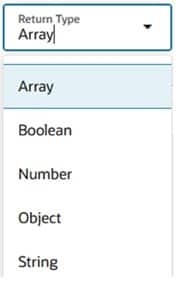
Example 1 – return an array:
let arr = [1, 2, 3];
Return arr;
Example 2 – return a json object
let json = {a : “x”, b: “y”, c: “z”};
return json; // returns a JSON object
Example 3 – return a json object containing an array
let json = {a : “x”, b: “y”, arr: [1, 2, 3]};
return json;
If a code node raise an error, the error is output in the structure:
$context.$error.$errorMessage
and the node that throws the error is captured in:
$context.$error.$nodeCode
If a code node times out, then the value TIMEOUT is set in context.$error.$errorMessage.
Sample code node
A code node can contain any Javascript subject to the restrictions outlined above and so it is a powerful tool for processing data that has been derived in earlier nodes.
A simple example of such a node is the one below which retrieves the result of the PROCESSWORKERS business object and reduces the JSO to only contain a limited set of attributes. It outputs the reduced JSON.
// Read the input from Get Workers
const people = $context.$nodes.PROCESSWORKERS.$output.result;
// Only return selected attributes
const result = people.map(({ PersonNumber, DisplayName, WorkEmail }) => ({
PersonNumber,
DisplayName,
WorkEmail
}));
return result;