Getting started
If you are new to Autocomplete, refer this blog on how to enable Autocomplete and key links to get you started. You must complete the comprehensive training if you are the implementor.
Pattern Matching in Autocomplete rules
Pattern matching is one of the most common use cases in Autocomplete. Some examples of use cases are –
- Ensure specific phone number, email, address format
- No junk characters in address, person names
We have a MOS white paper specifically that covers pattern matching and we also delivered an office hours session on pattern matching.
Autocomplete Rule to validate spaces in Person Name
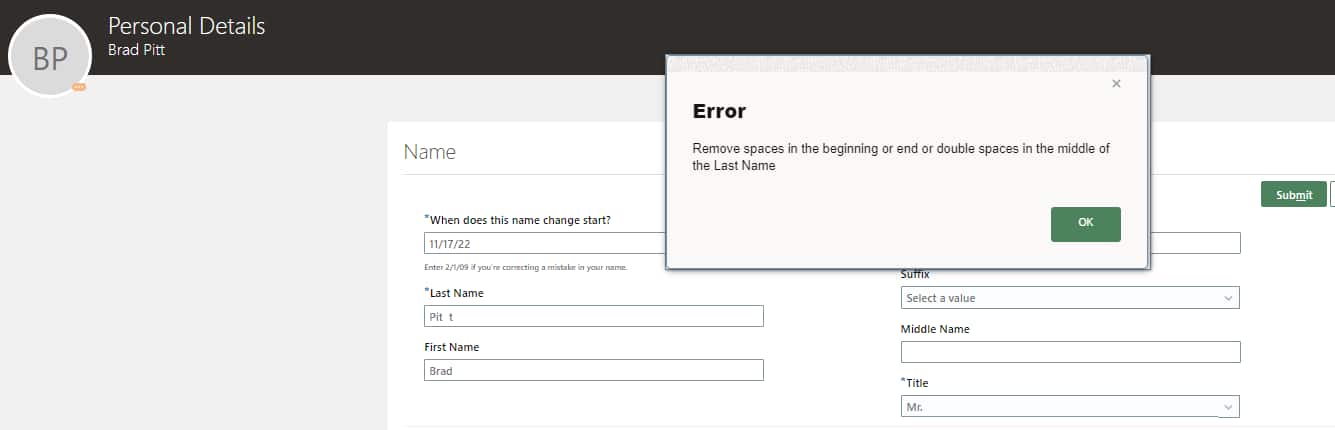
You can use regex to validate and avoid users to enter spaces in Person Name fields – First Name and Last Name.
E.g., Names that are not allowed –
- John ,
- J ohn,
- Jo y ce,
Regular Expressions used in the rule –
- Trailing Space – “.*\s+$”
- More than 1 space in between – “.*\s{2,}.*”
- Space at the beginning – “^\s+.*”
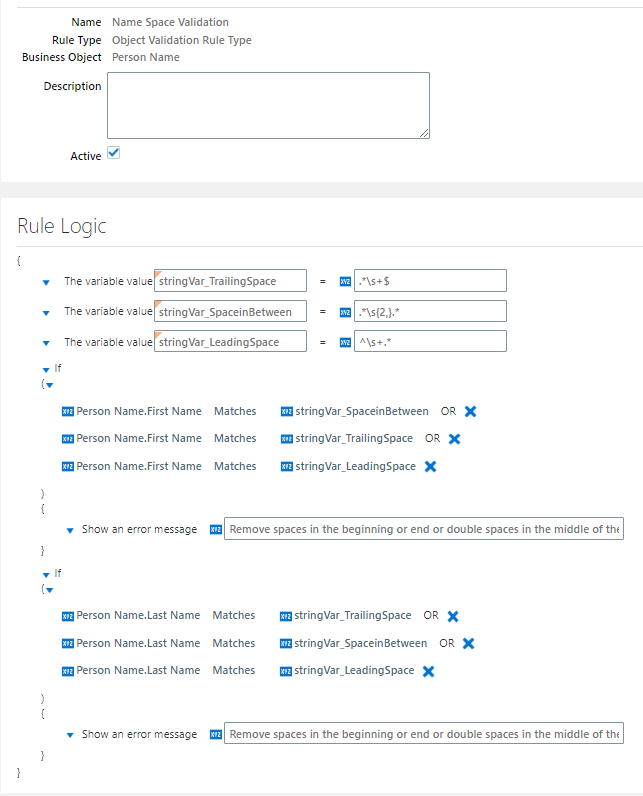
This rule from trigger for all Person Names including contact and candidate. You can add additional filters if you want this to trigger only for Employees.