
In Fusion AI Agent Studio, AI Agents are built using a few key parts that work together to complete business tasks automatically. Teams\Workflows are the step-by-step plans, Agents are the AI workers that perform tasks, Tools connect the agents to fusion (and external) systems and data, Instructions/Prompts control how the agent behaves and responds, Topics define the subject of conversation, and Testing ensures everything works correctly. Together, these components help organizations create smart, automated AI advisors that can talk to users, gather information, make decisions, and take actions efficiently.
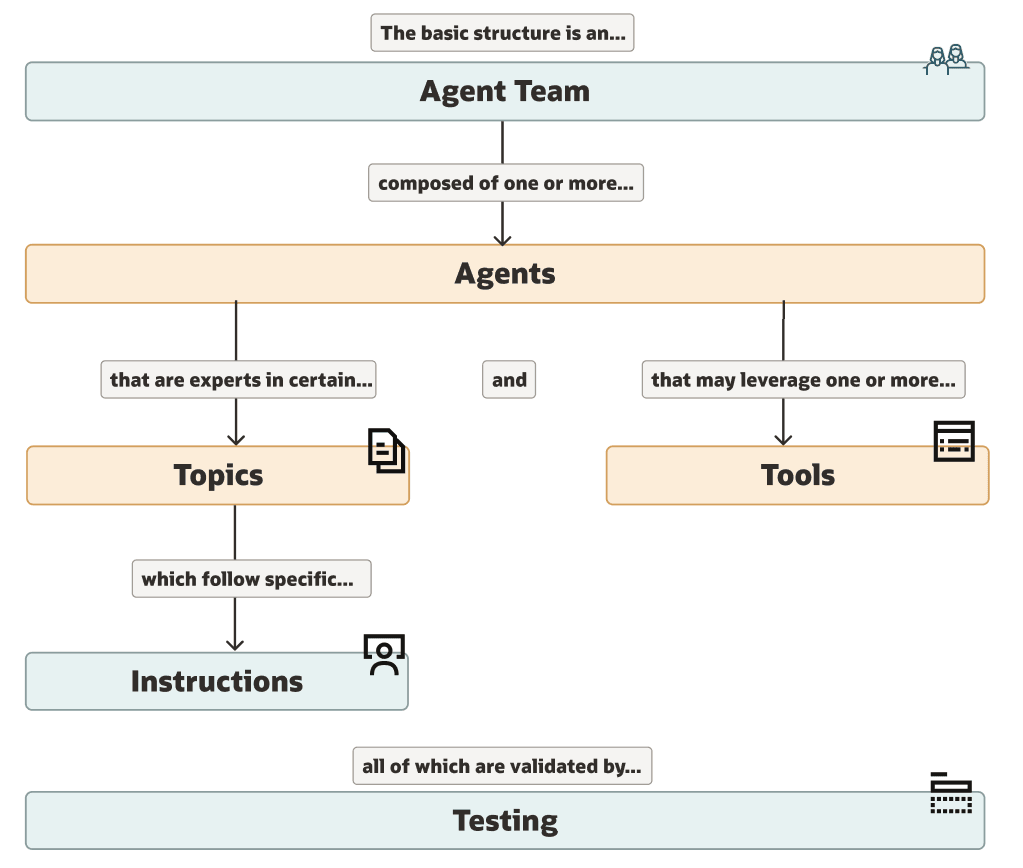
| Component | Meaning | What It Does (Short) | Example |
| Agent Team / Workflows | Step-by-step plan | Defines how the AI completes a task, what to ask, what data to get, and how to respond. | Recruitment agent that screens resumes and schedules interviews. |
| Agents | AI workers | Perform specific tasks, talk to users, fetch data, and take actions. Each agent has its own skills and role. | Calendar agent that manages meetings and invites. |
| Tools | Extra utilities | Connect the agent to systems, APIs, or databases so it can send emails, calculate numbers, or retrieve information. | Calculator tool, Email tool, Business Objects, MCP, REST API tool. |
| Instructions / Prompts | Behavior rules | Natural-language guidelines that control tone, limits, and accuracy. Prevents wrong or made-up answers. | “If data is missing, ask the user instead of guessing.” |
| Topics | Subject areas (or reusable instructions) | Define what the conversation is about and help the agent understand user intent. | Payroll, IT Support, Benefits, Stock Plans, Date interpretation rules. |
| Testing | Quality check | Lets admins test if agents, tools, and responses are working correctly. | Running sample user questions to verify answers. |