


How composable, specialized agent teams deliver superior intelligence compared to monolithic generalist agents
Introduction
In previous posts, we established that agentic apps are decision-making partners built on four pillars. But there is a critical architectural question we have not yet addressed: how many agents should power your app, and how should they be organized?
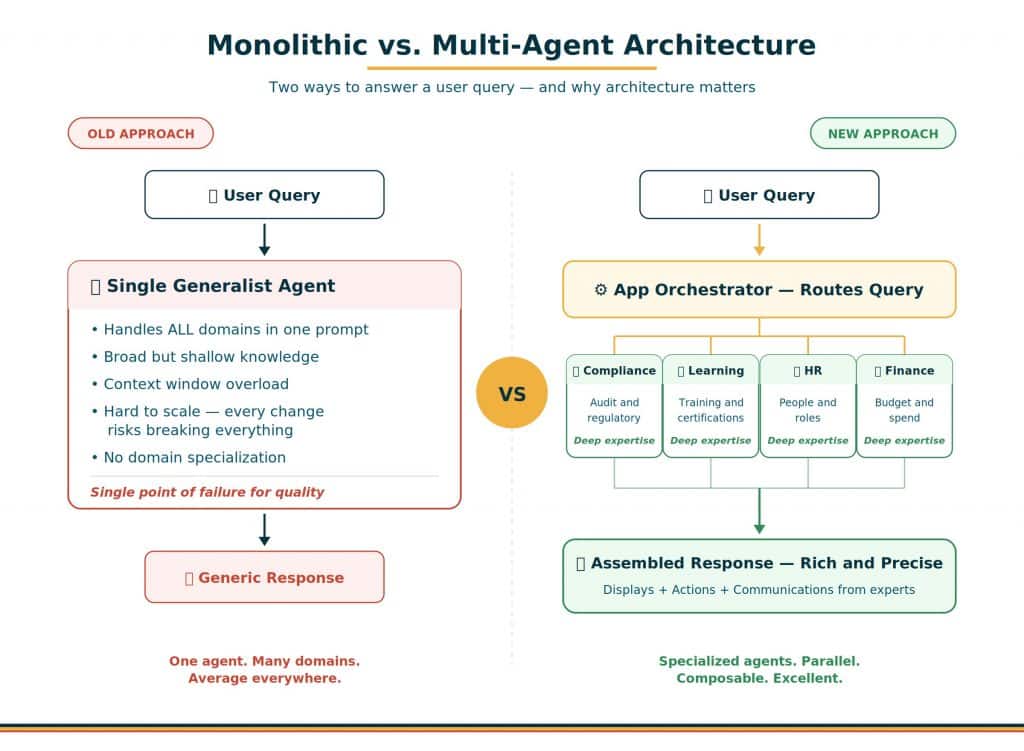
The answer is foundational to everything that follows. Traditional agentic applications relied on a single, monolithic generalist agent because the interface was limited to a single chat stream. You had one agent that tried to handle everything – HR questions, procurement insights, compliance monitoring, finance analysis—all in one giant prompt. It worked, but it worked poorly. The context window was overloaded, domain knowledge was shallow, and every change risked breaking something else.
Modern agentic apps take a fundamentally different approach: composable, specialized agent teams where each agent is purpose-built for a specific domain. Instead of one generalist trying to do everything, you have an advisory board of experts. Each member brings deep knowledge in their area, and together they cover far more ground—with far greater precision—than any single advisor ever could.
Why Multi-Agent Beats Monolithic
The shift from monolithic to multi-agent is not about adding complexity—it is about adding quality. Here is why specialized agents consistently outperform generalists in enterprise applications.
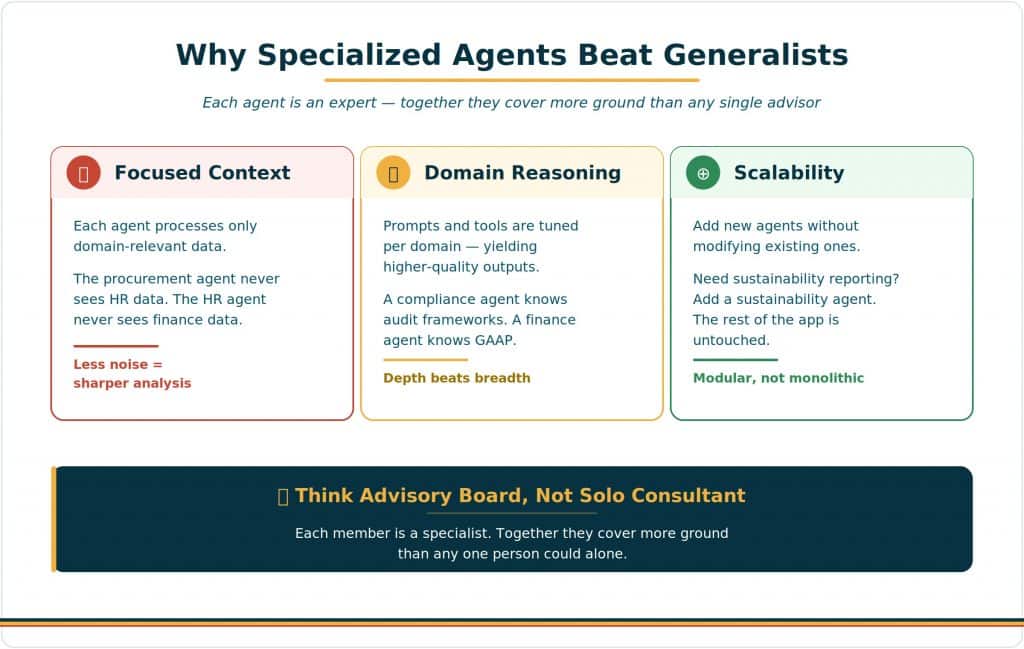
Focused Context
Each agent processes only domain-relevant data. The procurement agent never sees HR data. The HR agent never sees finance data. This focus dramatically reduces noise in the context window and lets each agent concentrate its reasoning capacity on the data that matters. The result is sharper analysis, more relevant insights, and fewer hallucinations caused by context confusion.
Think of it this way: if you asked a single consultant to simultaneously be an expert in regulatory compliance, employee development, immigration law, and financial reporting, the quality of their advice in any one area would suffer. But if you hired four specialists and coordinated their inputs? The quality compounds.
Domain-Specific Reasoning
Specialization is not just about data isolation—it is about tuned intelligence. Each agent’s prompts, tools, and reasoning patterns are optimized for its specific domain. A compliance agent knows audit frameworks, regulatory timelines, and risk scoring methodologies. A finance agent knows GAAP principles, variance analysis techniques, and budget cycle patterns. These domain-specific prompts yield dramatically higher-quality outputs than a generalist prompt that tries to cover all domains superficially.
Scalability Without Fragility
In a monolithic architecture, adding new functionality means modifying the existing agent—expanding its prompt, adding new tools, adjusting its routing logic. Every change risks breaking something that was working. In a multi-agent architecture, adding new functionality means adding a new agent. Need sustainability reporting? Add a sustainability agent. Need vendor risk scoring? Add a vendor risk agent. The existing agents are completely untouched. This modular approach means your app grows in capability without growing in fragility.
How Multi-Agent Routing Works
When a user interacts with an agentic app, the request does not go to a single agent. Instead, the Agentic App Orchestrator routes the request to the appropriate specialist(s). The routing depends on the type of request:
- Initialization events (Summary, InitDisplay, InitActions, InitCommunications) are sent to all agents in parallel. Each agent contributes its domain-specific output—the summary agent stitches them together, and the page populates with contributions from every specialist.
- Ask Oracle queries in Summary View are routed to all relevant agents. In Section Focus View, queries are scoped to only the agents powering that section—delivering focused, expert answers.
- Action invocations are routed to the specific agent that created the action. Since actions have single-agent ownership, the routing is deterministic—the originating agent handles execution.
- Communication events are routed to the designated communications agent, which may be a generic reusable agent shared across the entire app.
The assembled response combines displays, actions, and communications from all contributing agents into a unified, coherent experience. The user sees one app, not separate agents.
Agent Team Types: Workflow vs. Supervisor
Within each specialist agent, you must choose a team type that determines how the agent internally processes requests. Oracle’s AI Agent Studio offers two primary approaches, and choosing the right one is a critical architectural decision.
Workflow Teams (Recommended)
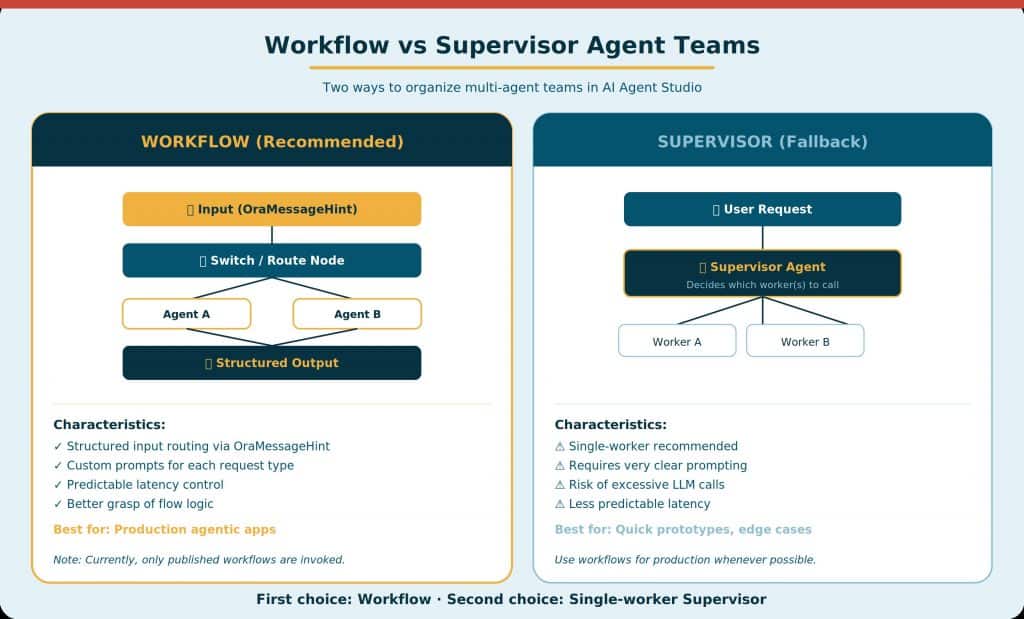
Workflow agent teams are the strongly recommended default for agentic apps. In a workflow, you define a structured graph of nodes—routing logic, code nodes, LLM nodes, and agent nodes—that processes requests deterministically. The key advantages:
- Structured routing: The backend orchestrator passes structured input (including OraMessageHint) that your workflow uses to route to the right processing path. A Summary request takes a different path than an InitDisplay request.
- Custom prompts per request type: You can define your own prompt for each event type, rather than relying on default app overrides. This gives you fine-grained control over what each agent produces for each trigger.
- Predictable latency: Because the graph is fixed, you can predict how many LLM calls will be made and control latency. This is critical given the strict 60-second response limit.
Supervisor Teams (Fallback)
If a workflow cannot express your logic, a single-worker Supervisor Agent Team is the fallback option. The supervisor dynamically decides at runtime what to do—which tools to call, how many LLM passes to make, and when to stop. This offers maximum flexibility but comes with significant trade-offs and hence it is only a fallback plan and not the preferred option.
Architecture Decision Guide
Use this reference table when making architectural decisions for your agentic app. These recommendations are based on Oracle’s production guidance.
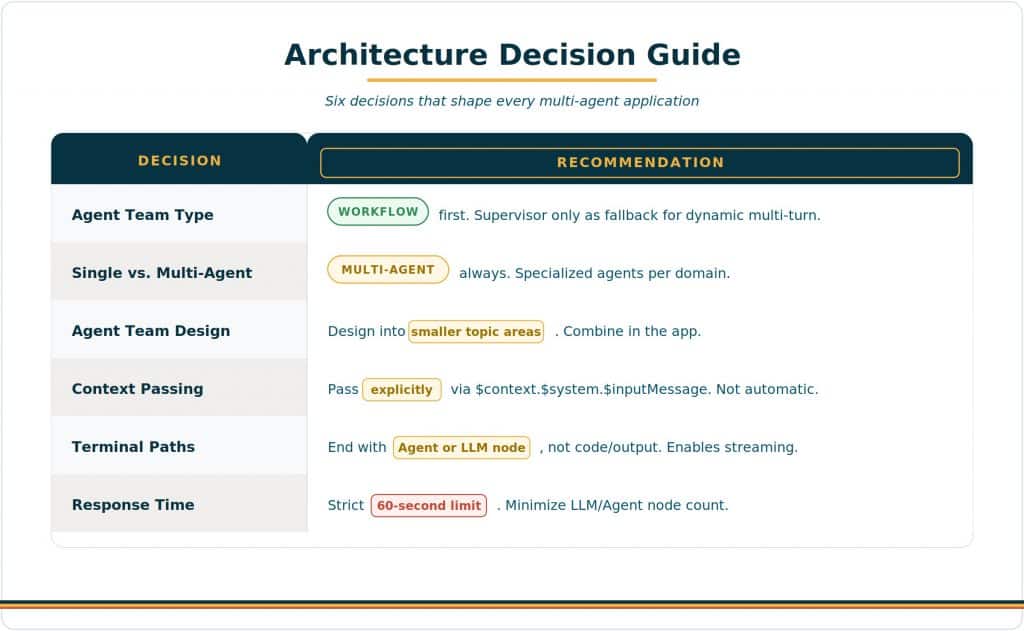
| Decision | Recommendation |
| Agent team type | Workflow (first choice). Supervisor only as fallback for dynamic multi-turn collaboration. |
| Single vs. multi-agent | Always multi-agent. Specialized agents per domain yield better results. |
| Agent team granularity | Design into smaller topic areas. Combine different agents at the app level. |
| Context passing | Pass explicitly via $context.$system.$inputMessage. Never assume automatic. |
| Terminal workflow paths | End with Agent or LLM node (not code/output) to support future streaming. |
| Communication type | Template-based for docs (PowerPoint, PDF). Agent-generated for ad-hoc email/text. |
| Action invocation | ora.Invoke() for defined workflows. ora.Agent() for ad-hoc agent commands. |
| Widget selection | Match the data story to the widget type. See the Widget Selection Guide. |
| Drill-down navigation | ora.App.launch() or Navigate to App action step for cross-app linking. |
| Response time | 60-second hard limit. Minimize LLM/Agent nodes. Test latency in Preview. |
Example: An HCM Compliance Workspace
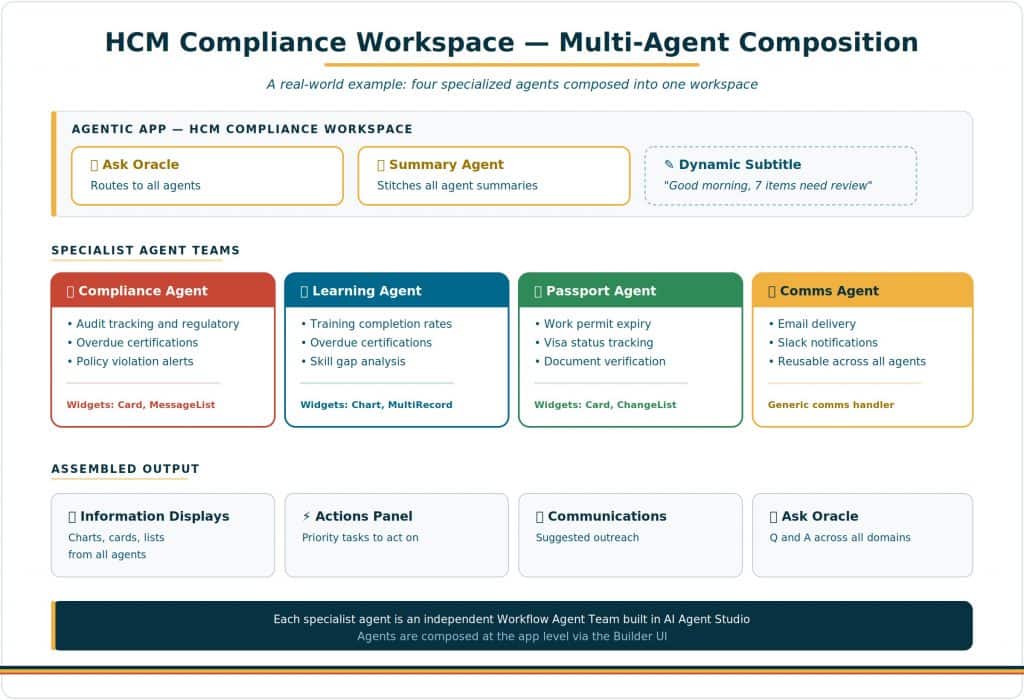
To make the multi-agent architecture concrete, let us walk through a real-world example. Imagine you are building an HCM Compliance Workspace for an HR operations team that needs to monitor regulatory compliance, training completion, and work authorization across a global workforce.
The Agent Team Lineup
This app is composed of four specialist agents plus two static agents:
- Compliance Agent: Tracks audit requirements, regulatory deadlines, policy violations, and overdue certifications. Uses cardWidget for critical alerts and messageListWidget for prioritized compliance items.
- Learning Agent: Monitors training completion rates, overdue certifications, and skill gap analysis. Uses chartWidget for completion trends and multiRecordWidget for tabular training data.
- Passport Agent: Tracks work permit expiry, visa status, and document verification. Uses cardWidget for urgent expiry alerts and changeListWidget for status changes.
- Communications Agent: A generic, reusable agent that handles email delivery and Slack notifications for all other agents. Any agent can route communications to this single handler.
- Summary Agent (static): Aggregates the top-priority insight from each specialist agent into a 1–2 sentence executive overview.
- Ask Oracle Agent (static): Routes user questions to the appropriate specialist(s) based on the query content and agent descriptions.
How It Plays Out
The HR Operations Manager opens the app. In seconds, they see: a summary (“7 items need review: 2 critical compliance gaps, 3 overdue trainings, 2 expiring work permits”), four specialist sections each with their own displays, an actions panel with priority tasks, and a communications panel suggesting follow-up emails. They drill into the compliance section, ask “Which teams have the most overdue items?”, and get a focused answer from the compliance agent—not a generalist guess. They approve an action, send a notification, and move on.
Four specialist agents. One coherent experience. That is multi-agent architecture in practice.
| The Architecture Principle Think of your agentic app as an advisory board, not a solo consultant. Each member is a specialist. Together they cover far more ground—with far greater precision—than any single advisor ever could. Build modular. Build specialized. Compose at the app level. |
New to Oracle Fusion AI Agents?
Explore AI Agent Studio Learning Path — blog series to help build from zero to production-grade AI agents, with deep dives on every agent pattern, node type, and tool integration.
Explore AI Agentic Apps Learning Path — blog series on everything you need to build Oracle Fusion AI Agentic Apps using AI Agent Studio.