
Unlocking External Intelligence for AI Agents: A Practical Guide to Using MCP with AI Agent Studio
As enterprise AI evolves, enabling AI agents to securely access external systems – repositories, decision services, enterprise APIs, and knowledge platforms – has become essential. Traditionally, this demanded custom integrations or REST wrappers for every system.
That changes with the Model Context Protocol (MCP). With MCP support introduced in Fusion AI Agent Studio, developers can now connect AI agents directly to MCP-compliant servers, unlocking new possibilities for automation, knowledge access, and intelligent workflows.
What is Model Context Protocol (MCP)?
The Model Context Protocol (MCP) is a standardized communication protocol designed to let AI agents interact with external tools and systems through structured request-response exchanges.
Instead of building custom APIs or plugins per integration, MCP provides a consistent interface for agents to communicate with external services – simplifying architecture while improving scalability and maintainability.
With MCP, AI agents can:
- Access external knowledge repositories
- Trigger enterprise services
- Query external tools
- Retrieve structured data from external systems
This enables agents to go beyond static knowledge and dynamically engage with enterprise ecosystems.
MCP Tool vs. External REST API Tool
Choosing between an MCP tool and a traditional REST API tool depends on your use case. Here is a side-by-side comparison:
| Aspect | MCP Tool | REST API Tool |
| Integration Method | AI-native Model Context Protocol | Traditional REST API calls |
| Protocol Type | Standardized bidirectional AI protocol | Standard HTTP request/response |
| Tool Discovery | Automatic – server exposes tools dynamically | Manual – each endpoint must be configured |
| Development Effort | Minimal once MCP server is available | Requires API schema definition and mapping |
| Communication Model | Agent ↔ MCP Server ↔ External System | Agent → REST API Endpoint |
| Context Awareness | Rich, AI-native context management | Stateless interactions |
| Scalability | High – new tools added server-side only | Low – each new API needs separate configurations |
| Transport Options | Streamable HTTP, SSE | GET, POST, PUT, DELETE |
| Authentication | None, API Key, JWT, Client Credentials | Depends on API implementation |
| Maintenance Effort | Lower – managed centrally in MCP server | Higher – each integration maintained separately |
| Best Fit | AI copilots, knowledge retrieval, scalable ecosystems | ERP/CRM APIs, transactional operations |
When to Use Each Approach – example Scenario’s
| Scenario | Recommended Tool |
| Integrating with AI tool platforms | MCP Tool |
| Accessing knowledge or repository services | MCP Tool |
| Building scalable AI tool ecosystems | MCP Tool |
| Calling enterprise transactional APIs (ERP, CRM) | REST API Tool |
| Simple data retrieval from existing REST endpoints | REST API Tool |
| External system does not support MCP | REST API Tool |
Why MCP Matters for AI Agents
Modern AI agents operate within complex enterprise environments and need access to multiple data sources and operational tools. MCP addresses this need directly:
| Benefit | What It Means |
| 🔗 Standardized Integration | Connect agents to external systems without custom wrappers – one protocol fits all. |
| 🧩 Extensibility | Add new tools without modifying the agent architecture. |
| 🔒 Secure Communication | Supports API Keys, JWT, and Client Credentials for secure, authenticated access. |
| ♻️ Reusable Tooling | One MCP server can be shared by multiple agents simultaneously. |
AI Agent Studio MCP Integration Architecture
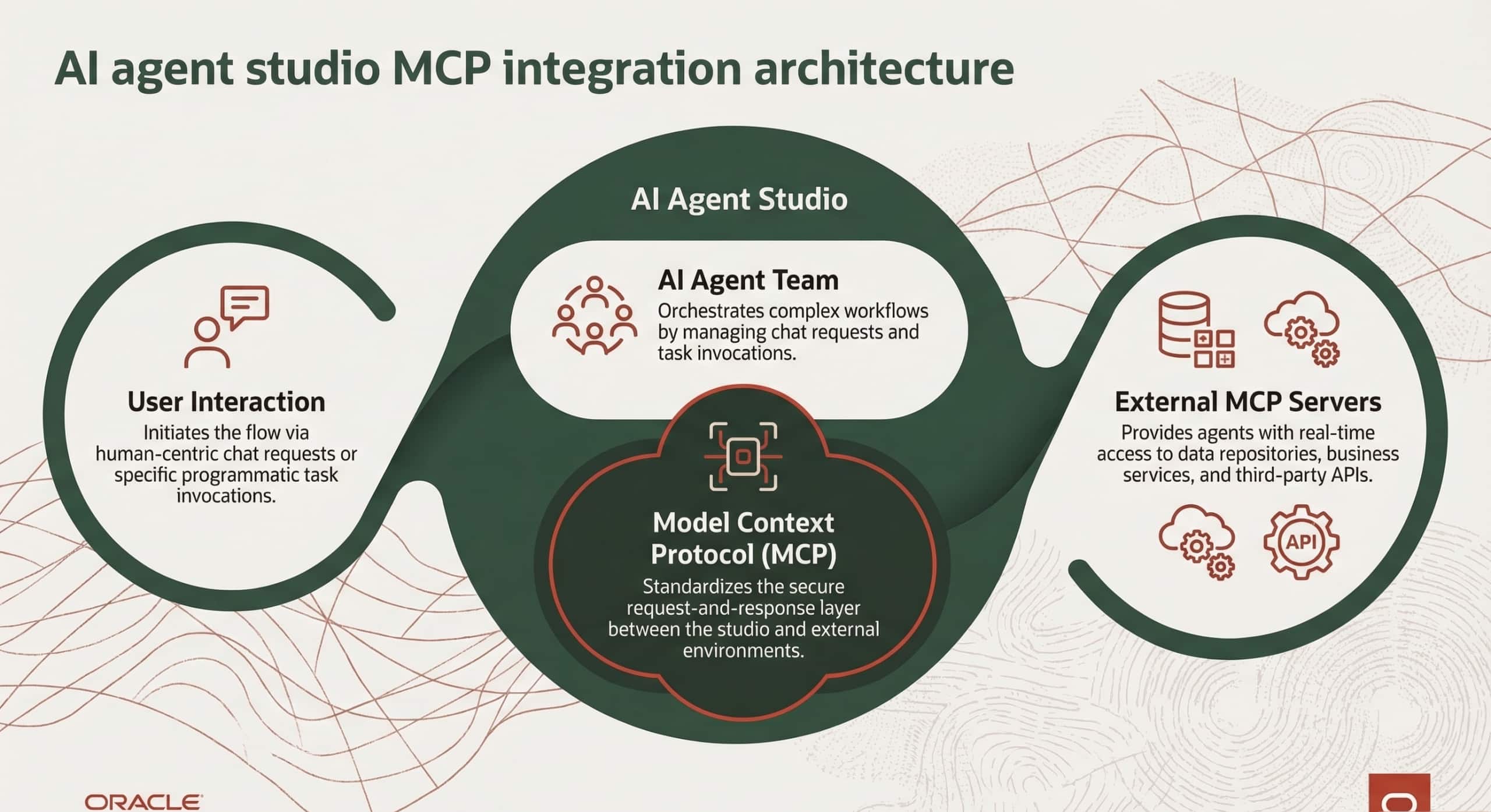
The result is a more modular, secure, and scalable AI ecosystem where new capabilities can be added without rearchitecting the agent.
Access Requirements
Before implementing MCP tools, ensure the following prerequisites are in place:
- Access to AI Agent Studio with tool creation permissions
- Access to the MCP server endpoint
- Valid authentication credentials (if required by the server)
- Network connectivity between the AI environment and the MCP server
How to Configure MCP in AI Agent Studio
AI Agent Studio lets administrators configure MCP servers as tools that agents invoke during execution. The process involves seven clear steps.
Step 1 — Access MCP Tool Setup
Navigate to Tools tab of AI Agent Studio and add tool type as MCP
Step 2 — Configure Basic Tool Metadata
Define the tool’s identity by filling in the following fields:
- Name — unique identifier for the tool
- Code — short alphanumeric code
- Family — logical grouping
- Product — associated product or service
- Description — plain-language explanation of what the tool does
Step 3 — Configure the MCP Server Connection
The connection block defines how the agent communicates with the MCP server. Key fields include:
- Instance URL — the MCP server endpoint the agent will call
- Transport Type — SSE (Server-Sent Events) or Streamable HTTP (recommended for modern servers)
Authentication credentials are also configured here. Supported types:
| Credential Type | Description |
| None | No authentication required — suitable for public MCP servers. |
| API Key | Pass a static key in the request header. |
| JWT Authentication | Token-based auth using signed JSON Web Tokens. |
| Client Credentials | OAuth 2.0 machine-to-machine authentication. |
Credentials are securely stored within the system and can be updated at any time without recreating the tool.
Example: Integrating the DeepWiki MCP Server
The DeepWiki MCP server is a practical example that illustrates how MCP enables agents to query and navigate code repositories intelligently.
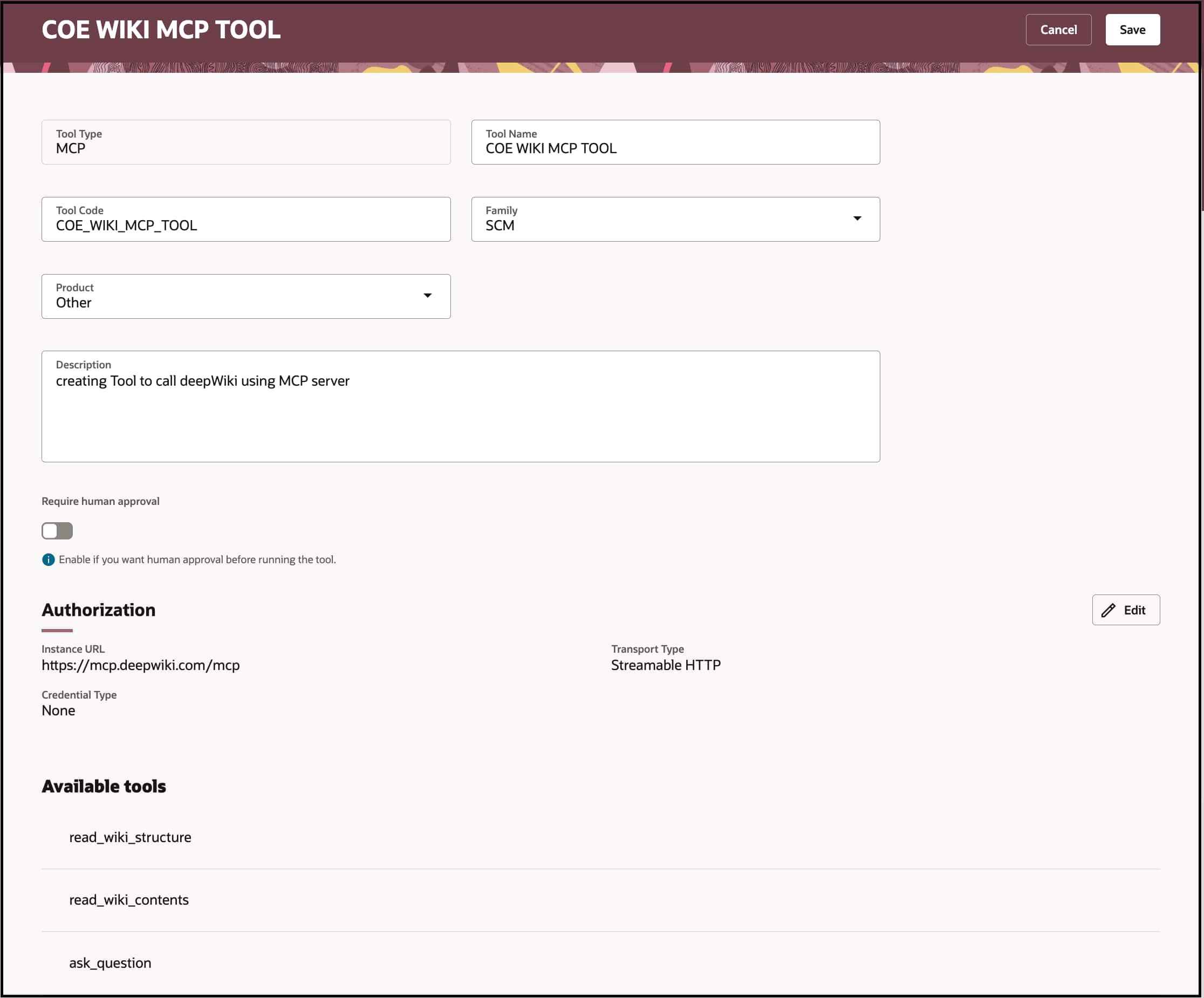
| Endpoint | https://mcp.deepwiki.com/mcp |
Configuration settings:
- Transport Type: Streamable HTTP
- Credential Type: None (public server)
Step-by-Step: Creating a MCP Tool
Create Tool using MCP tool type and configure the URL, transport type.
Let us walk through how to use a MCP Tool in AI Agent Studio. In this example, we will use a deepWiki MCP Server that helps answer wiki structure, content and questions DeepWiki repositories.
- Navigate to AI Agent Studio, Tools tab to create a new MCP tool.
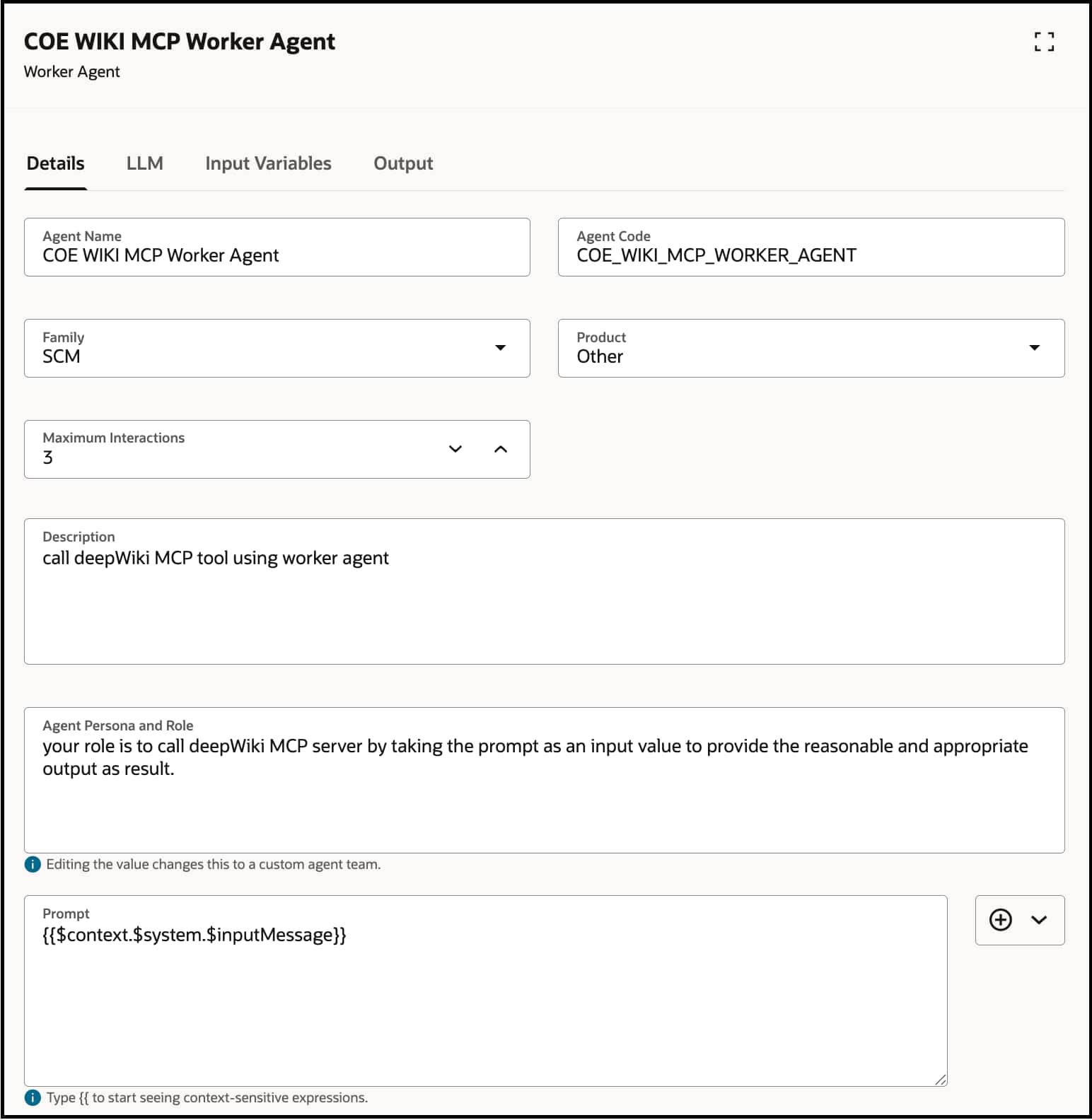
- Create Supervisor Agent in Agent teams
- Add Worker Agent
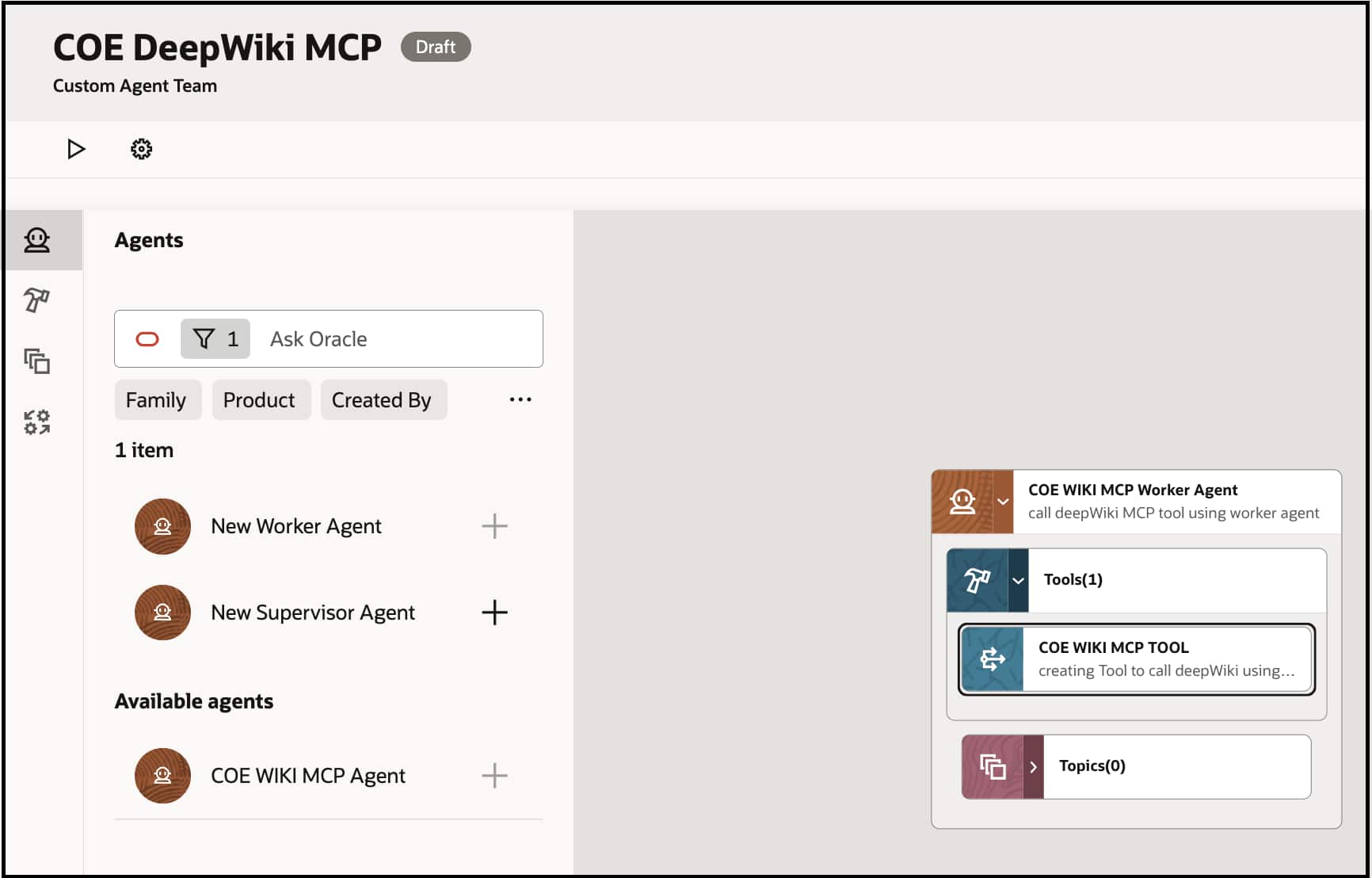
- Search for MCP Tool created above and add into Tools of Worker Agent
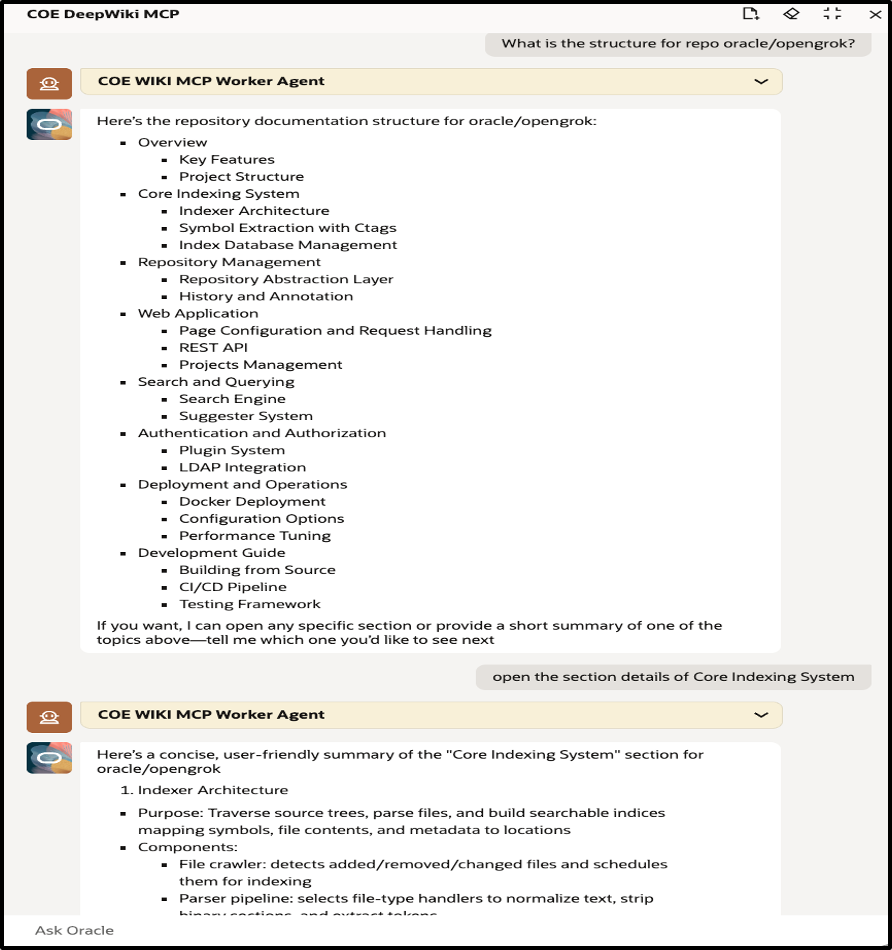
Sample questions agents can answer via DeepWiki MCP:
- What is the structure for repo oracle/opengrok?
- Follow up question: open the section details of Core Indexing System to get more details from the results.
- How does the Indexer architecture work?
- How can LDAP integration be configured?
- How can a REST API be constructed using opengrok?
This demonstrates how MCP enables dynamic, context-aware knowledge retrieval from external sources without any custom coding.
Best Practices for MCP Integration
Following these practices will help ensure reliable, secure, and maintainable MCP integrations:
| Practice Area | Recommendation | Why It Matters |
| Transport Protocol | Prefer Streamable HTTP over SSE for modern MCP servers. | Streamable HTTP is actively supported and provides more reliable communication. |
| Authentication | Use JWT Authentication or Client Credentials in production environments. | Ensures secure access and protects MCP endpoints from unauthorized usage. |
| Testing | Validate all MCP tools using the Preview option before attaching them to agents. | Helps detect configuration issues early and prevents runtime failures. |
| Documentation | Document input parameters, expected outputs, and tool capabilities. | Improves maintainability and helps other developers understand the integration. |
| Monitoring | Regularly review agent execution logs and performance metrics. | Enables faster troubleshooting and helps optimize MCP tool performance. |
Conclusion
The Model Context Protocol (MCP) represents a significant step forward in enabling AI agents to interact with enterprise systems in a standardized, scalable, and secure way.
With MCP support in Fusion AI Agent Studio, developers can integrate external capabilities into agent workflows without building custom APIs or middleware layers. Key benefits include:
- Extended agent capabilities without one-off custom integrations
- Faster time-to-integration with external services
- Modular and scalable AI architectures
- Secure enterprise connectivity
- Reduced long-term maintenance overhead
While challenges around authentication, configuration, and connectivity may arise, they are readily addressed through proper setup and the best practices outlined above.
As AI adoption accelerates, protocols like MCP will play a critical role in building intelligent, extensible, and enterprise-ready AI ecosystems. Getting familiar with MCP today positions your team to build more capable agents tomorrow.
New to Oracle AI Agent Studio?
Check out the Fusion AI Agent Studio Learning Path — a full blog series from zero to production-grade AI agents, with deep dives on every agent pattern, node type, and tool integration.