
If you’ve ever built an integration that calls a REST API and only got back the first 25 records -when there are 1000+ records, you already know the pagination problem. Most enterprise APIs, including Oracle HCM, don’t return all data in a single response. They return it in chunks, with metadata telling you how much is left.
This blog walks through a complete, production-ready workflow agent pattern built in Oracle AI Agent Studio that handles pagination automatically-looping through every page, aggregating results, and delivering a clean consolidated output.
Why Pagination Exists
REST APIs paginate data to protect backend performance. Returning thousands of rows in a single call puts enormous strain on servers and can make responses slow or unstable. Instead, APIs return a manageable batch per request along with metadata to help you request the next batch.
For this blog, we will use DepartmentsLov as an example. Here are the key pagination signals you’ll notice when using this API:
- totalResults – the complete count of records in the dataset
- hasMore – a boolean flag indicating whether there are more pages
- limit – how many records were returned in this response
- offset -the starting position of this page (0, 10, 20, …)
A typical API response looks like this:
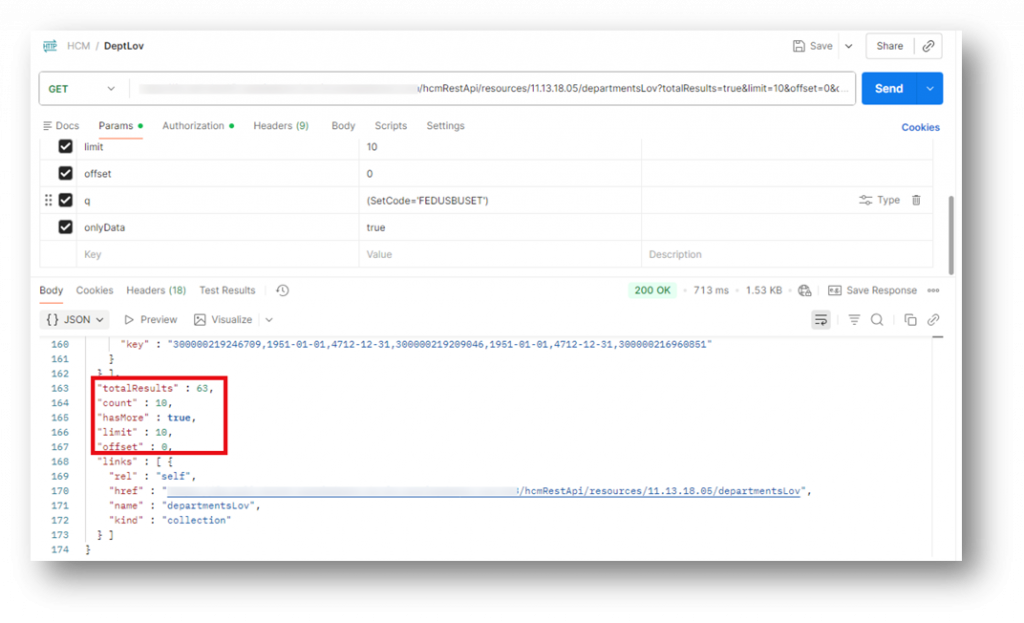
This tells us: there are 63 records total, we got the first 10, and there are more pages to fetch.
The Solution Approach
In a traditional coding environment, you’d handle this with a while (hasMore) loop-keep calling the API until hasMore is false. Oracle AI Agent Studio (26A) does not currently support traditional while-loop constructs inside workflow agents.
So what do you do?
You pre-calculate exactly how many pages you need, build a list of those page requests upfront, then loop through that list. It’s a two-step pattern that works elegantly within the current constraints.
The Two-Step Pagination Pattern
Step 1: Pre-Build the Page Request Array
Before looping, you make one initial API call with a limit of 1. This returns the totalResults metadata without fetching a lot of unnecessary data. Using that total, you calculate every offset value you’ll need. Here is the sample code you will use in the code node after fetching the API call-
let total = $context.$nodes.FETCHDATA.$output.totalResults;
const fetchSize = $context.$variables.fetchSize; // e.g., 10
let offsets = [];
for (let i = 0; i < total; i += fetchSize) {
 offsets.push({ offset: i });
}
return offsets;
For 63 records with a fetchSize of 10, this generates an array of 7 offset values: [0, 10, 20, 30, 40, 50, 60]. Each entry represents one API call.
Pagination Breakdown (63 Records, fetchSize = 10)
| Page # | Limit | Offset | Records Returned |
| 1 | 10 | 0 | 1–10 |
| 2 | 10 | 10 | 11–20 |
| 3 | 10 | 20 | 21–30 |
| 4 | 10 | 30 | 31–40 |
| 5 | 10 | 40 | 41–50 |
| 6 | 10 | 50 | 51–60 |
| 7 | 10 | 60 | 61–63 |
Step 2: Loop Through the Array and Aggregate
With your offset array ready, a Loop node iterates through each entry and fires a Business Object Function call for each page- passing the current offset dynamically:
limit  = {{$context.$variables.fetchSize}}
offset = {{$context.$nodes.LOOP_THROUGH_DATA.$currentItem.offset}}
After the loop completes, a Code node collects and flattens all responses into one array:
const resultsArray = $context.$nodes.LOOP_THROUGH_DATA.$output;
const returnArray = [];
resultsArray.forEach(item => {
  const jsonResult = JSON.parse(item);
  returnArray.push(...jsonResult.items);
});
return returnArray;
The Complete Agent Flow
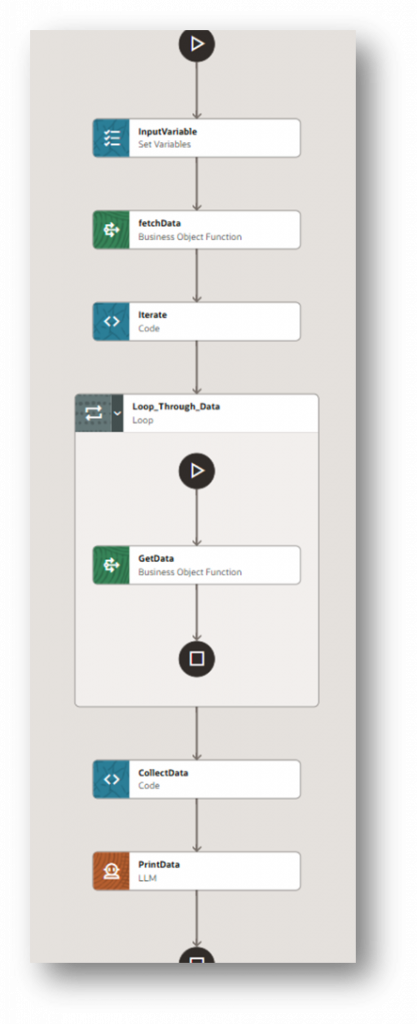
Here’s the full node sequence for the workflow agent, in order:
- Set Variables (InputVariable) -Initialize fetchSize = 10
- Business Object Function (fetchData) -Call API with limit=1, offset=0 to get totalResults
- Code Node (Iterate) -Generate offset array based on totalResults and fetchSize
- Loop Node (Loop Through Data) – Iterate sequentially through offset array
- Business Object Function inside loop (GetData) -Fetch each page using dynamic limit + offset
- Code Node (CollectData) -Aggregate all page results into one flat array
- LLM Node (PrintData) -Render final HTML table output with all results
| Key Design Insight: The initial fetchData call (limit=1) is used only to retrieve the totalResults value. This allows the agent to calculate how many API calls are required upfront. The actual data itself is not used from this call -all real data retrieval happens inside the loop through the GetData node. |
Putting all of this together, the agent follows a structured sequence -starting with determining the total number of records, generating the required offsets, looping through each page, and finally aggregating the results.
The diagram below shows how these nodes are connected in Oracle AI Agent Studio and how the data flows through the agent from start to finish.
Why This Pattern Is Reusable
This two-step approach is portable to virtually any paginated REST API. Here’s why it holds up:
- It doesn’t rely on hasMore – it uses totalResults, which is more reliable for pre-calculation
- The fetchSize (variable) is configurable, so you can easily tune performance without changing the workflow design
- The loop runs sequentially, which keeps the results in order and avoids any timing issues
- The aggregation step is generic -you can reuse the same logic regardless of which API you’re calling
The Output: A Clean, Consolidated Table
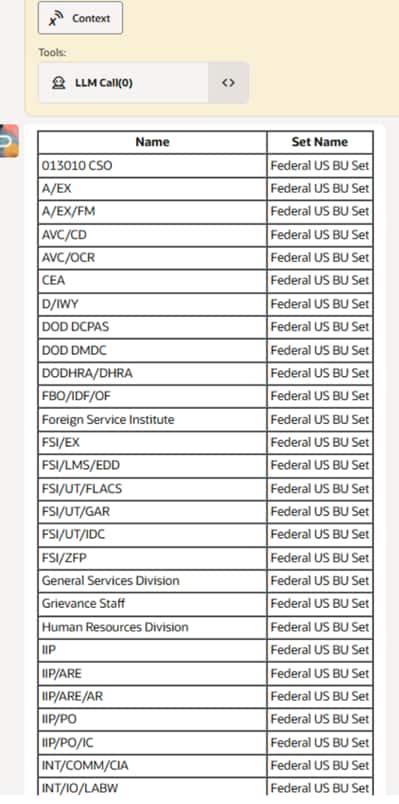
After collecting all pages, the final Code node combines everything into one array. This is passed to the LLM node for rendering.
Generate only HTML, no extra text or formatting.
Use an input JSON array to create a table with two columns: Name and Set Name
Output must start with <div> and end with </div>.
This tight prompting ensures the LLM doesn’t add commentary or markdown -just clean, renderable HTML that displays all 63 department records in one scrollable table, regardless of how many API pages were needed to collect them.
Here’s an example of the final output generated by the agent after aggregating all paginated results:
Conclusion
This same approach can be applied to other paginated APIs that provide the total result count and support page and offset parameters. Keep in mind that not all APIs fully support this pagination pattern, so the implementation may vary depending on the API design. Hope you found this helpful, and good luck building your workflow agents.