
Subledger Accounting mapping sets provide an efficient way to derive account segment values based on a combination of input transaction values. No matter how complete the mapping logic is at implementation, exceptions may occur over time.
This post describes what happens when transaction data values do not match existing mappings and how you can approach exception handling. It applies to both Oracle subledgers and Accounting Hub implementations.
Suspense Accounting
We’ll review a small example illustrating how you can use suspense accounting.
Let’s say, you use a mapping set to derive Cost Center from a combination of Location and Customer Category. For some locations – like New York (NY) for instance – you have target cost center mappings defined for individual customers only.

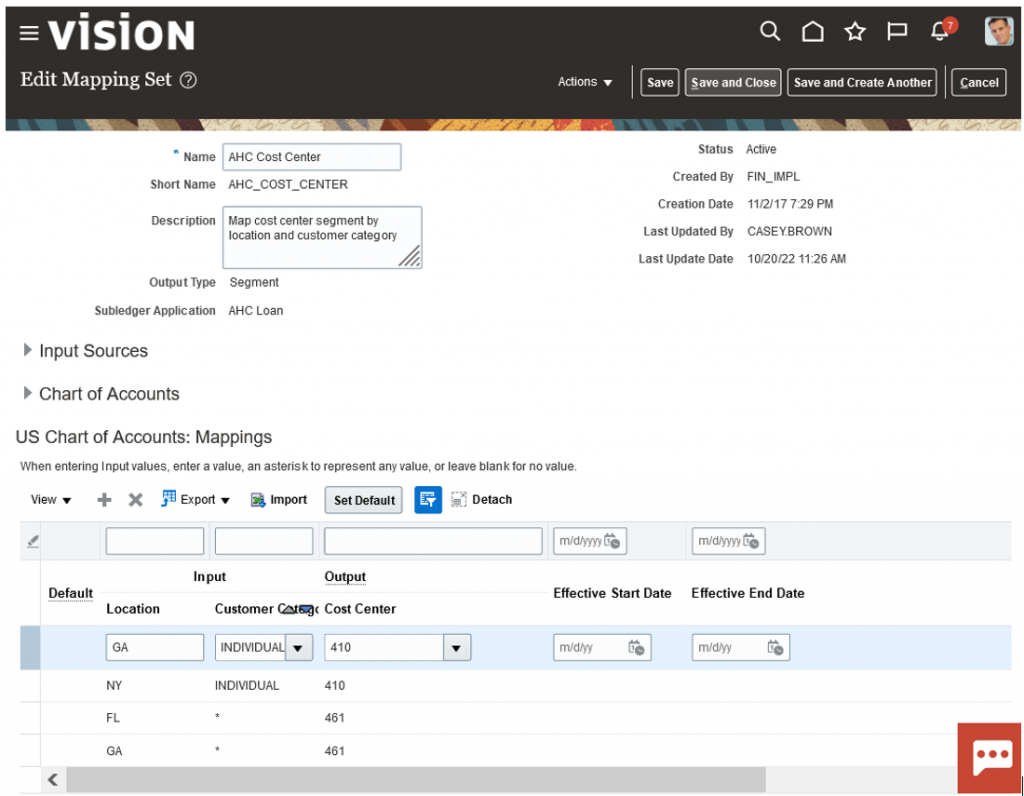
In case a transaction contains a different combination of Location and Customer Category, the accounting engine would fail to derive a value for the Cost Center segment (segment 4 in this case).
For a transaction with Location: NY and Customer Category: CORPORATE, Create Accounting would complete in Warning with an invalid account error.

The Manage Accounting Errors page would show the invalid entry too.
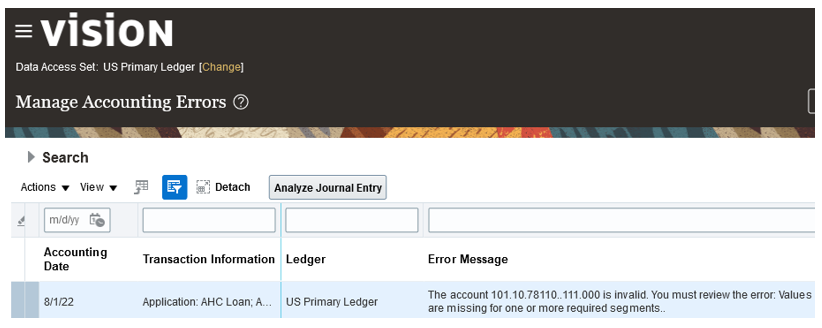
You could add the missing mapping at this point to derive the correct account. However, you would typically first post such entries to suspense while the correct accounting treatment is confirmed.
Subledger Accounting uses the Default Suspense Account from ledger options along with the journal’s balancing segment values, to create a complete and balanced accounting entry. See also How subledger accounting entries are balanced.
You need to run the accounting program again with Process Events: Invalid Accounts to reprocess the events in error and replace invalid accounts with suspense.

Make sure you keep a copy of the Create Accounting Execution Report for this run. You will need that when correcting the suspense entries later by entering adjustments.
You could also leverage Account Override and edit the account directly on the completed journal entry. Review the original entry together with the correction for easier reconciliation. See also Guidelines for Reviewing a Subledger Journal Entry and How To Run Report For Overridden Accounts (Doc ID 2042777.1).
With this approach:
- All non balancing segments of the original account are replaced with the suspense account.
- You may face performance issues as Create Accounting is optimized for the non-error case. Check out Healthy transaction sizing on Accounting Hub implementations.
- You need to run Create Accounting twice – first to generate the invalid entries and then to replace the invalid accounts with suspense.
Mapping Defaults
Another approach, which we recommend, relies on mapping defaults.

Define a default output value to use when the actual input values don’t match the mappings. This applies to any combination of input values (including null values) with no explicit mapping defined.
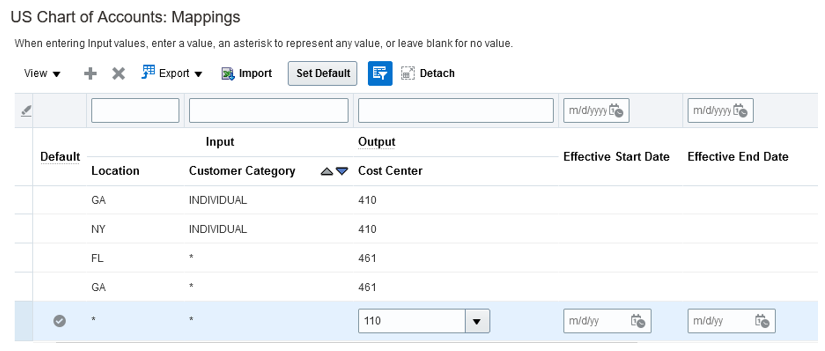
This will allow Create Accounting to derive a valid account during a single run.
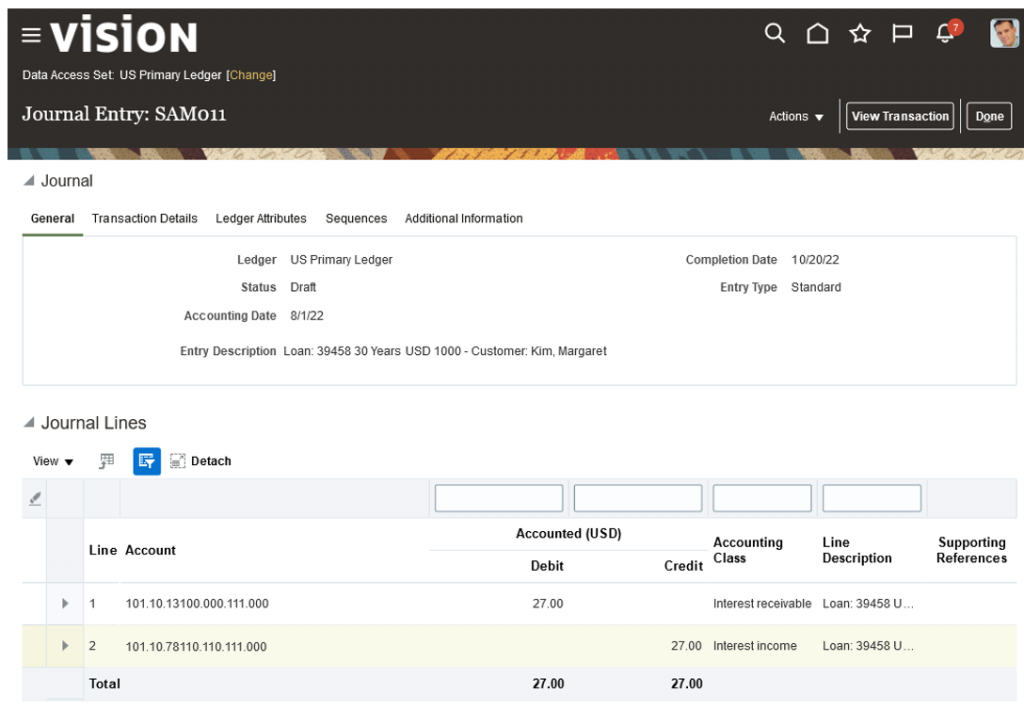
The default Cost Center value is used like a suspense account in this case. You can monitor postings to default segment values, analyze accounting entries and correct as needed.
With this approach:
- You avoid creating invalid entries altogether and the associated delays in case of large transactions.
- You keep values of all other segments of the original account (as derived by accounting rules) to facilitate reclassification of suspense.
- You run Create Accounting just once.
Other Defaults
You may come across other defaults at play when transaction data do not match existing mappings:
- Account Combination Rules. If no explicit mapping, nor a mapping default, the accounting engine would use the account combination rule – if there is one – to derive a value for the missing segment. In our example above, there is no account combination rule or it would have supplied a Cost Center value.
- Key Flexfield Segment Instance Default Value. You may see the Cost Center flexfield segment default used if none of the rules returns a Cost Center value — e.g. when there is no mapping and no account combination rule.
- Alternate Accounts. When the rules return a value but the resulting account is invalid, the accounting engine would use any alternate account defined for the account combination.
Check out Laurent’s blog post: Use Alternate Account for Straight-Through Accounting.
Conclusion
Mapping defaults provide an efficient way to avoid common accounting exceptions. They can help streamline your exception handling, simplify suspense accounting and mitigate performance risks.