
How to let it query business data through MCPs safely
Companion notebook: Oraviz-MCP
Key takeaways
- Start with what the agent is allowed to see and do. When connecting AI agents to Oracle AI Database through the Oracle SQLcl MCP server, give them only the database permissions their tasks need. Add controls over who can call each tool, and log what happens.
- Every result takes up room in the context window. Cap rows, clip long values, and keep embeddings inside the database. Give the agent enough information to answer the question, with a clear signal when more results are available.
- Make repeatable questions easier to answer consistently. For recurring business questions, use reviewed, parameterized queries or purpose-built tools. This gives the agent a more predictable way to retrieve data and makes the results easier to check.
What an MCP server actually does
In every AI project out there, there’s always a question that comes to mind: “Can I just give it access to my database?”
It’s a reasonable question. AI Agents are smarter than ever, and the data is right there. And we have the Model Context Protocol (MCP), the standard way AI assistants connect to 3rd party applications. So, wiring the agents with a database should be pretty straightforward. Right?
That’s the problem. MCPs make AI Agents able to access these applications trivially easy, even before us humans consider what agents are allowed to see in these applications. The database is no different.
So let’s, for the sake of what you’re reading, put the database as an example. How do you let an AI agent query business data safely? Hopefully, by the end of reading this, you will know exactly what you need to do to let agents access data without having the ability to turn into a nightmare.
We’ll open up a small MCP server I built to show what’s inside it, explain why it’s built like that, and cover what the database has to do to hold the line against attackers and cybersecurity mishaps.
Three ideas to consider: security lives in the database, not in the MCP; everything a tool returns costs money (expressed in latency and tokens) and attention; and an AI writing fresh SQL queries every time it wants to access something is wrong, for accuracy and repeatability reasons.
What’s actually inside an MCP server
I built a minimal MCP for the Oracle AI Database, with a focus on data visualization and being deliberately tiny: seven tools, read-only, small enough to read in a sitting.
It connects to Oracle AI Database, runs queries, profiles tables, and turns results into charts. It isn’t a replacement for Oracle’s official MCP servers — it’s a proof of concept MCP.
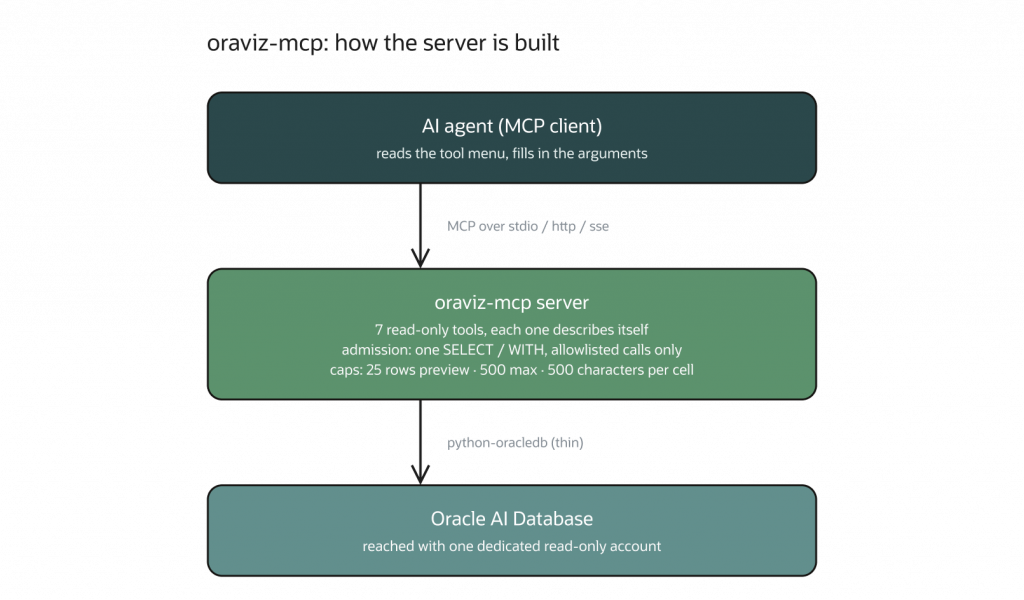
When people hear “MCP server,” they picture infrastructure: a service, a cluster, a deployment diagram. It’s nothing like that. An MCP server is a collection of things an AI agent is allowed to do, where each item on the list describes itself. You write one function per item — “run this query,” “list these tables” — and attach a plain-English description. The agent reads the menu, picks an item, and fills in the blanks.
So the interesting part isn’t how the MCP protocol works: it’s three questions each item on the list has to answer.
Question 1: What am I allowed to run?
My server only accepts read-only queries. Before anything reaches the database, it checks that the request starts with SELECT — the word meaning “show me” — and rejects anything that would create, change or delete data.
It also refuses to run two commands at once, an old trick used in cybersecurity injection attacks, which consists in smuggling a second instruction past a check that only inspected the first part of a query.
Here’s the part that matters: this check is cosmetic, and cosmetic checks are theater. It’s pattern-matching on text — it reads the shape of a request, not its meaning. It can’t catch a request that’s technically read-only but triggers side effects. And it fundamentally cannot stop a perfectly ordinary “show me everything in the employees table” that returns every salary in the company. If you want to manually control this, it’s just a matter of writing more detailed functions or capabilities of your MCP server with access control and similar techniques.
The check is like wearing a seatbelt in your car: it won’t stop you from crashing if you’re determined to crash, but it will certainly make the crash easier on your body.
The real boundary isn’t code at all — it’s which database account the server logs in with (as there’s only one database account the MCP server uses). If that account can’t change data, the MCP server won’t be able to change the data either. Not because the code says so, but because the database already has access control implemented in its software. That holds no matter what the agent asks for, or what instructions somebody hid in a document it read.
That account still needs a real identity. In production, give the agent or workload its own principal, authenticate it through the same identity system you use elsewhere, and grant only the roles it needs (the fewer permissions, the better). OAuth, workload identity federation, or a tightly scoped key can establish that identity.
Your MCP server’s security model (for your database) is your first line of defense against attackers We don’t need to reinvent the wheel, as the database already has a pretty robust and secure system built around it. If you want to remember something from this reading, make it this.
Question 2: How much am I allowed to say back?
This is the question most MCP servers get wrong, and the one non-technical readers should care about most, because it shows up on your AI agent bills (expressed by tokens, and indirectly latency too).
When an MCP client sends a tool result to the model, that result takes up space in its context window. The window has a size limit, and larger inputs can increase token use and processing time. The effect on the bill depends on the model, its pricing, and how the client handles the result.
So before returning 10,000 rows, ask how many the agent actually needs. A smaller, relevant result gives it less material to work through. That is a useful design goal, even before you measure the effect on cost, latency, or answer quality.
Every tool in my MCP that returns data follows the same contract:
| What’s capped | Default |
| Rows shown by default | 25 |
| Absolute maximum per query | 500 |
| Characters per cell | 500 |
| Query timeout | 60 seconds |
There’s a small trick in there I like to do: when the agent asks for 25 rows, the server quietly fetches 26, shows 25, and throws the extra away. That discarded row is how it knows to say “there’s more where this came from” without paying to send it.
The agent can then see this signal and ask a narrower, more specific question that will allow to get the exact number of results it needs. If you don’t have this kind of hard cap, you may run into catastrophic context window management issues, where it will simply fill with a few MCP tool outputs and you will end up with a rotten context window.
Then there’s formatting: most database connectors return data in JSON, like this example:
[{"REGION": "East", "REVENUE": 573932}, {"REGION": "North", "REVENUE": 502897}]Notice that the column names — REGION, REVENUE — are repeated on every single row. Across 500 rows, you have paid to transmit the word “REGION” five hundred times. Here’s the same information the way my server sends it:
2 row(s) | columns: REGION, REVENUE

| REGION | REVENUE |
|---|---|
| East | 573932 |
| North | 502897 |
This format avoids repeating the column names in every row. The metadata line describes the result, and the table presents the values. Whether it uses fewer tokens than JSON depends on the data, the formatting, and the tokenizer. The comparison below shows what happened in my tests.
Question 3: What about data that doesn’t fit?
This one you only discover in production with real tables that hold a significant amount of data (tabular and/or vector). For instance, having columns full of embeddings — long lists of numerical values, representing the “meaning” of text so the database can search by similarity rather than exact match.
An agent does not need all those values. It only needs to know they’re there. If the agent wants to use those embeddings, it does so inside the database, where comparing them is a single operation — the numbers never enter its context window at all.
That’s the real lesson of context engineering. It isn’t summarizing things after they arrive. It’s deciding at the door what is worth letting in.
Some numbers to compare MCPs
I measured my minimal server against Oracle’s official SQLcl MCP server across five typical questions. I’m including the results where mine loses, because those are the honest and interesting ones.
| Question | oraviz-mcp | sqlcl-mcp | Savings |
| List what’s in the database | 69 | 354 | 80.5% |
| Describe one table | 143 | 93 | -53.8% |
| Total revenue by region | 63 | 40 | -57.5% |
| Sample 10 rows | 375 | 242 | -55.0% |
| Pull a 96-row result | 825 | 2,136 | 61.4% |
| The menu itself (read once per session) | 862 | 2,139 | 59.7% |
| Total | 2,337 | 5,006 | 53.3% |
Numbers are tokens (lower is better. Tokens are an approximation, roughly 2.33 tokens per word.)
If we compare my MCP server with the official one, it’s clear the official one wins in most tasks as it’s been created to cover most cases. But there’s always the possibility of you creating a minimal MCP server to extend original capabilities of MCP servers you can’t find.
My MCP server, as it’s a proof of concept, loses in performance in three of the five individual questions. It wins where it was designed to: pulling unfamiliar data (61% less tokens).
Now put real business data behind it
Everything so far was about shape — how much an agent sees and how much it costs. Now safety, and here my server is the wrong tool. I want to be direct about why: oraviz has no idea who the AI agent is. Everything is tunneled through one single connection, with a single set of permissions, which is fine for a demo, but not fine for production.
For real business data you want the SQLcl MCP server and the managed Database Tools MCP server— Oracle’s official one, built into their command-line tool. It offers fewer tools than mine, but each functionality is far more powerful, including one that runs administrative commands. That’s a lot of capability on the other end of an AI’s decision. So if you’re trying to let your agents connect to the Oracle AI Database, make sure you use the official one!
For production, choose a managed or centrally operated MCP deployment that gives you centralized identity and access control, network policy, audit logging, resource limits, and inspection of calls and responses.
Conclusion
We need to consider the possibility that AI agents can go rogue like humans, and prepare our MCP server infrastructure to block malicious requests. We can do that following least-privilege principles that were invented a long time ago, while maintaining an efficient use of the context window of these agents when interacting with MCP calls.
Also, unofficial MCP servers are easy to create following the Model Context Protocol, like in this case; however, the official MCP server is always a better choice when going into production as all these notions have been taken into consideration when building MCP servers.
In the next article, we will focus on some of the least-privilege principles I’ve mentioned, as well as the benefits of logging everything that happens in our MCP server and inspecting this content; and why letting AI agents write SQL queries by themselves is rarely a good strategy for achieving accurate responses from the database.
Frequently Asked Questions
What are the advantages and disadvantages of using MCP?
MCP gives you one standard way to connect models to tools and data, so an integration you build once works across any MCP-compatible client. The downsides are that it’s still a young spec, and every server you add widens the security surface and consumes context-window tokens with tool definitions.
How does MCP compare to other context-sharing frameworks, and what are the alternatives?
Before MCP, the options were vendor-specific function calling, framework-level tool abstractions (LangChain, LlamaIndex), or custom API glue. MCP’s advantage is that it’s model- and framework-agnostic, so the same server works everywhere.
What features should I look for when comparing MCP to others?
Check client and ecosystem support, the authentication and authorization model, transport options (local stdio vs. remote HTTP), and how well it handles tool discovery, permissions, and observability.
Where does MCP fit among context management protocols?
MCP covers the agent-to-tool/data layer, meaning how a model reaches the outside world. Protocols like A2A cover agent-to-agent coordination. The two are complementary, not competing.
How do I let AI agents query business data safely with an MCP server?
Put an MCP server in front of your database using a least-privilege account, read-only access, and scoped views. Then log every tool call, so the agent only sees what it should and you can audit what it did. Oracle’s SQLcl ships with an MCP server you can use as a starting point.
Should an MCP server let AI agents write arbitrary SQL?
Even though this is possible, it’s not a recommended practice as generated SQL may be different every time, producing inaccurate and non-repeatable results; and considering one of the main purposes of AI Agents is to achieve reliability and reproducibility, we want to minimize the cases where this may happen.
Resources
- oraviz-mcp — the minimal server dissected here
- Getting Started with the SQLcl MCP Server — Jeff Smith
- SQLcl MCP Server Tools — Oracle docs
- Oracle AI Vector Search
- Model Context Protocol
- Google Cloud: AI security and safety for MCP servers — least privilege, human approval, prompt-injection defenses, tool review, and recovery planning
- Google Cloud: How to secure your remote MCP server — centralized authorization, audit logging, resource limits, and network controls
- NSA: MCP security design considerations — parameter validation, constrained tool execution, and data-classification boundaries