
ODP.NET script execution is designed for safer, automated Oracle database updates across cloud and AI workflows
Key Takeaways
- The preview feature runs multiple SQL and PL/SQL statements directly from .NET applications without a separate scripting tool.
- Scripts can come from files, cloud storage, REST APIs, or any other source available as a .NET stream.
- Results, output parameters, metadata, and detailed errors are returned as JSON for easy processing and recovery.
- Developers can control error handling, parameter binding, transactions, output limits, and concurrent script execution using .NET.
ODP.NET Core introduces a scripting option for applying database changes. Developers can now programmatically manage schema changes, errors, and scale their workflows more easily without a separate tool. ODP.NET scripting benefits include:
- Cloud and AI-friendly
As more applications move to the cloud and adopt AI, management tools must support cloud automation and AI-driven operations. ODP.NET scripting can run in the cloud and enable both AI agents and human operators to execute database tasks.
- Enhanced security and safety
ODP.NET scripting can retrieve credentials at runtime from encrypted vaults or secure environment configurations, so they do not appear in command history.
- Robust error handling and conditional logic
.NET applications can inspect detailed statement execution errors to automate recovery workflows, such as retries after a temporary network outage or rolling back changes. Developers can inspect the execution results to determine application-level failures and take the appropriate next steps.
- Seamless data sharing and state management
Programmers can capture script output as JSON, parse it, and manipulate it as variables or objects. Keeping intermediate results in memory can avoid disk I/O, which can improve performance and reduce exposure of sensitive data.
- Parallelism and concurrency
.NET provides APIs for asynchronous programming, threads, and parallel processing, making it easier to run multiple scripts concurrently.
ODP.NET SQL Script Execution Features
For these reasons, we have introduced ODP.NET SQL scripting. Available on NuGet as a preview release, the Oracle.ManagedDataAccess.SQLScriptExecution package supports:
- Executing SQL scripts with
OracleCommand.ExecuteStatements - Running multiple SQL and PL/SQL statements from one stream
- Returning result sets, output parameters, and errors as JSON
- Binding parameters through JSON or APIs
- Choosing whether to stop after an error or continue execution
- Setting LOB and LONG fetch limits for JSON results
- Getting statement-level metadata with detailed error information
Let’s explore ODP.NET SQL script execution.
Using SQL Script Execution
ODP.NET Core can execute SQL and PL/SQL from a StreamReader so that developers can apply and automate their database changes. The scripts can originate from a file, blob storage, a REST API, or any other source that can be represented by a .NET StreamReader.
Programmatically, a script is represented by a .NET StreamReader object and passed to an OracleCommand.ExecuteStatements extension method to run.
Parameters can be provided either as a JSON document via OracleCommand.SetParametersForExecuteStatements method or through the OracleCommand.Parameters collection. If both are provided, the parameter collection takes precedence. JSON-based parameters support bind-by-name only, while the parameter collection supports bind-by-name and bind-by-position.
SQL script execution supports binding all the parameter data types ODP.NET can bind except for associative arrays, array binds, and user-defined types.
Output result sets, parameters, and metadata, such as rows affected are all returned as JSON strings.
For every error, its related information is returned, including its number, message, and statement parsing metadata. Developers can configure whether the script aborts upon an error (default) or continues to execute after the error. After an error, previously committed statements are not undone. Retries must account for partially committed scripts.
These scripts can only contain SQL and PL/SQL syntax. A forward slash (/) on a line by itself is supported as a PL/SQL block terminator. It is recognized by the SQL script execution parser as a statement terminator and is not included in the statement text returned in the result JSON. Other SQL*Plus and SQLcl syntax is not supported.
By default, statements execute with the connection’s auto-commit behavior. Transactions are supported. However, if a DDL statement is supplied within a transaction, its execution implicitly commits the current transaction. The remaining statements are executed in connection’s auto-commit mode.
ODP.NET SQL script execution is backwards compatible with the same database versions as the ODP.NET version it depends on. For example, ODP.NET 26ai is backwards compatible with Oracle Database 19c.
Sample Scripts and Output
Here is a C# code sample that supplies a script and its input parameters through StreamReader objects, sets the script error option behavior, and executes the script. The results are returned as a JSON string. The script and parameters are retrieved from Oracle Cloud infrastructure Object Storage.
const string namespaceName = "<OCI_NAMESPACE>";
const string bucketName = "<BUCKET_NAME>";
const string sqlObjectName = "oci_sql_script.sql";
const string jsonParametersObjectName = "oci_sql_parameters.json";

// Authenticate using the DEFAULT OCI profile.
var provider = new ConfigFileAuthenticationDetailsProvider("DEFAULT");

using var objectStorageClient = new ObjectStorageClient(provider);

// Retrieve the SQL script from OCI Object Storage.
var sqlRequest = new GetObjectRequest
{
    NamespaceName = namespaceName,
    BucketName = bucketName,
    ObjectName = sqlObjectName
};

var sqlResponse = await objectStorageClient.GetObject(
    sqlRequest,
    completionOption: HttpCompletionOption.ResponseHeadersRead);

using var sqlReader = new StreamReader(
    sqlResponse.InputStream,
    Encoding.UTF8,
    detectEncodingFromByteOrderMarks: true);

// Retrieve the JSON parameters from OCI Object Storage.
var jsonParametersRequest = new GetObjectRequest
{
    NamespaceName = namespaceName,
    BucketName = bucketName,
    ObjectName = jsonParametersObjectName
};

var jsonResponse =
    await objectStorageClient.GetObject(jsonParametersRequest);

using var jsonParametersReader = new StreamReader(
    jsonResponse.InputStream,
    Encoding.UTF8,
    detectEncodingFromByteOrderMarks: true);

// Open the database connection.
using var connection = new OracleConnection("<CONNECTION_STRING>");
connection.Open();

using var command = connection.CreateCommand();

// Set parameters from the JSON stream.
command.SetParametersForExecuteStatements(jsonParametersReader);

// Set execution behavior.
var executionSettings = new OracleStatementExecutionSettings
{
    ExecutionOption = OracleExecutionOption.ContinueOnError
};

// Execute the SQL/PLSQL script from the stream.
string results = command.ExecuteStatements(
    sqlReader,
    executionSettings);
JSON Parameter Binding
A JSON stream provides the parameter binding information for the SQL script. The JSON below supplies the parameters for the SQL script above.
[
  {
    "name": "param1",
    "type": "NUMBER",
    "direction": "Output"
  },
  {
    "name": "param2",
    "type": "VARCHAR2",
    "size": 32,
    "value": "John",
    "direction": "Input"
  },
  {
    "name": "p_message",
    "type": "VARCHAR2",
    "size": 40,
    "value": "This ",
    "direction": "InputOutput"
  }
]
After the script executes, the results from the SELECT statement are returned as a JSON output string. Here are several examples of the output.
Note: The JSON document returned from SQL script execution does not escape certain special characters, including the less-than sign (<), greater-than sign (>), ampersand (&), and apostrophe (’). If the JSON is embedded in HTML or JavaScript script elements, apply the appropriate context-specific encoding before inserting it to avoid potential security vulnerabilities.
DML Statement Output
{
  "statement": "insert into EMPTABLE(EMPNO, ENAME) values (5,'John')",
  "errors": null,
  "rowsAffected": 1,
  "result": null
}
Execution Error Output
{
  "statement": "insert into INVALIDEMPTABLE(EMPNO, ENAME) values (10, 'Max') returning EMPNO into :param1",
  "rowsAffected": null,
  "result": null,
  "errors": {
    "startLine": 2,
    "endLine": 2,
    "startColumn": 1,
    "endColumn": 90,
    "items": [
      {
        "number": 942,
        "message": "ORA-00942: table or view does not exist"
      }
    ]
  }
}
SELECT Output
{
  "statement": "select * FROM EMPTABLE where ENAME = :param2;",
  "errors": null,
  "rowsAffected": -1,
  "result": [
    {
      "columns": [
        {
          "name": "EMPNO",
          "type": "NUMBER",
          "precision": 0,
          "scale": -127,
          "columnDefinition": "NUMBER"
        },
        {
          "name": "ENAME",
          "type": "VARCHAR2",
          "size": 32,
          "isByteSemantic": true,
          "columnDefinition": "VARCHAR2(32)"
        }
      ],
      "rows": [
        [
          5,
          "John"
        ],
        [
          20,
          "John"
        ]
      ]
    }
  ]
}
PL/SQL Output
{
"statement": "BEGIN\r\n:p_message := NVL(:p_message, '') || 'is an anonymous PL/SQL block.';\r\nEND;\r\n",
"errors": null,
"rowsAffected": -1,
"result": [
{
"columns": [
{
"name": "p_message",
"type": "VARCHAR2"
}
],
"rows": [
[
"This is an anonymous PL/SQL block."
]
]
}
]
}
Oracle Data Type Representation in JSON Results
This table defines how Oracle database data types are mapped to JSON value types (JsonValueKind) in .NET for accurate JSON representation.
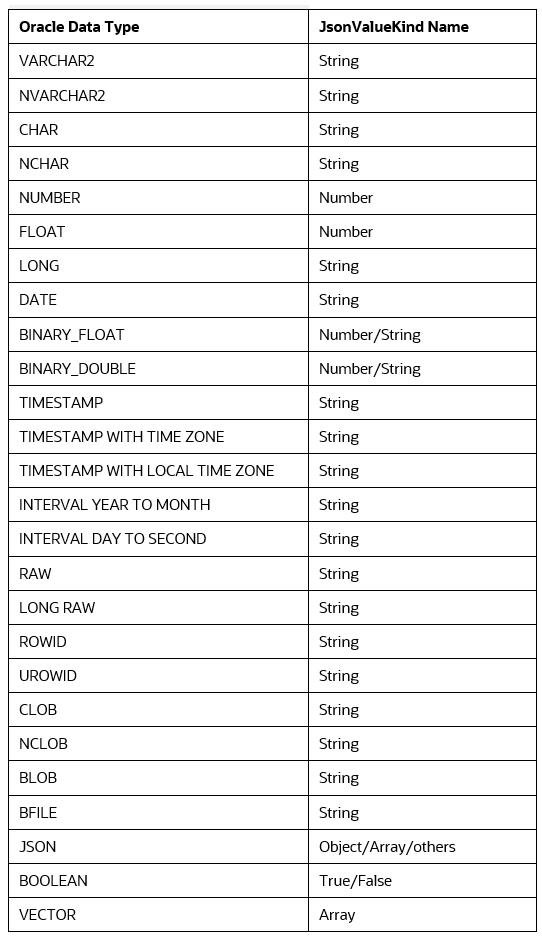
Now that the capabilities and features have been covered, let’s explore the ODP.NET SQL scripting APIs in detail.
SQL Script Execution APIs
OracleCommand.ExecuteStatements Method
This method executes a stream of SQL and PL/SQL statements and returns any results as a JSON string.
Declaration
public static string ExecuteStatements (this OracleCommand cmd, StreamReader streamReader, OracleStatementExecutionSettings executionSettings = null);Parameters
- cmd — The OracleCommand instance
- streamReader — The stream of SQL and PL/SQL statements to execute.
- executionSettings — The mode the statements are executed and output size limits for LONG/LOB columns.
Return Value
A JSON string with result sets, result metadata, and error information, if applicable.
Remarks
By default, each statement execution is auto-committed. App can use ExecuteStatements in a transaction by starting the transaction before calling this method.
executionSettings determines behavior when a statement returns an error.
Statement Execution Result Format
The return value is output in the following JSON schema format:
{
  "$schema": "https://json-schema.org/draft/2020-12/schema",
  "$id": "urn:oracle:manageddataaccess:sqlscriptexecution:schemas:statement-result:1.0",
  "title": "ScriptExecutionResults",
  "type": "array",
  "items": {
    "type": "object",
    "required": [
      "statement",
      "errors",
      "rowsAffected",
      "result"
    ],
    "properties": {
      "statement": {
        "type": "string",
        "description": "SQL or PL/SQL command text"
      },
      "errors": {
        "description": "Error details if execution failed; null otherwise",
        "oneOf": [
          {
            "type": "null"
          },
          {
            "type": "object",
            "required": [
              "startLine",
              "endLine",
              "startColumn",
              "endColumn",
              "items"
            ],
            "properties": {
              "startLine": {
                "type": "integer",
                "minimum": 1
              },
              "endLine": {
                "type": "integer",
                "minimum": 1
              },
              "startColumn": {
                "type": "integer",
                "minimum": 1
              },
              "endColumn": {
                "type": "integer",
                "minimum": 1
              },
              "items": {
                "type": "array",
                "minItems": 1,
                "items": {
                  "type": "object",
                  "required": [
                    "number",
                    "message"
                  ],
                  "properties": {
                    "number": {
                      "type": [
                        "integer",
                        "null"
                      ],
                      "description": "Oracle error number or null for non-SQL errors"
                    },
                    "message": {
                      "type": "string"
                    }
                  },
                  "additionalProperties": false
                }
              }
            },
            "additionalProperties": false
          }
        ]
      },
      "rowsAffected": {
        "description": "-1 for successful SELECT, DDL, and PL/SQL statements; a nonnegative affected-row count for successful DML; null when statement execution fails",
        "oneOf": [
          {
            "type": "integer"
          },
          {
            "type": "null"
          }
        ]
      },
      "result": {
        "description": "Query result sets or OUT / IN OUT bind values",
        "oneOf": [
          {
            "type": "null"
          },
          {
            "type": "array",
            "items": {
              "type": "object",
              "required": [
                "columns",
                "rows"
              ],
              "properties": {
                "columns": {
                  "description": "Metadata for each column in the result set, in the same order as values appear in each row.",
                  "type": "array",
                  "items": {
                    "$ref": "#/$defs/columnMetadata"
                  }
                },
                "rows": {
                  "description": "Result set rows; each row is an array of column values",
                  "type": "array",
                  "items": {
                    "type": "array",
                    "items": {}
                  }
                }
              },
              "additionalProperties": false
            }
          }
        ]
      }
    },
    "additionalProperties": false
  },
  "$defs": {
    "oracleNativeType": {
      "type": "string",
      "description": "Oracle native data type or PL/SQL data type.",
      "enum": [
        "NUMBER",
        "INT",
        "INTEGER",
        "FLOAT",
        "LONG",
        "BINARY_FLOAT",
        "BINARY_DOUBLE",
        "VARCHAR2",
        "NVARCHAR2",
        "CHAR",
        "NCHAR",
        "CLOB",
        "NCLOB",
        "BLOB",
        "BFILE",
        "DATE",
        "TIMESTAMP",
        "TIMESTAMP WITH TIME ZONE",
        "TIMESTAMP WITH LOCAL TIME ZONE",
        "INTERVAL DAY TO SECOND",
        "INTERVAL YEAR TO MONTH",
        "RAW",
        "LONG RAW",
        "ROWID",
        "BOOLEAN",
        "JSON",
        "VECTOR",
        "REFCURSOR",
        "SYS_REFCURSOR",
        "XMLTYPE"
      ]
    },
    "columnMetadata": {
      "type": "object",
      "required": [
        "name",
        "type"
      ],
      "properties": {
        "name": {
          "type": "string",
          "description": "Column name for SELECT result sets, or parameter name for OUT/INOUT/ReturnValue bind results"
        },
        "type": {
          "$ref": "#/$defs/oracleNativeType"
        },
        "precision": {
          "type": "integer",
          "minimum": 0,
          "description": "Numeric precision (optional)"
        },
        "scale": {
          "type": "integer",
          "minimum": -127,
          "description": "Numeric scale (optional)"
        },
        "size": {
          "type": "integer",
          "minimum": 1,
          "description": "Size of the column in bytes or chars depending on isByteSemantic (optional)"
        },
        "isByteSemantic": {
          "type": "boolean",
          "description": "True for byte semantics, false for character semantics (optional)"
        },
        "vectorDimensions": {
          "type": "string",
          "description": "Vector dimension count for VECTOR types (optional)"
        },
        "vectorType": {
          "type": "string",
          "enum": [
            "DENSE",
            "SPARSE"
          ],
          "description": "Vector storage type for VECTOR columns (optional)"
        },
        "vectorDimensionFormat": {
          "type": "string",
          "description": "Vector dimension format for VECTOR columns (optional)"
        },
        "columnDefinition": {
          "type": "string",
          "description": "The column definition that matches what SQL*Plus returns when describing a table with this column"
        }
      },
      "additionalProperties": false
    }
  }
}
OracleCommand.SetParametersForExecuteStatements Method
This method binds a JSON stream of parameters for SQL script execution.
public static void SetParametersForExecuteStatements(this OracleCommand cmd, StreamReader jsonParameters)Parameter
- cmd — The OracleCommand instance
- jsonParameters — The parameter information to bind to the script’s SQL and PL/SQL statements.
Remarks
Parameters can only be bound by name using this method.
Bind Parameter Format
SQL script execution parameters are bound using the following JSON schema format:
{
  "$schema": "https://json-schema.org/draft/2020-12/schema",
  "$id": "urn:oracle:manageddataaccess:sqlscriptexecution:schemas:bind-parameters:1.0",
  "title": "BindParameters",
  "type": "array",
  "items": {
    "type": "object",
    "required": [
      "name",
      "type",
      "direction"
    ],
    "properties": {
      "name": {
        "type": "string"
      },
      "type": {
        "$ref": "#/$defs/oracleNativeType"
      },
      "direction": {
        "type": "string",
        "enum": [
          "Input",
          "Output",
          "InputOutput",
          "ReturnValue"
        ]
      },
      "value": {
        "description": "Value for the bind parameter."
      },
      "size": {
        "type": "integer",
        "minimum": 1
      },
      "precision": {
        "type": "integer",
        "minimum": 0
      },
      "scale": {
        "type": "integer",
        "minimum": -127
      }
    },
    "allOf": [
      {
        "if": {
          "properties": {
            "direction": {
              "enum": [
                "Output",
                "InputOutput",
                "ReturnValue"
              ]
            },
            "type": {
              "enum": [
                "VARCHAR2",
                "NVARCHAR2",
                "CHAR",
                "NCHAR",
                "RAW",
                "LONG RAW"
              ]
            }
          },
          "required": [
            "direction",
            "type"
          ]
        },
        "then": {
          "required": [
            "size"
          ]
        }
      },
      {
        "if": {
          "properties": {
            "direction": {
              "enum": [
                "Input",
                "InputOutput"
              ]
            }
          },
          "required": [
            "direction"
          ]
        },
        "then": {
          "required": [
            "value"
          ]
        }
      }
    ],
    "additionalProperties": false
  },
  "$defs": {
    "oracleNativeType": {
      "type": "string",
      "description": "Oracle native data type or PL/SQL data type.",
      "enum": [
        "NUMBER",
        "INT",
        "INTEGER",
        "LONG",
        "BINARY_FLOAT",
        "BINARY_DOUBLE",
        "VARCHAR2",
        "NVARCHAR2",
        "CHAR",
        "NCHAR",
        "CLOB",
        "NCLOB",
        "BLOB",
        "BFILE",
        "DATE",
        "TIMESTAMP",
        "TIMESTAMP WITH TIME ZONE",
        "TIMESTAMP WITH LOCAL TIME ZONE",
        "INTERVAL DAY TO SECOND",
        "INTERVAL YEAR TO MONTH",
        "RAW",
        "LONG RAW",
        "BOOLEAN",
        "JSON",
        "VECTOR",
        "REFCURSOR",
        "SYS_REFCURSOR",
        "XMLTYPE"
      ]
    }
  }
}
OracleStatementExecutionSettings Class
An OracleStatementExecutionSettings object provides options for configuring the execution mode of SQL and PL/SQL statements from a script and output size limits for LONG/LOB columns.
Class Inheritance
System.Object
Oracle.ManagedDataAccess.SQLScriptExecution.OracleStatementExecutionSettings
Declaration
public sealed class OracleStatementExecutionSettingsThread Safety
Instance members are not guaranteed to be thread-safe.
OracleStatementExecutionSettings.ExecutionOption Property
This property specifies ODP.NET SQL script execution exception behavior.
Declaration
public OracleExecutionOption ExecutionOption {get; set;}Property Value
An OracleExecutionOption enumeration value
Property Type
OracleExecutionOption
Remarks
This property determines ODP.NET behavior when SQL script execution encounters an error. Either the execution aborts on error, OracleExecutionOption.AbortOnError, (default) or continues to execute the remaining statements after the error is encountered, OracleExecutionOption.ContinueOnError.
OracleStatementExecutionSettings.MaxLOBFetchSize Property
This property specifies the maximum amount of LOB data included in the JSON result.
Declaration
public long MaxLOBFetchSize { get; set; }Property Value
The maximum number of characters for CLOB/NCLOB data or the maximum number of bytes for BLOB/BFILE data to include in the result JSON.
Property Type
Long
Remarks
This property limits how much CLOB/NCLOB/BLOB/BFILE data is fetched and serialized into the JSON result for each LOB column value. If the LOB value exceeds this limit, only up to MaxLOBFetchSize characters for CLOB/NCLOB or bytes for BLOB/BFILE are included. The default is 65536.
OracleStatementExecutionSettings.MaxLONGFetchSize Property
This property specifies the maximum amount of LONG data (LONG/LONG RAW) included in the JSON result.
Declaration
public long MaxLONGFetchSize { get; set; }Property Value
The maximum number of characters for LONG data or the maximum number of bytes for LONG RAW data to include in the result JSON.
Property Type
Long
Remarks
This property limits how much LONG/LONG RAW data is fetched and serialized into the JSON result for each LONG column value. If the value exceeds this limit, only up to MaxLONGFetchSize characters for LONG or bytes for LONG RAW are included. The default is 65536.
OracleExecutionOption Enumeration
This enumeration values specifies the SQL script execution behavior after encountering an exception.
OracleExecutionOption Enumeration Values
AbortOnError — When ODP.NET encounters an exception, SQL script execution stops with no further statements executed. This is the default value.
ContinueOnError — When ODP.NET encounters an exception, SQL script execution continues on.
Get Started with ODP.NET SQL Scripting
After this whirlwind tour, try ODP.NET SQL scripting for yourself. Download the SQL scripting package from NuGet and share feedback with the Oracle team on GitHub or in the ODP.NET discussion forum.
#OracleDotNet
FAQs
How can developers access the feature?
It is available as a preview release through the Oracle.ManagedDataAccess.SQLScriptExecution package on NuGet.
What syntax can a script contain?
Scripts may contain SQL and PL/SQL, including / as a PL/SQL block terminator. Other SQL*Plus and SQLcl commands are unsupported.
What happens when a statement fails?
Execution stops by default, but it can be configured to continue. Each error includes its number, message, and location in the statement.
How are database changes committed?
Statements are auto-committed by default. Transactions are supported, although a DDL statement implicitly commits the current transaction and causes the remaining statements to run in auto-commit mode.